¶ Description
Extract named entities from text.
¶ Parameters
¶ Parameters tab
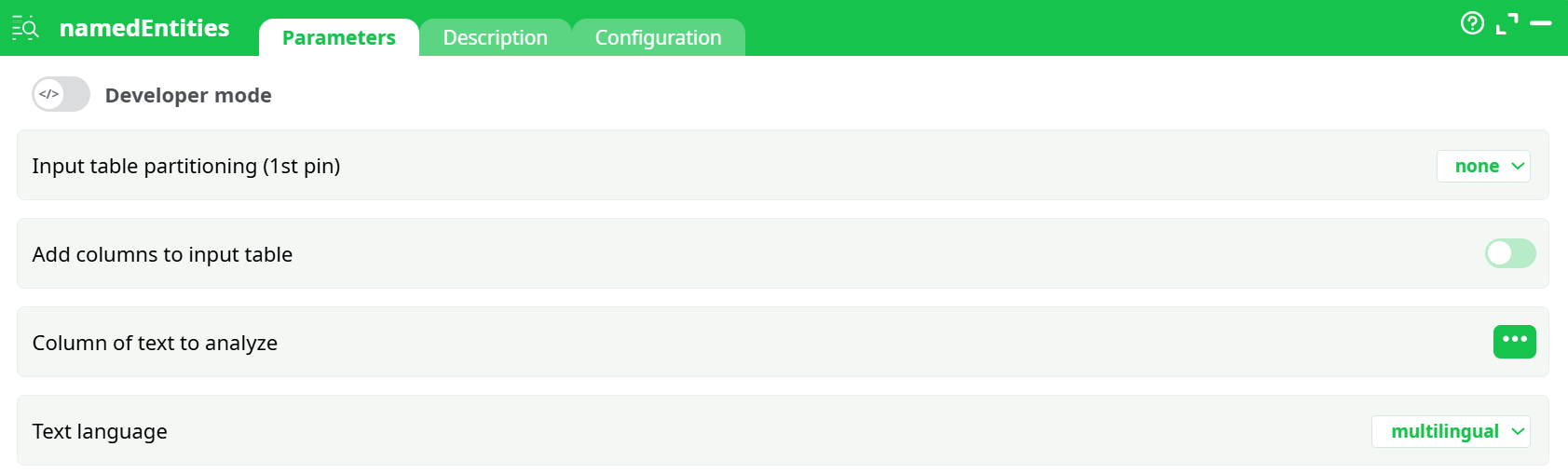
Parameters:
- Developer mode: activate/deactivate code tab.
- Add columns to input table
- Add columns to input table
- Column of text to analyze
- Text language
¶ Description tab
See dedicated page for more information.
¶ Configuration tab
See dedicated page for more information.
¶ About
The namedEntities action is used to perform Named Entity Recognition (NER) on text data. It scans through a given text column and identifies entities such as names of people, organizations, locations, dates, and more. This functionality is essential in Natural Language Processing (NLP) workflows, enabling automated extraction of structured information from unstructured text.
This action relies on pre-trained language models (such as those provided by spaCy) to recognize and classify entities. It supports multiple languages and can operate in multilingual mode, making it suitable for processing international datasets or datasets with mixed language content.
¶ Functionality
The action reads an input table containing a column of free-form text and processes each row to extract named entities. It produces an output table where each identified entity is returned as a separate row, associated with its original input context.
For example, if a text contains "Alice from IBM moved to Paris in July 2025", the output might include:
- Entity: "Alice", Type: PERSON
- Entity: "IBM", Type: ORG
- Entity: "Paris", Type: GPE
- Entity: "July 2025", Type: DATE
These entities are automatically detected based on linguistic context and the model's training.
¶ Parameters
The following parameters must be configured:
- Column of text to analyze: The input column containing text to analyze.
- Text language: The language of the text. This can be set to a specific language like English, German, or to
multilingualfor automatic multi-language support. - Add columns to input table: When enabled, appends the extracted entities as new columns to the original input table. When disabled, produces one row per entity in the output.
The language parameter ensures the appropriate model is used for entity detection. For example, using the English model provides better recognition for English texts, while multilingual mode is more general but slightly less precise.
¶ Output
The output of this action is a table containing extracted entities. Each row typically includes:
- The original text or an identifier linking to it.
- The extracted entity (e.g., a person or location).
- The entity type or label (e.g., PERSON, ORG, DATE).
- The character position of the entity within the original text (start and end index).
- Optional confidence scores (depending on implementation).
When Add columns to input table is enabled, these results are added as additional columns to the original input rows. Otherwise, the result is a flat table with one row per extracted entity.
¶ Use Case Example
Imagine you're analyzing customer feedback or support tickets and want to extract key entities like product names, locations, or customer names. By passing the text through this action, you can automatically identify these entities and create structured insights from them.
Another example is processing legal contracts or news articles to extract mentions of companies, jurisdictions, and dates, allowing for indexing, analytics, or compliance checks.
This action is particularly useful in pipelines that require:
- Text classification or tagging.
- Feature extraction before machine learning.
- Filtering or grouping data based on entities.
- Semantic search or knowledge graph population.
Notes
- This action depends on language-specific NLP models. Make sure the correct model is installed and accessible on your system. For multilingual support, the model
xx_sent_ud_smmust be downloaded using:
python -m spacy download xx_sent_ud_sm- Complex or noisy input texts may lead to less accurate results. For best results, ensure the text is clean and grammatically structured.