¶ Description
Loade a telecom BTS log file.
¶ Parameters
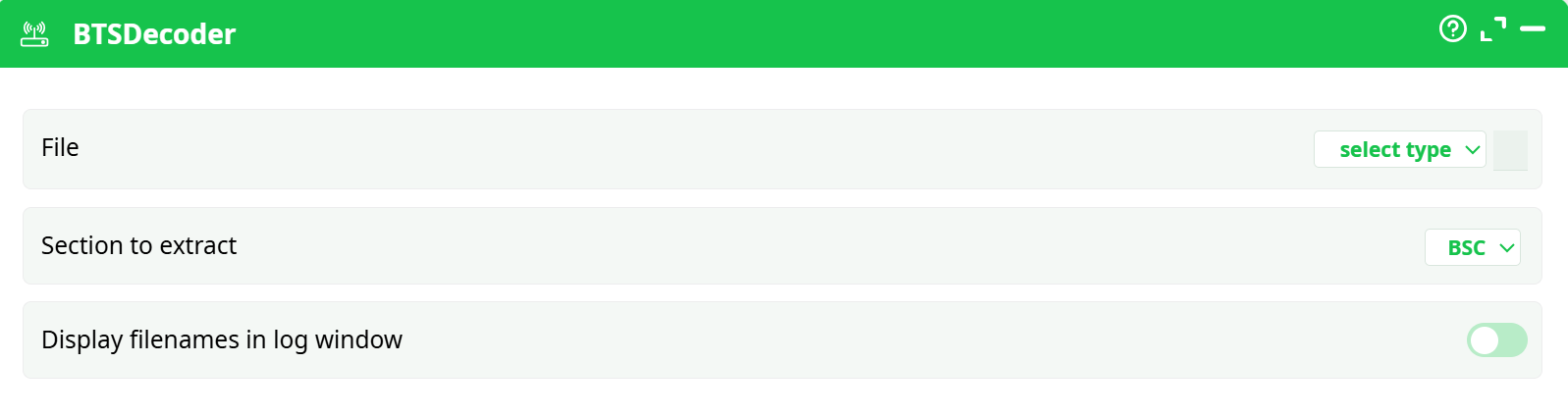
Parameters:
- File
- Section to extract
- Display filenames in log window
¶ About
The BTSDecoder action is used to load and decode telecom BTS (Base Transceiver Station) log files. It extracts specific sections from the log for analysis, allowing further processing inside the ETL pipeline.
This action is designed for telecom engineers and analysts working with BTS configuration and operational logs.
¶ How to Test the BTSDecoder Action Button
Follow the steps below to prepare a pipeline and generate results for documentation purposes.
¶ Step-by-Step Instructions:
¶ 1. Prepare a Sample Input File
Create a sample telecom BTS log file (.log or similar). You can use a basic text file with dummy log lines such as:
[2025-07-08 12:30:00] BTS LOG ENTRY 1
[2025-07-08 12:31:00] BTS LOG ENTRY 2
Save this file in your ETL workspace or shared directory.
¶ How to Test the BTSDecoder Action Button
Follow the steps below to prepare a pipeline and generate results for documentation purposes.
¶ 2. Configure the Pipeline
- Add the BTSDecoder action button in your pipeline.
- Set the following parameters:
- File: Select the sample BTS log file from your workspace.
- Section to extract: Choose any available section from the dropdown (for example,
BSC). - (Optional) Enable Display filenames in log window to display the file name in the pipeline logs.
¶ 3. Add an Output Action (Optional but Recommended)
To verify and document the output:
- Connect an output action after BTSDecoder, such as:
- WriteCSV – to export the decoded data to a CSV file.
- Or any other appropriate output action for your workflow.
¶ 4. Run the Pipeline
- Execute the pipeline.
- Ensure the pipeline completes successfully.
- Review the pipeline logs and confirm that data has been extracted and processed.
¶ Example Pipeline
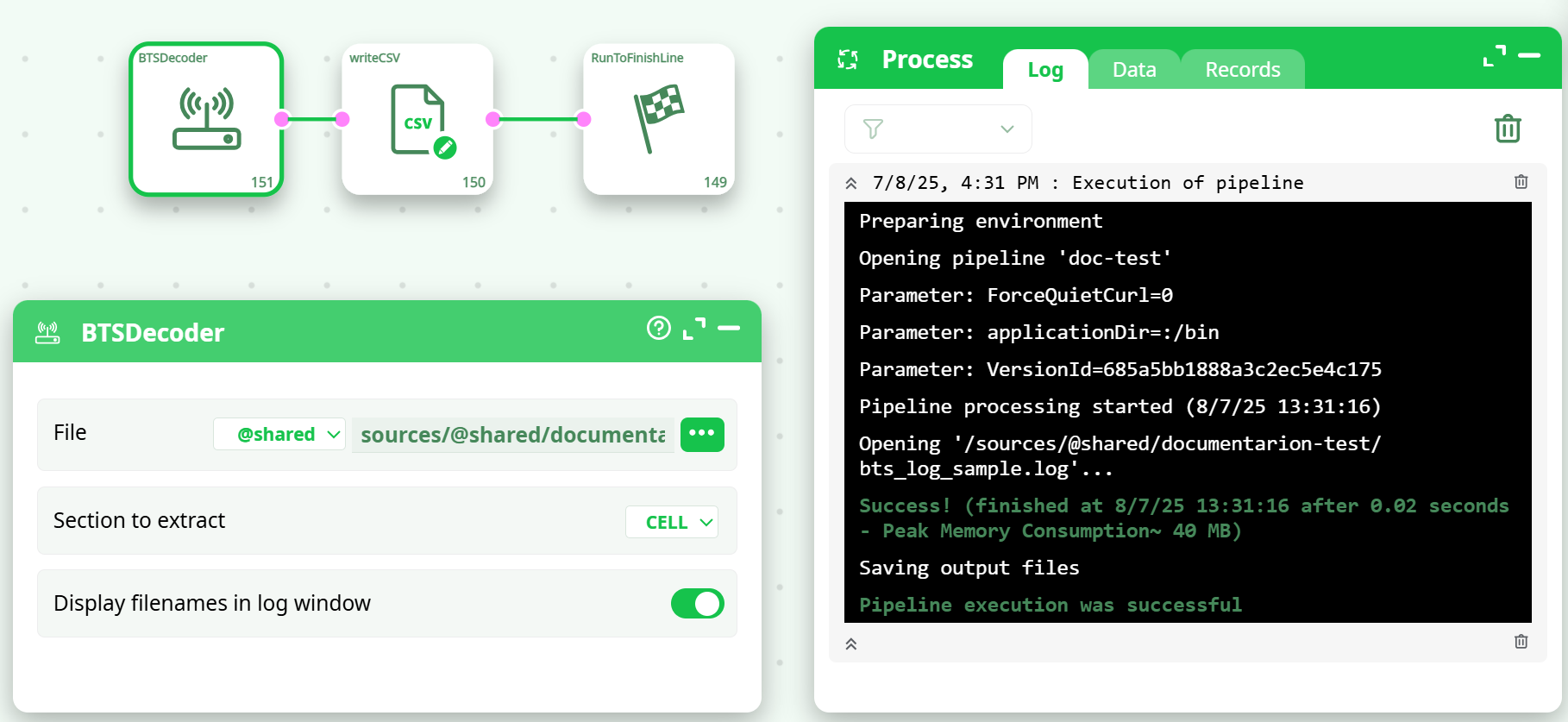
This is an example of a working pipeline that extracts BTS log data:
- BTSDecoder: Reads the BTS log file and extracts the
CELLsection. - writeCSV: Writes the extracted data to a CSV file for further use.
- RunToFinishLine: Marks the pipeline’s successful completion.
¶ Pipeline Screenshot:
¶ Configuration Example:
- File:
sources/@shared/documentation-test/bts_log_sample.log - Section to extract:
CELL - Display filenames in log window: Enabled
¶ Output
The output of this action is the extracted data from the selected section, passed downstream in the ETL pipeline (for example, to a CSV writer). The data can include cell-level configurations such as:
- Cell Identity
- LAC (Location Area Code)
- BTS Index
- BSC Numbers
- Other parameters depending on the log structure.
Notes & Tips
- Ensure that the selected section exists in the log file; otherwise, the output will be empty.
- Common sections always present in most logs are
BSCandBTS.- Use the “Display filenames in log window” option for easier debugging in multi-file pipelines.
- The decoder automatically detects the required delimiters and field mappings.
- If no output is generated, verify that the log file contains the selected section and valid data.
¶ Typical Use Case
Extracting detailed BTS and cell configuration data from telecom logs for network analysis, reporting, or optimization tasks.
¶ Additional Pipeline Tips
- After extracting the data, you can connect it to:
- writeCSV or writeExcel for exporting.
- Data cleaning or filtering actions.
- Data visualization dashboards for further analysis.