¶ Description
Reads a table from an Clickhouse database. Launch the execution any free-form SQL statement(s).
¶ Parameters
¶ Standard tab
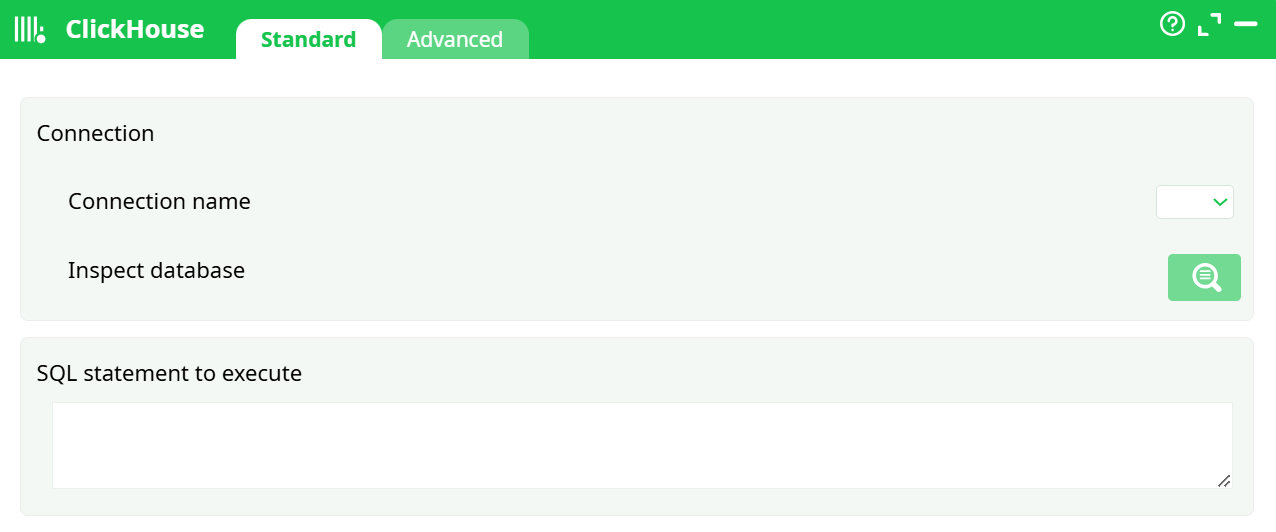
Parameters:
- Connection name – choose an existing ClickHouse connection defined in the Services tab.
- Inspect database – browse available databases and tables from the connected ClickHouse instance.
- SQL statement to execute – enter any valid ClickHouse SQL query or command (SELECT, INSERT, CREATE, etc.).
¶ Advanced tab
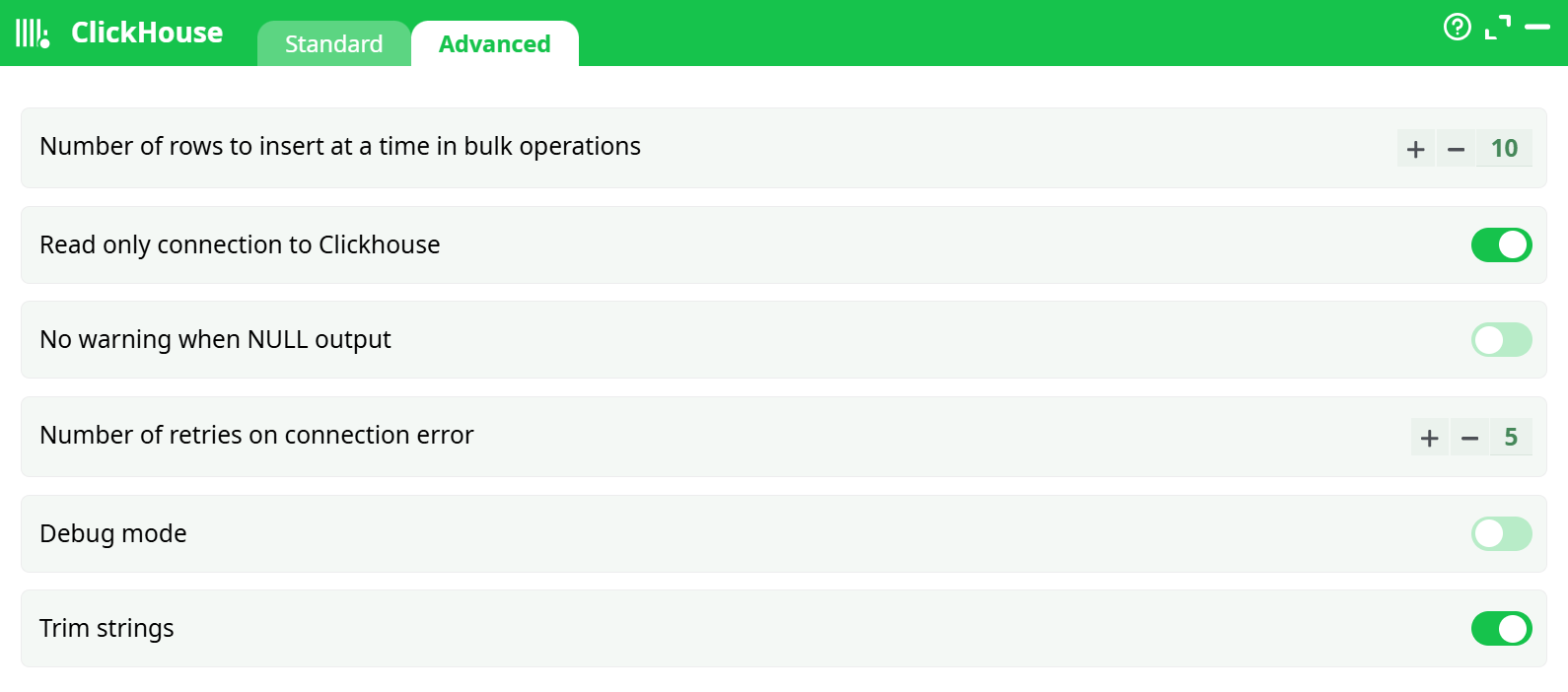
Parameters:
-
Number of rows to insert at a time in bulk operations – defines how many rows are sent per batch during large INSERT operations (default = 10).
Increasing this value improves throughput when inserting large datasets. -
Read only connection to ClickHouse – enables read-only mode for safe query execution. Prevents accidental data modifications.
-
No warning when NULL output – disables warnings when queries return NULL values, useful for performance monitoring scripts.
-
Number of retries on connection error – specifies how many times the action retries if the connection fails (default = 5).
-
Debug mode – enables verbose logs for troubleshooting query execution.
-
Trim strings – automatically removes leading and trailing spaces from text fields.
¶ About
The ClickHouse action connects to a ClickHouse database and executes SQL statements for querying or modifying data.
It supports both read and write operations and is optimized for handling large analytical datasets with high throughput.
This action uses centralized connection management through Pipeline parameters → Services, allowing secure credential handling, reusable connections, and integration with secrets.
¶ When to use it
Use ClickHouse when you need to:
- Query analytical or aggregated data from ClickHouse tables.
- Load or insert data into ClickHouse using SQL commands.
- Perform high-speed read and write operations on large columnar datasets.
- Integrate ClickHouse with other data sources in your ETL workflow.
¶ Connection management
¶ Defining a ClickHouse connection
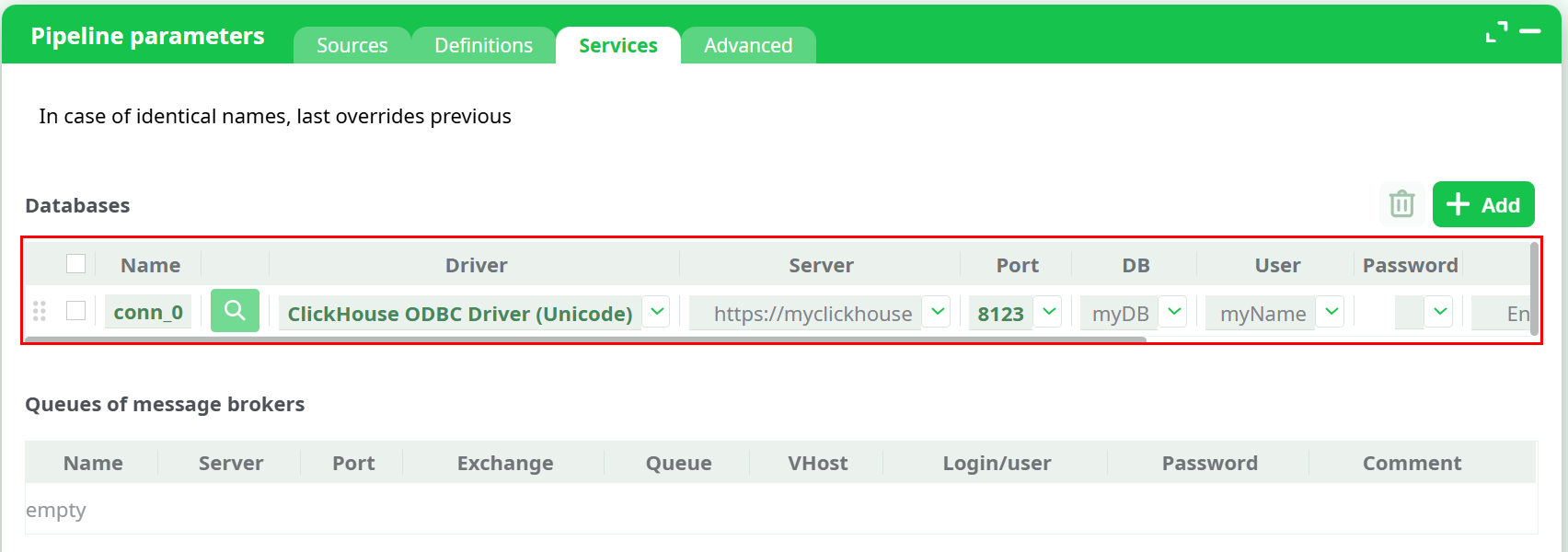
Before using this action, define your ClickHouse connection in the Pipeline parameters → Services tab.
-
Open the Pipeline parameters window and select the Services tab.
-
Click the Add button to create a new connection.
-
From the Driver dropdown, select ClickHouse ANSI or ClickHouse Unicode, depending on your preferred character set.
-
Fill in the connection fields:
- Name – unique connection identifier (e.g.,
click_conn) - Server – hostname or IP address of the ClickHouse server
- Port – typically
8123for HTTP or9000for TCP connections - DB – database name
- User / Password – ClickHouse credentials
- Others – optional connection parameters (e.g., compression or SSL flags)
- Name – unique connection identifier (e.g.,
¶ Using secrets
For security, you can use Secrets defined in the Definitions tab instead of storing credentials in plain text.
Example:
-
Add a secret under Definitions → Secrets:
secret_clickhouse = MyStrongPassword -
In the Password field, type
secret_clickhouse— the system will securely substitute it during execution.
¶ Connection priority
When two connections share the same name, the last defined one takes precedence.
This allows overriding a global ClickHouse connection with a local one at the pipeline level.
Tip:
Use global connections for shared infrastructure and define local overrides for testing or isolated environments.
¶ Example queries
¶ Example 1 – Select query
SELECT region, sum(revenue) AS total_revenue
FROM sales_data
WHERE date >= '2025-01-01'
GROUP BY region;
¶ Example 2 – Insert data
INSERT INTO orders (order_id, customer_id, total)
VALUES (101, 55, 899.99);
¶ Example 3 – Create table
CREATE TABLE IF NOT EXISTS products (
  id UInt32,
  name String,
  price Float64
)
ENGINE = MergeTree()
ORDER BY id;
¶ Step-by-step workflow
- Open Pipeline parameters → Services.
- Add a new entry with the ClickHouse driver.
- Fill in server, port, database, and authentication details.
- Return to the ClickHouse action box.
- Select your defined Connection name.
- Click Inspect database to verify access.
- Enter your SQL command in the SQL statement to execute field.
- (Optional) Adjust advanced parameters for retry logic, bulk inserts, or debugging.
- Run the pipeline to execute your query and retrieve or update data.
¶ Troubleshooting
Connection failed
Check that the ClickHouse server is reachable and the port is open. Ensure that authentication credentials and SSL settings (if used) are correct.
Authentication error
Verify your username/password or secret reference.
Query execution error
Ensure your SQL statement is valid and matches the syntax supported by your ClickHouse version.
Timeout or network drop
Increase the “Number of retries on connection error” parameter.
Bulk insert too slow
Increase “Number of rows to insert at a time in bulk operations” to send larger batches.
Unexpected NULLs or spaces
Enable Trim strings or No warning when NULL output depending on your preference.
¶ Summary
The ClickHouse action provides a flexible and high-performance interface to query or modify data within a ClickHouse database.
It supports both analytical queries and large-scale write operations while allowing full connection reusability through centralized Services management.
The built-in retry, debug, and trimming options make it robust and production-ready for complex ETL workflows.
