¶ Description
List files in Google Drive.
¶ Parameters
¶ Parameters tab
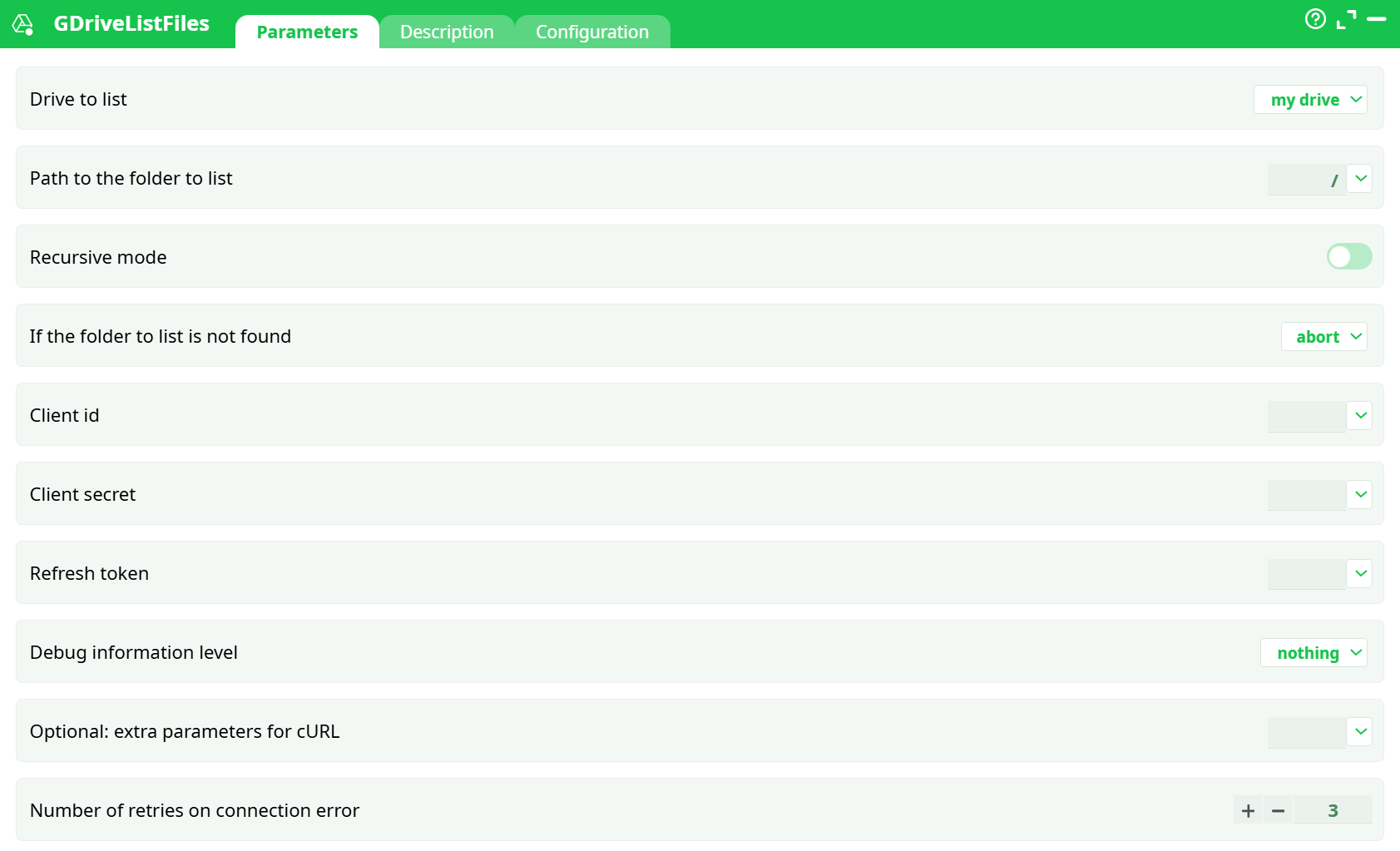
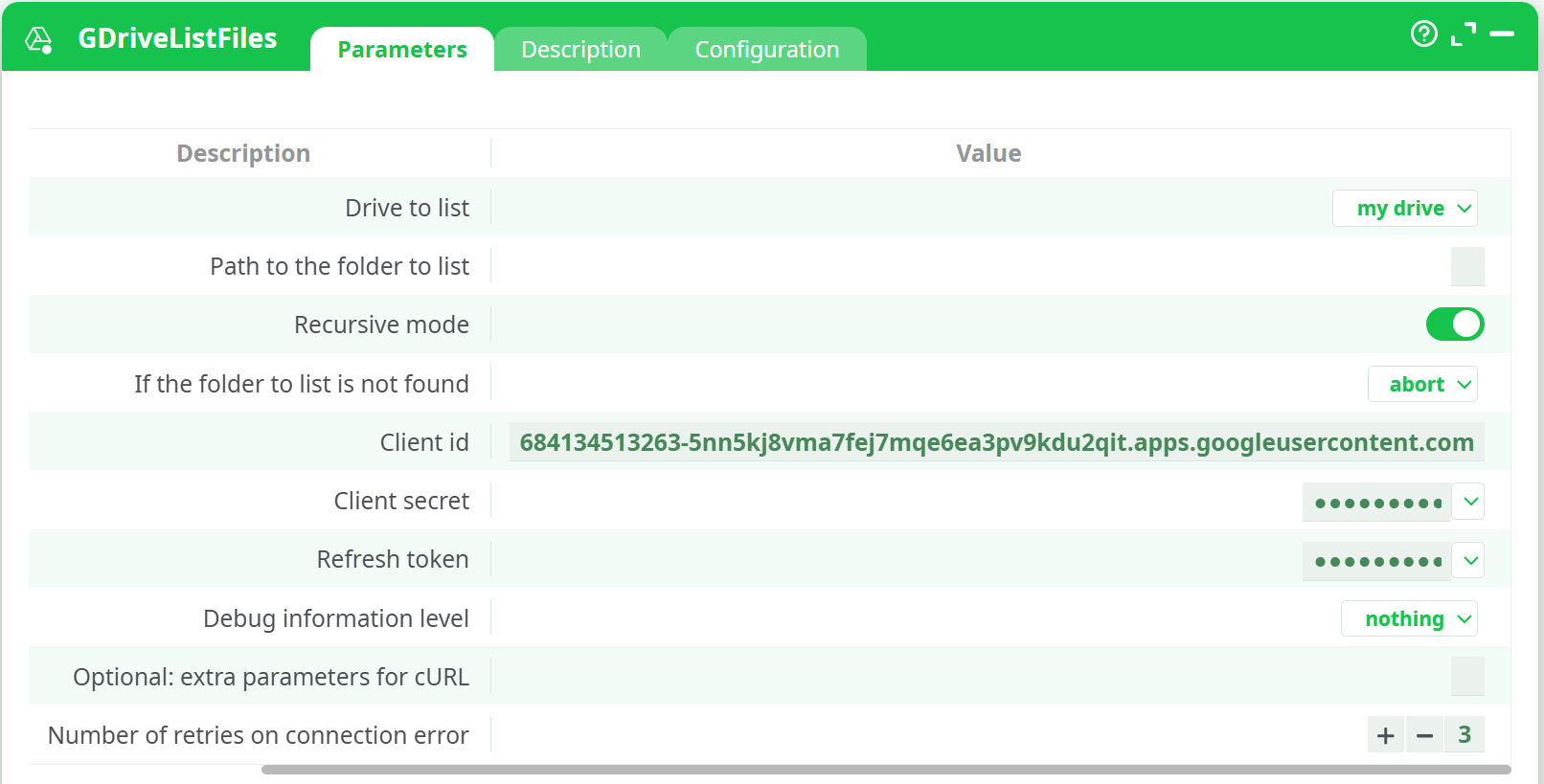
Parameters:
- Drive to list
- Path to the folder to list
- Recursive mode
- If the folder to list is not found
- Client id
- Client secret
- Refresh token
- Debug information level
- Optional: extra parameters for cURL
- Numbers of retries on connection error
¶ Description tab
See dedicated page for more information.
¶ Configuration tab
See dedicated page for more information.
¶ About
Query Google Drive (your “My Drive” or a Shared Drive) and return a tidy table of files with names, paths, sizes, MIME types, timestamps, and IDs you can reuse in downstream actions (download, move, delete, etc.).
¶ What you’ll get
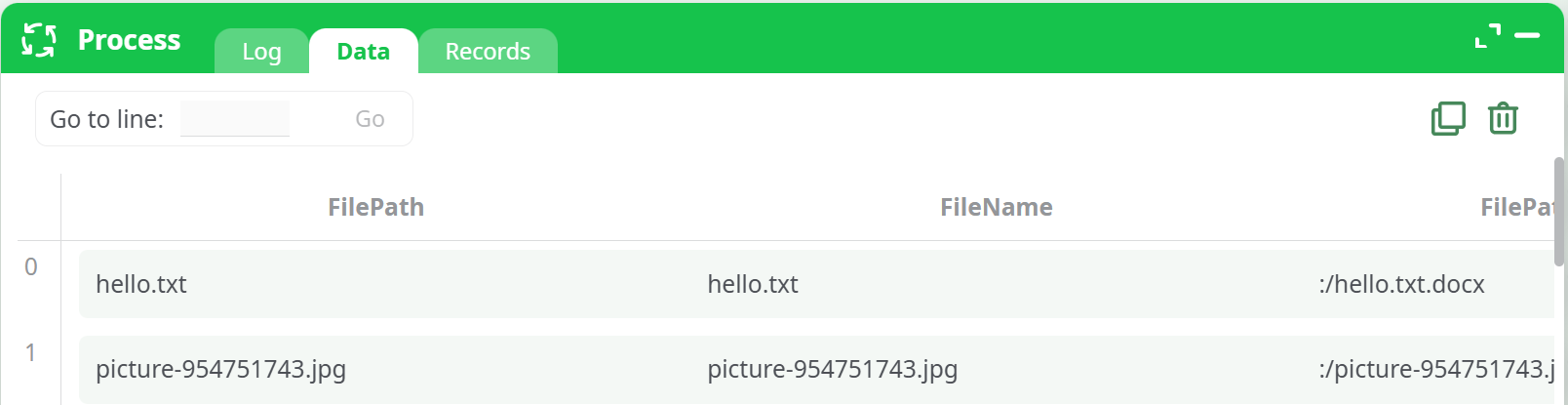
Each run outputs rows like:
- FileID – the stable Drive file ID (use this to download/update/share/delete).
- FileName – display name.
- FilePath – path relative to the selected drive root (folders separated by “/”).
- FilePathWithExtention – same as
FilePathbut guaranteed to end with an extension if one can be inferred. - MissingExtention – the extension that was added/was missing (e.g.,
.docx) or empty if none. - Created Date / Modified Date – ISO 8601 timestamps (UTC).
- Size – bytes (Drive-native docs show
-1; folders shownull). - Mime Type – e.g.,
image/jpeg,application/pdf,application/vnd.google-apps.folder,application/vnd.google-apps.document, …
¶ Parameters
-
Drive to list
Choose my drive or a specific Shared Drive (if your connector exposes them). -
Path to the folder to list
Use/for the root of the selected drive or a subfolder like/Reports/2025.
If the folder doesn’t exist, behavior is controlled by If the folder to list is not found. -
Recursive mode
Off = only the specified folder. On = walk all subfolders. -
If the folder to list is not found
abort (default) or continue with a warning. -
Client id / Client secret
From your Google Cloud OAuth 2.0 Client (Web application). -
Refresh token
The long-lived token you’ll mint once (see setup below). -
Debug information level
- nothing – minimal logs
- basic – adds convenient columns like FilePathWithExtention/MissingExtention
-
Optional: extra parameters for cURL
Advanced (e.g.,-sS --fail-with-body -H "Accept: application/json" --max-time 30). -
Number of retries on connection error
Retries transient network errors.
¶ Google side: one-time setup (OAuth)
If you saw “Error 400: redirect_uri_mismatch” earlier, this section fixes it.
-
Create an OAuth client
- Go to Google Cloud Console → APIs & Services → Credentials → Create Credentials → OAuth client ID.
- Application type: Web application.
- Authorized redirect URIs – add:
https://developers.google.com/oauthplayground
(This must match exactly; otherwise you’ll getredirect_uri_mismatch.) - Save and note the Client ID and Client secret.
-
Enable the Drive API
- APIs & Services → Enable APIs and Services → Google Drive API → Enable.
-
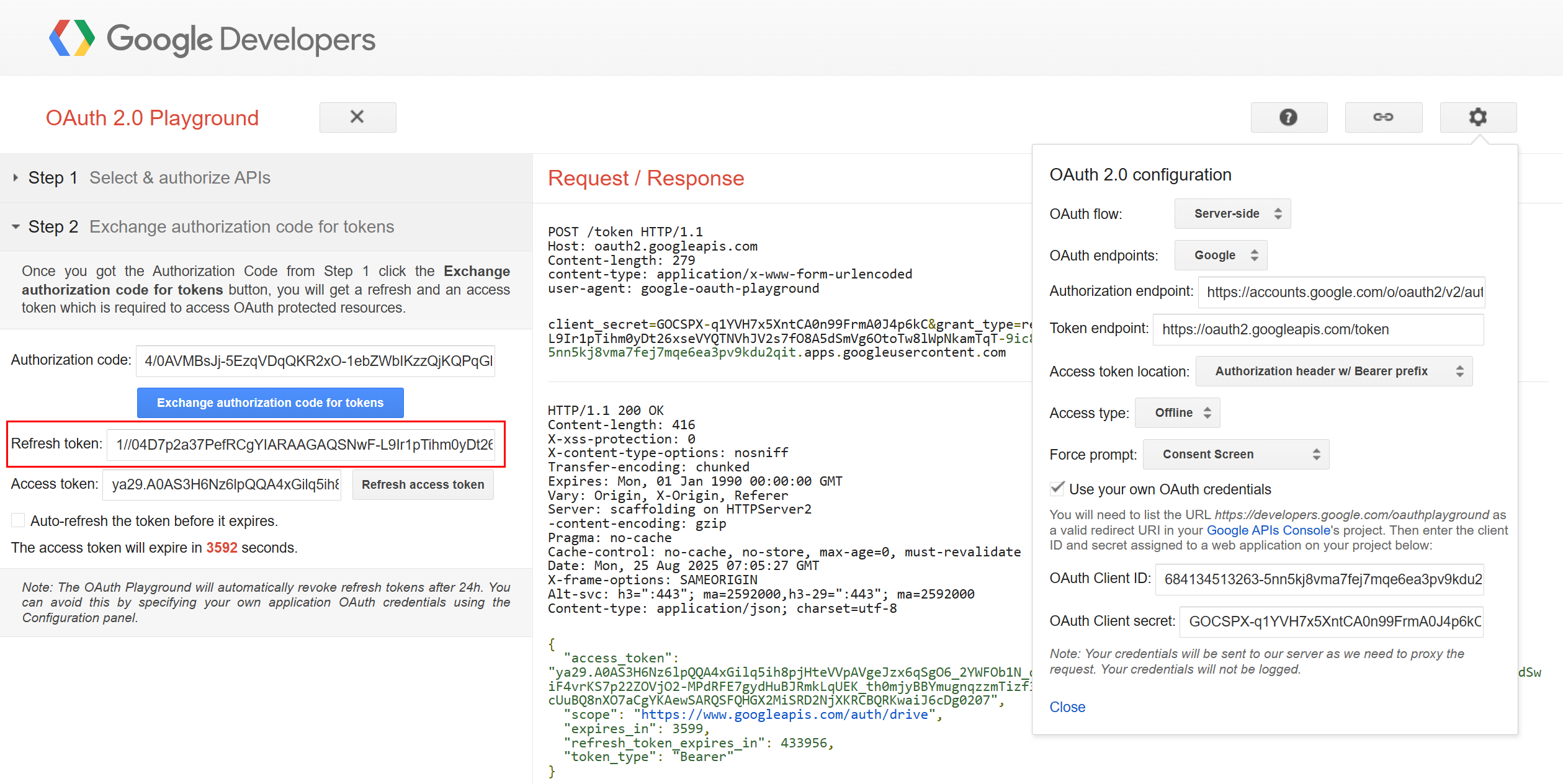
Mint a Refresh Token (using OAuth 2.0 Playground)
-
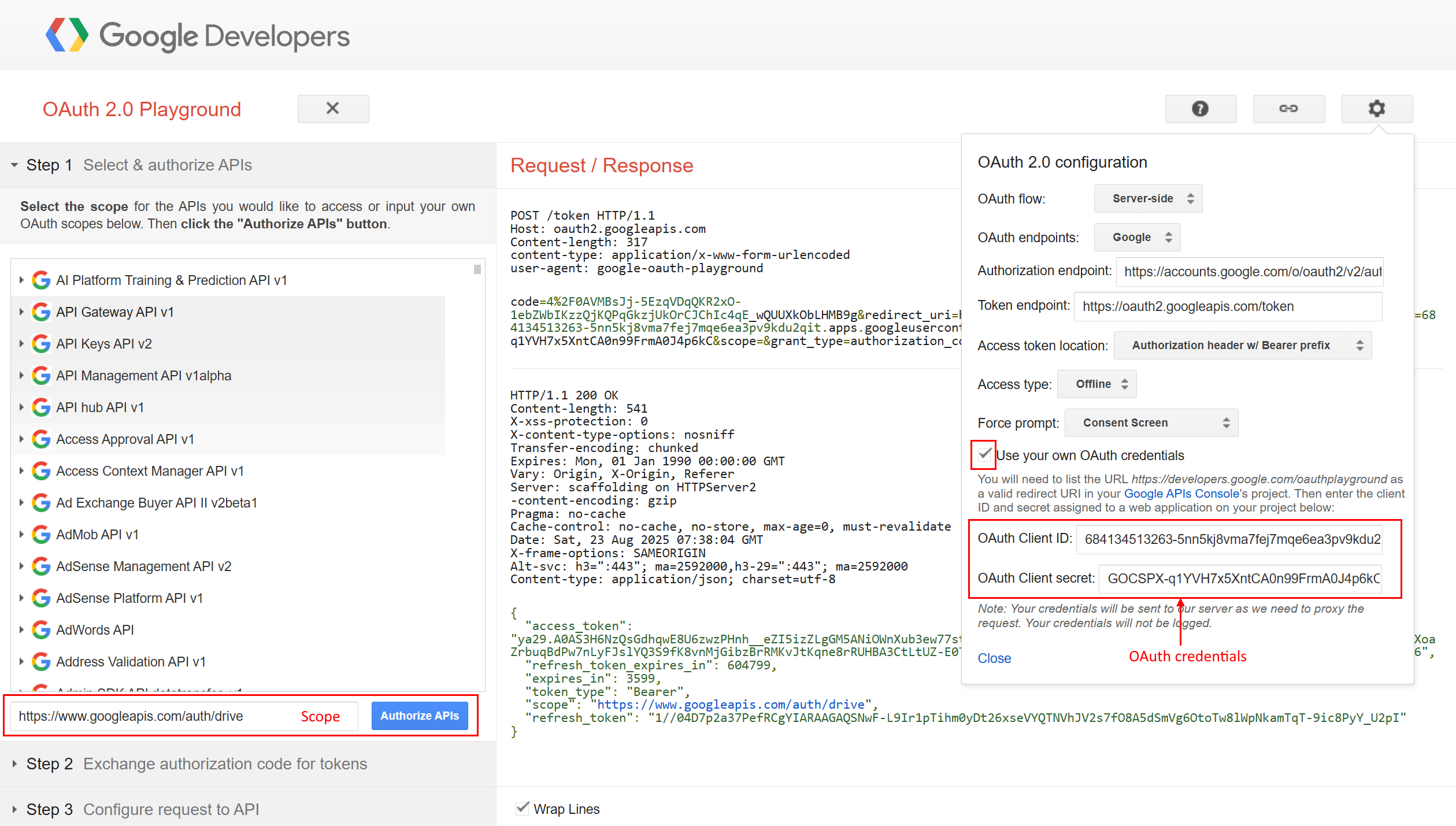
Open OAuth 2.0 Playground → gear icon → Use your own OAuth credentials → paste your Client ID/Secret.
Set Access type = Offline, Force prompt = Consent Screen (so you get a refresh token). -
In Step 1, add scopes (for listing metadata you can use the minimal one):
https://www.googleapis.com/auth/drive.metadata.readonly(See full scope matrix below for uploads/edits/deletes.)
-
Click Authorize APIs, choose your Google account, accept the consent.
-
In Step 2, click Exchange authorization code for tokens → copy the refresh_token value.
-
-
Paste into the action
- In GDriveListFiles Parameters: paste Client ID, Client secret, and Refresh token.
- Set Drive to list, Path, and whether to Recursive mode.
- Run.
¶ Scope matrix (use the least powerful that works)
| What you want to do | Recommended scope |
|---|---|
| List metadata (names, ids, mimeType, size, timestamps) | https://www.googleapis.com/auth/drive.metadata.readonly |
| List metadata + download file content you can access | https://www.googleapis.com/auth/drive.readonly |
| Upload new files / update files you created with this app (no full-drive takeover) | https://www.googleapis.com/auth/drive.file |
| Full access to all Drive files you can see (create, update, move, delete, share) | https://www.googleapis.com/auth/drive |
| App Data folder only | https://www.googleapis.com/auth/drive.appdata |
For GDriveListFiles specifically,
drive.metadata.readonlyis enough. If you plan to download file content later in the same project, considerdrive.readonly.
¶ Reading the results
- Google Docs/Sheets/Slides report Size = -1 and Mime Type like
application/vnd.google-apps.document.
Use FileID with a proper export endpoint if you need their content (e.g., export as PDF). - Folders report Mime Type = application/vnd.google-apps.folder and Size = null.
- If Debug information level = basic, you’ll see FilePathWithExtention and MissingExtention; this is handy when names lack an extension (e.g., Google Docs exported to
.docx).

¶ Troubleshooting
-
400 redirect_uri_mismatch
Addhttps://developers.google.com/oauthplaygroundto the OAuth client’s Authorized redirect URIs (exact match), then re-authorize in the Playground. -
Empty table but “pipeline successful”
- Verify Path exists; if unsure, use
/first. - Switch If folder not found to continue with a warning to see a message.
- Check scopes: for listing use
drive.metadata.readonlyordrive.readonly. - If your Drive is huge, start non-recursive to validate, then enable recursion.
- Verify Path exists; if unsure, use
-
Some rows missing
If you’ve just created files in the same run, a preview may warn: “some records may be partial”. Re-run or ensure the listing happens after upstream writes finish. -
Shared Drive not visible
Ensure the service account / user has access and that your action supports selecting that drive.