¶ Description
Get Emails from Gmail.
¶ Parameters
¶ Standard Tab
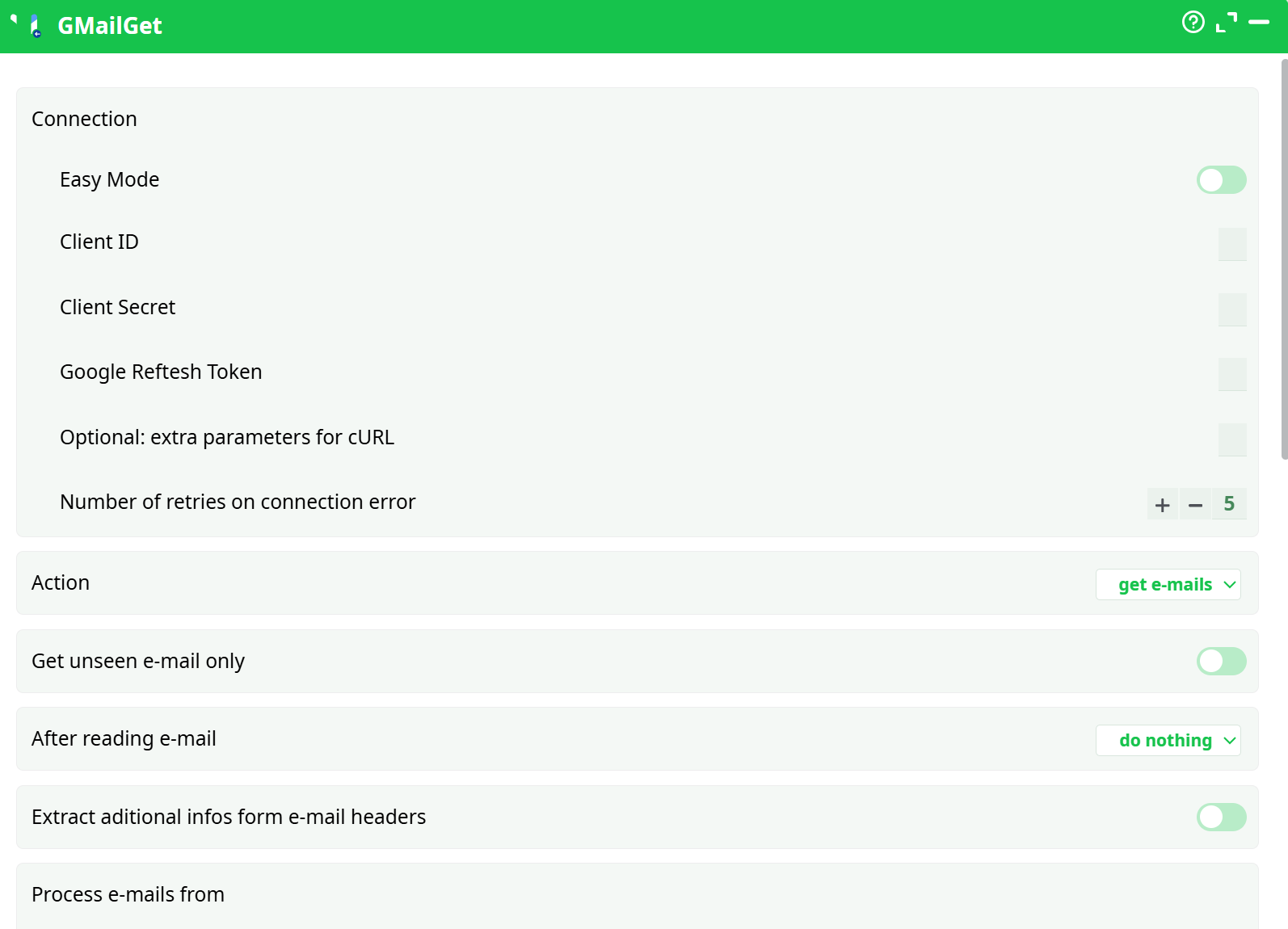
Parameters:
- Action
- Get Unseen mail only
- After reading email
- Extract Aditional infos form mail headers
- Attachements
- Save Inline Attachments
- Save Standard (not inline) Attachments
- Attachment dir
- Overwrite Attachments
- Save PNG/GIF
- Save JPG
- Custom query
- Inbox
- Starred
- Snoozed
- Sent
- Drafts
- Bin
- All Mail
- Spam
- Connection
- Easy Mode
- Client ID
- Client Secret
- Google Reftesh Token
- Optional: extra parameters for cURL
- Retries on connection error
¶ About
GMailGet is an Input action that reads messages from a Gmail or Google Workspace mailbox via the Gmail API. It produces one row per message (optionally one row per part, depending on your build), with parsed headers, addresses, subject, timestamps, and body (text/HTML). You can limit retrieval to unseen mail, filter by Gmail’s search syntax, and decide whether to leave messages unchanged, mark them as read, or delete them after ingestion. Attachments can be downloaded to a local folder and referenced in the output.
Key capabilities:
- Select folders/labels (Inbox, Starred, Sent, etc.) and/or a Custom query such as
newer_than:7d from:noreply@yourco.com. - Stateful options: do nothing, mark as read, or delete (requires the
gmail.modifyscope). - Attachment handling: save standard (non-inline) attachments and/or inline (CID) parts to a folder.
- Header extraction: Message-ID, In-Reply-To, References, and more for threading correlations.
- OAuth 2.0 authentication using your own Google OAuth client and a Refresh Token.
¶ Prerequisites
-
A Google Cloud project with Gmail API enabled.
-
OAuth consent screen configured (External with your account added as a Test user, or Internal for Workspace).
-
OAuth client (Web application) with this Authorized redirect URI:
https://developers.google.com/oauthplayground -
A Refresh Token minted with the scopes you need:
- Read-only:
https://www.googleapis.com/auth/gmail.readonly - Read + state changes (recommended):
https://www.googleapis.com/auth/gmail.modify
- Read-only:
-
Network egress to
oauth2.googleapis.comand Gmail endpoints. -
A Gmail/Workspace mailbox with necessary permission and quota.
¶ Step-by-step: create credentials & a refresh token
-
Enable Gmail API
Google Cloud Console → APIs & Services → Library → search “Gmail API” → Enable. -
Configure OAuth consent screen
Set the publishing status and add yourself to Test users (if External). -
Create OAuth client
APIs & Services → Credentials → Create credentials → OAuth client ID- Application type: Web application
- Authorized redirect URIs:
https://developers.google.com/oauthplayground
Save the Client ID and Client secret.
-
Mint a refresh token in OAuth 2.0 Playground
-
Open the Playground → gear icon
- Use your own OAuth credentials: paste your Client ID/Secret
- Access type:
offline(checked) - Force prompt:
consent(checked)
-
Step 1: Input scope(s). Recommended single line:
https://www.googleapis.com/auth/gmail.modify
(You can also addgmail.readonlyinstead, but “mark as read”/“delete” won’t work.) -
Authorize APIs → Allow → Exchange authorization code for tokens.
-
Copy the Refresh token (a long string starting with
1//).
-
-
Store securely in atrnatv
-
Pipeline Secrets (recommended):
gmail_client_id= your client idgmail_client_secret= your client secretgmail_refresh_token= the refresh token (1//…)
-
Use these secrets in GMailGet (or paste values directly with Easy Mode = OFF).
-
Security: Never commit tokens or client secrets to source control. Rotate the client secret periodically; mint a new refresh token afterward.
¶ Input Requirements
No upstream dataset is required. GMailGet pulls directly from Gmail using the parameters you set:
- One or more folders/labels (start with Inbox only).
- Optional Custom query to narrow the pull (e.g.,
newer_than:1d,from:alerts@yourco.com,subject:"invoice"). - Unseen only toggle to avoid reprocessing.
¶ Parameter rules & interdependencies
- After reading e-mail = mark as read or delete → the refresh token must include
gmail.modify. - Saving attachments → Attachment folder must be set and writable.
- Keep initial runs small: Inbox = ON, others OFF,
Get unseen only = ON, plus a Custom query likenewer_than:1d.
¶ Output
The action emits one row per message with typical columns such as:
- IDs & labels:
id,threadId,historyId,labelIds[],isUnread - Addresses:
from,to,cc,bcc - Content:
subject,snippet,body_text,body_html - Timestamps:
receivedAt(UTC),internalDate - Headers (when extraction enabled):
headers.MessageId,headers.InReplyTo,headers.References - Attachments (when saving enabled):
attachments.count,attachments.names[],attachments.paths[]
Column names may vary slightly by build; verify on the Data tab after a test run.
¶ Example Workflow (step-by-step)
-
Create credentials & token (see Prerequisites). Use scope
https://www.googleapis.com/auth/gmail.modifyto enable mark-as-read/delete. -
Configure GMailGet (first run)
- Easy Mode = OFF
- Client ID / Client Secret / Google Refresh Token → paste or select secrets.
- Action = get e-mails
- Get unseen e-mail only = ON
- After reading e-mail = do nothing
- Folders: Inbox = ON, all others OFF
- Custom query:
newer_than:1d
-
Run and inspect the Data output (row count, subjects, timestamps).
-
Enable attachments (optional)
- Turn Save Standard (not inline) Attachments = ON
- Set Attachment folder =
./out/GMailGet/attachments/ - Overwrite Attachments = ON
- Re-run; verify files exist and
attachments.paths[]is populated.
-
Enable state changes (optional)
- Set After reading e-mail = mark as read (requires
gmail.modify). - Re-run; confirm messages are marked read in Gmail.
- Set After reading e-mail = mark as read (requires
¶ Troubleshooting
| Symptom / Log | Likely Cause | Resolution |
|---|---|---|
Error 400: redirect_uri_mismatch during consent |
OAuth client not Web, or redirect URI not added | Create Web application client and add https://developers.google.com/oauthplayground to Authorized redirect URIs. |
invalid_client / unauthorized_client |
Wrong client id/secret or project | Check you’re using the same project where Gmail API is enabled; re-copy Client ID/Secret. |
invalid_grant at token endpoint |
Stale/revoked refresh token | Re-authorize in Playground with Use your own credentials, offline, force consent; paste the new refresh token. Remove old app at myaccount.google.com/permissions if needed. |
insufficientPermissions |
Token missing required scope | Re-mint token with https://www.googleapis.com/auth/gmail.modify (or gmail.readonly if you never change state). |
| No rows or huge runtime | Too broad selection | Start with Inbox only, Get unseen only = ON, and a query like newer_than:1d. |
| Attachments not saved | Save toggles off / folder missing | Turn on Save Standard Attachments and set a writable Attachment folder; enable Overwrite for idempotency. |
| Garbled text in body | Encoding/part selection | Prefer body_text for plain text pipelines; if HTML needed, parse body_html and strip markup downstream. |
¶ Use Cases
- Ops/Monitoring intake: ingest alert emails (e.g., CI failures) with
from:andsubject:filters, mark as read after processing. - Invoice capture: pull messages with
subject:invoice, save PDF attachments for OCR and posting. - Support triage: read from a shared Inbox, extract headers for threading, route to ticketing.
- Vendor statements: download monthly statements with
newer_than:31d from:vendor@domain.
¶ Operational notes
- Gmail has quotas and rate limits. Use retries + backoff and keep initial pulls scoped with queries.
- Keep emails within compliance policies; avoid processing Spam unless required.
- Treat Client Secret and Refresh Token as credentials; store as Secrets.
- Rotate client secrets and tokens on a schedule; document ownership of the Google project.