¶ Description
Download data from Hubspot.
¶ Parameters
¶ Standard tab
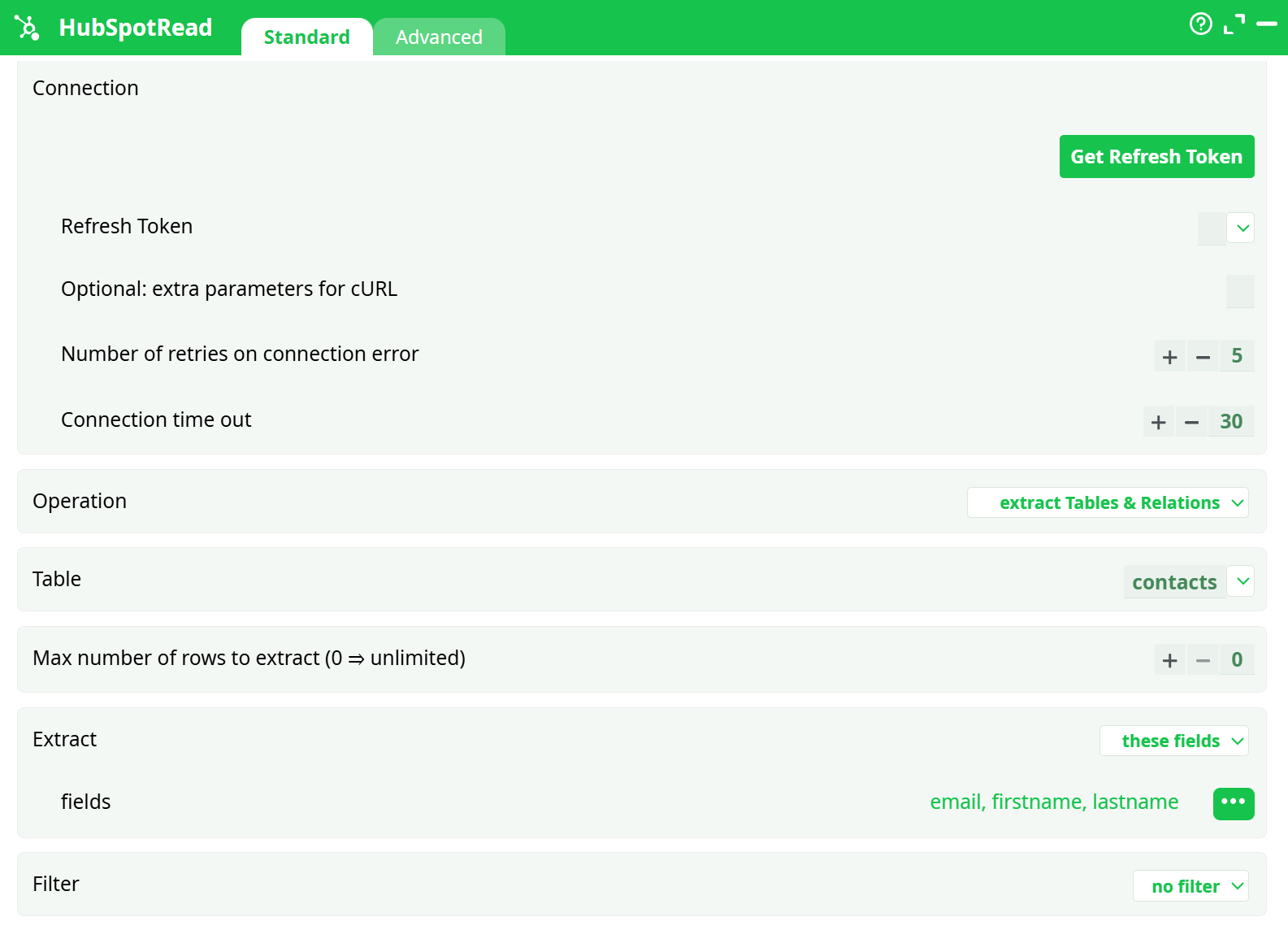
Parameters:
- Connection
- Refresh Token
- Optional: extra parameters for cURL
- Number of retries on connection error
- Connection time out
- Operation
- Table
- Max number of rows to extract (0 = unlimited)
- Extract
- fields
- Filter
¶ Connection tab

Parameters:
- In the case of truncated results
- Debug information in console
¶ About
The HubSpot Read connects to your HubSpot CRM using an OAuth Refresh Token (the same token described in the HubSpot Write doc). Once connected, it requests data from HubSpot’s public CRM objects and returns a clean, tabular dataset to your pipeline. It automatically handles pagination and common rate-limit responses, so large datasets flow through as a single table.
¶ What you can read
- Core objects (“tables”): contacts, companies, deals, line_items, owners, quotes, marketing_events, lists, and more.
- Forms & submissions: list forms and download their submissions.
- Property history: fetch historical changes for contact properties.
Pick the object you want and the box will retrieve records for that object.
¶ The essential knobs
¶ 1) Connection
- Refresh Token: paste the token you generated for your HubSpot Private App. This authenticates all requests.
(If you need the creation steps, see the credentials section in the HubSpot Write documentation.)
¶ 2) Operation (what kind of read)
- Extract Tables & Relations – standard object pulls (contacts/companies/deals…).
- List Forms – metadata about your forms.
- Download Form Responses – form submissions.
- Download Contact Historical Data – time-series changes to contact properties.
Choose the one that matches the type of data you need.
¶ 3) Scope (which data to bring)
- Table: when extracting tables & relations, select the object (e.g., contacts).
- Fields: choose the properties (columns) you want. You can keep it lean (only critical fields) or include many for richer downstream logic.
- Associations (optional): request linked object references (e.g., a contact’s associated companies or deals). These arrive as additional columns containing IDs or small structures, depending on the relationship.
¶ 4) Filtering & volume control
-
Filter:
- No filter (pull everything you can access),
- Only these IDs (restrict to IDs present on an incoming column), or
- Custom JSON filter (advanced HubSpot filter syntax).
-
Row limit: cap the number of rows if you’re sampling or protecting downstream steps.
0means “no cap.”
¶ 5) Reliability & pacing
- Retries and timeouts: tune these if your environment is chatty, networks are slow, or you’re near rate limits. The action already backs off on transient errors; these controls let you be more or less patient.
¶ 6) Output shape
- The result is a flat table: each row is an object record, each column is a selected property.
- If you requested associations, the table includes extra columns with the linked IDs/refs.
- Property names match HubSpot property API names for clarity and joins.
¶ Typical uses
- Sync a slice of CRM data into your warehouse or spreadsheets.
- Enrich other datasets by joining on contact/company/deal IDs.
- Fetch form submissions for analysis or routing.
- Pull association IDs to map relationships across objects.
- Retrieve historic changes when you need “who/when” for a property.