¶ Description
Get data from Oracle Fusion Cloud
¶ Parameters
¶ Standard tab
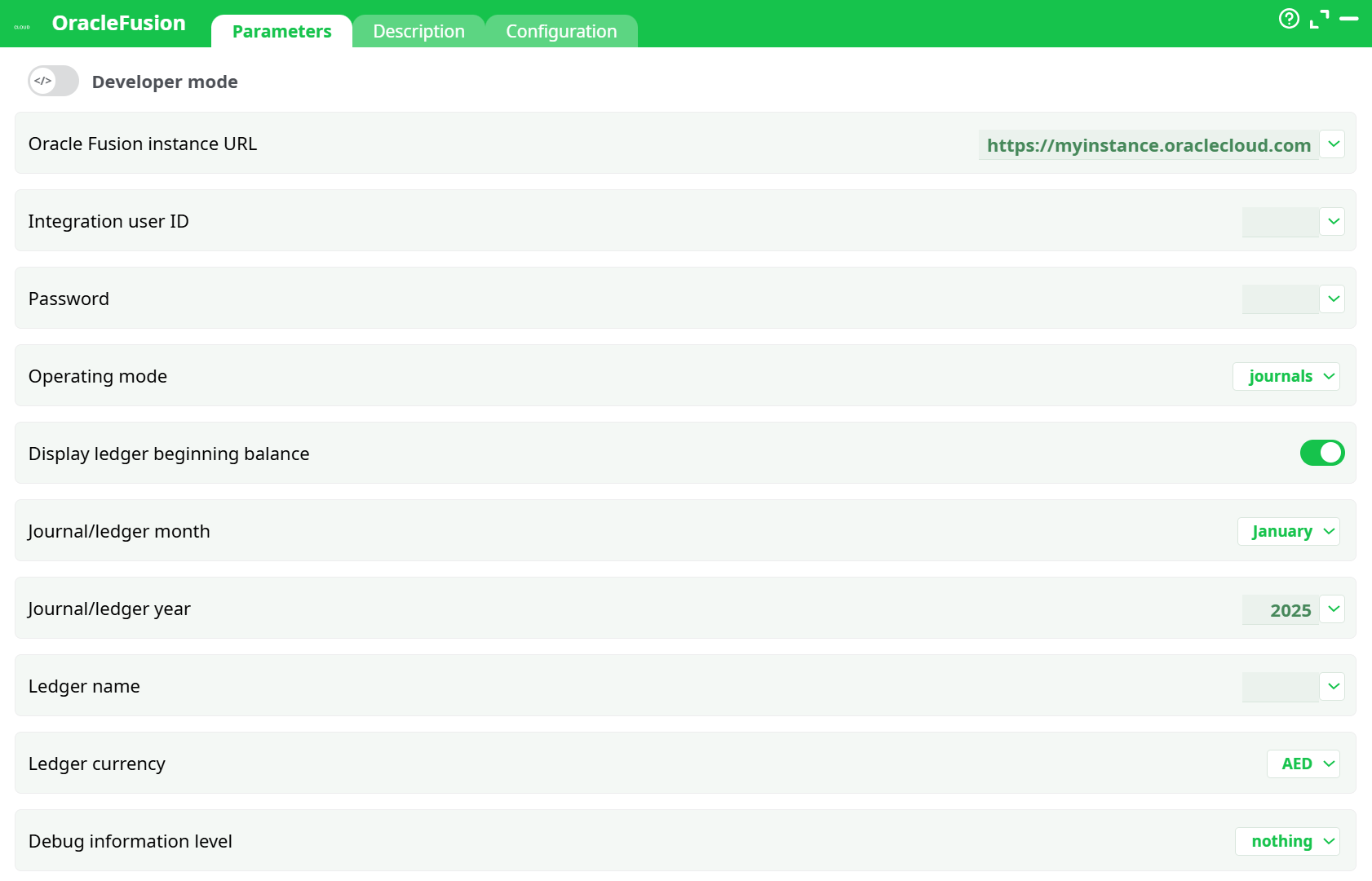
Parameters:
- Oracle Fusion instance URL
- Integration user ID
- Password
- Operating mode
- Display ledger beginning balance
- Journal/ledger month
- Journal/ledger year
- Ledger name
- Ledger currency
- Debug information level
¶ Description tab
See dedicated page for more information.
¶ Configuration tab
See dedicated page for more information.
¶ About
OracleFusion retrieves financial and procurement data from Oracle Fusion Cloud via authenticated REST calls. You choose an Operating mode (for example journals or ledger balances), optionally set period and ledger filters, and the box outputs the matching rows in Records for downstream processing.
¶ Prerequisites
- Oracle Fusion instance URL (tenant base URL).
- Integration user ID and Password with access to the selected data domain.
- (Optional) The ledger name, ledger currency, and period (month/year) you plan to filter on.
¶ Input requirements
- A reachable Oracle Fusion tenant.
- Valid credentials for the chosen domain (e.g., Journals, Ledger Balances).
- If filtering by period: a valid month (January–December) and year (YYYY).
- If filtering by ledger: an existing ledger name and a supported currency code (e.g., AED, USD, EUR).
¶ Output
- Tabular rows , shaped by the selected Operating mode and any filters applied.
- Execution diagnostics in Log according to the selected Debug information level.
¶ Minimal setup (quick start)
-
Set Oracle Fusion instance URL to your tenant base URL.
-
Enter Integration user ID and Password.
-
Choose Operating mode (e.g.,
journals). -
(Optional) Set period and ledger filters:
- Display ledger beginning balance as needed.
- Journal/ledger month and Journal/ledger year.
- Ledger name and Ledger currency.
-
Keep Debug information level =
nothingfor standard runs (basic/verbosefor troubleshooting). -
Run the box. Review Process tab.
¶ Example workflow
-
Goal: fetch January 2025 journal data for a specific ledger in AED.
-
Steps:
- Operating mode:
journals - Journal/ledger month:
January - Journal/ledger year:
2025 - Ledger name:
<Your Ledger> - Ledger currency:
AED - Display ledger beginning balance: On (if required)
- Run → verify rows in Process tab.
- Operating mode:
¶ Troubleshooting
-
Run fails at initialization
Ensure Integration user ID and Password are provided and valid. -
No rows returned
Relax filters (month, year, ledger) and re-run; confirm the ledger and currency exist in Oracle Fusion for the selected mode. -
Access or authorization problems
Confirm the integration account has permissions for the chosen Operating mode domain. -
Unexpected or missing columns
Output columns vary by Operating mode. Switch Debug information level tobasicorverboseto inspect requests and adjust filters accordingly. -
Performance considerations
Start without filters to validate connectivity, then apply period/ledger filters. Reduce verbosity tonothingfor production runs.
¶ Use cases
- Periodic extraction of journals for reconciliation.
- Retrieving ledger balances for management reporting.
- Collecting RFP–related entities (lines, responses, attachments) for audit or analytics.
- Exporting account combinations to validate mappings in upstream systems.