¶ Description
This action runs some SQL command to extract data from Oracle (i.e. it also runs any free-text SQL command inside Oracle).
¶ Parameters
¶ Standard tab
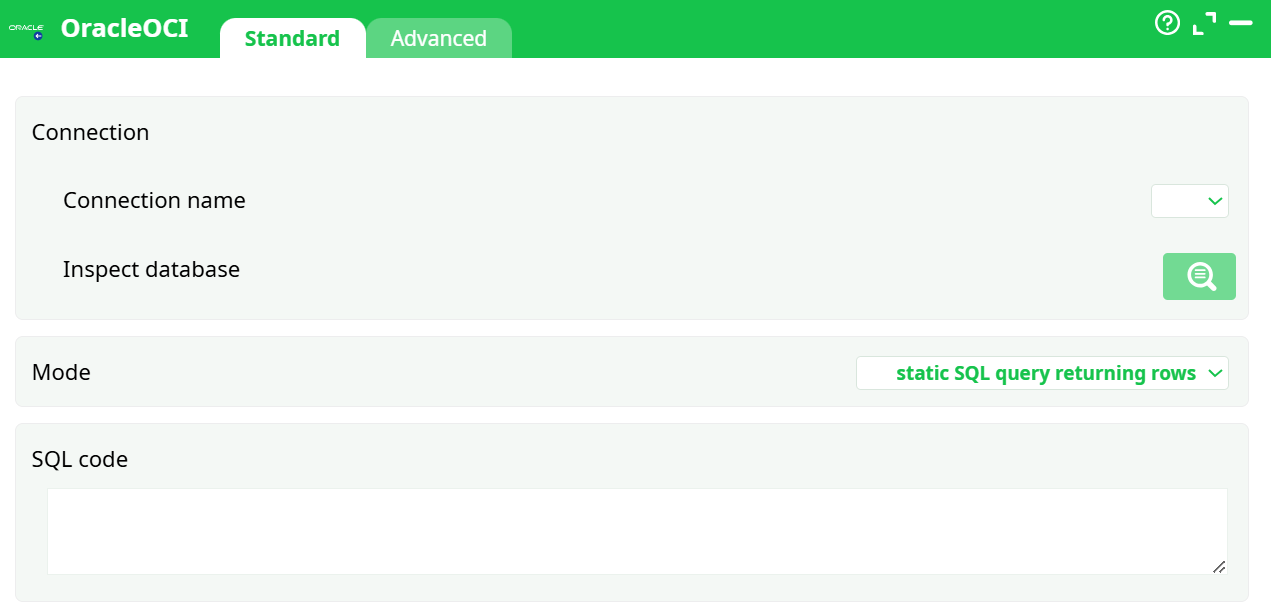
Parameters:
-
Connection name – select the Oracle connection you created in Services.
-
Inspect database – browse available schemas and tables from the connected Oracle instance.
-
Mode – defines the type of SQL execution:
static SQL query returning rows– standard SELECT query returning a result set.static SQL query not returning rows– SQL commands such asINSERT,UPDATE, orDELETE.dynamic SQL query not returning rows– SQL built dynamically using JavaScript or global parameters.
-
SQL code – the SQL statement or script to execute.
¶ Advanced tab
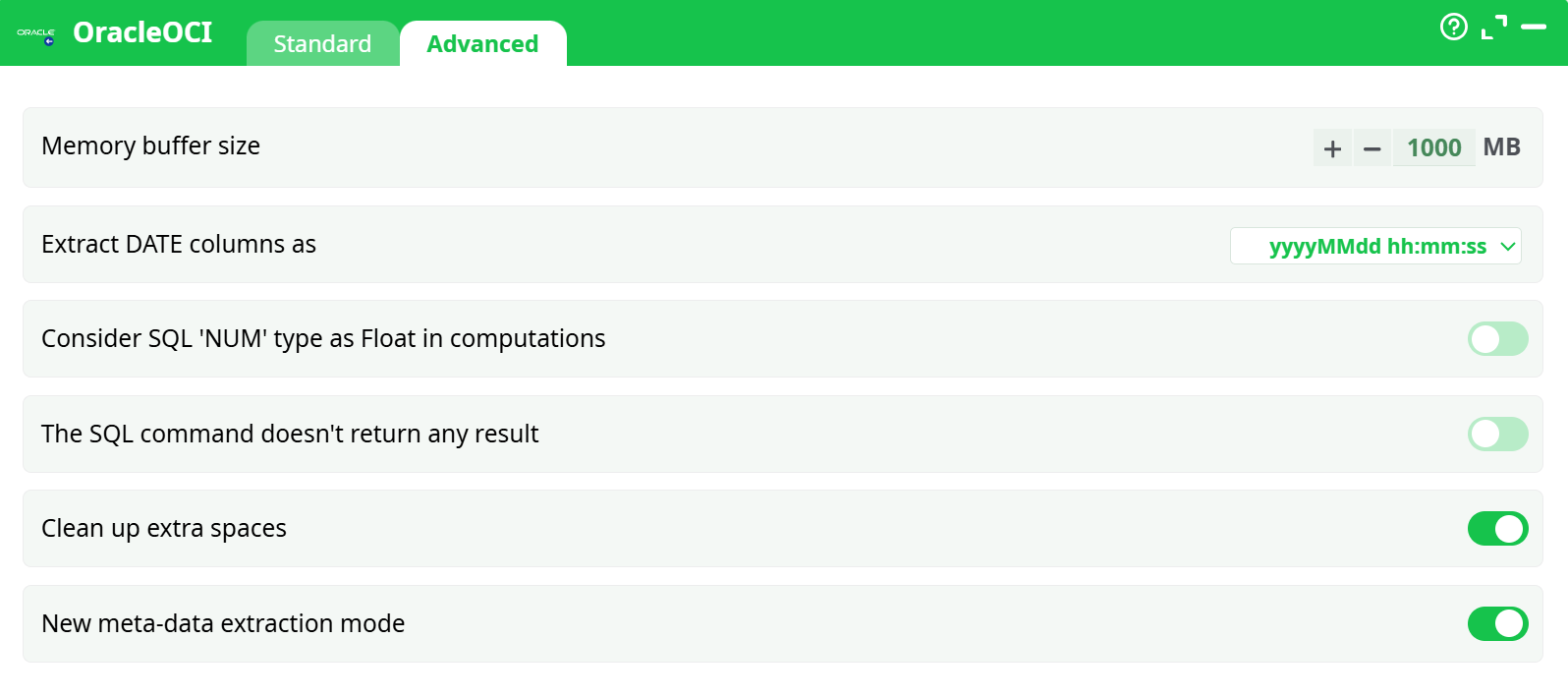
Prameters:
- Memory buffer size – defines how many rows are fetched per block.
Higher values reduce network round trips but increase RAM usage. - Extract DATE columns as – controls the date/time format used in the output.
- Consider SQL ‘NUM’ type as Float in computations – treats Oracle NUMERIC values as floats to ensure compatibility with numeric operations.
- The SQL command doesn’t return any result – skip output table creation for statements such as
UPDATEorCREATE TABLE. - Clean up extra spaces – automatically trims trailing and leading spaces in string fields.
- New meta-data extraction mode – enables improved detection of column names and types.
¶ About
The OracleOCI action executes SQL queries directly on an Oracle database using Oracle’s native OCI (Oracle Call Interface) libraries.
It is designed for reliable, high-performance data extraction from Oracle databases, especially when handling large datasets or long-running queries.
Compared to ODBC-based actions, OracleOCI offers better connection stability and reduced timeout issues, making it the preferred option for production-grade Oracle integrations.
¶ When to use it
Use OracleOCI when you need to:
- Extract data from an Oracle database with full SQL flexibility.
- Execute static or dynamic SQL queries directly from the ETL pipeline.
- Avoid ODBC driver timeouts during large or complex extractions.
- Improve stability and performance in Linux environments (especially under Wine).
¶ Connection management
¶ Defining an Oracle connection
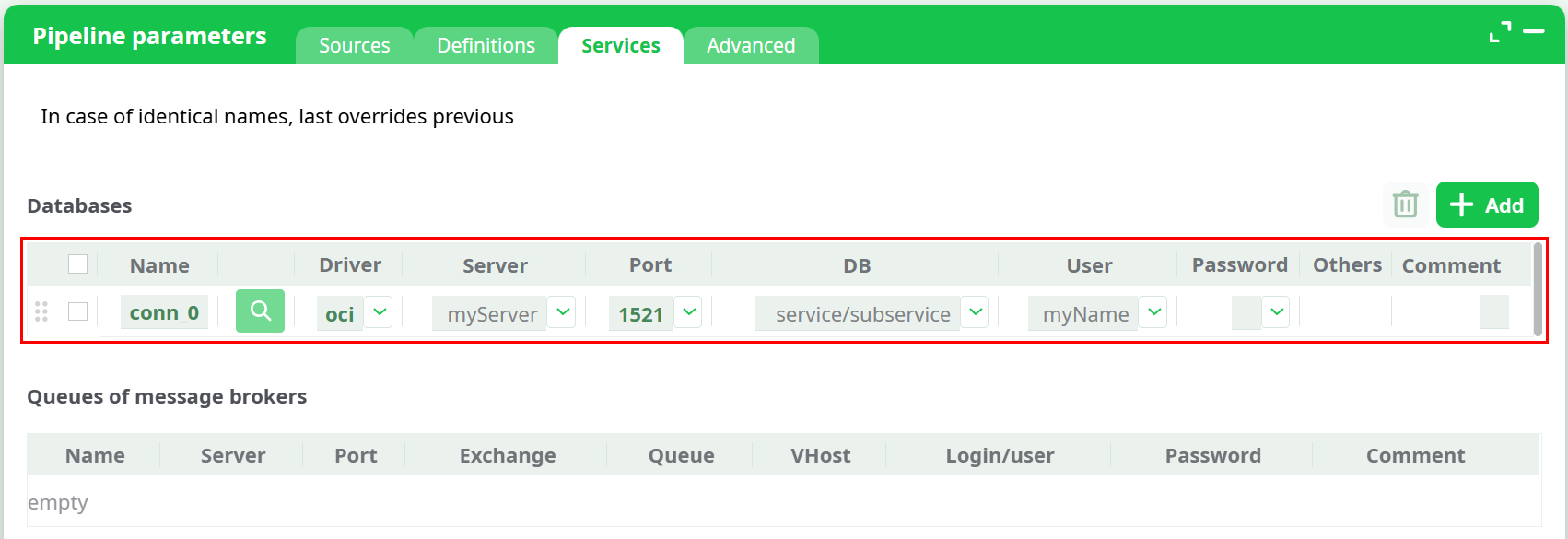
Before using this action, define a connection in Pipeline parameters → Services.
-
Open the Pipeline parameters window and go to the Services tab.
-
Click Add to create a new connection entry.
-
In the Driver dropdown, select Oracle OCI.
-
Fill in the connection fields:
- Name – connection identifier (e.g.,
oracle_conn) - Server – Oracle host address or service name
- Port – default is
1521 - DB – Oracle SID or service name
- User / Password – authentication credentials
- Others – optional connection flags or environment variables
- Name – connection identifier (e.g.,
¶ Using secrets
You can reference Secrets from the Definitions tab to protect your credentials.
Add a secret (e.g., secret_0 = MyPassword) and reference it in the Password field of your Oracle service configuration.
This approach avoids storing plain text passwords inside your pipeline.
¶ Connection priority
Connections defined directly in a pipeline override global definitions created under Sources → Services.
If multiple connections share the same name, the last one in order takes precedence.
Tip:
Keep global Oracle connections in Sources for shared use, and override them locally when different credentials or endpoints are required.
¶ SQL dynamic mode
You can prefix the SQL code with the > character to enable dynamic SQL.
This allows building the query programmatically using JavaScript or Global Parameters.
Example:
> "SELECT * FROM SALES WHERE YEAR = " + g_year
¶ Connection string format
The connection string can reference an entry in a TNSNAMES.ORA file or contain its full equivalent directly.
For example:
(DESCRIPTION =
  (ADDRESS = (PROTOCOL = TCP)(HOST = 192.168.1.1)(PORT = 1521))
  (CONNECT_DATA = (SERVICE_NAME = MYDB))
)
This string can be placed directly in the Server field or referenced through a file path depending on your environment setup.
¶ Memory buffer tuning
The Memory buffer size parameter determines how many rows are fetched “per block” from the Oracle server.
- Increasing it reduces round-trip latency and speeds up extraction.
- Setting it too high may cause excessive RAM usage or potential driver crashes.
A value between 500 MB and 1500 MB is usually a safe range for most pipelines.
¶ Step-by-step example
- Open Pipeline parameters → Services.
- Click Add and select Oracle OCI as the driver.
- Enter the server, port (1521), database (SID/service), and credentials.
- Return to the pipeline and open the OracleOCI box.
- Select your connection name.
- Choose the desired Mode (e.g.,
static SQL query returning rows). - Write your SQL command inside the SQL code field.
- Adjust advanced parameters if needed.
- Run the pipeline — the result is loaded into the ETL flow as a data table.
¶ Example queries
¶ Example 1 – Select data
SELECT CUSTOMER_ID, TOTAL_AMOUNT, ORDER_DATE
FROM ORDERS
WHERE ORDER_DATE > TO_DATE('2025-01-01','YYYY-MM-DD');
¶ Example 2 – Update data
UPDATE PRODUCTS
SET STOCK = STOCK - 1
WHERE PRODUCT_ID = 1001;
¶ Example 3 – Dynamic SQL
> "SELECT * FROM SALES WHERE REGION = '" + g_region + "'"
¶ Troubleshooting
Connection failed
Verify the host, port, and credentials. Ensure the Oracle listener service is running and accessible.
Missing OCI components
Click the installation link in the interface to install Oracle’s native client libraries.
Timeouts
Use OracleOCI instead of ODBC for long-running queries; OCI handles large data extractions more efficiently.
Invalid SQL
Ensure that semicolons are removed from the end of your statements.
Driver crash / memory issue
Reduce the Memory buffer size value if extractions are too large for available RAM.
¶ Summary
The OracleOCI action provides a robust, efficient, and secure way to interact with Oracle databases.
By using native OCI libraries, it delivers superior performance, especially for high-volume extractions or long-running operations.
Its flexible configuration supports both static and dynamic SQL queries while maintaining centralized connection management through the unified Services system.