¶ Description
Extract tables from SAP.
¶ Parameters
¶ Standard tab
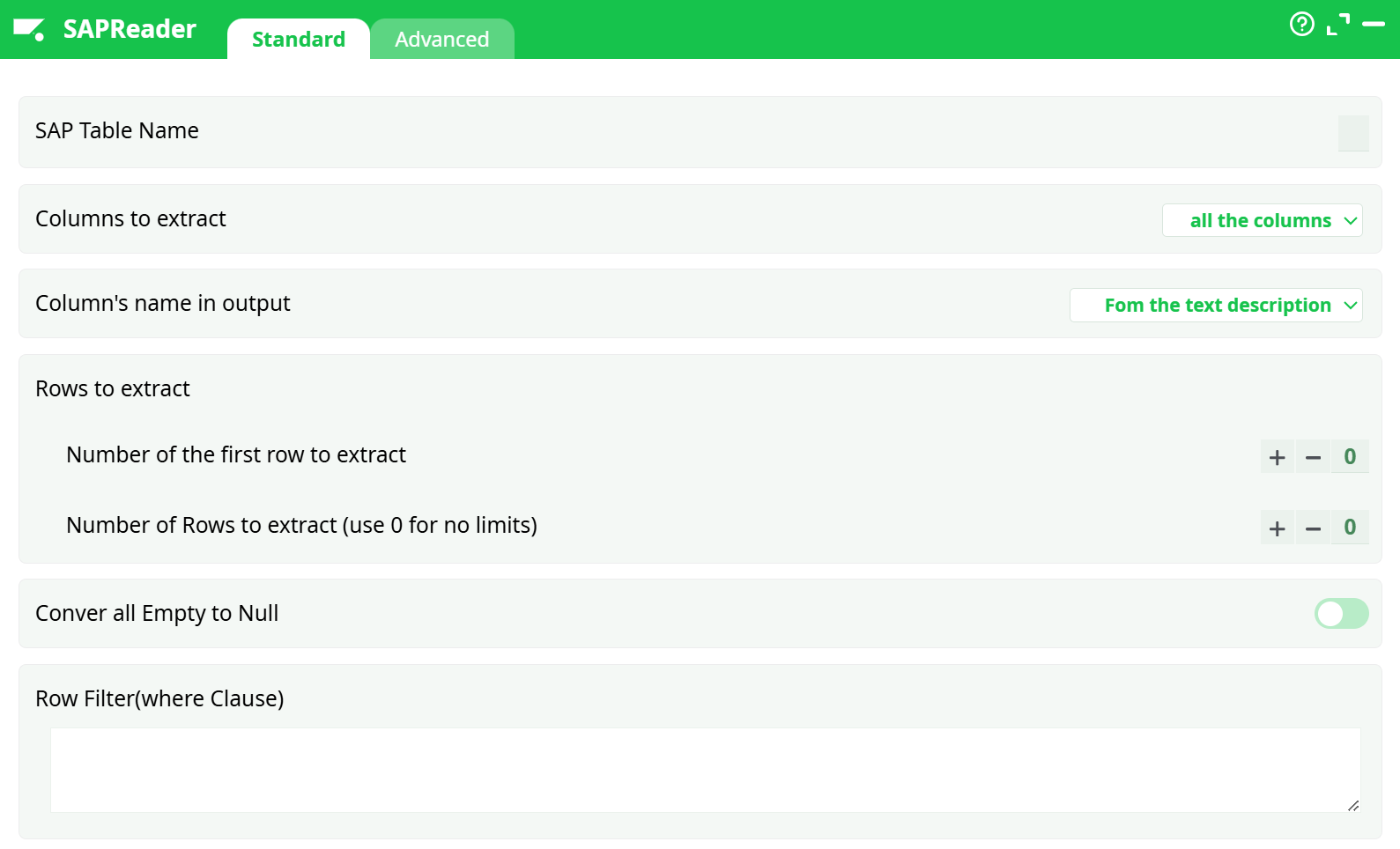
Parameters:
- SAP Table Name
- Columns to extract
- Column's name in output
- Rows to extract
- Number of the first row to extract
- Number of Rows to extract (use 0 for no limits)
- Conver all Empty to Null
- Row Filter(where Clause)
¶ Advanced tab
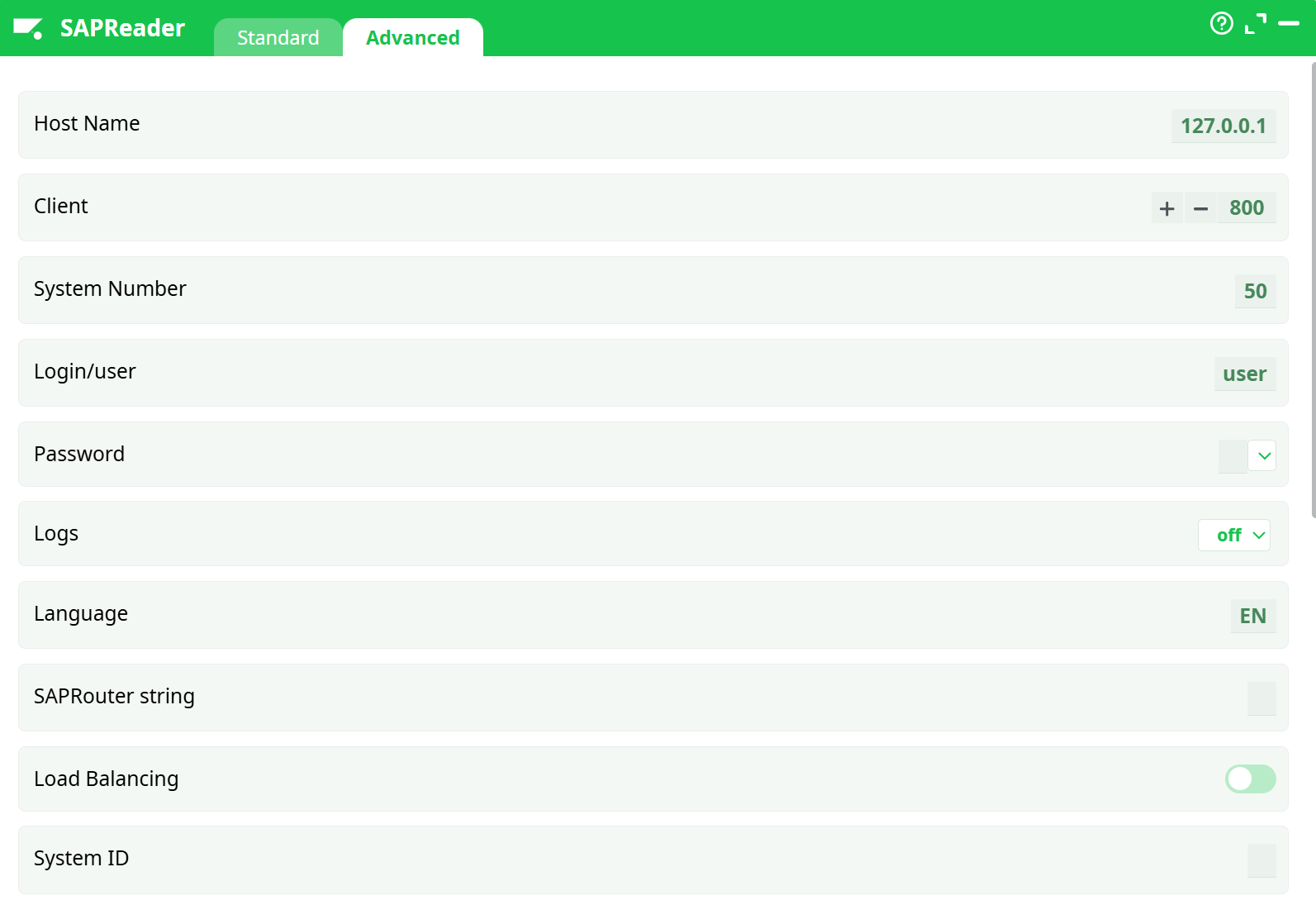
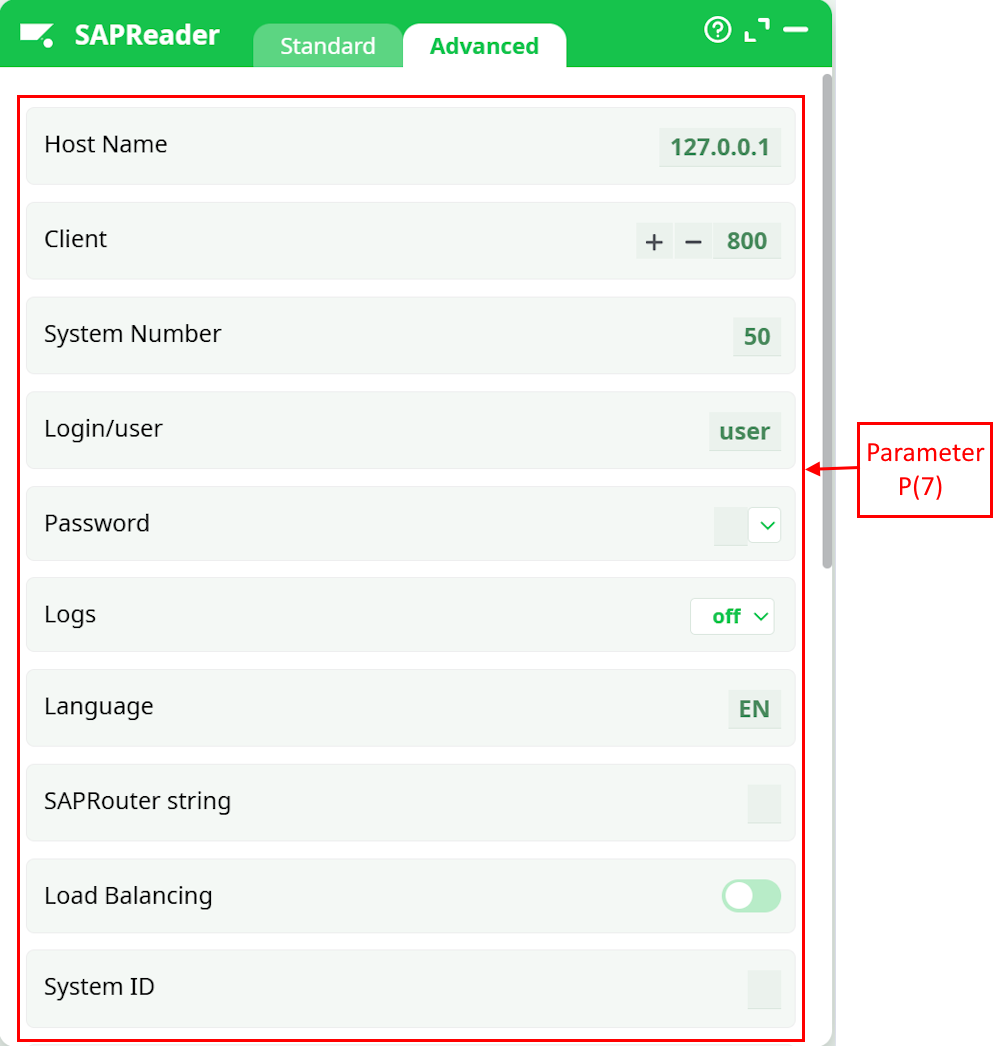
Parameters:
- Host Name
- Client
- System Number
- Login/user
- Password
- Logs
- Language
- SAPRouter string
- Load Balancing
- System ID
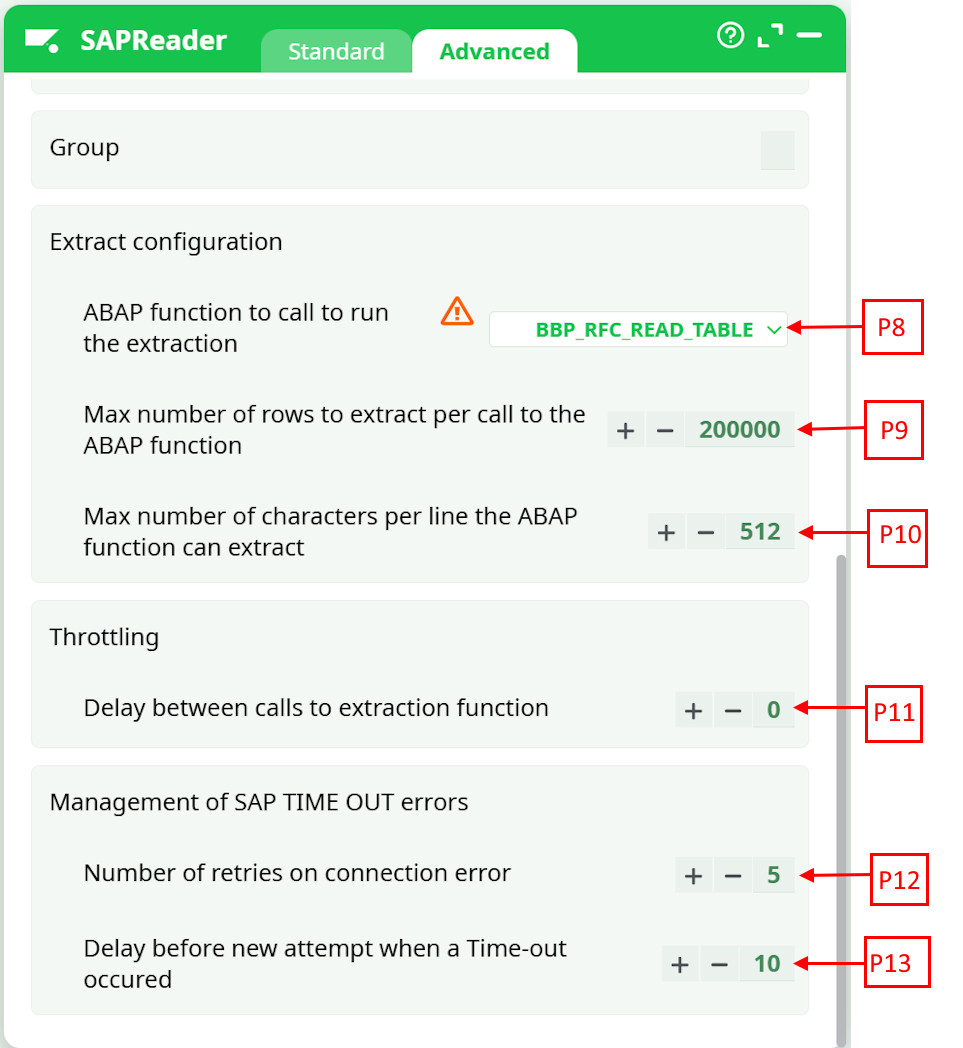
- Group
- Extract configuration
- ABAP function to call to run the extraction
- Max number of rows to extract per call to the ABAP function
- Max number of characters per line the ABAP function can extract
- Throttling
- Delay between calls to extraction function
- Management of SAP TIME OUT errors
- Retries on connection error
- Delay before new attempt when a Time-out occured
¶ About
The SAP table extraction is performed using the newest NetWeaver RFC libraries. By default, to run the extraction, ETL calls the ABAB function named “BBP_RFC_READ_TABLE”, but you can change that using the parameter P8 here:
Instead of running “BBP_RFC_READ_TABLE”, you can run any alternative ABAP function with the same signature. All the ABAP functions with the following signature are compatible with ETL:
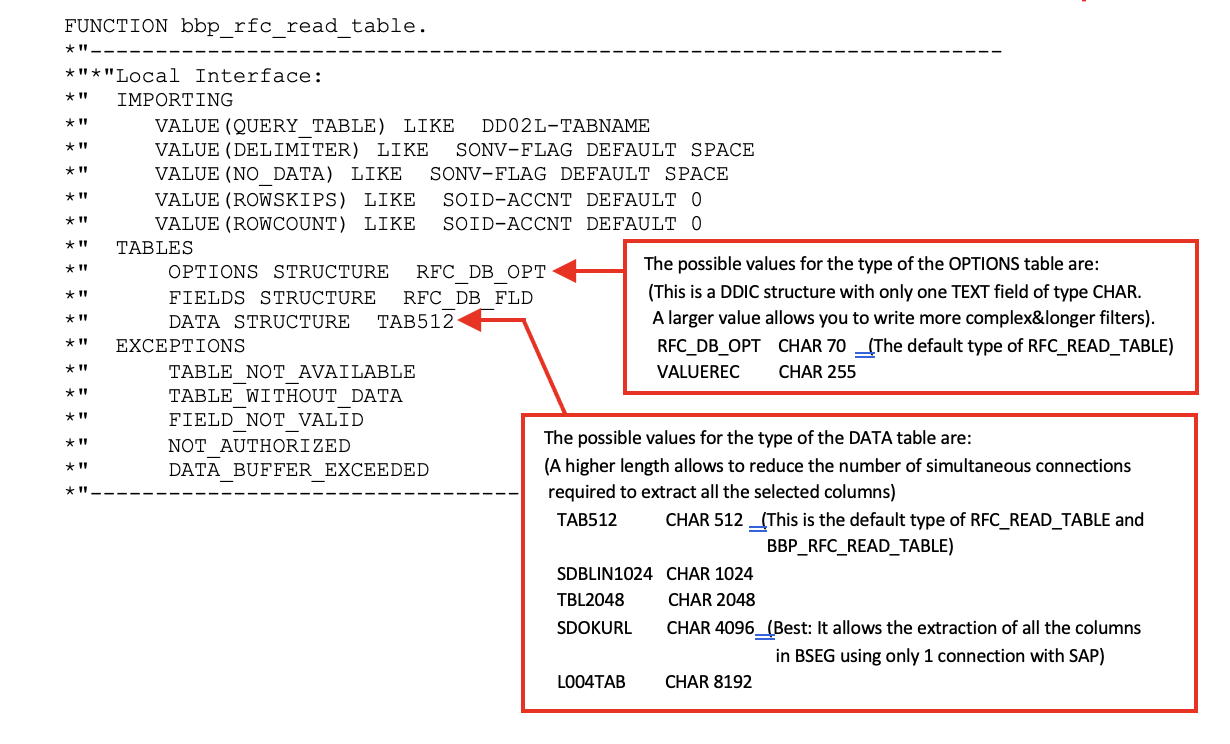
These are all the standard ABAP functions that are compatible with ETL:
BBP_RFC_READ_TABLE
RFC_READ_TABLE
/SAPDS/RFC_READ_TABLE (which is still different from “RFC_READ_TABLE”)
Z_AW_RFC_READ_TABLE
ZRFC_READ_TABLE
Many SAP system only contains the ABAP function “RFC_READ_TABLE” and no other function.
NOTE:
If you get an error inside the ETL-log-window that says:
SAP ERROR: cannot describe function …
or
SAP ERROR: authorization refused to access function…
This means that you need to use another ABAP function to run the extraction.
NOTE :
Which ABAP function should I use? What’s the order of preference?
The order is (from best to worst):
/SAPDS/RFC_READ_TABLE
BBP_RFC_READ_TABLE
Z_AW_RFC_READ_TABLE
ZRFC_READ_TABLE
RFC_READ_TABLE
The “RFC_READ_TABLE” ABAP function has the advantage to be available in (nearly) all SAP systems.
The disadvantage of the “RFC_READ_TABLE” ABAP function is that, sometime, when working with some columns of type FLOAT, this function might cause an ABAP exception named “ASSIGN_BASE_WRONG_ALIGNMENT”. When this happens, the extraction fails (In this situation, just remove the FLOAT column that caused the error from the list of selected columns and re-run the extraction).
NOTE :
The extraction methogology that is used by ETL guarantees a total safety: No data is ever written inside SAP. The extraction algorithm used in ETL is working in pure “read-only” mode: It is thus 100% safe. There are no dangers of loosing any data from your SAP system.
All these ABAP functions proceed in the same way to do the extraction:
More precisely, they all execute the following steps:
1.Run the following SQL command:en_in_parameter_P15>
2.Rutitle: SAPReadern a loop to skip the first X rows of the output table of the “SQL SELECT” command that was performed during the previous step 3. The quantity X of “skipped” row is given in the parameter P5.
4.Create “in-memory” (inside the memory of the remote SAP server) a large table “T” that contains at most R rows and one single column.the “SQL SELECT” command that was performed during the previous step 1. The quantity X of “skipped” row is given in the parameter P5.
5.Create “in-memory” (inside the memory of the remote SAPcontains the concatenation inside one unique string “S” of all the columns that were selected using the parameters P2 and P3.
Depending on the ABAP function used, there are different limits to the length of this large string “S”. For example, when you use the standard “RFC_READ_TABLE” or “BBP_RFC_READ_TABLE” ABAP functions, the maximum length of the string “S” is 512 characters.
6.Send back to ETL the output table “T” using the computer network. At that point, the whole output table “T” is fully stored inside both the RAM memory of the SAP server and inside the RAM memory of the ETL server.
There are many different ways for the above ABAP function to fail. Luckily, the ETL engine that is used to extract data from SAP has many built-in “work arounds” to still be able to run a successful extraction. You're in for a treat because the SAP-data-extraction-engine included inside ETL is one of the most advanced engine currently available!
The most common cause of failure is due to the limitation on the length of the string “S” (that is used inside the single column of the output table). By default, this string “S” is limited to 512 characters and this is way too short to be able to extract all the columns of nearly all the “wide” tables (such as the “BSAK” table from SAP).
The obvious advantage of opening several simultaneous connections to SAP is that you are no longer limited to 512 characters per row.
However, there are some downsides:
- The load on the SAP server is slightly higher.
- Since multiple connections are used to extract data, ACID properties cannot be enforced.
To learn more about ACID properties in databases, refer to:
https://en.wikipedia.org/wiki/ACID
In rare cases, inconsistencies may appear between columns extracted through different connections.
To prevent this, the ETL engine performs all extractions simultaneously, ensuring they occur at the exact same time. This makes it extremely unlikely to encounter inconsistent data.
As a best practice, it is also recommended to schedule extractions during off-peak hours (e.g., at night) when the SAP server load is minimal.
That said, this limitation is generally not critical, because the database most commonly used behind SAP is DB2, and DB2 does not support ACID properties anyway.
Another common cause of extraction failure is excessive RAM consumption.
An “out-of-RAM” memory error can occur:
- …during step 1:
During this step, the SAP system runs a heavySELECT * FROM tableSQL command, without placing any limits on the number of rows or columns returned.
Even if you configure ETL with the parameter P6 to extract only one row from SAP, the SAP server will still run the full SELECT * FROM table, which may load millions of rows into RAM — potentially exhausting system memory.
This behavior is problematic and can lead to failure.
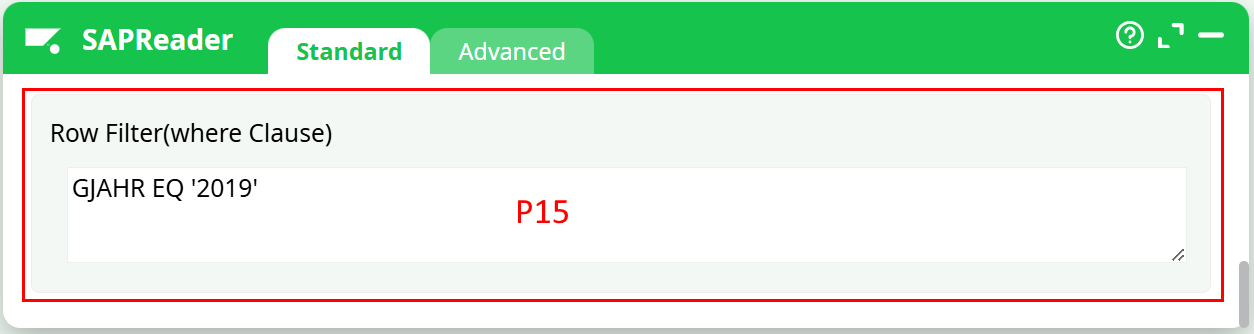
To avoid this issue, use the parameter P15 to limit the size of the dataset returned by the SQL query.
For example, to extract only the rows from the BSAK table where the Invoicing Year (GJAHR in SAP) is 2019, you would write:
Please note that the SQL language used inside SAP is not a “standard” SQL: For example:
o Simple operators used to compare field values are EQ, NE, GT, LT, GE and LE (equivalent to =, <>, >, <, >=, <=).
o You need to place numbers in-between single quotes.
This means that this “standard” SQL command:
SELECT * from BSAK WHERE GJAHR=2019
…will not work inside SAP and you need to write instead:
SELECT * from BSAK WHERE GJAHR EQ '2019'
(see also the screenshot here above to know how to write this row filter inside ETL).
If you see the following message inside the ETL log window:

…this means that the SAP system does not understand your user-defined “Where clause” SQL filter that is defined inside the parameter P15 (i.e. There is a syntax error inside your “Where clause”).
• …during the Steps 3 and 4: During these two steps, the SAP system creates in-memory the output table “T” (inside the RAM memory of the SAP server and, thereafter, inside the RAM memory of the ETL server). This output table “T” might be very large and consume too much RAM memory.
To solve this error, you need to reduce the RAM memory consumption required to run the extraction: e.g. one solution is to reduce the number of rows inside the output table “T” that is used during the steps 3 and 4 of the ABAP function. To reduce the number of rows inside the output table “T”, you can decrease the value of the ETL parameter P9.
Let’s now assume that:
o The ETL parameter P9 is 1000.
In other words, the maximum size of the output table “T” is 1000 rows.
o There are, in total, 3500 rows inside table to extract from SAP.
In such a situation, ETL will run the ABAP function 4 times (i.e. ETL will run 4 extractions):
o Run 1: ETL extract the rows 0 to 1000
o Run 2: ETL extract the rows 1000 to 2000
o Run 3: ETL extract the rows 2000 to 3000
o Run 4: ETL extract the rows 3000 to 3500
ETL will automatically merge the 4 tables obtained from these 4 extractions into a single large table. Everything is totally transparent and non visible to the final user.
The obvious advantage of using a small value for the parameter P9 is that you will use less RAM memory on the server and, thus, your extractions are more likely to run successfully. The downsides are:
o A longer extraction-time because: If you use a smaller value for the parameter P9, you will be forced to make many more calls to the ABAP function to extract the full table. And, each of these “calls” introduces a significant overhead (i.e. the overhead is really big: it’s the time required to run the steps 1 and 2 from the ABAP function). This overhead is heavily slowing down the extraction procedure.
To reduce the overhead, you can use the parameter P15 to add a “Where clause” filter because this effectively reduces the running-time of the steps 1 and 2 from the ABAP function.
o Since we are using several different runs to extract the data from SAP, we cannot enforce any ACID properties anymore
Finally, the SAP system sometimes returns a “TIME OUT error” for no apparent reason. No worries: When this happens ETL just re-runs the extraction of the last block of rows (the size of this block of row is defined using the parameter P9) and the extraction continues without any problem. The parameters P12 and P13 control how ETL reacts to the TIME OUT errors. If you see many TIME OUT errors, it might be because you are extracting data from SAP at a “too high pace” for your (old) SAP system to handle: i.e. You need to slow down a little: i.e. You should increase the parameter P11 to a higher value (e.g. 40).