¶ Description
Download files.
¶ Parameters
¶ Parameters tab
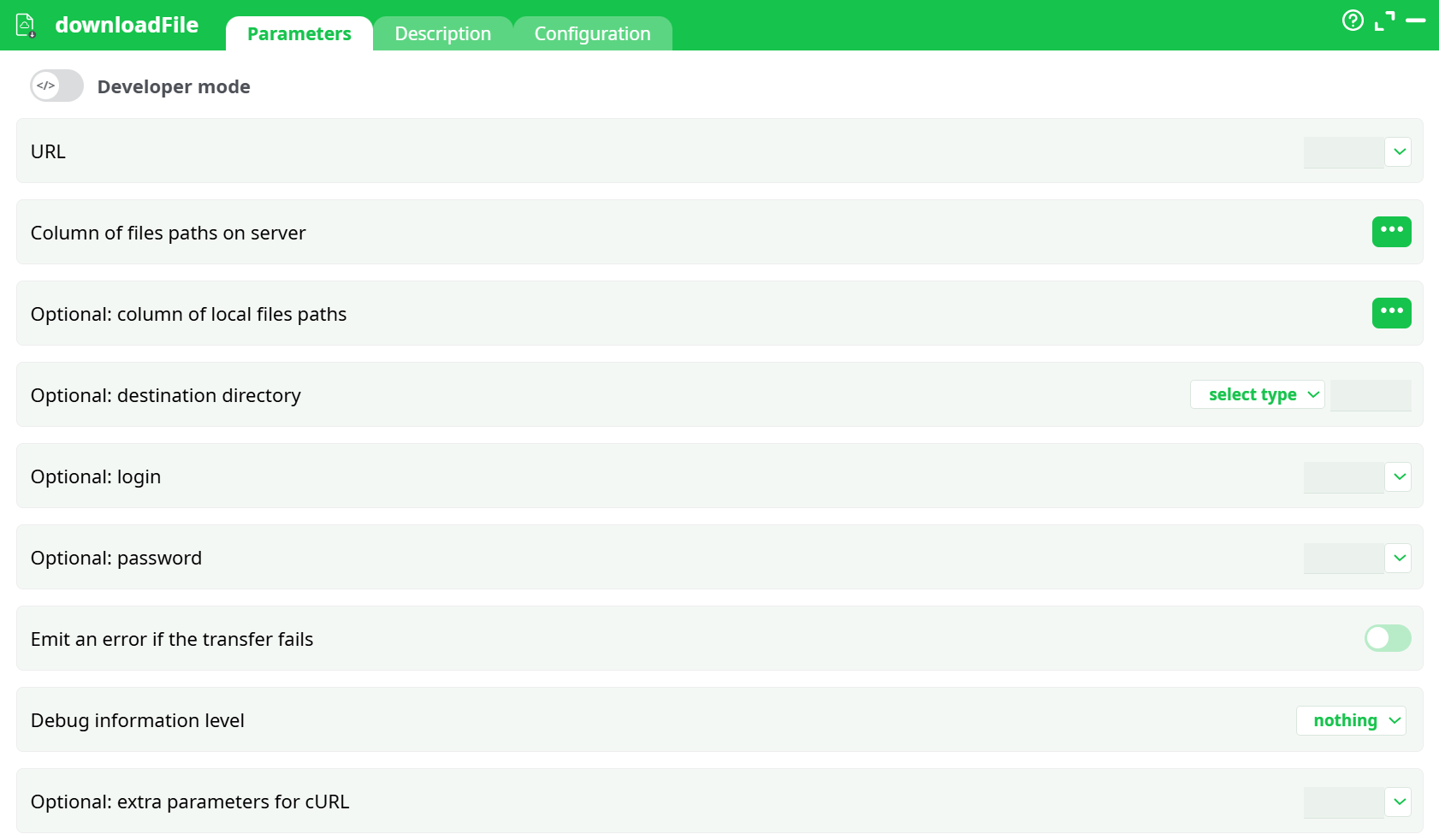
Parameters:
- URL
- Column of files paths on server
- Optional: column of local files paths
- Optional: destination directory
- Optional: login
- Optional: password
- Emit an error if the transfer fails
- Debug information level
- Optional parameters for cURL
¶ Description tab
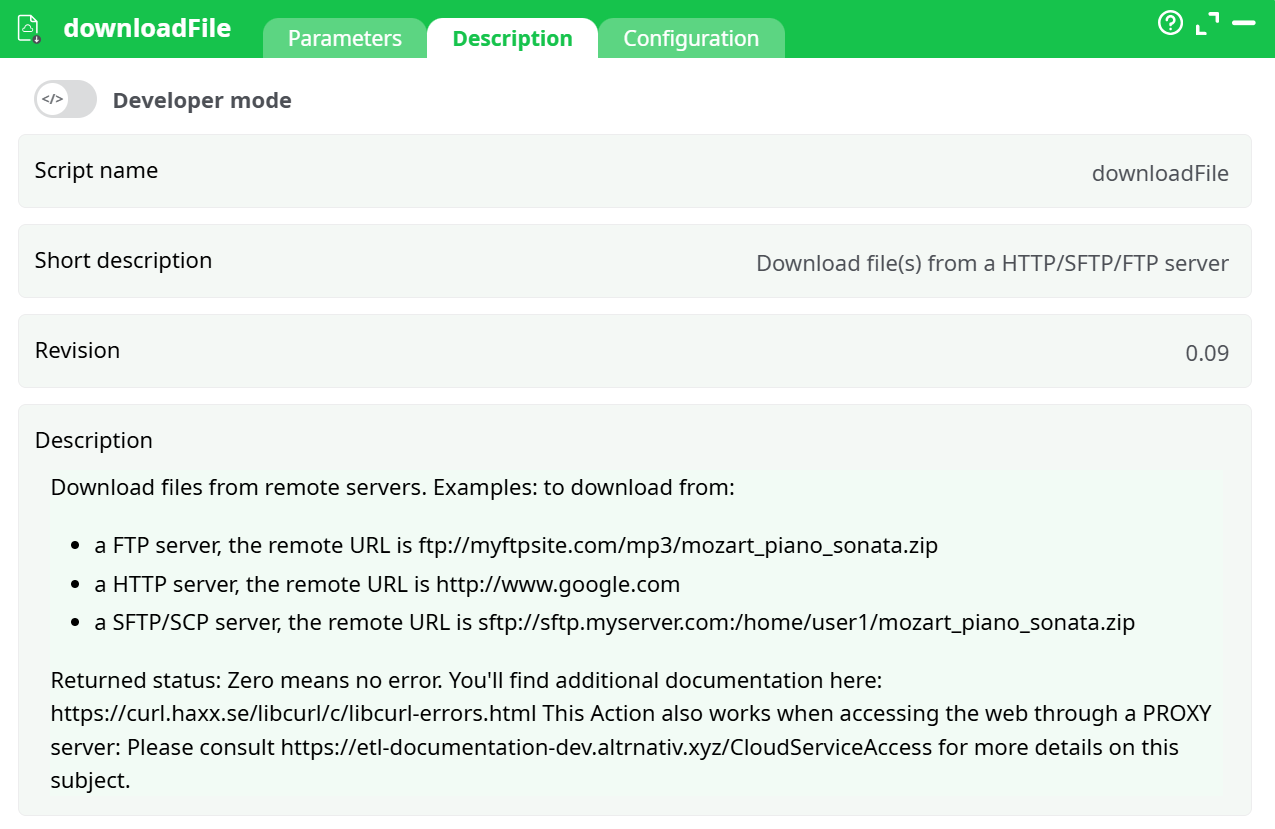
Parameters:
- Script name
- Short description
- Revision
- Decription
¶ Configuration tab
See dedicated page for more information.
¶ About
downloadFile retrieves files from remote locations and saves them locally. Supported protocols include HTTP/HTTPS, FTP/FTPS, and SFTP/SCP. The action wraps cURL and surfaces a clear success/failure signal, so your pipeline can branch when something goes wrong.
Two usage patterns:
- Single-file mode: set fixed parameters; no input pin required.
- Batch mode: connect a table; each row provides the URL and optional per-row output name.
Key points
- Destination (
Optional: destination directory) must be a folder (not a file path). - If any parameter is mapped to a column, the node expects ≥1 input row.
- Google Drive and other redirecting sites work; ensure the file is shareable and consider setting
Column of files paths on serverfor a clean name.
¶ Prerequisites
- Network egress to the target host/port (e.g., 443 for HTTPS, 22 for SFTP).
- If required: valid username/password or an access method supported by the server.
- Write permission on the local destination folder.
- If your org uses a proxy, the proxy URL/port (to pass in extra cURL parameters).
¶ Input Requirements
-
Pin 0 (optional table) for batch downloads.
-
Recommended columns:
url— full URL (https://…,sftp://…,ftp://…)remote_file— server path when using SFTP/FTP and the URL does not include a file (leave empty for HTTP/HTTPS file links)local_file— optional per-row filename override
-
-
Column names are case-sensitive and must match what you select in pickers.
-
With a mapped
URL, at least one row must exist at runtime.
Partitioning
- The node respects upstream partitioning; each partition is processed row by row.
¶ How It Works
- For each row (or once in single-file mode), the node builds a cURL command, follows redirects, creates missing directories, and writes the file under Optional: destination directory.
- If Column of files paths on server is empty, the filename is inferred from the URL/redirect.
- The action exposes cURL’s exit status; 0 means success.
What the action emits
- Data tab: either the pass-through of your input (when using an input table), optionally augmented by delivery metadata when that option is available; or a single status row in some configurations. In all cases, status = 0 → success.
- Records tab: any file saved under recorded data appears here for easy download from the UI.
¶ Minimal Setup to Run
- Set URL to a valid link (or map to a URL column).
- Leave Remote file empty for HTTP/HTTPS direct file links.
- Set Destination to a folder (e.g.,
records/downloadsvia recorded data). - Optionally set Local file to force a clean filename.
- Emit error ON, Debug = basic.
¶ Step-by-Step Run Instructions
-
Choose mode
- Single-file: leave input pin empty.
- Batch: connect a table with a
urlcolumn (plus optionallocal_file,remote_file).
-
Open Parameters.
-
Set URL: paste a constant URL or pick the
urlcolumn. -
Clear Remote file unless you’re doing SFTP/FTP with a separate server path.
-
Local file (optional): set a filename (e.g.,
report.csv). -
Destination: select recorded data →
records/downloads. -
Credentials: fill only if required by the server.
-
Emit error ON, Debug = basic.
-
Run and check the Log and Records tabs.
¶ Examples
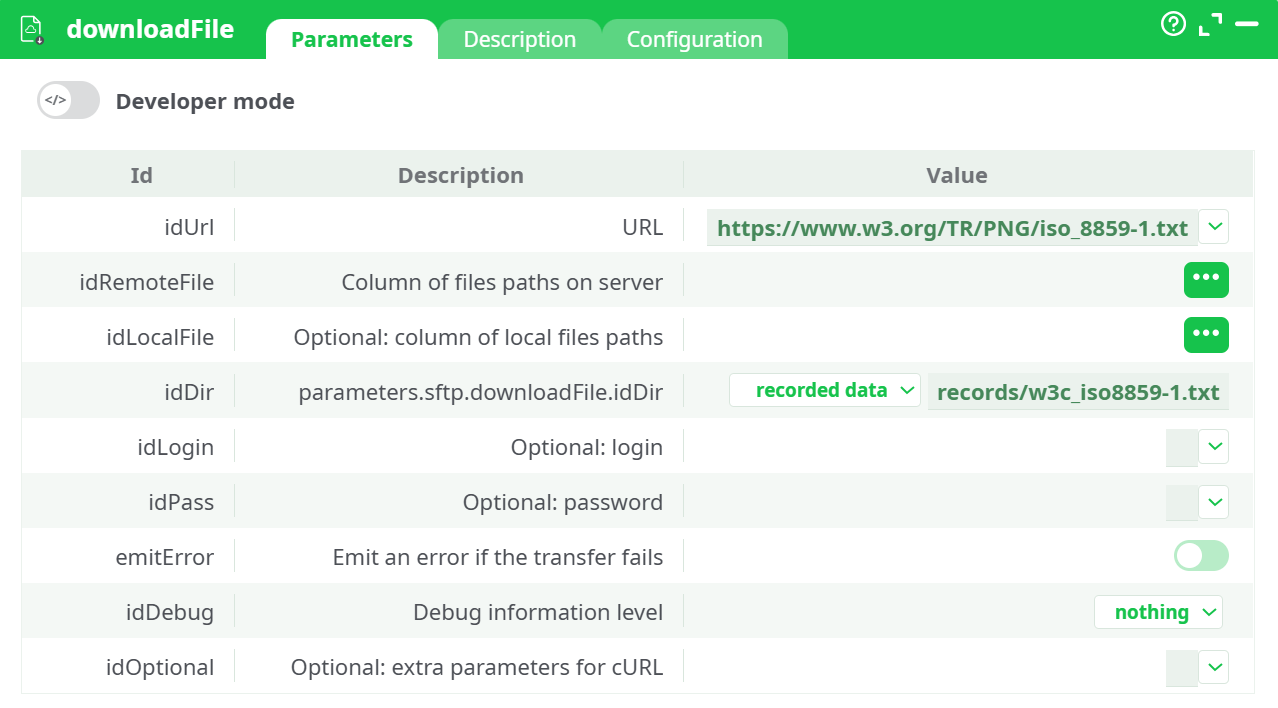
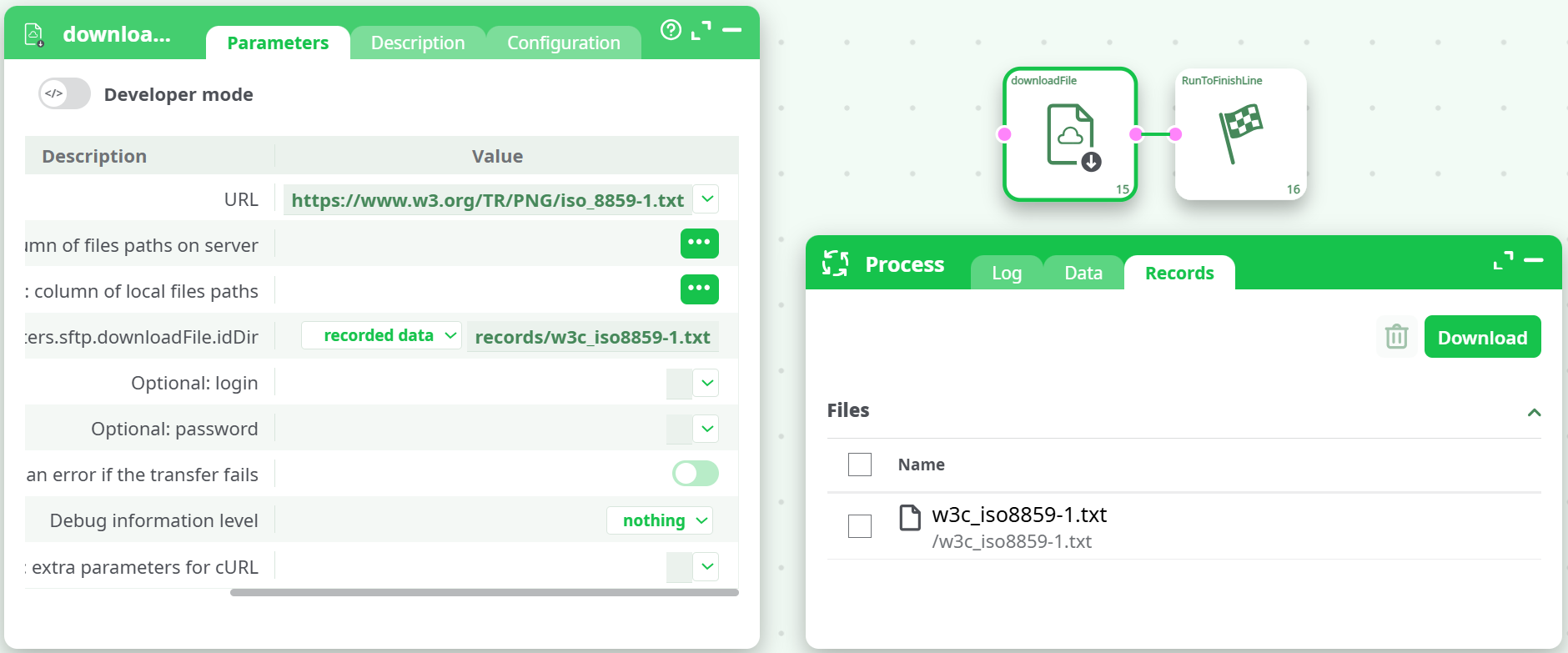
¶ A) HTTP → Records (public CSV)
- URL:
https://www.w3.org/TR/PNG/iso_8859-1.txt - Local file:
records/w3c_iso8859-1.txt - Destination: recorded data
- Result:
status = 0, file listed in Records.
¶ B) FTP with credentials
- URL:
ftp://ftp.example.com - Remote file:
/incoming/report.zip - Login/Password: filled
- Local file:
records/report.zip - Destination: recorded data
- Result:
status = 0, file saved to Records.
¶ C) Google Drive direct download
- In Drive, set the file to Anyone with the link (Viewer).
- URL (uc link):
https://drive.google.com/uc?id=<FILE_ID>&export=download - Local file:
gdrive_test.bin - Destination: recorded data →
records/downloads - Result:
status = 0. If you see 403, fix sharing and retry.
¶ Post-Run Validation
- File count equals the number of valid input rows.
- Each file size > 0 bytes.
- Open one output (CSV/JSON) to ensure it’s not an HTML error page.
- For SFTP/FTP, verify remote path correctness and permissions.
¶ Troubleshooting (targeted)
-
“out of range while accessing the content of a row (-1)”
You mapped to a column but there are no input rows (or the column is missing).
Fix: Provide at least one row; verify the exact column name; or test in single-file mode. -
URL becomes
http://www.google.com/https://…
Full URL was placed in Remote file instead of URL.
Fix: Put the full URL in URL; clear Remote file. -
Saves to
'records/out.csv'or can’t write
Optional: destination directory is a file, not a folder.
Fix: Set Optional: destination directory to a directory (e.g.,records/downloads). -
403 Forbidden (Drive or similar)
Resource not publicly accessible.
Fix: Adjust sharing; for Drive use the uc link; optionally set Local file to force the name. -
Common cURL exit codes
- 6: could not resolve host → check hostname/DNS/proxy
- 7: failed to connect → firewall/egress/port not open
- 23: write error → invalid local path/permissions/disk
- 28: timeout → add
--max-time 120in Extra parameters - 35: TLS/SSL failure → certificate chain; temporarily test with
--insecure - 67: login/auth failed → credentials/role
- 78: remote file not found → wrong path/404
-
Corporate proxy required
Add in Extra parameters:--proxy http://proxy.company.local:3128
¶ Use Cases & Tips
- Nightly fetches from SFTP to seed analytics (map URLs from a scheduler table).
- Artifact capture: write to recorded data so downstream users can download from Records.
- Strict pipelines: keep Emit error ON to fail fast and alert.