¶ Description
Get messages from broker.
¶ Parameters
¶ Parameters tab
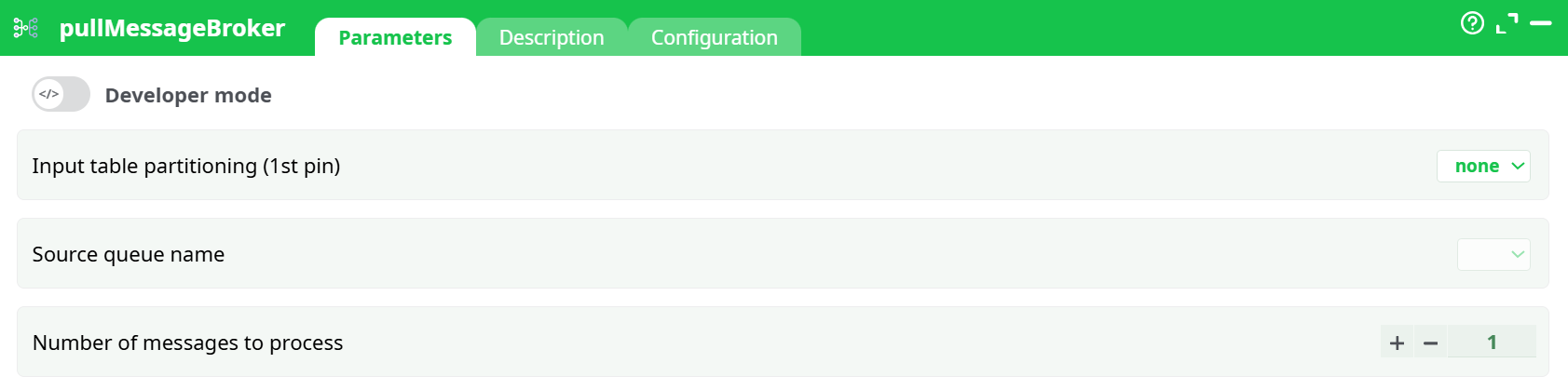
Parameters:
- Developer mode: activate/deactivate code tab.
- Input table partitioning (1st pin)
- Source queue name: select the queue connection previously defined in Services.
- Number of messages to process: defines the maximum number of messages to retrieve per run (default:
1).
Each message becomes one row in the output dataset.
¶ Description tab
See dedicated page for more information.
¶ Code tab
pullMessageBroker is a scripted action. Embedded code is accessible and customizable through this tab.
¶ Configuration tab
See dedicated page for more information.
¶ About
The pullMessageBroker action connects to a RabbitMQ-compatible message broker and pulls messages from a specified queue into your pipeline.
Each execution retrieves up to the number of messages defined in the parameters and converts them into output rows — one row per message — including both the message payload and metadata fields such as headers and routing information.
This action is typically used to integrate event-driven systems or streaming data into ETL workflows, allowing message-based ingestion directly into the pipeline.
¶ When to use it
Use pullMessageBroker when you need to:
- Ingest event or transaction messages from RabbitMQ queues.
- Poll queues periodically to process batches of messages.
- Bridge message broker systems to databases, files, or machine learning pipelines.
- Consume AMQP messages as structured rows in your ETL workflow.
¶ Connection setup
¶ Defining the broker connection
Connections to message brokers are configured in Pipeline parameters → Services.
-
Open Pipeline parameters and go to the Services tab.
-
Scroll to the Queues of message brokers section.
-
Click Add to define a new broker connection.
-
Fill in the connection fields:
- Name – unique connection name (e.g.,
rabbit_conn) - Server – RabbitMQ host (IP address or domain)
- Port – typically
5672for non-TLS or5671for TLS - Exchange – exchange name if applicable
- Queue – the name of the queue to consume messages from
- VHost – RabbitMQ virtual host (default:
/) - Login/User – RabbitMQ username
- Password – password or secret reference
- Comment – optional description for internal reference
- Name – unique connection name (e.g.,
Tip:
You can store your password securely under Definitions → Secrets and reference it here, instead of writing plain text.
¶ Output
Each successfully retrieved message produces a single row in the output table.
Columns typically include:
- Body / Payload – the message content (text or JSON).
- Routing key – routing information used by the exchange.
- Exchange name – the source exchange if present.
- Content type, correlation ID, timestamp – standard AMQP headers.
- Custom headers – user-defined metadata (varies depending on producer).
If the queue is empty, the output will contain zero rows.
Note:
Messages are acknowledged (removed) from the queue once successfully read.
To ensure at-least-once delivery semantics, use small batch sizes (Number of messages to process = 10–100) and configure dead-letter queues for unprocessed messages.
¶ Prerequisites
Before using this action, ensure you have:
- Access to a reachable RabbitMQ broker.
- A valid user with
consumepermission on the target queue. - A pre-declared queue to pull messages from.
If you are using TLS (port 5671), confirm that your runtime environment trusts the broker’s certificate.
¶ Security recommendations
- Create dedicated users per pipeline or virtual host (vhost).
- Use TLS encryption whenever possible (
amqps://, port5671). - Avoid default credentials (
guest/guest) in non-local environments. - Rotate passwords regularly and follow RabbitMQ best practices for user policies and queue TTLs.
¶ Example workflow
- Define your RabbitMQ connection under Pipeline parameters → Services → Queues of message brokers.
- Specify the Server, Port, Queue, and authentication details.
- Return to your pipeline and open the pullMessageBroker action.
- Select your Source queue name from the dropdown.
- Set Number of messages to process to the number of messages you want to retrieve.
- Execute the pipeline.
- View results in the output table — each message appears as a separate row.
Example configuration:
Source queue name: rabbit_conn
Number of messages to process: 50
¶ Troubleshooting
Connection refused or timeout
- The host or port may be unreachable, the broker is down, or the queue is misconfigured.
- Verify network access (e.g.,
telnet <host> 5672).
ACCESS_REFUSED error
- Incorrect username, password, vhost, or missing permissions on the queue.
- Recheck broker credentials and vhost policies.
NOT_FOUND – no queue 'X'
- The target queue does not exist in the specified vhost.
- Create the queue or correct the name in your configuration.
No rows in Data tab
- The queue is empty.
- Publish a test message or ensure you are using the right vhost and queue name.
TLS handshake failure
- Using port
5671without proper certificates or trust store configuration. - Verify the certificate chain and CA trust.
¶ Best practices
- Use small, frequent pulls (e.g.,
Number of messages to process = 100) to avoid locking the queue. - Enable dead-letter exchanges to handle failed or poison messages.
- Monitor queue depth, consumer acknowledgments, and connection health in RabbitMQ.
- Standardize message formats — JSON with versioned schemas improves downstream stability.
- Schedule this action to run at regular intervals to maintain continuous ingestion.
¶ Summary
The pullMessageBroker action is the core integration point for consuming messages from RabbitMQ and similar AMQP-compatible systems.
It provides reliable ingestion of message streams into ETL pipelines, supports secure TLS connections, and automatically transforms queue messages into structured rows for further processing.
By combining it with scheduling and proper error handling, it becomes an effective tool for building event-driven data workflows.