¶ Description
Query Aleria DB.
¶ Parameters
¶ Parameters Tab
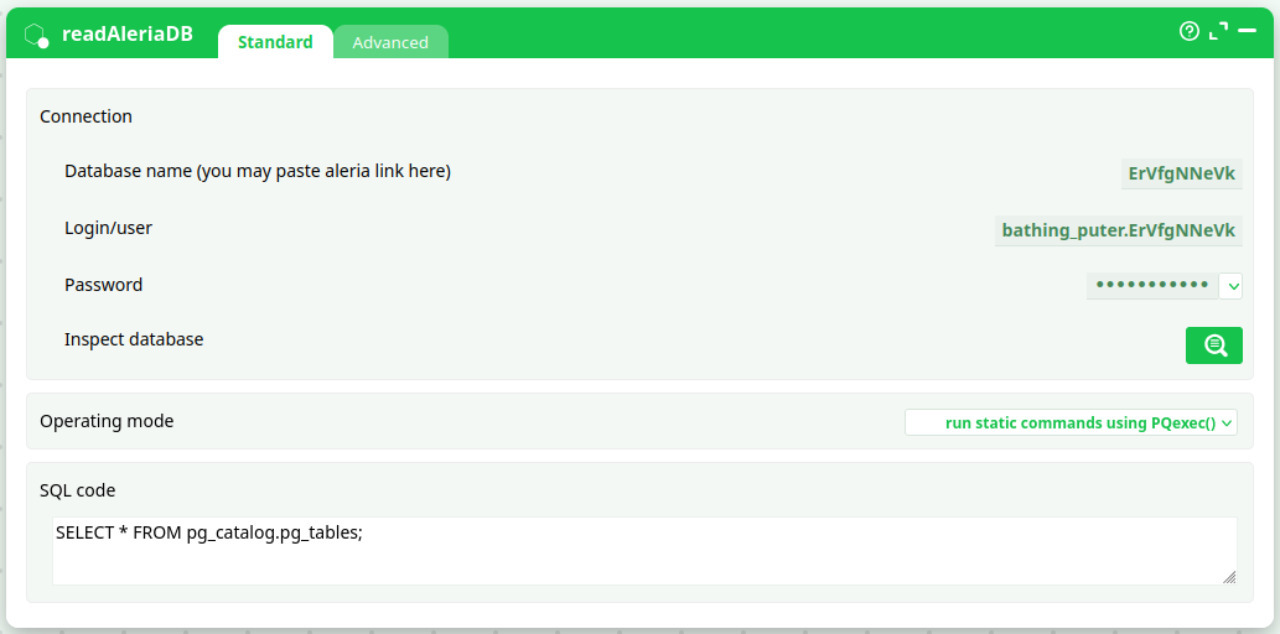
Parameters:
- Connection
- Database name(you may paste aleria link here)
- Login/user
- Password
- Inspect database
- Operating mode
- SQL code
¶ Advanced Tab
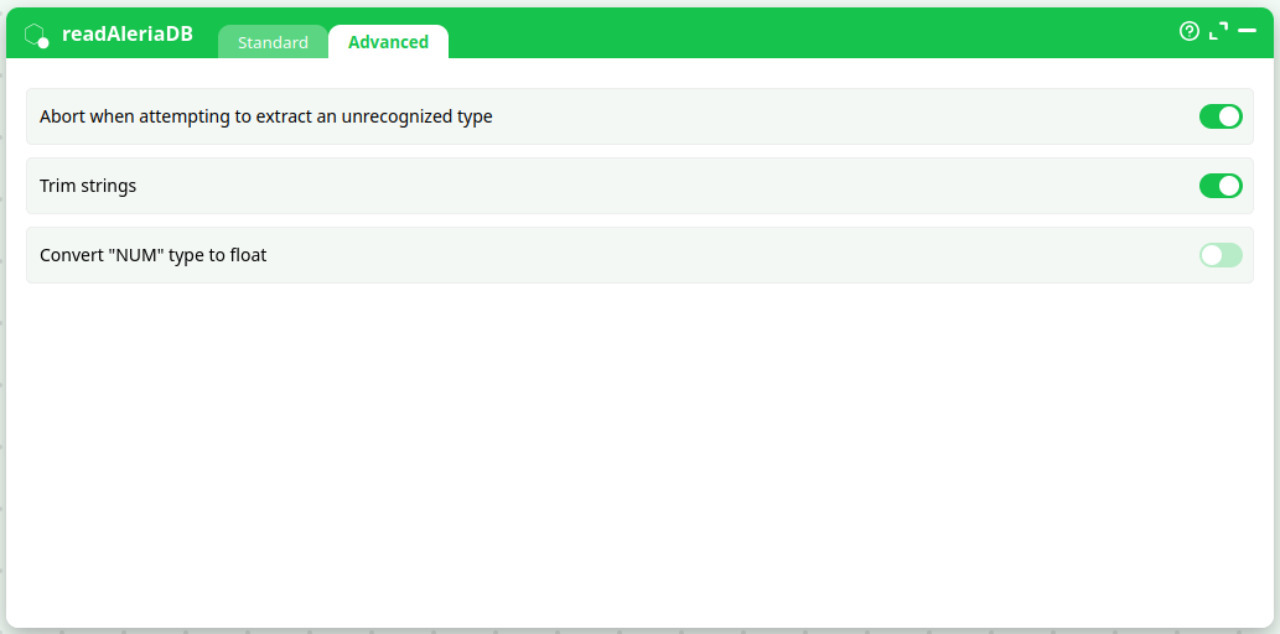
Parameters:
- Abort when attempting to extract an unrecognized type
- Trim strings
- Convert "NUM" type to float
¶ About
readAleriaDB connects to Aleria’s built-in, Postgres-compatible datastore and executes the SQL you provide. It is designed for in-platform use on Aleria (green UI). The host and port are managed by Aleria and do not need to be set—you only provide the database name (or an Aleria link), credentials, and the SQL to run.
Typical uses:
- Pull records to feed downstream transforms, visualizations, or LLM steps (summaries, classification, Q&A).
- Inspect schemas and sample data during pipeline design.
- Export subsets for scoring or reporting.
¶ Inputs & outputs
- Input: none (apart from the credentials and your SQL text).
- Output: a tabular dataset (rows/columns) produced by your SQL query.
¶ Parameters (Standard tab)
| Field | Purpose | Notes / examples |
|---|---|---|
| Database name (or Aleria link) | Which Aleria DB to query | You can paste an Aleria DB link or just the DB name, e.g. ErVfgNNeVk. |
| Login/user | Aleria DB user | Example: bathing_puter.ErVfgNNeVk. |
| Password | Secret for the user | Stored in a secret field; use vaults/variables where possible. |
| Inspect database | Launch the schema browser | Opens a helper to explore tables, columns, and sample data. |
| Operating mode | How SQL is executed | Default: run static commands using PQexec() (standard, buffered). Other modes are available when needed. |
| SQL code | The SQL statement(s) to execute | e.g. SELECT * FROM pg_catalog.pg_tables; or your business query. |
Host and port are internally managed by Aleria, so they’re not exposed in this action.
¶ Advanced tab
- Abort when attempting to extract an unrecognized type
Stop the run if the driver encounters a column type it cannot map. (Recommended ON in production.) - Trim strings
Remove leading/trailing whitespace from text columns on read. - Convert
"NUM"type to float
If your data uses a"NUM"pseudo-type, automatically map it to floating-point.
¶ Credentials — how to get them
-
Database name / link:
In Aleria, open Data → Databases and copy the database identifier or the connection link. -
User & password:
- Use an existing service account for pipelines, or
- Create a least-privileged user with only the schemas/tables you need.
Store the password in Aleria’s secrets manager or pipeline variables; avoid hard-coding.
Tip: Prefer read-only roles for analytics/LLM workloads.
¶ Examples
List tables in a schema
SELECT schemaname, tablename
FROM pg_catalog.pg_tables
WHERE schemaname NOT IN ('pg_catalog','information_schema')
ORDER BY 1,2;
Fetch recent events for an LLM step
SELECT id, event_time, user_id, payload
FROM analytics.events
WHERE event_time >= NOW() - INTERVAL '24 hours'
ORDER BY event_time DESC
LIMIT 5000;
Connect the output pin to your LLM action to summarize, classify, or perform grounded Q&A.
¶ When to use each operating mode
- PQexec() (default): most SELECT/CTE queries that return a moderate result set.
- SingleRow mode: stream very large results row-by-row to reduce peak memory.
- Dynamic / no-rows: for commands that do not return a table (e.g., DDL, temp staging).
¶ Performance & limits
- Select only needed columns and filter early with
WHEREclauses. - Use
LIMITwhen exploring or when feeding LLMs (you rarely need all rows). - Add indexes on filter/join keys in the source DB for recurring workloads.
- For very large extracts, consider batching by time/key ranges.
¶ Security
- Keep passwords in secrets/variables; avoid plain text.
- Use least privilege (read-only where possible).
- Output may contain sensitive data—sanitize before sending to LLM steps if required by policy.
¶ Troubleshooting
- Authentication failed → Verify user/password and that the account has access to the target DB.
- Relation does not exist → Check schema qualification:
schema.table. - Type mapping error → Turn Trim strings on; enable Convert "NUM" to float; or CAST explicitly in SQL.
- Large result memory issues → Switch to SingleRow mode or filter/limit the query.
¶ Best practices with LLM steps
- Grounding: include IDs, timestamps, and the minimal text fields needed so the LLM can cite context/results.
- Chunking: for long text columns, limit size (
LEFT(text, 4000)) or split batches. - Determinism: sort rows (
ORDER BY) to make runs reproducible.