¶ Description
Read a CSV/Text file.
¶ Parameters
¶ Standard tab
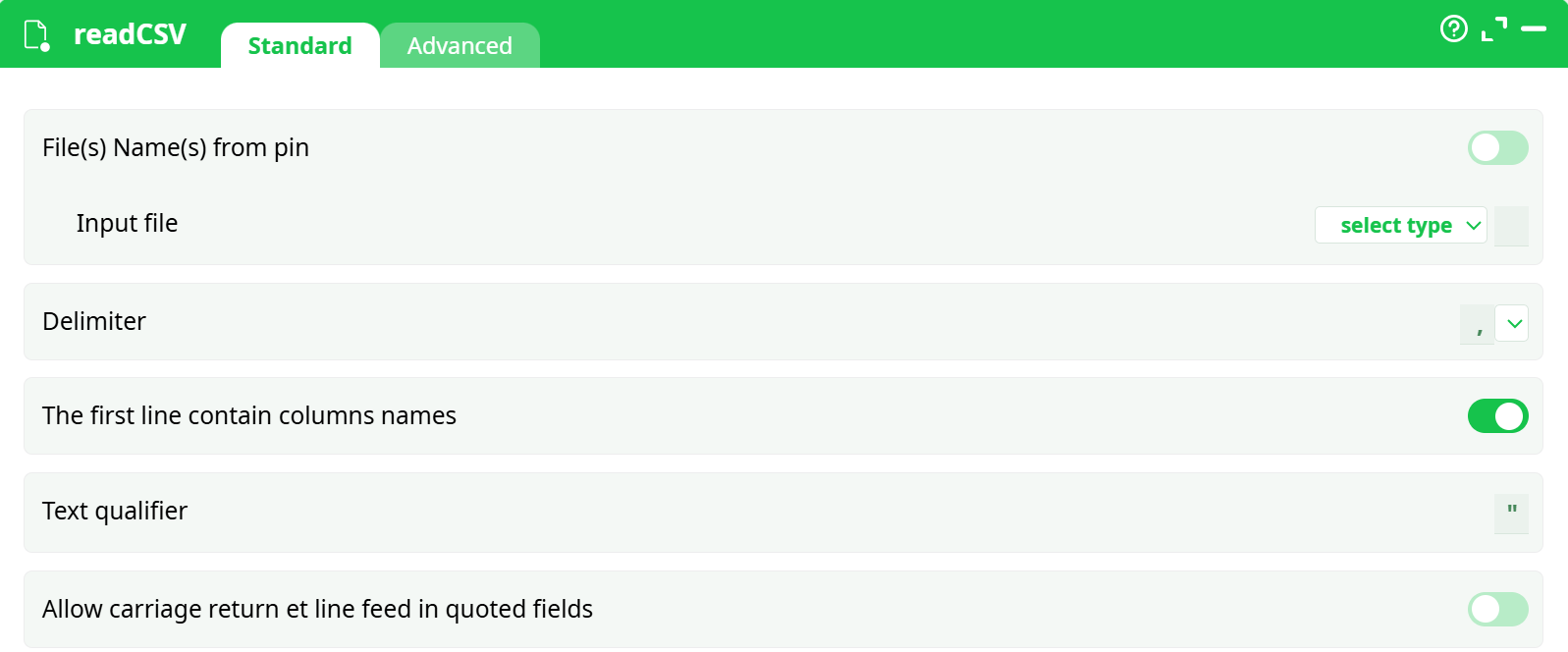
Parameters:
- File(s) Name(s) from pin: self explanatory
- Input file: self explanatory
- Delimiter : select delimiter used in csv file (',' or ';')
- The first line contain columns names: first line of csv file contains column names
- Text qualifier: define text marker
- Allow carriage return et line feed in qutoed fields: define Unix Windows line ending
¶ Advanced tab
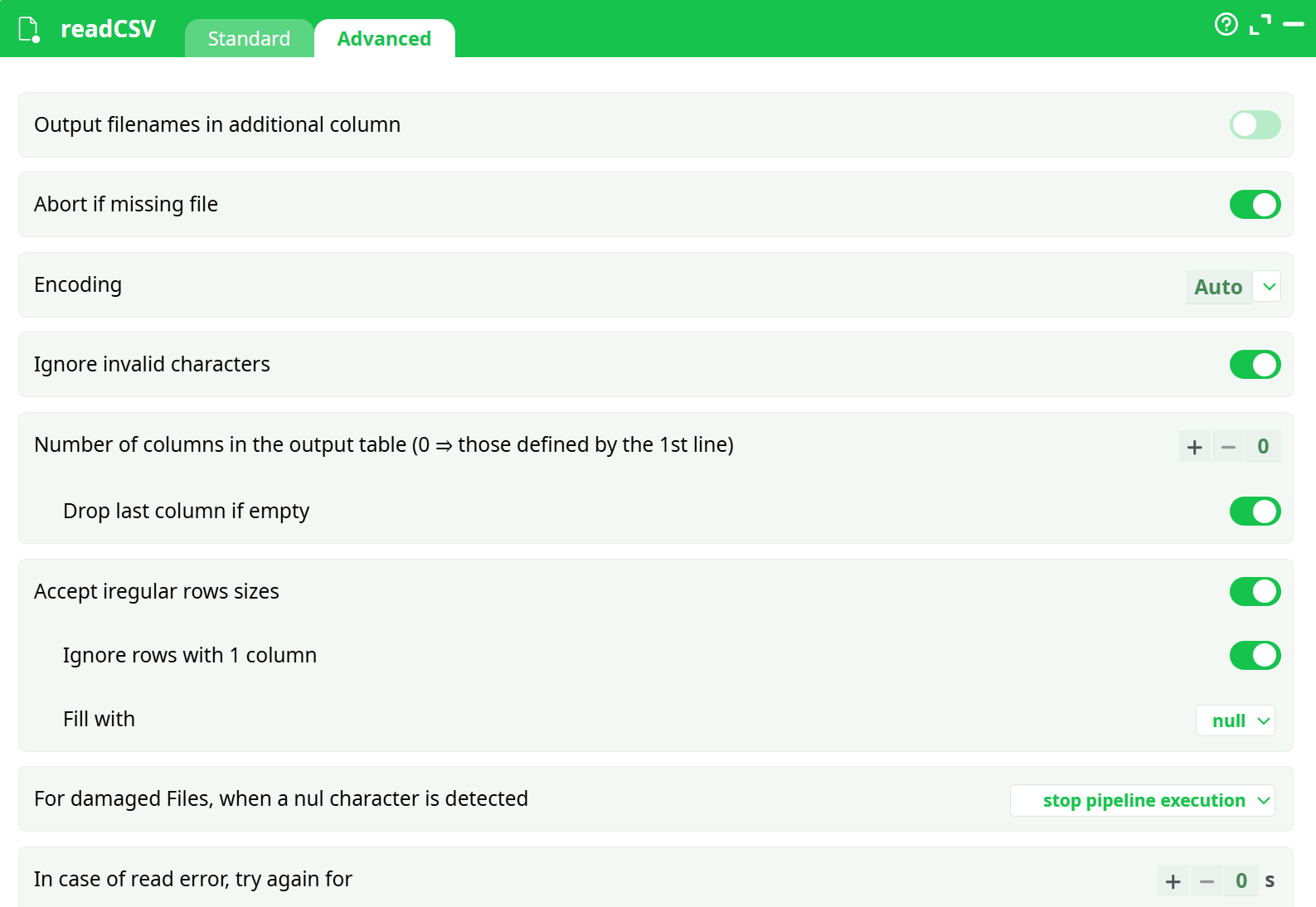
Parameters:
¶ Configuration Tab – readCSV (Advanced)
This panel provides advanced options for fine-tuning the behavior of the CSV reader, particularly when working with irregular files, missing data, or corrupted content. These options are especially useful in data-cleaning scenarios or when automating the handling of inconsistent input formats.
¶ Parameters
¶ Output filenames in additional column
Toggle switch to include the source filename as an extra column in the output table.
¶ Abort if missing file
If enabled, the pipeline will stop execution when a specified input file is not found.
¶ Encoding
Dropdown to select the character encoding of the file.
Default is Auto, which attempts automatic detection.
¶ Ignore invalid characters
If enabled, invalid byte sequences will be ignored rather than causing errors.
¶ Number of columns in the output table
Defines the expected number of columns in the output.
- Setting it to
0allows the system to infer columns from the first line of the file.
¶ Drop last column if empty
If enabled, the last column will be removed when it is empty across the row.
¶ Accept irregular row sizes
If enabled, rows with fewer or more columns than expected will still be processed.
¶ Ignore rows with 1 column
Skips rows that contain only one column.
¶ Fill with
Specifies the default value to use when filling missing cells in irregular rows.
Example: null.
¶ For damaged files, when a null character is detected
Specifies the fallback behavior when encountering null (\0) characters.
Dropdown options may include:
stop pipeline executionskip rowreplace with default
¶ In case of read error, try again for
Numeric input (in seconds) to define retry delay in case of read failures.
¶ About
When reading a Text/CSV file, the first operation that ETL does is to decode the characters contained inside your Text/CSV file to obtain Unicode characters. ETL supports many different character encodings. To decode characters, ETL uses the most extensive library about character encodings currently available (i.e. it uses the “iconv” library).
NOTE :
The supported character encodings are (this is a non-limitative list):
UTF16, UTF16LE, UTF16BE, UTF8, CP1252, CP819 (aka ISO-8859-1 or LATIN1), SHIFT-JIS, BIG5, GBK, CP1251 (Cyrillic), JAVA, etc.
ETL currently supports nearly all known encodings (even the most exotic ones found inside very old servers).
If the Text/CSV file contains a BOM (Byte-Order-Mark), then ETL will always use the character encoding that is specified inside the BOM (this takes precedence over any other user’s settings, including the “Auto” character encoding setting).
¶ Native UTF-16 Support and Compressed File Handling
Unlike many other ETL tools, all strings within the ETL platform are managed using true UTF-16 encoding. This ensures full compliance with international standards in string manipulation routines, such as case-insensitive sorting.
¶ On-the-Fly Decompression of Text/CSV Files
If a Text or CSV file has an extension like .rar, .zip, .gz, or .lzo, ETL will automatically decompress the file in memory. The decompression method is determined by the file extension.
ETL does not extract compressed files onto the hard drive. Instead, it performs on-the-fly decompression directly in RAM, which reduces:
- Load on the hard drive
- Disk space usage during analysis
For typical real-world datasets, the compression ratio for CSV files is around 90–95%.
For instance, the well-known Census-Income dataset is originally 100 MB, but only 4 MB when compressed using WinRAR.
¶ Benefits in Networked Environments
This native ability to read compressed files is especially beneficial when working on a shared or distributed file system. For example, if multiple ETL users access the Census-Income database from a central network drive, only 4 MB of data is transmitted over the network — compared to 100 MB with ETL tools that lack compressed file support. This greatly reduces network traffic and improves performance.
¶ Centralized Data and Version Control
Storing data in a central shared location helps avoid data duplication, ensuring there is only one version of the truth. Duplicated datasets across multiple locations often become out of sync, leading to inconsistencies.
If multiple analysts work on different versions of the same dataset, they may reach contradictory conclusions, which could result in conflicting recommendations for your business.
Avoiding data duplication is essential for maintaining data integrity and consistency across your organization.
¶ Summary
- ETL fully supports standard Unicode characters.
- Maintaining a single, centralized data repository ensures consistency across all analyses performed by your team.
- ETL’s unique compression technology significantly reduces network load, making it easy to work with centralized data sources.
¶ Reading Corrupted CSV/Text Files
When transferring large .csv or .txt files (e.g., 100 GB) over an unreliable network, it is possible that some bytes may not arrive correctly at the destination. As a result, the file may contain a “hole”—a section filled with the ASCII character number zero (also known as Unicode code point zero). These holes are typically 1 to 2 MB in size.
Similar file corruption can also occur when using low-quality USB drives.
When reading such corrupted files, ETL provides four handling options:
-
Abort the pipeline if any ASCII character number zero is detected.
This is the default behavior. -
Skip rows containing the ASCII character zero.
This option allows ETL to bypass corrupted sections ("holes") and preserve only the valid data rows. It's especially useful when dealing with files damaged during transfer or storage. -
Remove all ASCII character zeros and proceed normally.
This preserves all rows and columns, making it useful for processing malformed text files exported from systems like SAP. -
Replace the ASCII character zero with a valid character (e.g., a space
' ').
This enables smooth parsing while avoiding outright data loss.
These options make ETL resilient when handling damaged files, allowing users to recover and analyze critical data even in imperfect environments.