¶ Description
Reads a Microsoft Excel Sheet content.
¶ Parameters

Parameters:
- File(s) Name(s) from pin
- Input file
¶ About
Each cell inside a .xlsx file can have a different data type (e.g., String, Double, Date, etc.). Furthermore, there is no reliable way to determine in advance the most common type used in a specific column of an Excel sheet. For this reason, all cells in an Excel file are imported into ETL as simple Strings.
You need to manually use the ChangeDataType action to assign a specific type to each column.
NOTE:
You can drag & drop a.xlsxfile from a MS-File-Explorer-Window into an ETL-Pipeline-Window. This will directly create the corresponding readExcel action inside the ETL pipeline.
Excel uses two methods to store dates in .xlsx files: as Strings or as integer numbers.
Dates stored as integers are imported into ETL as numeric values.
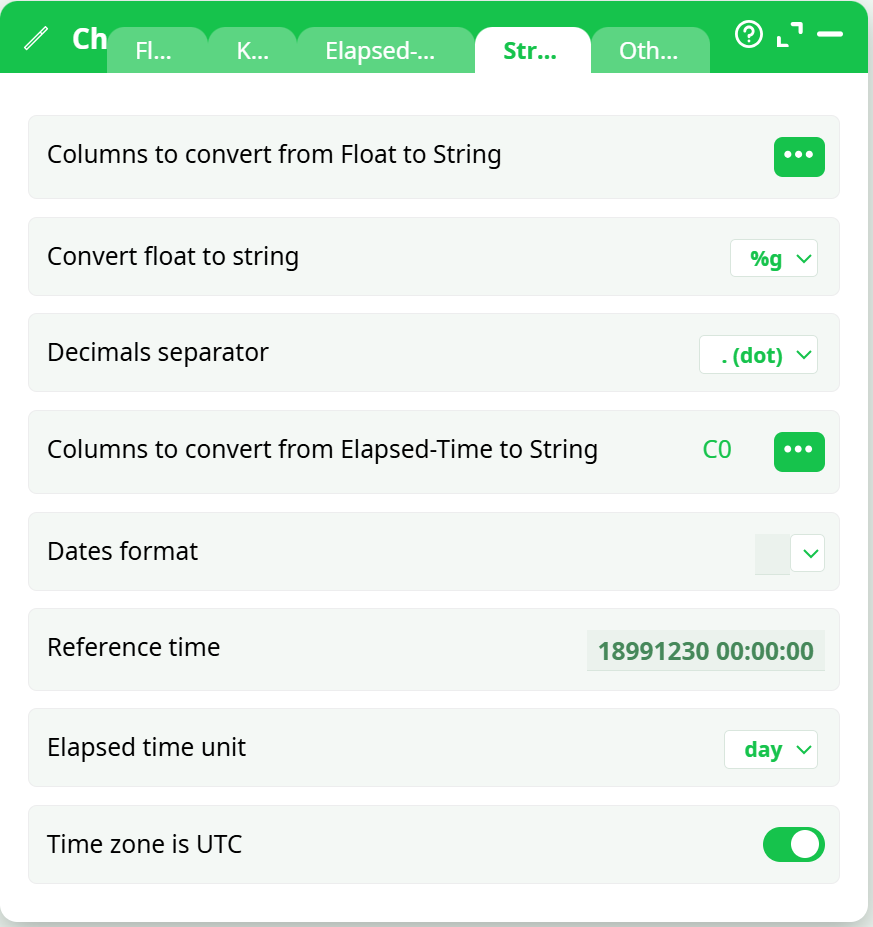
To convert these into standard ETL date values, use the “to String from Elapsed Time” option of the ChangeDataType action. Use the following parameters:
- Reference Time: 18991230 00:00:00
- Elapsed Time Unit: day
Here is a screenshot: