¶ Description
Runs SQL queries against PostgreSQL.
¶ Parameters
¶ Parameters Tab
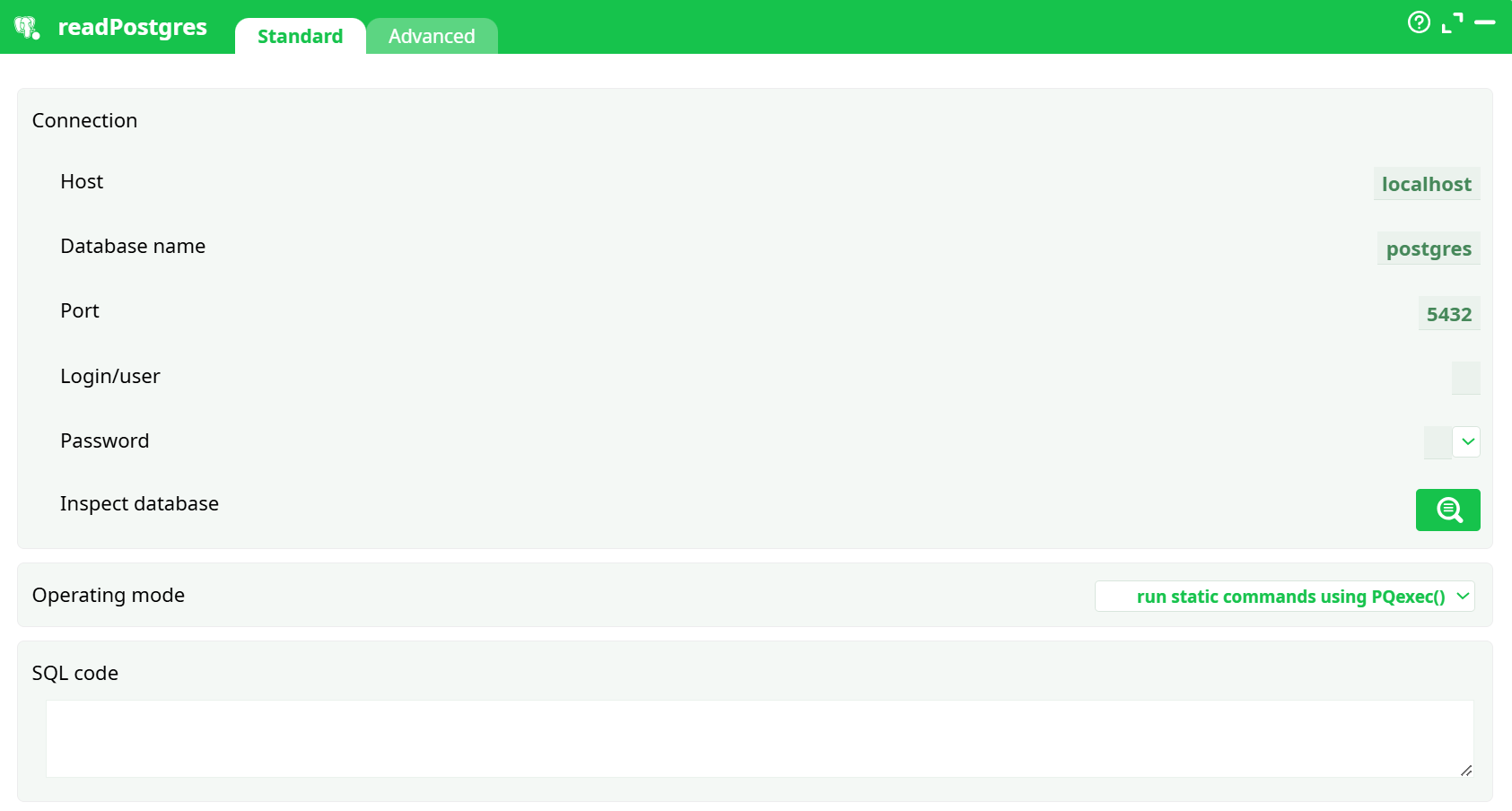
Parameters:
- Connection
- Connection name
- Inspect database
- Operating mode
- SQL code
¶ Advanced Tab
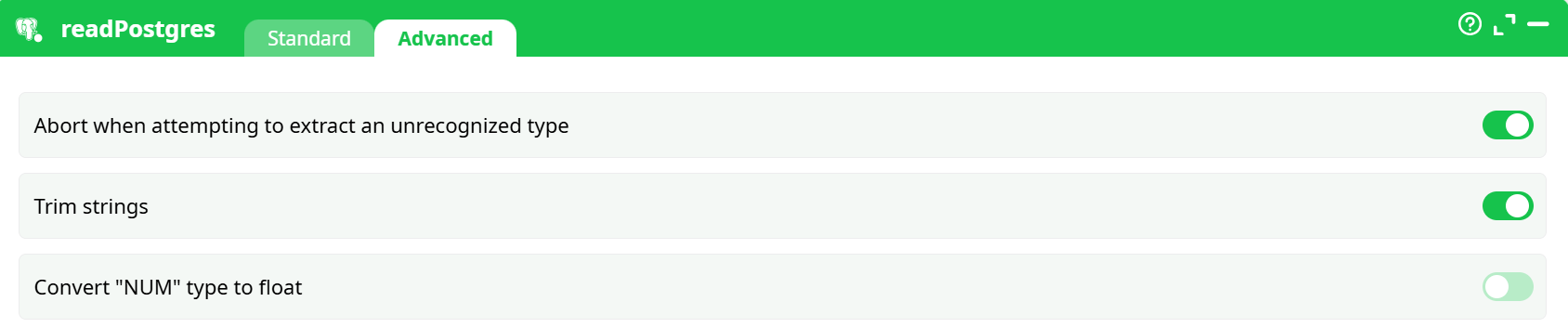
Parameters:
- Abort when attempting to extract an unrecognized type
- Trim strings
- Convert "NUM" type to float
¶ About
The readPostgres action connects to a PostgreSQL database, executes one or more SQL statements, and returns the result as a table within your pipeline.
It supports both static (in-memory) and streaming queries, as well as command-only executions for DDL/DML operations that do not return data.
¶ When to use it
Use readPostgres whenever you need to:
- Extract data directly from a PostgreSQL database into your ETL workflow
- Run administrative or preparation SQL (e.g.,
CREATE TEMP TABLE,ANALYZE, etc.) - Inspect database schemas using the built-in Inspect database helper
- Combine SQL queries with transformation boxes downstream for analytics, joins, or exports
¶ Connection management
Database credentials and connection settings are configured once and referenced by name.
The Connection name dropdown in the box allows you to select any predefined connection available in your workspace or pipeline.
¶ 1. Define the connection inside your pipeline
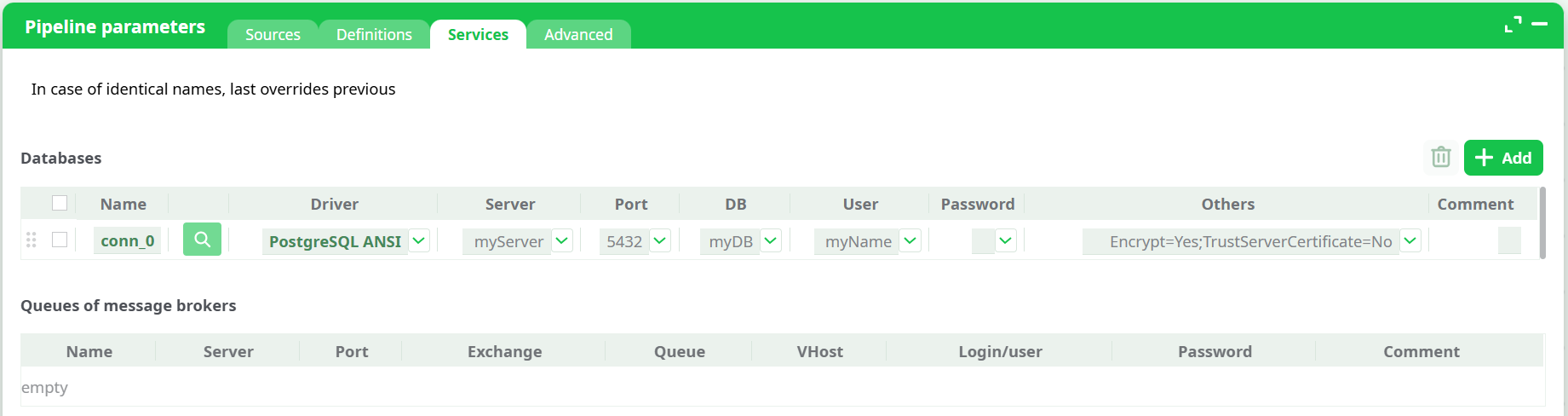
Open the pipeline editor and go to Pipeline parameters → Services.
Click Add, then configure the connection:
- Name — identifier for this connection (e.g.,
conn_0) - Driver — choose PostgreSQL ANSI or PostgreSQL Unicode
- Server — your PostgreSQL host or IP
- Port — usually
5432 - DB — target database name
- User — username for authentication
- Password — you can type it directly or select a secret defined under Definitions → Secrets
- Others — optional flags such as SSL/TLS parameters (
Encrypt=Yes;TrustServerCertificate=No)
Once defined, this connection will appear in the Connection name dropdown of the readPostgres box.
¶ 2. Define a shared connection in the “Sources” workspace
You can also define global connections under Sources → Services.
These definitions can be reused across multiple pipelines without redefining credentials each time.
Important note:
If the same connection name is defined in multiple places, the most recent one in the list takes priority.
Pipeline definitions always override Source definitions.
This mechanism makes it easy to override database credentials or targets without modifying shared settings.
¶ 3. Using secrets for passwords
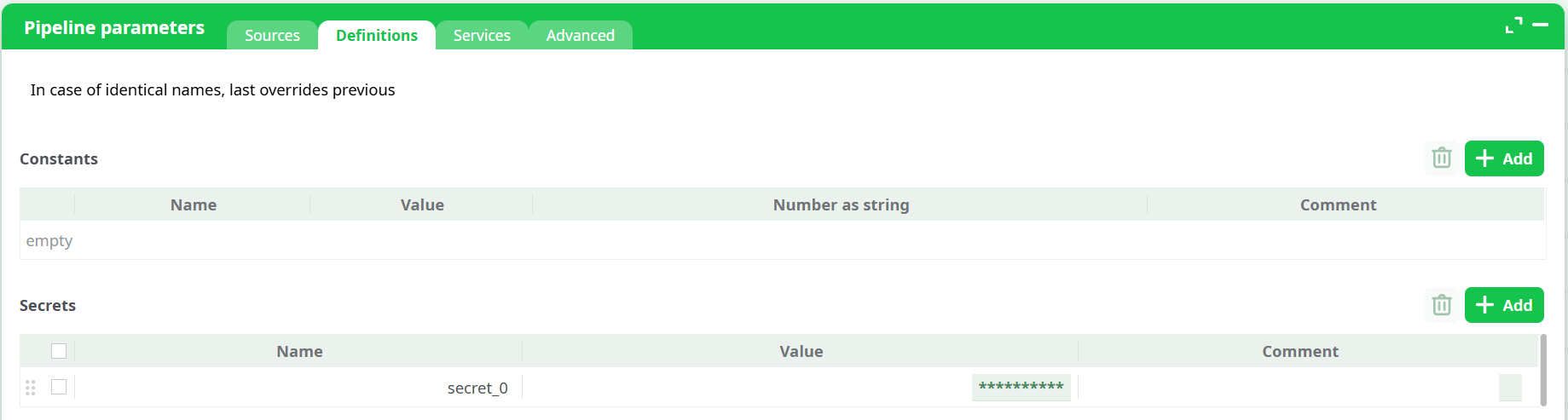
Passwords can be stored securely using the Definitions → Secrets section in the pipeline parameters.
You can then select the secret name (for example, secret_0) in the Password field of your Service definition.
This method protects sensitive data and ensures credentials are never exposed directly.
¶ Operating modes
Choose the most suitable operating mode depending on your data size and type of query:
-
run static commands using PQexec()
Executes the entire SQL result in memory. Best for small to medium-sized result sets. -
run static commands using PQsetSingleRowMode()
Streams results one row at a time from the database. Ideal for very large queries that cannot fit entirely in memory. -
run dynamic commands returning no rows
Executes SQL statements that don’t produce output (e.g.,CREATE TABLE,DROP,INSERT, orUPDATE).
¶ Step-by-step: first successful connection
-
Create or select a connection
Open Pipeline parameters → Services and define your PostgreSQL connection.
Example:- Server:
myServer - Database:
myDB - Port:
5432 - User:
etl_reader - Password: stored as
secret_0
- Server:
-
Select the connection name
In the readPostgres box, choose your defined connection (e.g.,conn_0). -
Inspect the database
Use the Inspect database button to confirm connection and view available tables. -
Run a simple query
SELECT now() AS server_time;Execute to confirm a successful connection.
-
Run your actual extraction
SELECT order_id, customer_id, order_date, total_amount FROM public.orders WHERE order_date >= CURRENT_DATE - INTERVAL '30 days'; -
For large result sets
Switch to the SingleRowMode to process the data in streaming mode.
¶ Writing multiple statements
You can include multiple SQL commands in the same box, separated by semicolons.
For example:
CREATE TEMP TABLE t_recent AS
SELECT * FROM public.orders WHERE order_date >= CURRENT_DATE - INTERVAL '30 days';

ANALYZE t_recent;

SELECT * FROM t_recent LIMIT 1000;
If your commands do not return results, set the Operating mode to run dynamic commands returning no rows.
¶ Examples
¶ Incremental load
SELECT *
FROM public.transactions
WHERE updated_at > TIMESTAMP '${last_success_timestamp}';
¶ Aggregation
SELECT date_trunc('day', order_date) AS day,
       COUNT(*) AS orders,
       SUM(total_amount) AS revenue
FROM public.orders
GROUP BY 1
ORDER BY 1;
¶ Join across schemas
SELECT c.customer_name, o.order_id, o.total_amount
FROM sales.orders o
JOIN crm.customers c ON c.customer_id = o.customer_id
WHERE o.order_date >= CURRENT_DATE - INTERVAL '90 days';
¶ Performance guidance
- Use PQsetSingleRowMode() for large data extractions to avoid memory limits.
- Always specify the exact columns you need to reduce network traffic.
- Use indexed columns and optimize your SQL with
EXPLAIN ANALYZE. - Consider temporary tables for multi-step or complex transformations.
¶ Security best practices
- Use a read-only user when possible.
- Store credentials in Secrets rather than typing them directly.
- Rotate database credentials regularly.
- Use SSL/TLS options in the Others field for encrypted connections.
- Avoid embedding passwords or sensitive values inside SQL code.
¶ Troubleshooting
Connection refused:
Verify the host, port, and network accessibility. Test the connection using a direct PostgreSQL client (psql).
Database not found:
Ensure the database name in your Service definition is correct.
Authentication failed:
Check username and password or verify the selected secret is valid.
Query freezes or memory error:
Use SingleRowMode for streaming data.
Permission denied:
Ensure the database user has SELECT rights on the target tables.
Unknown type error:
Disable Abort on unrecognized type or cast columns explicitly using ::text.
Numeric precision loss:
Turn off Convert NUM to float if exact precision is required.