¶ Description
Open a QVX File
¶ Parameters
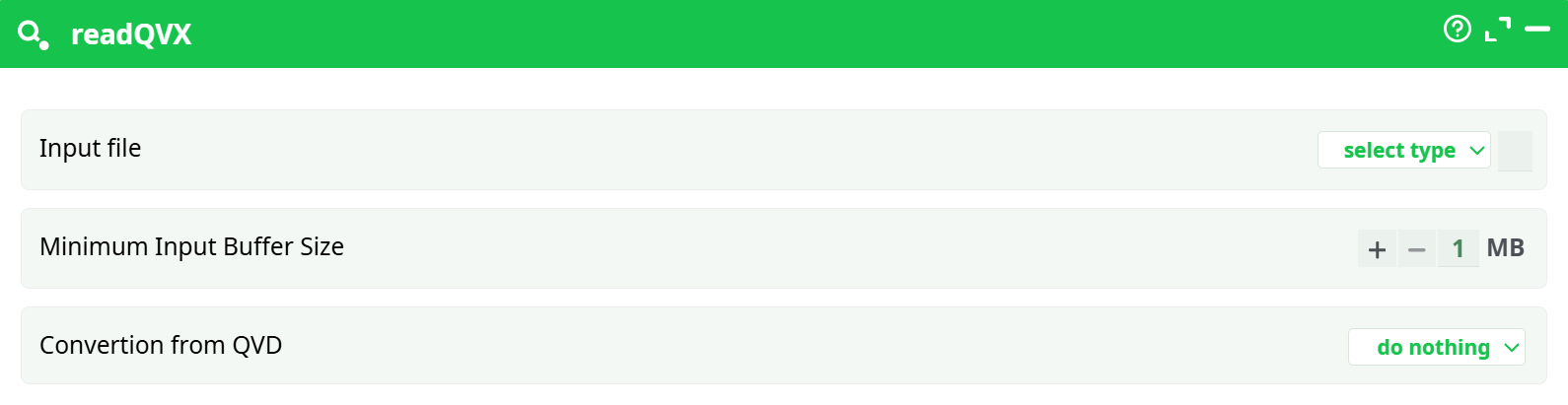
Parameters:
- Input file
- Minimum Input Buffer Size
- Convertion from QVD
¶ About
The readQVX action is designed to read data from a QVX file (QVX = QlikView Data eXchange).
This action loads the contents of a .qvx file into your ETL pipeline for further processing.
¶ What You Can Do with This File in ETL:
Once the QVX file is read into the ETL pipeline, you can:
- Filter Rows: Use actions like FilterRows to keep or exclude certain records.
- Transform Data: Apply transformations such as column renaming, string operations, math functions, etc.
- Join with Other Data: Merge this QVX data with other datasets (CSV, JSON, database tables, etc.).
- Aggregate Data: Group, summarize, or calculate statistics.
- Export Data: Write the processed data back to various formats:
- CSV
- Excel
- JSON
- Database tables
- Visualize Data: Send the data to reporting or visualization modules inside ETL.
¶ Typical ETL Use Case Example:
Step 1: Read QVX → Step 2: Filter/Transform → Step 3: Join/Enrich → Step 4: Export
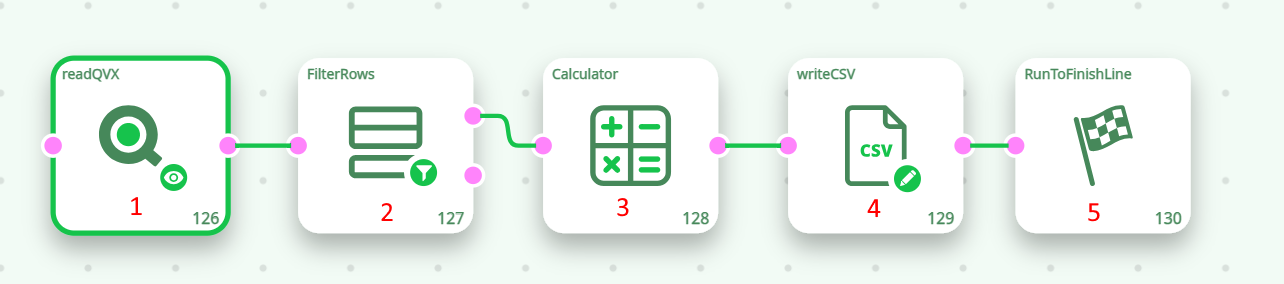
¶ Example Pipeline:
- readQVX: Load QVX file.
- FilterRows: Keep only records with sales over 1000.
- CalculateColumns: Compute new metrics like "Profit Margin".
- writeCSV: Export results as CSV for external reporting.
- Run pipeline.
¶ How It Works Together with Other Buttons:
- writeQVX creates .qvx files.
- readQVX loads .qvx files.
- Together, these actions allow exporting and reusing datasets between different pipelines or even between projects.
NOTE
Always verify that you are reading the correct QVX file.
For large files, increasing the Minimum Input Buffer Size may improve performance.
Combine with writeQVX for seamless QVX data handling in your ETL pipelines.