¶ Description
Download data from SuiteCRM.
¶ Parameters
¶ Parameters tab
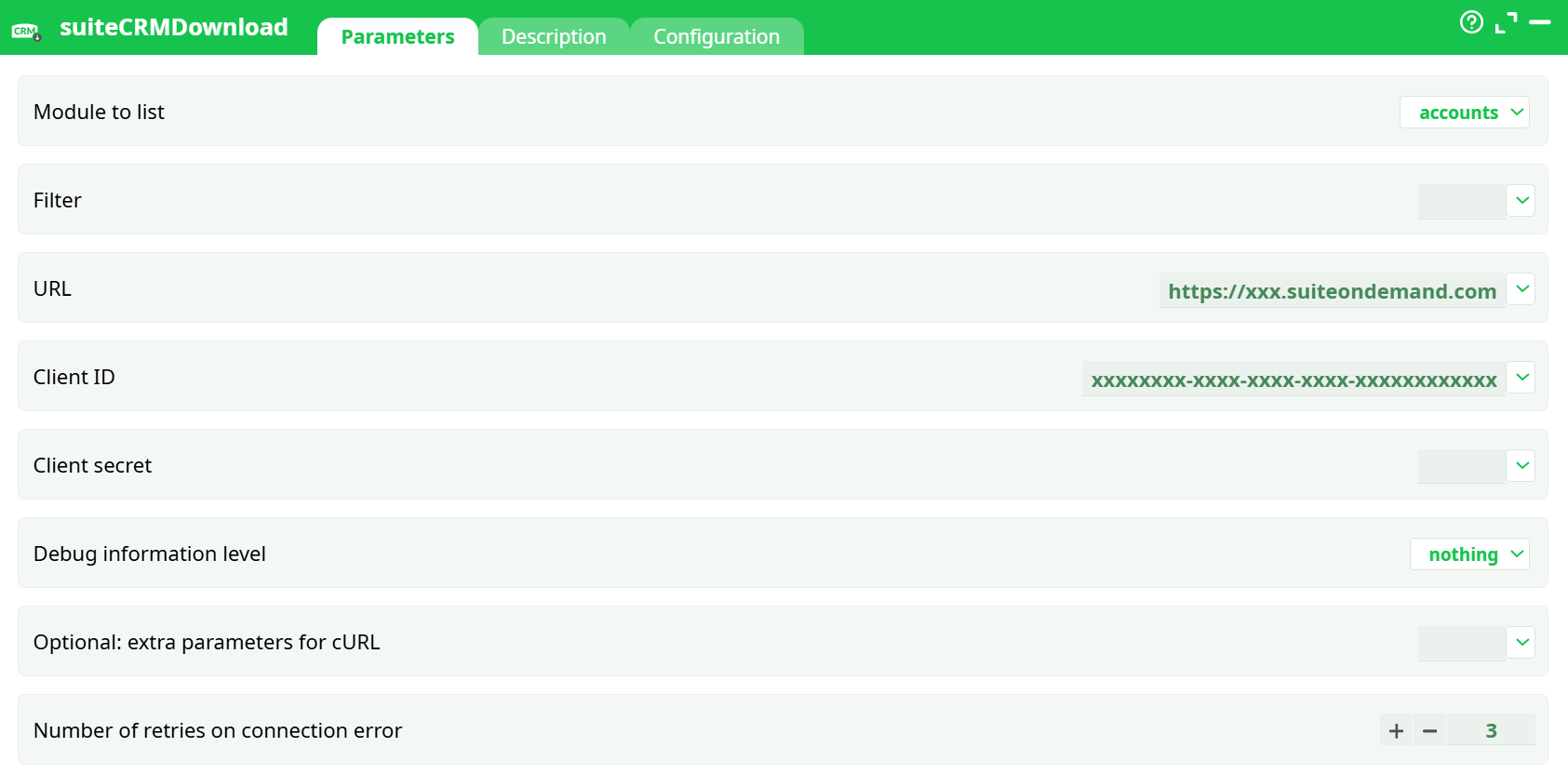
Parameters:
- Module to list
- Filter
- URL
- Client ID
- Client secret
- Debug information level
- Optional: extra parameters for cURL
- Number of retries on connection error
¶ Description
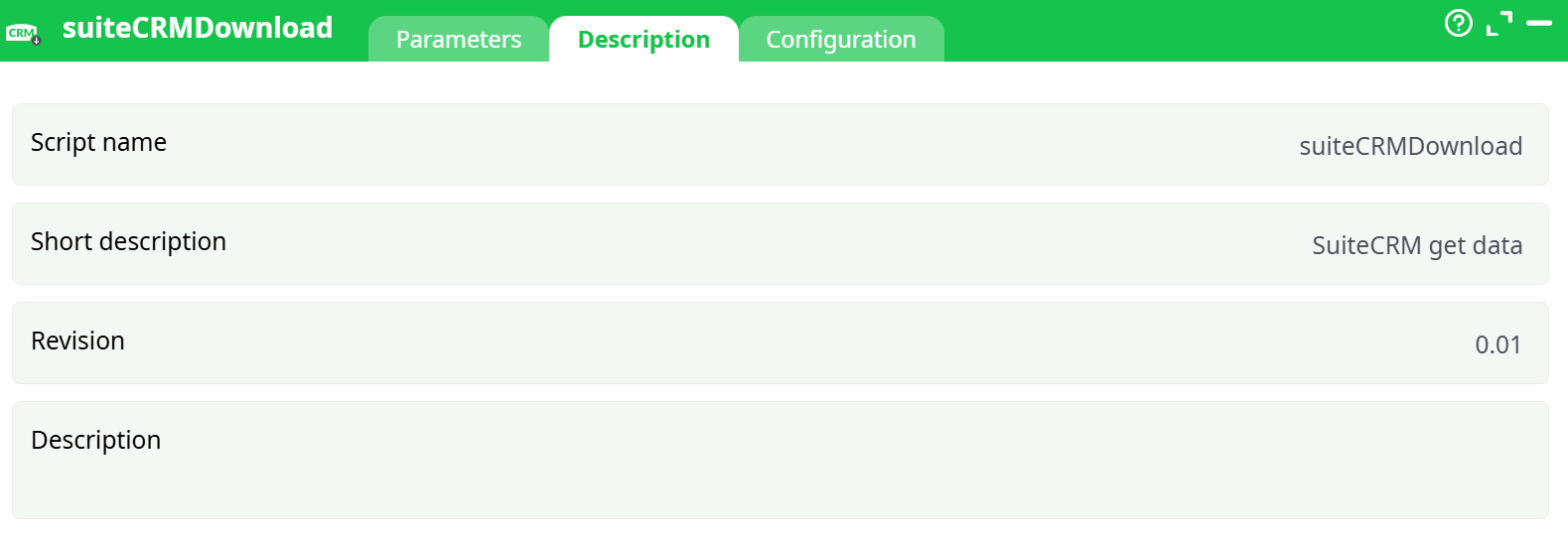
Parameters:
- Script name
- Short description
- Revision
- Decription
¶ Configuration
See dedicated page for more information.
¶ About
The SuiteCRM Download action pulls records from a SuiteCRM instance through OAuth-secured REST calls and outputs them as rows into the pipeline. It supports all standard modules (e.g., accounts, contacts, leads, opportunities, cases, documents, emails, etc.) and accepts verbatim API filter strings, so you can pass SuiteCRM REST query parameters exactly as documented by SuiteCRM (limit, offset, order, where filters…).
Use this action to:
- Export entities for analytics or data warehousing
- Incrementally pull deltas using date filters
- Mirror specific modules (e.g., Accounts, Contacts) to downstream systems
This action also works when accessing the web through a PROXY server.
To use this action, you’ll need to get your credentials from your SuiteCRM Website.
¶ SuiteCRM First time setup
Before using the SuiteCRM actions inside ETL, you need to get these 2 parameters:
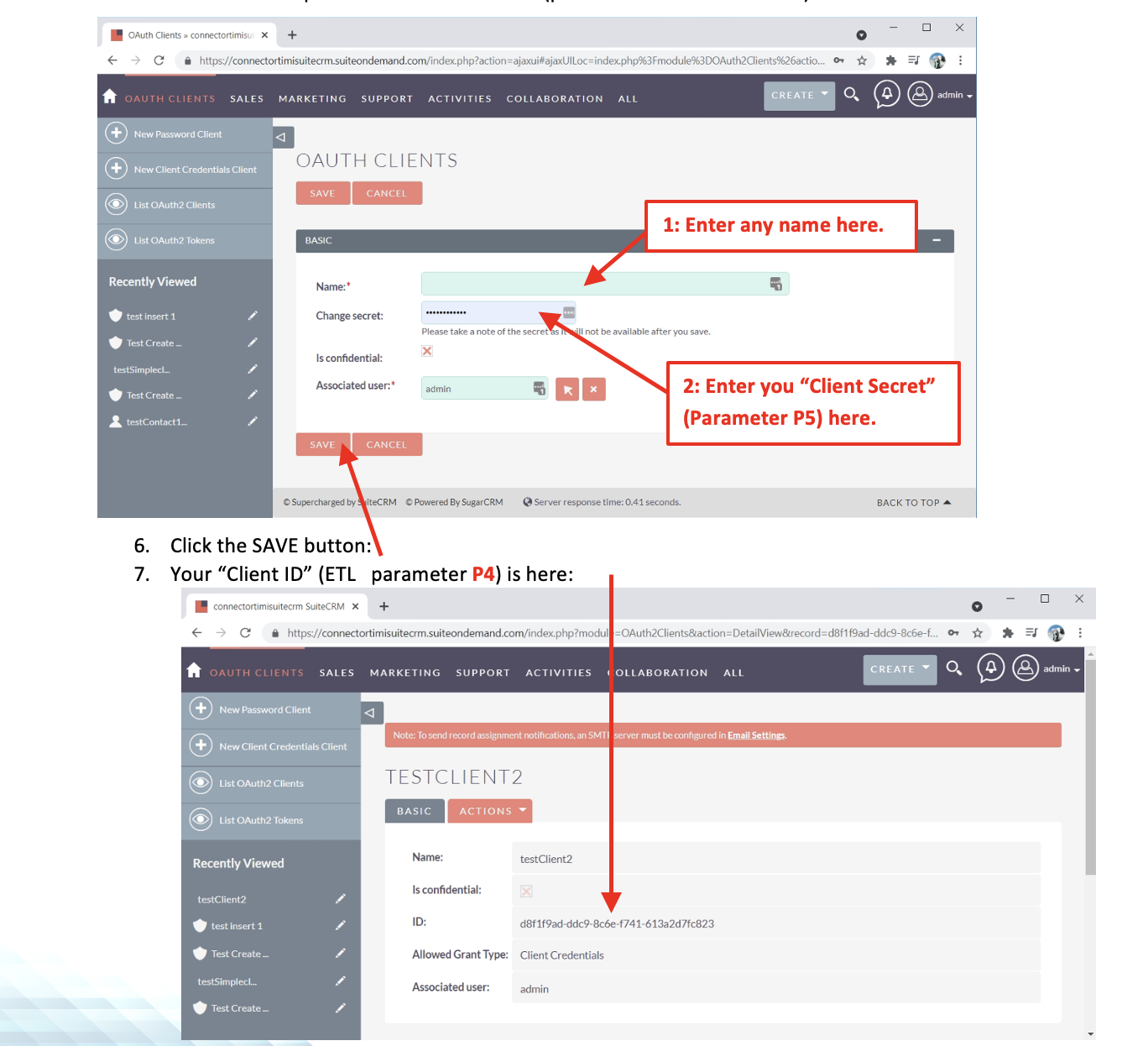
• the Client ID (Parameter P4)
• the Client Secret (Parameter P5)
…from the SuiteCRM website. Here are the steps to get these 2 parameters:
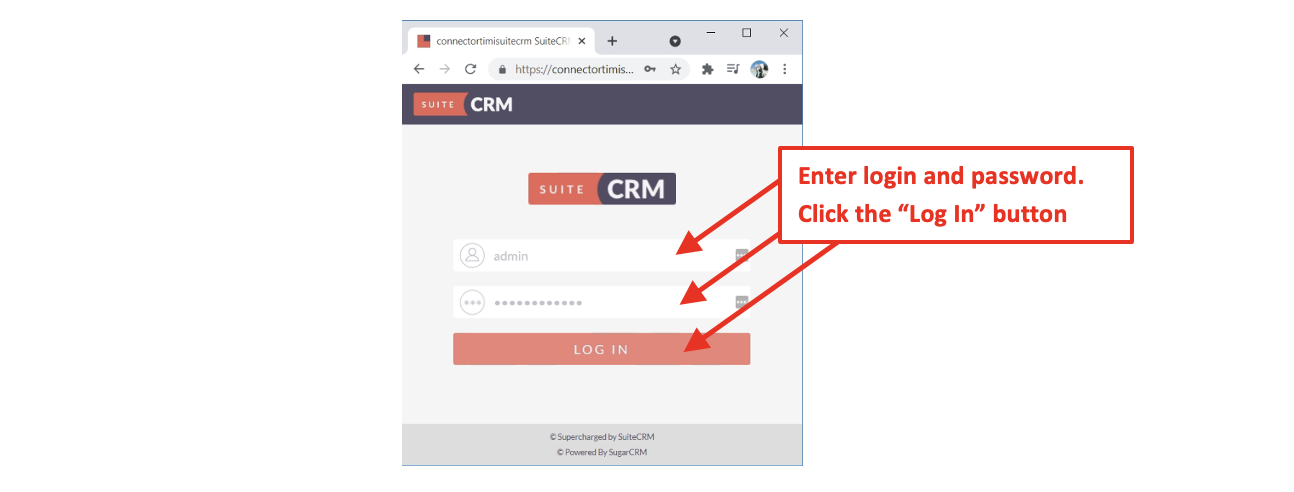
- Open your SuiteCRM website in a browser and “log-in” using your normal “Login” and “Password”:
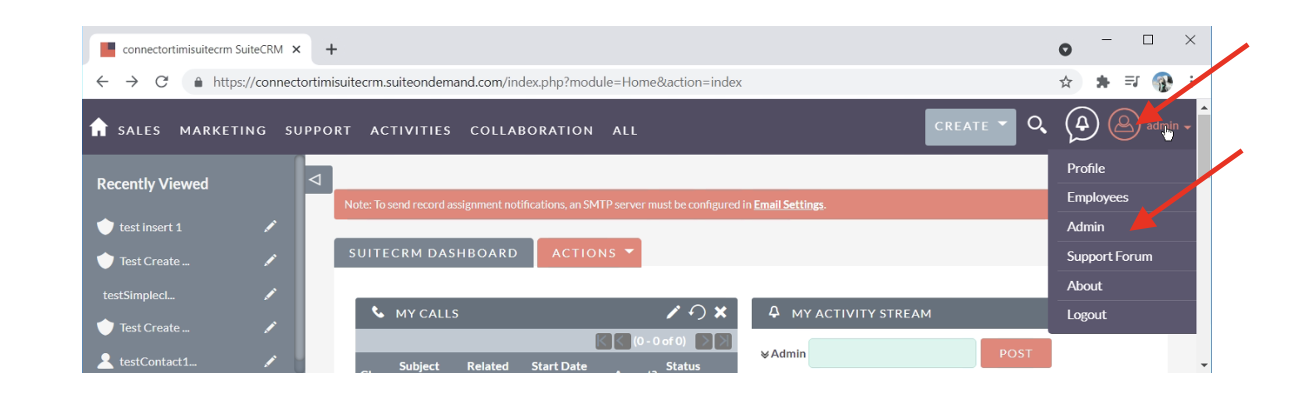
- Open the Menu in the Top-Right corner, and select the “Admin” option:
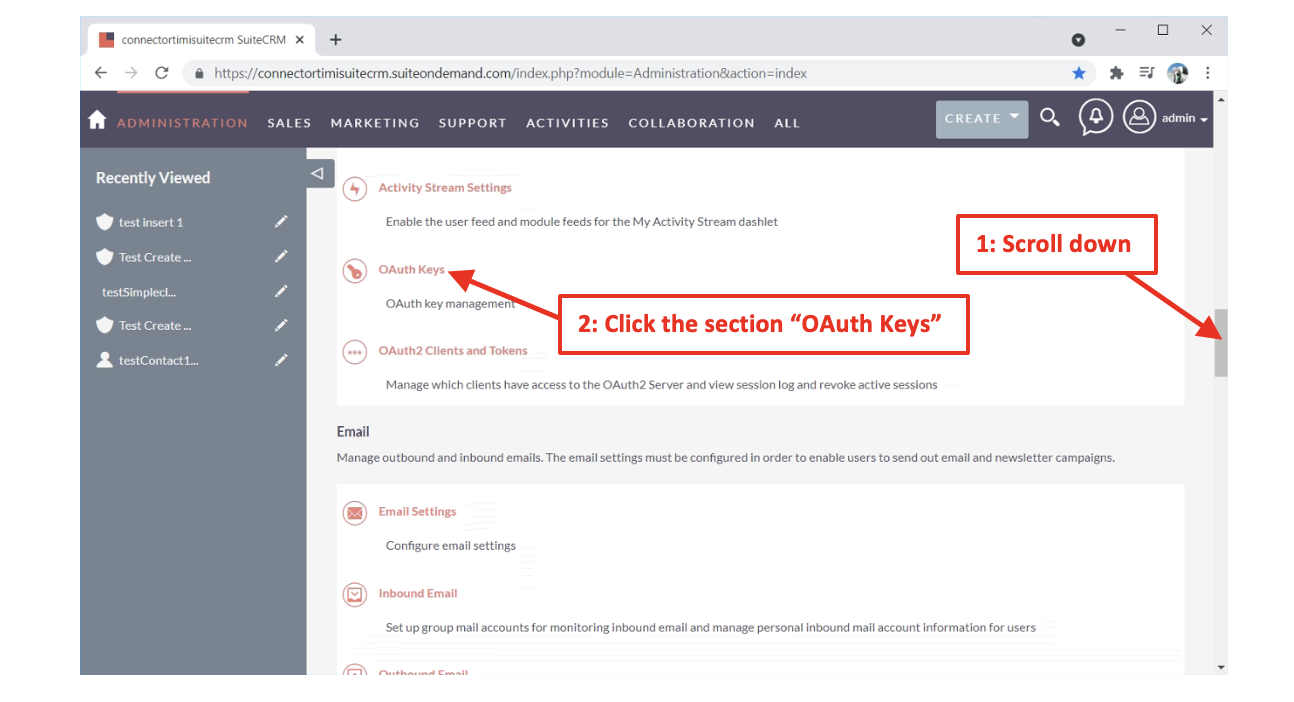
- Inside the “admin” page, scroll-down to the section named “OAuth Keys” and click on it:
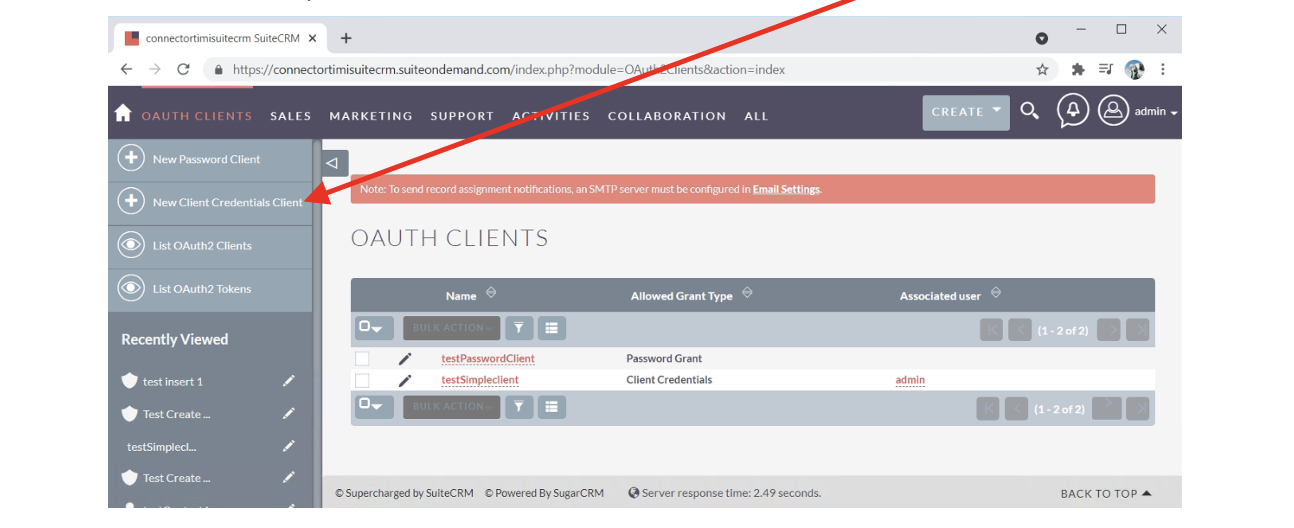
- In the left panel, click on the “New Client Credentials Client”:
5. Inside the next form, you must enter a name (you can choose any name) and a “secret”. The “secret” is the parameter “Client Secret” (parameter P5 from ETL):
¶ Input Requirements
This action does not require upstream rows. It acts as a source and produces rows.
All configuration is done via parameters.
¶ 4. Parameters
| Name (UI) | Id | Type | Required | Default | Description |
|---|---|---|---|---|---|
| Module to list | idModule |
Enum (SuiteCRM module) | ✅ | — | The SuiteCRM module to export. Examples: accounts, contacts, leads, opportunities, cases, documents, emails, etc. |
| idFilter | idFilter |
String | ❌ | (empty) | Passed verbatim as the query part for the SuiteCRM REST endpoint. Use it to set filter[limit], filter[offset], filter[order_by], and filter[where] conditions, etc. See Filter cookbook below. |
| URL | url |
String (URL) | ✅ | — | Base URL of your SuiteCRM, e.g., https://acme.suiteondemand.com. No trailing slash needed. |
| Client ID | CID |
String (secret) | ✅ | — | OAuth Client ID obtained from SuiteCRM Admin → OAuth Clients. |
| Client secret | CS |
String (secret) | ✅ | — | OAuth Client Secret obtained from SuiteCRM Admin → OAuth Clients. |
| Debug information level | idDebug |
Enum | ❌ | nothing |
Logging verbosity for this action. Options: nothing, verbose. |
| Optional: extra parameters for cURL | idOptional |
String | ❌ | (empty) | Advanced: extra flags appended to cURL (e.g., timeouts, TLS versions). Leave empty unless directed by support. |
| Number of retries on connection error | nRetry |
Integer | ❌ | 3 |
Retry attempts for transient network errors. |
¶ Output
Each SuiteCRM entity returned becomes one row in the pipeline. Columns are the fields exposed by the module. Examples:
accounts (typical columns)
id,name,website,industry,phone_office,phone_alternate,
billing_address_street,billing_address_city,billing_address_state,billing_address_postalcode,billing_address_country,
shipping_*,assigned_user_id,date_entered,date_modified,deleted
contacts (typical columns)
id,first_name,last_name,title,email1,email2,phone_work,phone_mobile,
primary_address_*,assigned_user_id,account_id,date_modified,deleted
¶ Example Workflow (step-by-step)
-
Add the action
suiteCRMDownloadto your pipeline. -
Set parameters:
-
Module to list:
accounts -
URL:
https://acme.suiteondemand.com -
Client ID / Client secret: paste values from SuiteCRM (Admin → OAuth Keys → OAuth Clients).
-
parameters.idFilter:
filter[limit]=500&filter[order_by]=date_modified:DESC
-
-
(Optional) Filter further using a downstream Filter/Where action if you prefer ETL-side filtering.
-
Write the data with a writeCSV action (example settings):
- File:
assets/SuiteCRM_Accounts_YYYYMMDD.csv - Delimiter:
, - Header row: ON
- Encoding:
UTF-8
- File:
-
Run the pipeline.
Post-run validation
- Row count > 0 for expected modules
idcolumn has no nulls and is unique- Spot-check 5–10 rows against SuiteCRM UI
- If incremental extract: verify
date_modifiedmax value is recent
¶ Filter Cookbook (parameters.idFilter)
The idFilter string is appended as the query string to the REST endpoint. Keep it URL-encoded. Common patterns:
-
Limit & paging
-
First page of 500:
filter[limit]=500 -
Page 2 (offset 500):
filter[limit]=500&filter[offset]=500
-
-
Sort
filter[order_by]=date_modified:DESC -
Where conditions (examples)
-
Name starts with “Acme”:
filter[where][0][field]=name&filter[where][0][operator]=starts&filter[where][0][value]=Acme -
Industry equals “Technology” AND not deleted:
filter[where][0][field]=industry&filter[where][0][operator]=eq&filter[where][0][value]=Technology&filter[where][1][field]=deleted&filter[where][1][operator]=eq&filter[where][1][value]=0 -
Modified since a date (UTC ISO 8601 recommended):
filter[where][0][field]=date_modified&filter[where][0][operator]=gte&filter[where][0][value]=2025-09-01T00:00:00Z -
ID in list:
filter[where][0][field]=id&filter[where][0][operator]=in&filter[where][0][value]=["a1","a2","a3"]
-
¶ Security & Secrets
- Treat Client ID and Client secret as secrets; store them in atrnatv Secrets and bind to the action field picker.
- Prefer HTTPS URLs only.
- Rotate secrets periodically per your security policy.
¶ 11. Use Cases
- CRM → Data Lake ingestion: Nightly export of
accounts,contacts,opportunitiesto a lakehouse. - Sales Ops delta loads: Pull only records modified since last run for faster sync.
- Case management analytics: Export
caseswith SLA fields for dashboards. - Document inventory: Extract
documentsand metadata for compliance review.