¶ Description
Upload JSON documents to a MongoDB Server
¶ Parameters
¶ Standard tab
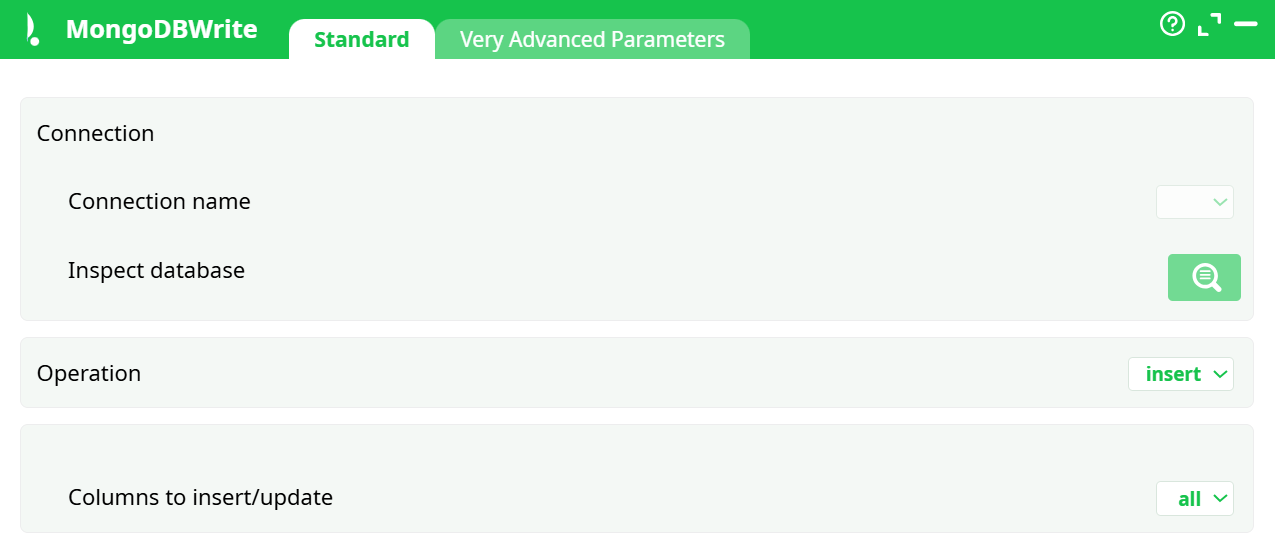
Parameters:
Connection
- Connection name — choose a connection defined in Global parameters → Services → Databases where Driver = MongoDB.
Tip: keep credentials in Global parameters → Definitions → Secrets and reference them in Services. - Inspect database — opens the inspector to browse/confirm the target (database/collection). (If the inspector in your build doesn’t set both, the database may be taken from the connection.)
Operation
- insert | update | upsert | delete — select the write action.
Object ID (shown for update, upsert, delete)
- Pick the column used to identify the target document (typically Mongo
_id). If_idis an ObjectId, provide 24-hex strings (or a native ObjectId if supported).
Columns to insert/update
- all — build the document from all input columns.
- Create JSON document using selected columns — open the selector and pick the columns to include.
Nested fields: if your platform supports path syntax (e.g.,address.city), you can map into nested objects. - Use the JSON document inside a column — choose a column that already contains a JSON document (text or JSON type) to write.
- Use a set of free-form JSON operations stored inside a column — choose a column that holds a MongoDB update document per row (e.g.,
{"$set":{"name":"Alice"}, "$unset":{"obsolete":1}}).
¶ Advanced tab

Parameters:
- Bulk operation: number of rows to insert in one go
- Write all rows
¶ About
Writes rows from the pipeline into a MongoDB collection. Supports insert, update, upsert, and delete. Documents can be built from selected columns, from a JSON column, or by applying free-form MongoDB update operators stored per row.
¶ When to Use
- Load new documents into MongoDB from tabular data.
- Update existing documents by an identifier (typically
_id). - Upsert (create if missing, update if present).
- Delete documents by identifier.
- Run complex per-row updates using
$set,$unset, etc., provided in a column.
¶ How It Works
-
Resolves Connection name to a MongoDB connection defined in Global parameters.
-
Per incoming row, builds an operation:
- insert: constructs the document from selected columns or a JSON column.
- update: matches by Object ID and applies either the constructed document (as
$set) or the free-form operators column. - upsert: same as update, but inserts a new document when no match is found.
- delete: matches by Object ID and removes the document.
-
Executes operations in bulk using the configured batch size.
-
Optional in-box row filtering when Write all rows = OFF.
¶ Minimal Setup (Quickstart)
-
Open the toolbar → Global parameters.
-
Services → Databases → Add:
- Name =
conn_mongo_1 - Driver =
MongoDB - Server, Port, DB, User, Password (use Definitions → Secrets for credentials); optional Others for connection options.
- Name =
-
Drop MongoDBWrite on the canvas.
-
In Standard:
- Connection name =
conn_mongo_1 - Operation =
insert - Columns to insert/update =
Create JSON document using selected columns→ select fields.
- Connection name =
-
(Optional) Inspect database to confirm target collection.
-
Run.
Validate: check logs for batch counts; verify documents in the collection.
¶ Example Workflow
- CSV/DB Read → Transform → MongoDBWrite (insert) — use selected columns for lean documents; start with Bulk = 1000.
- Join/Compute → MongoDBWrite (update/upsert) — provide Object ID and, for partial updates, a column containing
$set/$unsetdocuments. - Filter → MongoDBWrite (delete) — set Operation = delete, pick Object ID, and (optionally) turn Write all rows = OFF to restrict deletions.
¶ Compatibility & Limits
- Uses connections from Global parameters → Services with Driver = MongoDB.
- Observe MongoDB limits (e.g., ~16 MB per document) and field naming rules (avoid leading
$and embedded dots unless path mapping is supported).
¶ Performance & Tuning
- Tune Bulk operations: raise for throughput, lower if you see timeouts or large-doc failures.
- Prefer selected columns over all to reduce payload size.
- For heavy partial updates, use the free-form JSON operations mode.
- Filter rows upstream or with Write all rows = OFF.
¶ Error Handling & Troubleshooting
- Auth/connection failures: confirm Connection name points to a valid entry and credentials are set via Secrets.
- Invalid
Object ID: ensure values match your collection’s identifier format (24-hex for ObjectId unless customized). - Duplicate key / write conflicts: verify unique keys; decrease Bulk size.
- Document too large / invalid field names: avoid oversized payloads; check for illegal field names.
- No rows written: if Write all rows = OFF, verify the Only rows where / equals filter and data types.
¶ Security & Credentials
- Store passwords/tokens in Global parameters → Definitions → Secrets; reference them from Services → Databases.
- Follow least-privilege: grant only the required rights (insert/update/delete on the target collection).