¶ Description
Upload a table into PostgreSQL.
¶ Parameters
¶ Standard tab
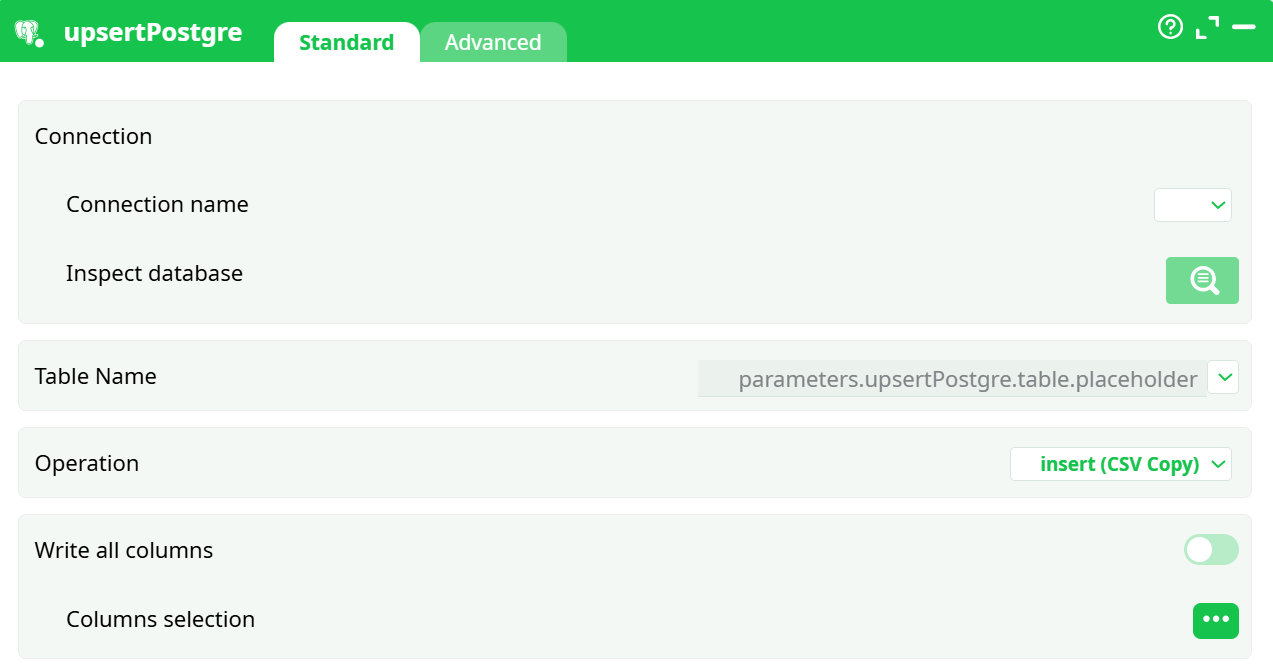
Parameters:
Connection
- Connection name – Pick a saved database connection.
Create or edit connections in Pipeline parameters → Services (or in a Source and attach that source to the pipeline).
Precedence note: when multiple definitions share a name, the last row wins; pipeline-level definitions always override source-level ones. - Inspect database – Opens a schema browser to quickly explore schemas/tables/columns.
Table Name
- Target table in PostgreSQL. You can type a literal name, reference a pipeline parameter (e.g.,
parameters.upsertPostgre.table.placeholder), or pick a value from the combo if you have defined constants/parameters.
Operation
Choose what to do and how to do it. The dropdown contains the following families:
-
Insert
- insert (CSV Copy) – uses
COPY FROM STDINwith CSV. Fast, robust, great for large loads. - insert (Binary Copy) – uses
COPY FROM STDIN BINARY. Fast and preserves numeric precision; requires compatible types. - insert (SQL – Binary) – parameterized inserts in binary format.
- insert (SQL – Text) – parameterized inserts with text representation (widely compatible, slower).
- insert (CSV Copy) – uses
-
Update
- update (SQL – Binary)
- update (SQL – Text)
-
Upsert (insert-else-update)
- upsert (SQL – Binary)
- upsert (SQL – Text)
-
Delete
- delete (SQL – Binary)
- delete (SQL – Text)
Write all columns
- When ON, every incoming column is written (subject to the chosen operation).
- When OFF, a Columns selection button appears so you can pick only the columns you need (useful for updates/upserts).
¶ Advanced tab
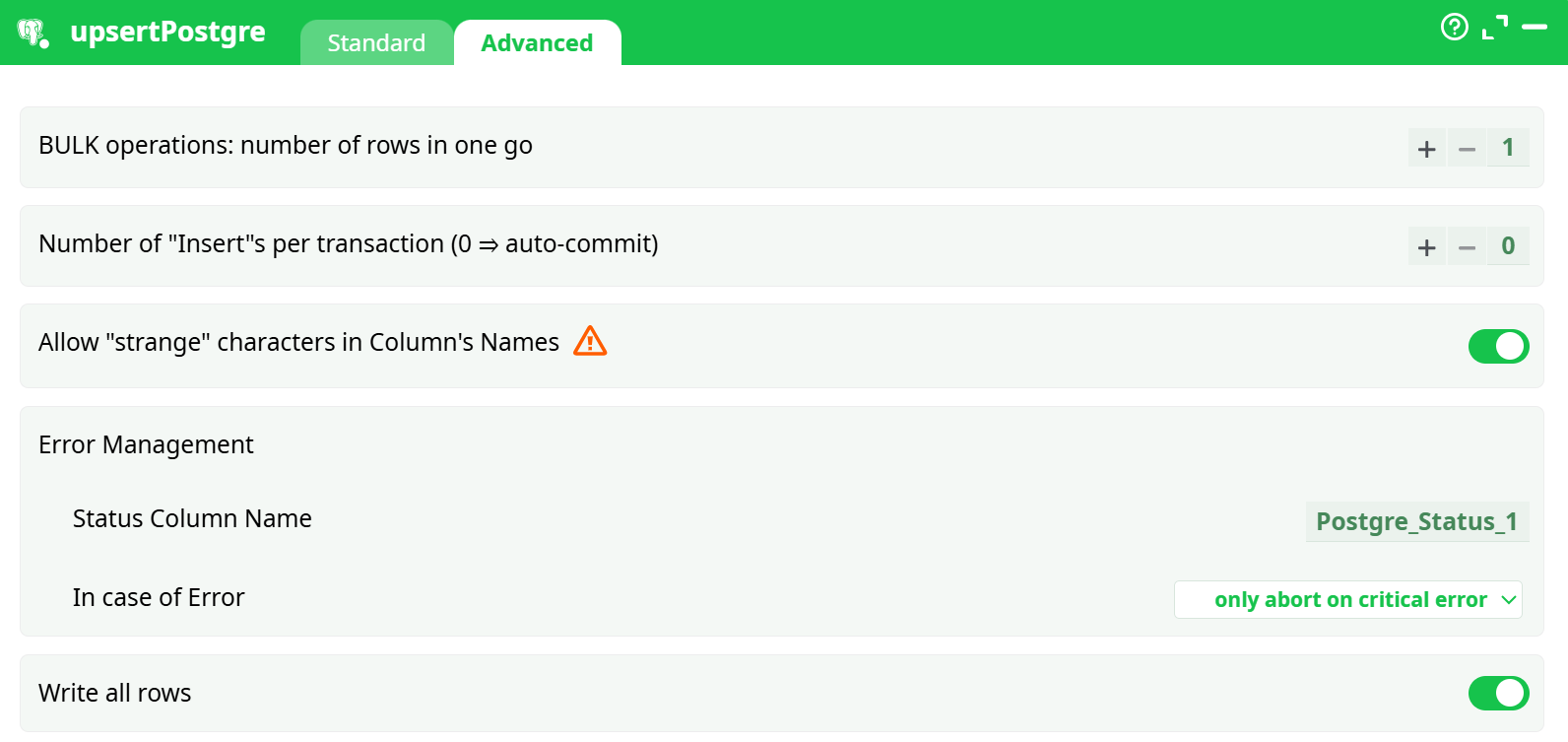
Parameters:
- BULK operations: number of rows in one go
- Number of "Insert"s per transaction (0 = auto-commit)
- Allow "strange" characters in Column's Names
- Error Management
- Status Column Name
- In case of Error
- Write all rows
¶ About
Writes rows from the incoming table into a PostgreSQL table.
You can insert, update, delete, or upsert (insert-else-update) and you can choose between several execution techniques (COPY, binary SQL, text SQL). The action also supports column selection, transactions/batching, and optional error reporting.
¶ Choosing the right mode
- COPY (CSV/Binary)
Best throughput for inserts. CSV is extremely portable; Binary keeps numeric/date precision perfectly and avoids text parsing. Use COPY when you only insert. - SQL (Binary/Text)
Required for update, delete, and upsert.
Binary SQL preserves numeric precision and is generally faster than Text SQL; Text SQL is the most tolerant to exotic types and encodings. - Performance expectations
Updates/deletes/upserts are naturally slower than pure inserts. Compared with MS-SQL Server, similar operations on PostgreSQL can be 10–20× slower at the same scale—plan batch sizes and scheduling accordingly.
¶ Step-by-step: first run
-
Define a connection
In Pipeline parameters → Services, add a row in Databases, set Name (e.g.,conn_1), choose Driver = PostgreSQL ANSI (or Unicode), then fill Server, Port (5432 by default), DB, User, and Password.
You may store the password as a secret and reference it from the Password cell. -
Select it in the box
In upsertPostgre → Standard → Connection name, chooseconn_1. Optionally click Inspect database to confirm access. -
Target table and operation
Enter the Table Name (or use a pipeline parameter), then pick Operation. For an initial load, prefer insert (CSV Copy). -
Column mapping
Leave Write all columns ON for simple inserts. For updates/upserts, turn it OFF and choose only the columns to write. -
(Optional) Advanced tuning
Increase the bulk size to speed up large loads, and set a non-zero “inserts per transaction” if you want explicit commit boundaries. -
Run
Execute the step and check the Data/Log tabs for status. When error reporting is enabled, the configured status column will contain per-row results.
¶ Tips & gotchas
- Precision & types
COPY Binary and SQL Binary avoid rounding errors on numerics/dates. Text modes rely on textual casts and are more forgiving but slower. - Primary keys & upserts
Make sure the target table has a unique index/key that matches your update/upsert predicate; otherwise you may get duplicates or poor performance. - Batch sizing
Larger batches reduce network overhead but increase memory consumption. Start modest (e.g., 5–10k rows per push) and scale up while monitoring. - Transactions
Grouping multiple batches per transaction reduces commit overhead and keeps integrity constraints consistent across a chunk of work. - Schema changes
Use Inspect database to confirm column names and types. If names contain special characters, enable the quoting option in Advanced. - Precedence of connection settings
If you define the same connection name in multiple places, the entry lower in the list takes precedence; pipeline definitions override source ones. This makes it easy to override credentials per pipeline.
¶ Troubleshooting
connection refused/ timeouts – Wrong host/port or firewall. Validate reachability from the runner to port 5432.database "X" does not exist– The DB name is wrong; check it with your DBA or by browsing via Inspect database.password authentication failed– Recheck user/password; confirmpg_hba.confallows your auth method from the runner’s IP.- Very slow or OOM during insert – Use insert (CSV Copy) or Binary Copy instead of SQL mode; lower the batch size.
permission denied for relation …– Grant the needed privileges to the service account (INSERT/UPDATE/DELETEas applicable).- Unexpected numeric rounding – Prefer a Binary variant (COPY or SQL) or cast explicitly to
NUMERIC(p,s)in your staging logic.
¶ Examples
A. Fast initial load
Operation: insert (CSV Copy)
Write all columns: ON
Bulk size: 10000
Inserts per transaction: 0  (auto-commit)
B. Daily upsert by key
Operation: upsert (SQL – Binary)
Write all columns: OFF → choose only the columns that can change
Bulk size: 2000
Inserts per transaction: 1–5  (small transactions for easy rollback)
C. Delete stale rows
Operation: delete (SQL – Text) or (SQL – Binary)
Write all columns: OFF → select only key columns used in the delete predicate
¶ Security best practices
- Use a least-privilege service account (only the statements you need).
- Store credentials as secrets and reference them in Services.
- Prefer TLS to the database when your environment requires it; install CA/cert chain at the platform level if your policy mandates validation.
- Rotate passwords regularly.