¶ Description
Run child pipelines in a loop.
¶ Parameters
¶ Parameters tab
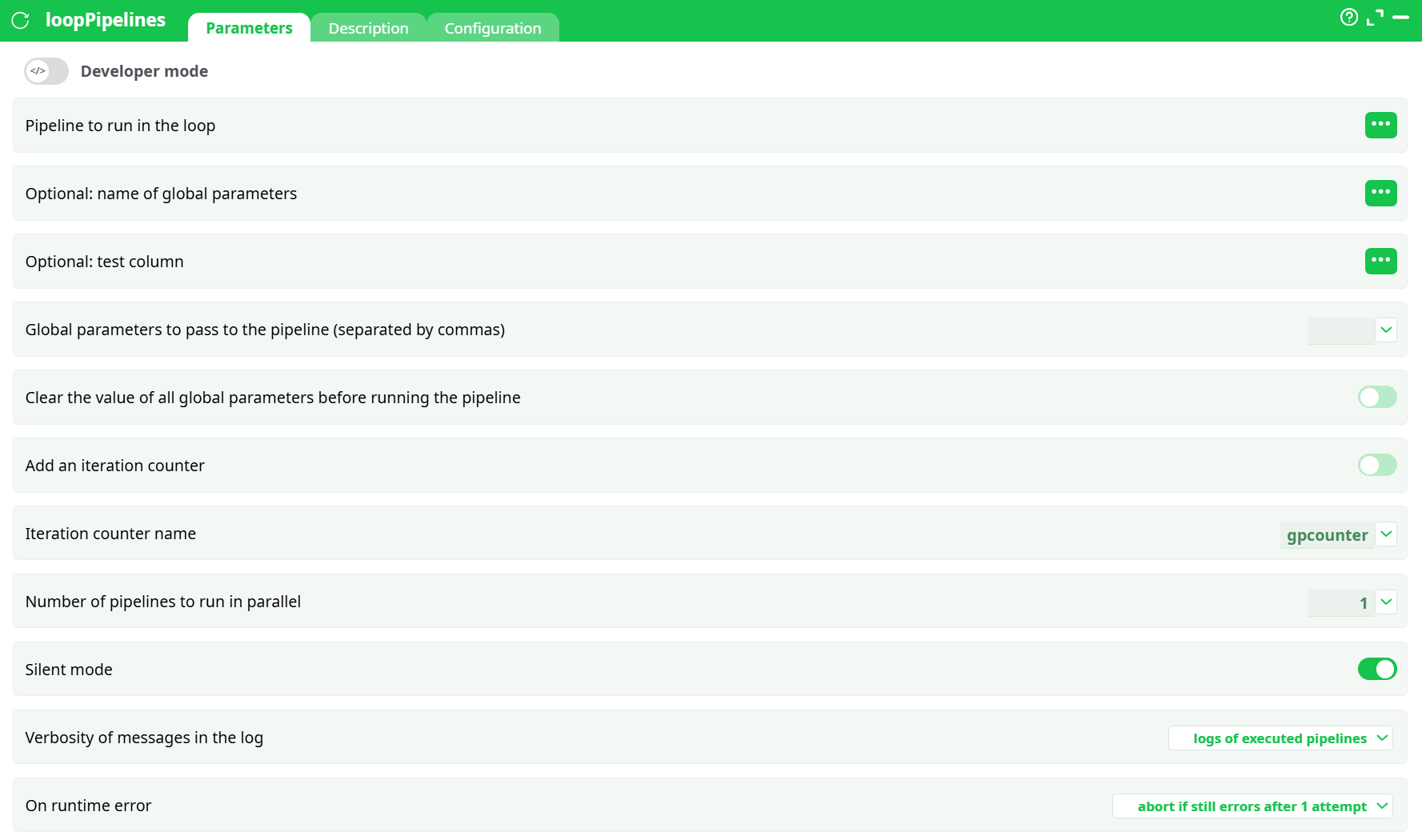
Parameters:
-
Developer mode: activate/deactivate code tab.
-
Pipeline to run in the loop
Select the column that contains the pipeline reference (name/path) to execute for each row.• The
…button opens the column selector.
• At runtime, the value in the selected column (for each row) is used as the pipeline reference. -
Optional: name of global parameters
Name of a Global Parameter set to pass through. Leave empty if not using Global Parameters. -
Optional: test column
When provided, rows with a falsy value in this column are skipped (quick way to enable/disable rows). -
Global parameters to pass to the pipeline (separated by commas)
Inline comma-separated list ofkey=valuepairs to set/override global parameters in the child pipeline (e.g.,country=FR, run_date=2025-08-18). Can be combined with Optional: name of global parameters. -
Clear the value of all Global Parameters before running the pipeline
Toggle ON to start each run from a clean GP state. -
Add an iteration counter
Adds a GP named by Iteration counter name with values1..Nfor each iteration. -
Iteration counter name
Default:gpcounter. Only used when Add an iteration counter is ON. -
Number of pipelines to run in parallel
Concurrency level. Set to the number of workers you want (start low; increase gradually). -
Silent mode
ON reduces console noise from children. -
Verbosity of messages in the log:
silent– minimal messagesnormal– standard messageslogs of executed pipelines– also prints each child’s main log header/status (useful for audits)
-
On runtime error
- do not abort but make N attempts – retry N times, then continue
- abort if still errors after N attempt(s) – retry N times, then stop the parent
- do not abort or try again – never retry, never stop (useful for “best-effort” batches)
¶ Description tab
See dedicated page for more information.
¶ Code tab
loopPipelines is a scripted action. Embedded code is accessible and customizable through this tab.
¶ Configuration tab
See dedicated page for more information.
¶ About
The loopPipelines action is very similar to the loopPipeline action.
- While the loopPipeline action always runs the same child pipeline, the loopPipelines action can run different child pipelines at each iteration of the loop (based on the input table).
- While the loopPipeline action typically changes (at each iteration) the value of one Global Parameter (whose name is, by default,
gpname), the loopPipelines action can change (at each iteration) the value of several Global Parameters.
An example
The procedure to create a loop inside the ETL platform usually involves (at least) two pipelines:
-
The first pipeline is the control pipeline: it runs the loop and decides how many iterations will be performed.
-
The second pipeline is the inner part of the loop (sometimes called the child pipeline): it defines which actions will be executed as part of the loop. This pipeline will be executed several times. At each execution (i.e., at each iteration of the loop), the inner pipeline is executed with a different set of values in its pipeline global parameters.
Let’s assume that we want to extract, each day, the content of a table stored in a remote database and save this content inside different .gel files (one file per day). We could simply run one ETL pipeline each day that performs the extraction.
…but what happens if this pipeline is not executed on a specific day? The corresponding .gel files won’t be created and some data will be missing.
So, a better solution is to check if all the .gel files from the last 10 days have been correctly created, and if some .gel files are missing, run a pipeline to create them.
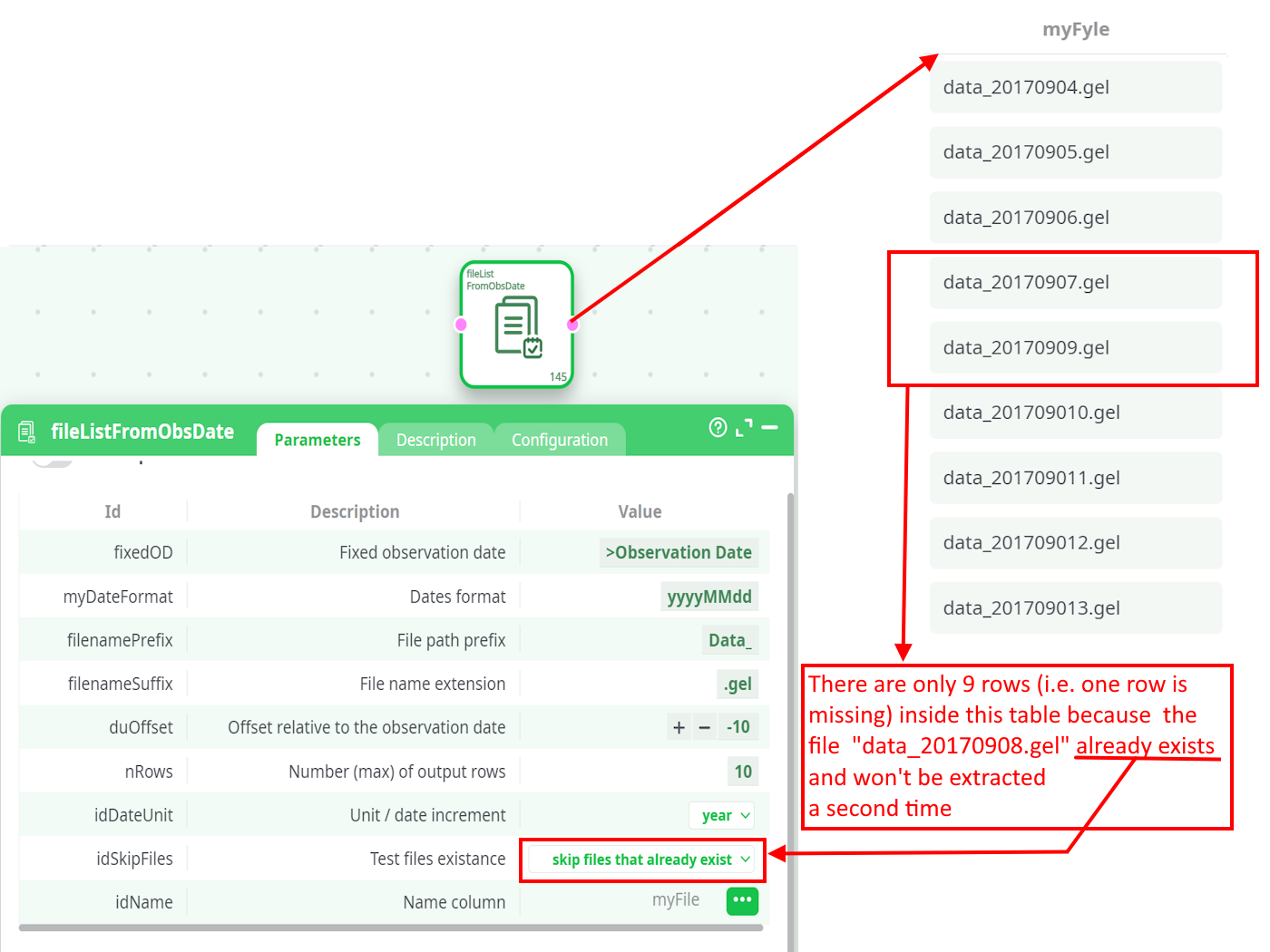
One easy way to check if a file is present/missing is to use the fileListFromObsDate action available in the “Other” category. For example, these parameters generate a table that contains (for the last 10 days) the name of all missing .gel files:
For each missing file (i.e., for each row of the above table), we’ll run a child pipeline named C20_sql_loop_inner_part that will do the extraction and create the missing file. This is done in this way:
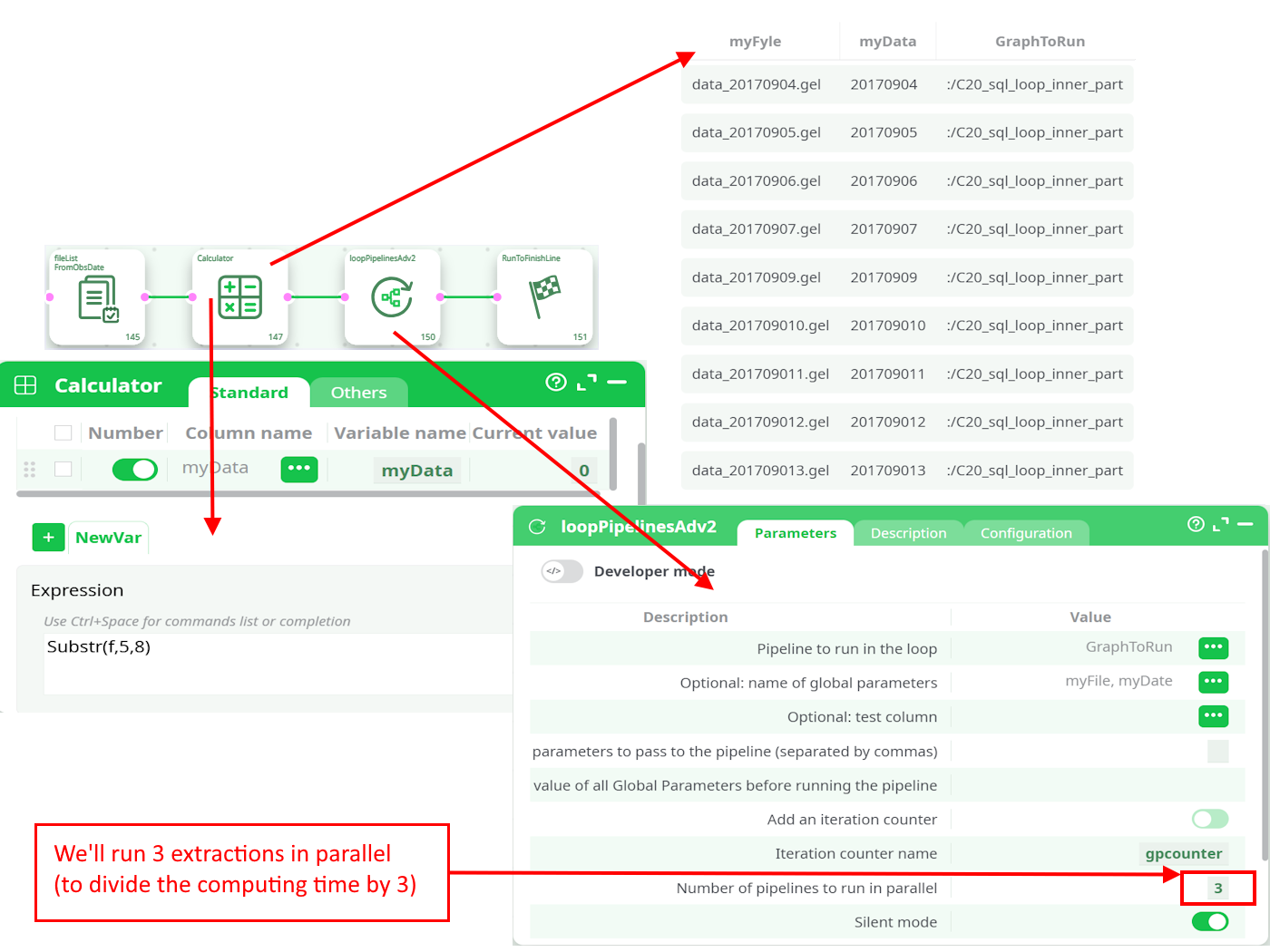
During the loop execution (i.e., when running the control pipeline), these values are replaced by the values computed in the control pipeline (more precisely: values extracted from the input table of the loopPipelines action).
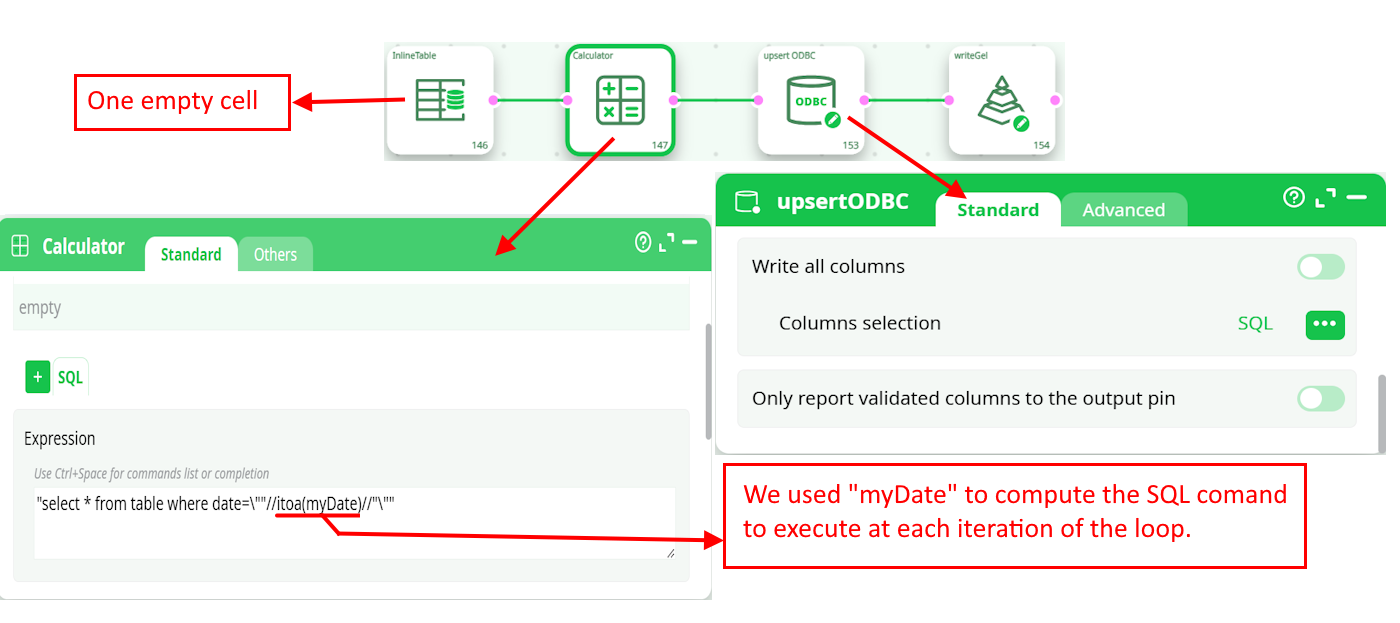
This is the C20_sql_loop_inner_part child pipeline:
¶ When to use
- You have a list of pipeline references and want to run each one.
- You want to run the same pipeline multiple times with different GP values.
- You need parallelism to speed up multiple independent jobs.
¶ Minimal working example
This mirrors the screenshots and is easy to reproduce.
¶ 1) Create the child pipeline loop
A tiny pipeline that produces a file in its Records (so we can see an artifact).
InlineTable -> WriteCSV -> RunToFinishLine
Expected Records (child):

¶ 2) Create the parent pipeline doctest
Structure:
InlineTable (with a single column "Path" and a single row "loop")
-> loopPipelines
-> RunToFinishLine
-
InlineTable content example: one column
Path, one rowloop.

-
loopPipelines configuration:
- Pipeline to run in the loop = column Path (so the action reads
loopfrom the table) - Add an iteration counter = OFF (optional)
- Number of pipelines to run in parallel =
1 - Silent mode = ON
- Verbosity of messages in the log =
logs of executed pipelines - On runtime error =
abort if still errors after 1 attempt
- Pipeline to run in the loop = column Path (so the action reads

¶ 3) Run and check
-
Log shows the parent starting, then opening pipeline
loop, and finishing successfully. -
Records of the parent pipeline show a folder
/loopaggregated from the child’s run.
¶ How the loop works
-
The input table is read row by row.
-
For each row:
- The child pipeline reference is taken from the selected Pipeline to run in the loop column.
- Optional Global Parameters are assembled from Optional: name of global parameters and/or Global parameters to pass to the pipeline (separated by commas).
- If Add an iteration counter is ON, a GP (e.g.,
gpcounter) is set to the iteration number. - The child pipeline is executed.
-
With Number of pipelines to run in parallel > 1, several children run in parallel.
-
By default, Records produced by children are exposed in the parent’s Records tab under their working subfolders.
¶ Output & observability
-
Parent Logs
Show loop progress and (depending on Verbosity of messages in the log) a summary of child logs. -
Parent Records
Consolidate file artifacts produced by each child. You’ll typically see a subfolder per child pipeline name or per run. -
Exit status
Controlled by On runtime error. If aborting behavior is selected and a child still fails after retries, the parent fails.
¶ Tips & good practices
- Start with Number of pipelines to run in parallel = 1 to validate your logic, then increase gradually.
- Use Clear the value of all global parameters before running the pipeline = ON if children rely on clean, predictable Global Parameters.
- Keep logs of executed pipelines ON while developing; switch to
normal/silentin production. - Prefer a column-driven Pipeline to run in the loop when you need to mix different child pipelines in one batch.
- To parameterize children, define GPs in the child and pass values via Global parameters to pass to the pipeline (separated by commas) (e.g.,
country=${CountryCol}using your row’s columns resolved upstream).
¶ Troubleshooting
-
“Pipeline not found”
Verify the exact value stored in the input column used by Pipeline to run in the loop (name/path). Check that the pipeline is accessible (Draft/Published scope). -
Parent finishes with error
Check On runtime error. If set to abort after N attempts, a persistent child failure will stop the parent as designed. -
Too many logs / memory
Lower Verbosity of messages in the log, turn Silent mode ON, and reduce Number of pipelines to run in parallel. -
Children run but no files in parent Records
Ensure the child writes to Records (e.g., by using actions that output files) and not only to Data.