¶ Description
Join several tables.
¶ Parameters
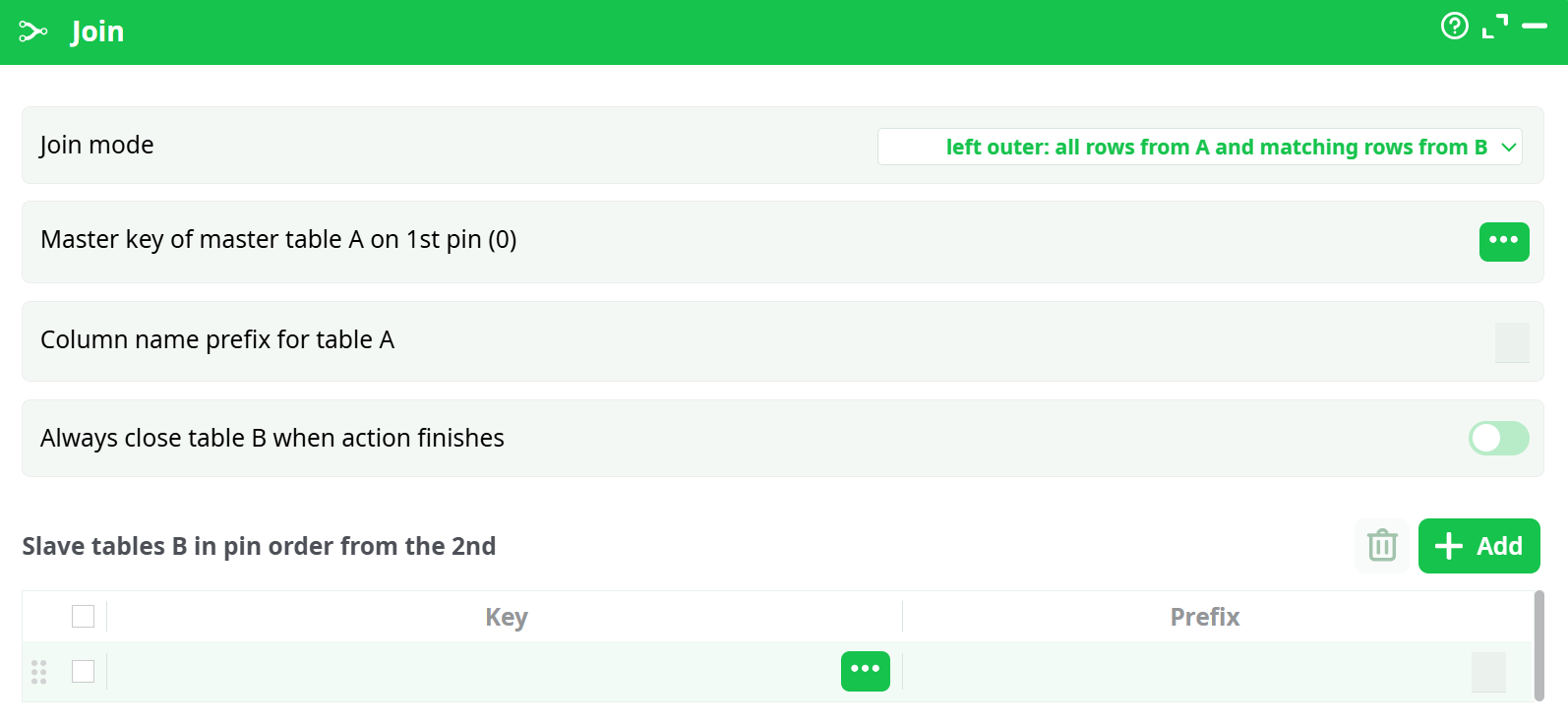
Parameters:
- Join mode
- Master key of master table A on 1st pin
- Column name prefix for table A
- Always close table B when action finishes
- Slave tables B in pin order from the 2nd
¶ About
All the joins computed by the Join actions are using the same unique KEY column inside the MASTER table (Use the MultiJoin action if you have many different keys inside the MASTER table).
NOTE :
All the input tables must be sorted on the "Key" columns using the SAME sorting algorithm (all "numeric sort" or all "alpha-numeric sort").
This action joins several tables on a key. Some definition:
-
The first input pin contains the MASTER table.
-
The other input pins (second, third, etc.) contain the SLAVE tables.
During the join, the SLAVE tables are added to (i.e. "joined with") the MASTER table.
The Join action checks that all the input tables are sorted in the same way (i.e. using the same sorting algorithm). Sorting all the input table is required for the Join action to work (in opposition to the MultiJoin action that does not require any sort at all).
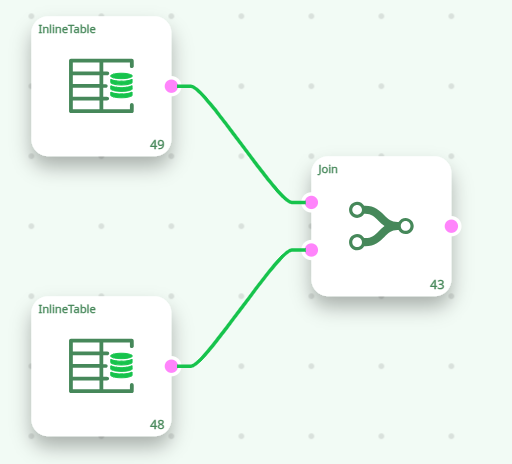
Because the input tables of the Join action MUST be sorted for the join to work, this produces an error:
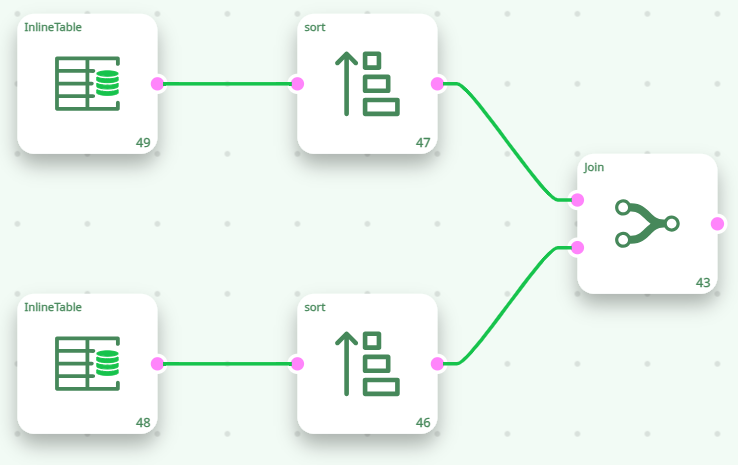
..but this will work (provided that the two Sort actions are properly parameterized):
NOTE :
When you use the sort action, it modifies the meta-data of the table, so that it now includes the information "this table is now sorted in a specific way". Using this meta-data, the "Join operator" is able to check if the input tables are correctly sorted.
This will work if the two .gel files are properly sorted:
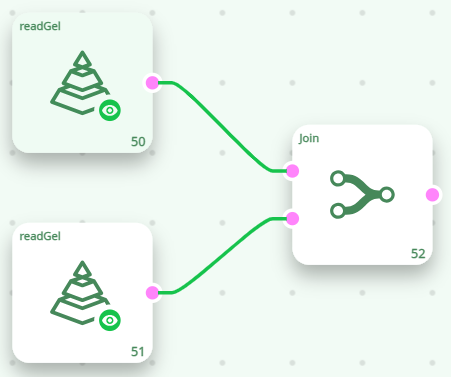
This means that if you intend to perform multiple joins with a specific table, it is better to sort the table first and then save it. This way, you can efficiently compute many joins, since the table is already sorted in the .gel file—eliminating the need to sort it repeatedly.
All the input tables used inside a Join action are read simultaneously (in opposition to the MultiJoin action that, first, reads completely all the SLAVE tables and then, once it's finished, starts reading the MASTER table).
The RAM Memory consumption of the Join action is negligible (i.e. very small) (in opposition to the MultiJoin action , which fully loads all SLAVE tables into RAM ).
NOTE:
You can only define one key inside the MASTER TABLE. If you want to define several different keys inside the MASTER TABLE, use the MultiJoin action.
Let's give some examples. Here are the input tables:
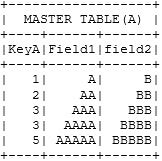
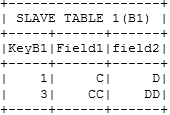
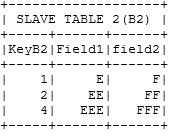
For the "Left Outer Join", we obtain:
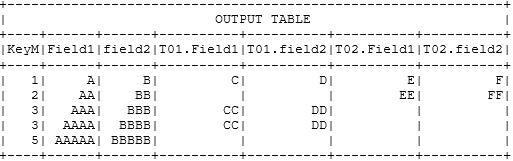
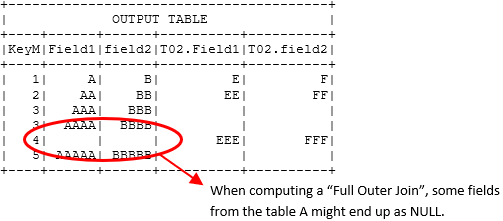
For the "Full Outer Join" between Table A and Table B2, we obtain:
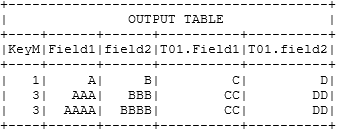
For the "Inner Join" between Table A and Table B1, we obtain:
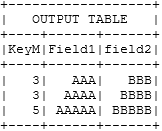
For the "A minus B Join" between Table A and Table B2, we obtain:
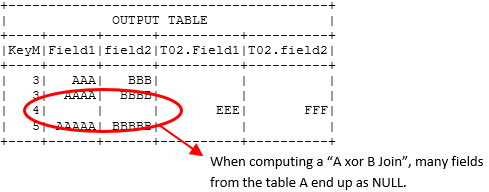
For the "A xor B Join" between Table A and Table B2, we obtain:
NOTE :
For the all kind of join, no row of the MASTER TABLE will ever be duplicated.
NOTE:
This action is actually a good example of meta-data management: the Join action looks at the "meta-data" of the input tables and refuses to join the input tables if the meta-data of the input tables says that "these table are not sorted properly".
This operator is a good example of intelligent metadata management. Most ETL actions can operate without using any metadata about the columns in the tables (i.e., they typically don’t need to know whether the columns contain numbers, text, etc.).
However, this does not mean that ETL is incapable of handling metadata—quite the opposite! For example, when the Join operator needs to verify the metadata of input tables (to check whether they are properly sorted), the ETL framework provides all the necessary functionality to perform that check.
Most of the time, ETL doesn’t require any metadata management. But when you do need it, the tools provided are both powerful and easy to use.