¶ Description
Delete file(s) on a SFTP/FTP server
¶ Parameters
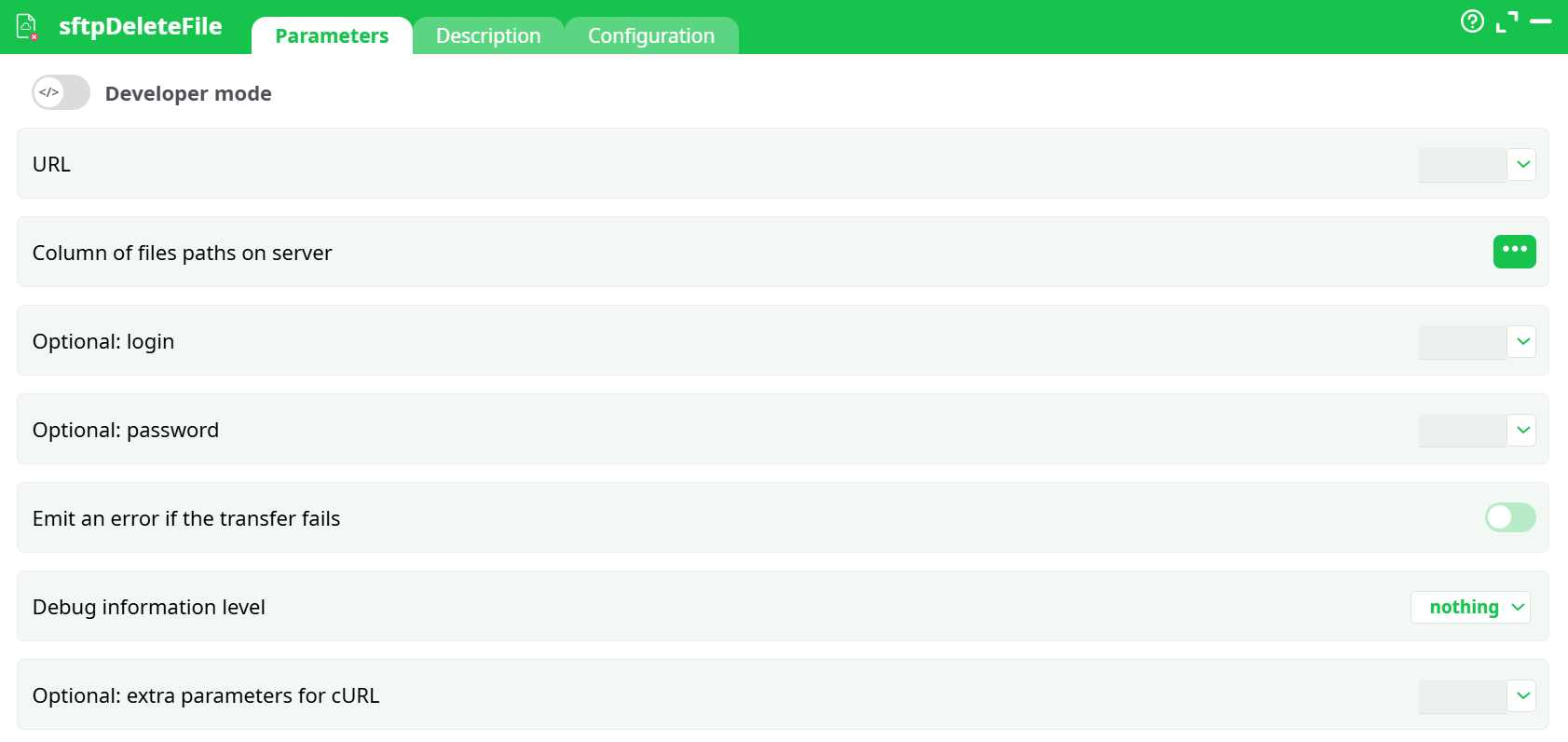
Parameters:
- URL : SFTP URL to the target directory
- Column of files paths on server : The exact filename to delete.
- Optional: login : SFTP username.
- Optional: password : SFTP password (masked).
- Emit an error if the transfer fails : If ON, non-zero cURL status fails the step (recommended).
- Debug information level : Logging verbosity. Start with basic; switch to verbose for connection issues.
- Optional: extra parameters for cURL : Extra cURL flags (advanced). Usually unnecessary here.
¶ Description tab
See dedicated page for more information.
¶ Code tab
scanDir is a scripted action. Embedded code is accessible and customizable through this tab.
¶ Configuration tab
See dedicated page for more information.
¶ About
sftpDeleteFile removes a single file from a remote SFTP/FTP server using cURL. It’s intended for housekeeping—e.g., deleting processed drops after a successful download. The node can run in:
- Single-file mode — you provide one filename to delete.
- Batch mode — connect an input table column with one filename per row.
Status 0 means the delete command succeeded on the server.
Notes
- The remote directory must be writable for your account.
- Paths are case-sensitive on most SFTP servers.
¶ Prerequisites
- Outbound network access to the server (SFTP port 22, or FTP).
- An account with delete permission on the target folder.
- The exact remote filename to delete.
- If on a corporate network: proxy/firewall allow-list for the host and port.
¶ Input Requirements
- Pin 0 (optional table)
Use when you want to delete multiple files. Provide a column (e.g.,remoteFiles) containing one exact filename per row (no wildcards).
¶ How It Works
- Builds a cURL SFTP/FTP command that issues a remote delete (
rmfor SFTP). - For each input row (or once in single-file mode), attempts to remove the Column of files paths on server inside URL.
- Returns cURL’s exit code as the operation status.
What the action emits
-
Data tab:
- Single-file mode: one row with
status. - Batch mode: pass-through of your input rows plus
status(implementation may vary).
- Single-file mode: one row with
-
Records tab: not used.
¶ Minimal Setup to Run
¶ A) Safe connectivity test (demo host; won’t delete)
- URL:
sftp://test.rebex.net/pub/example/ - Remote file:
readme.txt - Login:
demo - Password:
password - Emit error: OFF
- Debug: basic
Expected: Log shows connection and “Permission denied” (folder is read-only). This proves wiring and credentials.
¶ B) Real delete (your writable SFTP)
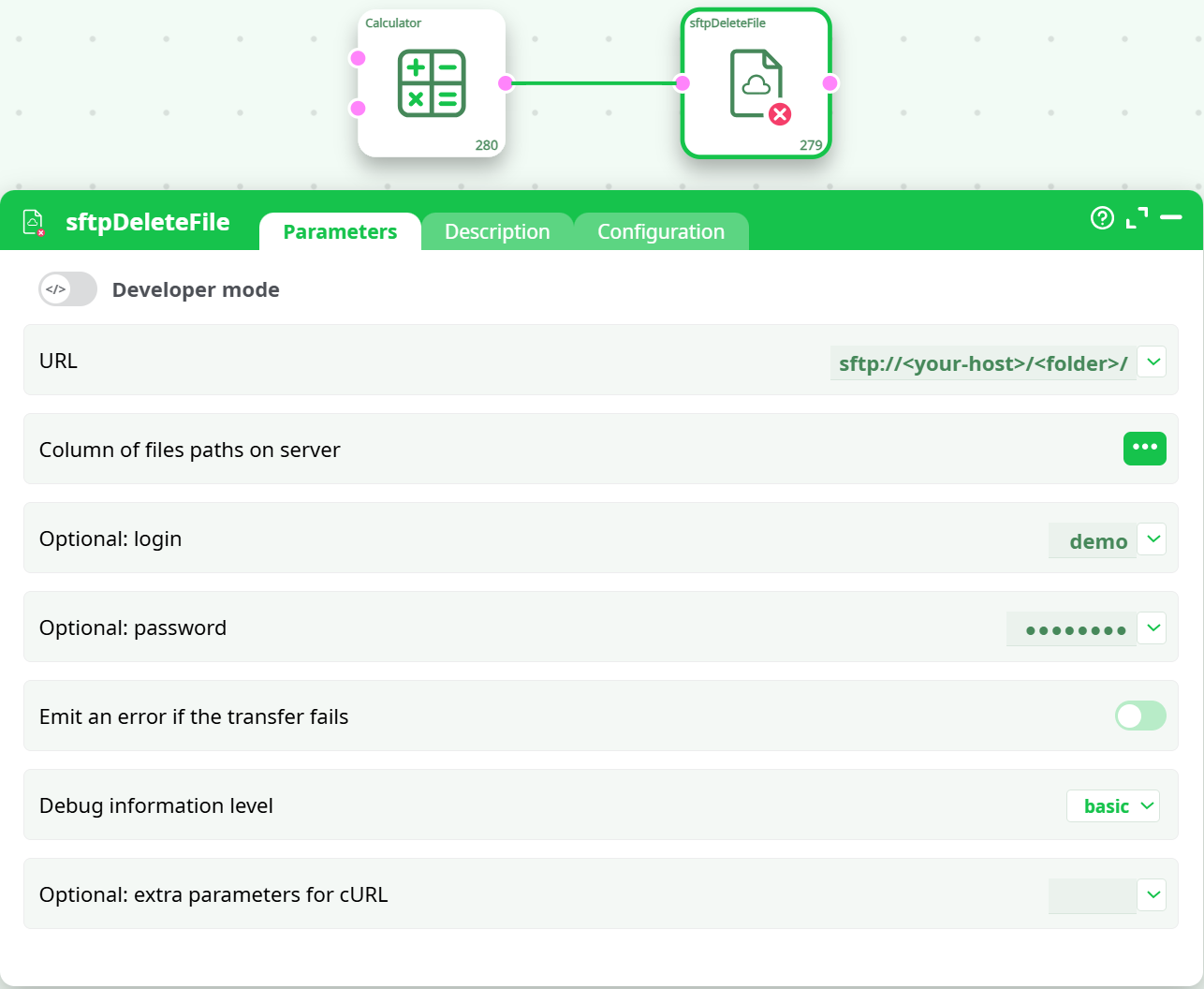
- URL:
sftp://<your-host>/<folder>/ - Remote file:
<exact-filename.ext> - Login / Password:
<user>/xxxxx - Emit error: ON
- Debug: basic
Expected: status = 0 in Data; the file disappears from the folder.
¶ Step-by-Step Run Instructions
- Open the node.
- Set URL to the target directory (with trailing
/). - Provide Remote file (constant or map a column).
- Fill Login / Password.
- Choose Emit error (ON for real, OFF for read-only demos).
- Set Debug = basic.
- Run.
¶ Output
- Successful delete:
status = 0in the output row(s), log shows the remotermsucceeded. - Connectivity test on demo host: log shows “Permission denied”; with Emit an error if the transfer fails OFF the node completes for inspection.
¶ Post-Run Validation
- Use sftpListFiles on the same folder before/after to verify the file disappears (real run).
- Confirm
status = 0for each row you intended to remove. - Ensure no unexpected files were affected (deletes are irreversible).
¶ Troubleshooting
-
“Permission denied”
- You’re in a read-only area or your role lacks delete rights.
- Fix: use a writable folder or a user/role with delete permission. For demo tests, keep Emit an error if the transfer fails OFF.
-
Exit code 78 — remote file not found
- Wrong filename or wrong directory.
- Fix: double-check spelling and case; make sure URL ends with
/and points to the folder that actually contains the file.
-
Exit code 67 — authentication failed
- Bad credentials or locked account.
- Fix: re-enter Optional: login/Optional: password; confirm account access to that directory.
-
Exit code 7 / 28 — connect/timeout
- Firewall or host/port issue.
- Fix: open port 22 (SFTP) to the host; verify the hostname; add
--max-time 60in Optional: extra parameters for cURL for a bounded wait.
-
“writing to an output pin exceed the size of the output”
- Log overflow due to Debug information level = verbose while failing.
- Fix: switch to basic and re-run; only use verbose temporarily for short diagnostic runs.
¶ Use Cases & Tips
- Post-ingestion cleanup: After a successful download and checksum, delete the processed file to keep the drop clean.
- Batch deletions: Feed a table with filenames (e.g., older than N days) and map it to Column of files paths on server.
- Guardrails: Keep Emit an error if the transfer fails ON for production so any failed delete is visible upstream.