¶ Description
Create Small data model.
¶ Description
¶ Parameters tab
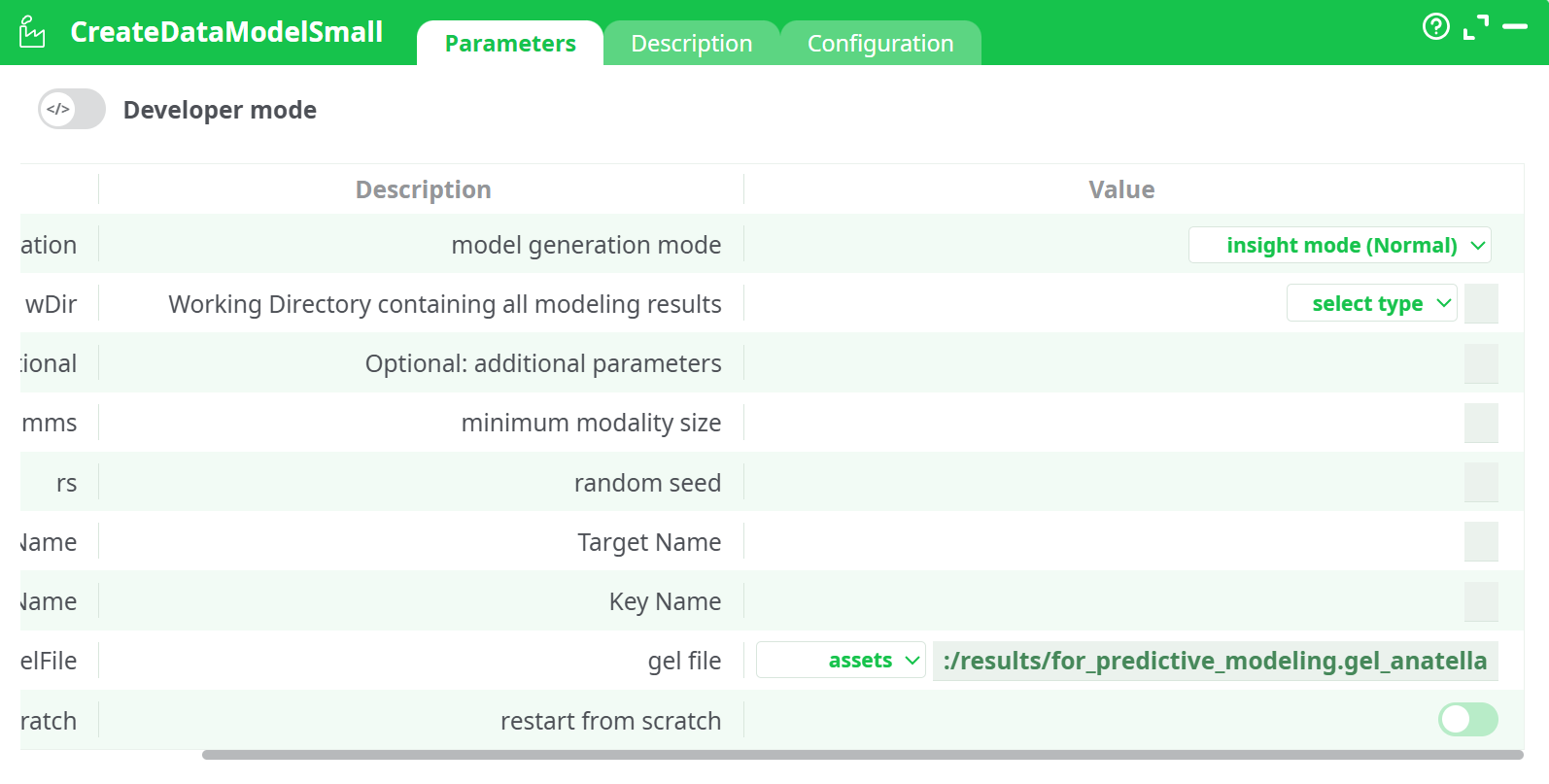
Parameters:
- Developer mode: activate/deactivate code tab.
- modelGeneration: model generation mode
- wDir: Working Directory containing all modeling results
- paroptional: additional optional parameters
- mms: minimum modality size
- rs: random seed
- tName: Target Name
- kName: Key Name
- gelFile: gel file
- restartCrash: restart from scratch
¶ Description tab
See dedicated page for more information.
¶ Code tab
CreateDataModelSmall is a scripted action. Embedded code is accessible and customizable through this tab.
¶ Configuration tab
See dedicated page for more information.
¶ About
CreateDataModelSmall is a “one-click trainer” that launches a compact Anatella/GEL training pipeline and writes all model artefacts into a working directory. It’s ideal for getting a first, good model quickly (proof-of-concept, baselines) before moving on to heavier sweeps.
Note: this action is a controller; it doesn’t emit rows on its output pin. Seeing an empty Data/Records panel after a successful run is normal—the results are files written to disk.
¶ Parameters
¶ modelGeneration
Choose the training strategy:
- insight mode – FAST (recommended to start)
Small search space & early stopping to return a model in minutes. - insight mode (Normal)
Broader search; better quality vs. FAST. - performance mode
Most exhaustive exploration; use when you’re ready to squeeze the last % after you’re happy with data/target settings.
¶ wDir — Working directory
Folder that will store all artefacts (models, metrics, logs, scoring pipeline, feature lists, etc.).
Typical choices:
recorded data / records/– persisted with the pipeline run history.temporary data– for ephemeral experiments.
Tips:
- Use a dedicated subfolder per experiment if you run multiple variants.
- If you re-use the same
wDir, disable restartScratch to resume/reuse cached steps; enable it to force a clean run.
¶ parOptional — Optional parameters
Free-form extra flags forwarded to the underlying .gel training pipeline.
Use for advanced tuning only (e.g., to pass a time budget or fold count if your GEL supports it). Leave empty otherwise.
¶ mms — minimum modality size (categorical levels)
Minimum number of rows a category must have to be kept as its own level.
Small levels are grouped into “Other” to stabilise models.
- Start with
mms=1–5for small datasets; raise it if you see rare-level overfitting.
¶ rs — random seed
Deterministic seed for reproducibility.
- Set to a fixed integer (e.g.,
42) to make runs repeatable. - Leave
0/blank to let the trainer pick a random seed.
¶ tName — Target Name
The column to predict.
- For binary problems: make sure the positive/negative classes are correctly encoded (0/1, Yes/No, etc.).
- For continuous problems: make sure the column is numeric.
¶ kName — Key Name
Optional, but recommended. A unique identifier per row used for joins, leakage checks and lineage. Supply if your dataset already contains one (e.g., ID, issue_key, customer_id).
¶ gelFile — GEL training pipeline
Path to the GEL that implements the training flow. In your setup:
assets:/results/for_predictive_modeling.gel_anatella
You can swap this to another GEL if you have a custom training recipe: the controller will run whatever GEL you point to and place its outputs under
wDir.
¶ restartScratch — restart from scratch
- OFF (default): reuse cached intermediate artefacts inside
wDirif present (faster reruns). - ON: purge/rebuild from zero (use when you changed core settings/data).
¶ Inputs & expectations
-
The training GEL will read data from your pipeline (usually via the recorded data / records/ mount you selected).
-
Ensure:
- The dataset accessible by the GEL contains
tName(target) and, if provided,kName. - Types are correct (no text target for regression, etc.).
- Enough rows exist per class to satisfy
mms.
- The dataset accessible by the GEL contains
¶ Outputs (written into wDir)*
Exact filenames depend on the GEL you use, but typically you’ll find:
- Model bundle (serialized model or model folder)
- Metrics & reports: CV scores, confusion matrix/regression metrics, lift/ROC data
- Feature information: selected features, importances
- Scoring pipeline (often a
.gelthat you can drop into production to score new data) - Logs for reproducibility
¶ How to use the trained model
- Point a UseDataModel / Apply Predictive Model (or your scoring GEL) at the wDir produced above, or import the generated scoring
.gelinto a downstream pipeline. - Connect your new scoring step to fresh data → run → get predictions.
¶ Troubleshooting
-
Action succeeds but “Data/Records” is empty
Normal. This is a controller; artefacts are on disk underwDir. -
“Target column not found” / “Unknown field”
VerifytNameandkNameexactly match the dataset columns available to the training GEL. -
Model quality unstable across runs
Fix rs (random seed) to a constant; raise mms if classes have tiny categories. -
Runs keep using stale results
Enable restartScratch or pointwDirto a fresh folder. -
It takes too long
Start with insight mode – FAST. Move to Normal/performance only when you’re satisfied with features/target.
¶ Good practices
- Keep one wDir per experiment (e.g.,
records/run_2025-09-05_fast/), so results are immutable and comparable. - Track the values you used for
modelGeneration,tName,kName,mms, and rs in your experiment log. - For imbalanced targets, handle imbalance upstream (sampling/weights) or via your GEL’s optional parameters.
¶ Example configuration (from your setup)
| Setting | Value |
|---|---|
| modelGeneration | insight mode – FAST |
| wDir | recorded data / records/ |
| gelFile | assets:/results/for_predictive_modeling.gel_anatella |
| tName | (set to your target column, e.g., statusResolved) |
| kName | (optional, e.g., issue_key or ID) |
| mms | (start with 1–5; increase if many rare categories) |
| rs | (set to a fixed integer like 42 to reproduce) |
| restartScratch | OFF (turn ON to force a clean run) |