¶ Description
Data audit
¶ Parameters
¶ Standard tab
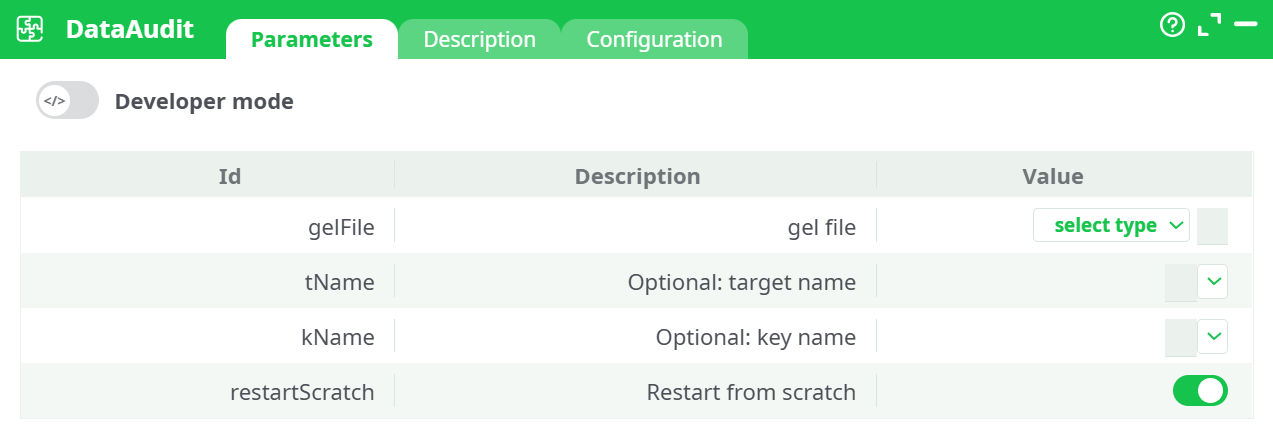
Parameters:
- gel file
- Optional: target name
- Optional: key name
- Restart from scratch
¶ Description tab
See dedicated page for more information.
¶ Configuration tab
See dedicated page for more information.
¶ About
DataAudit performs a quick, automated data-profiling pass over a dataset stored in a .gel file. It infers types, computes dataset/column statistics, and generates an audit report you can review in the UI or export from the Records panel.
Use it to validate incoming data, understand quality issues before modeling, or to baseline a dataset after ingestion.
¶ Inputs and prerequisites
-
Input format: a valid .gel file containing one or more tables.
-
How to obtain a .gel file:
- Upstream in the pipeline (e.g., writeGel from an input table).
- From Assets if you ship a .gel with the project.
- From the Records of a previous action in the same run.
¶ What DataAudit produces
After a successful run you will see:
-
Dataset-level metrics
Row/column counts, inferred schema, and computed type information. -
Column-level profiling
For each column (subject to type): missing/blank counts, distinct counts and ratios, basic distribution stats (min/max/avg for numeric and date/time), length statistics for text, detected constant columns, and potential anomalies such as low-cardinality IDs or high null density. -
Artifacts in Records
Audit outputs (e.g., typed schema and human-readable report files) appear in the Records panel and can be downloaded.
¶ Quick start (operator checklist)
-
Place or generate a .gel upstream.
-
Open DataAudit and set gelFile to the desired source:
- Assets if bundled, or
- recorded data → choose the .gel produced earlier in the flow.
-
(Optional) Set tName to the table you want to profile and kName to a primary-key column for duplicate checks.
-
Keep restartScratch enabled while iterating.
-
Run the action.
-
Review:
- Log for execution details,
- Data for summary metrics,
- Records to download the audit report artifacts.
¶ Operational guidance & best practices
-
Scope the audit
If the .gel contains multiple tables, supply tName to focus the run and reduce processing time. -
Provide a key when you can
Setting kName enables stronger checks (uniqueness/duplicates) and adds valuable quality signals. -
Regenerate intentionally
Disable restartScratch when you want to reuse previous intermediates in longer pipelines; enable it during development or when inputs changed. -
Large datasets
Keep the audit close to the ingestion step. Consider sampling upstream if you only need a quick health check. -
Make it repeatable
Store canonical .gel snapshots under Assets for deterministic audits in CI or promoted environments.
¶ Troubleshooting
-
“.gel header is corrupted”
The file path resolves, but the content is not a valid .gel. Regenerate the .gel upstream and verify you selected the correct source (Assets vs. recorded data). -
No metrics or empty output
Confirm tName matches a table in the .gel. If left blank with multi-table files, ensure at least one table exists. -
Duplicate/uniqueness checks missing
Provide kName so the auditor can run primary-key validations. -
Stale results
Enable restartScratch to force recomputation after input changes.
¶ Security & governance
-
PII awareness
Audit results can surface value samples and distribution hints. Avoid exporting or sharing reports that include sensitive information; anonymize upstream when needed. -
Reproducibility
Keep .gel sources versioned (Assets or artifact storage) so audits are traceable to exact snapshots.
Use DataAudit anywhere you need a fast, reliable picture of data health. Point it at a valid .gel, optionally specify the table and key, run, and review the generated audit outputs from the UI.