¶ Description
Download data from LinkedIn.
¶ Parameters
¶ Standard Tab
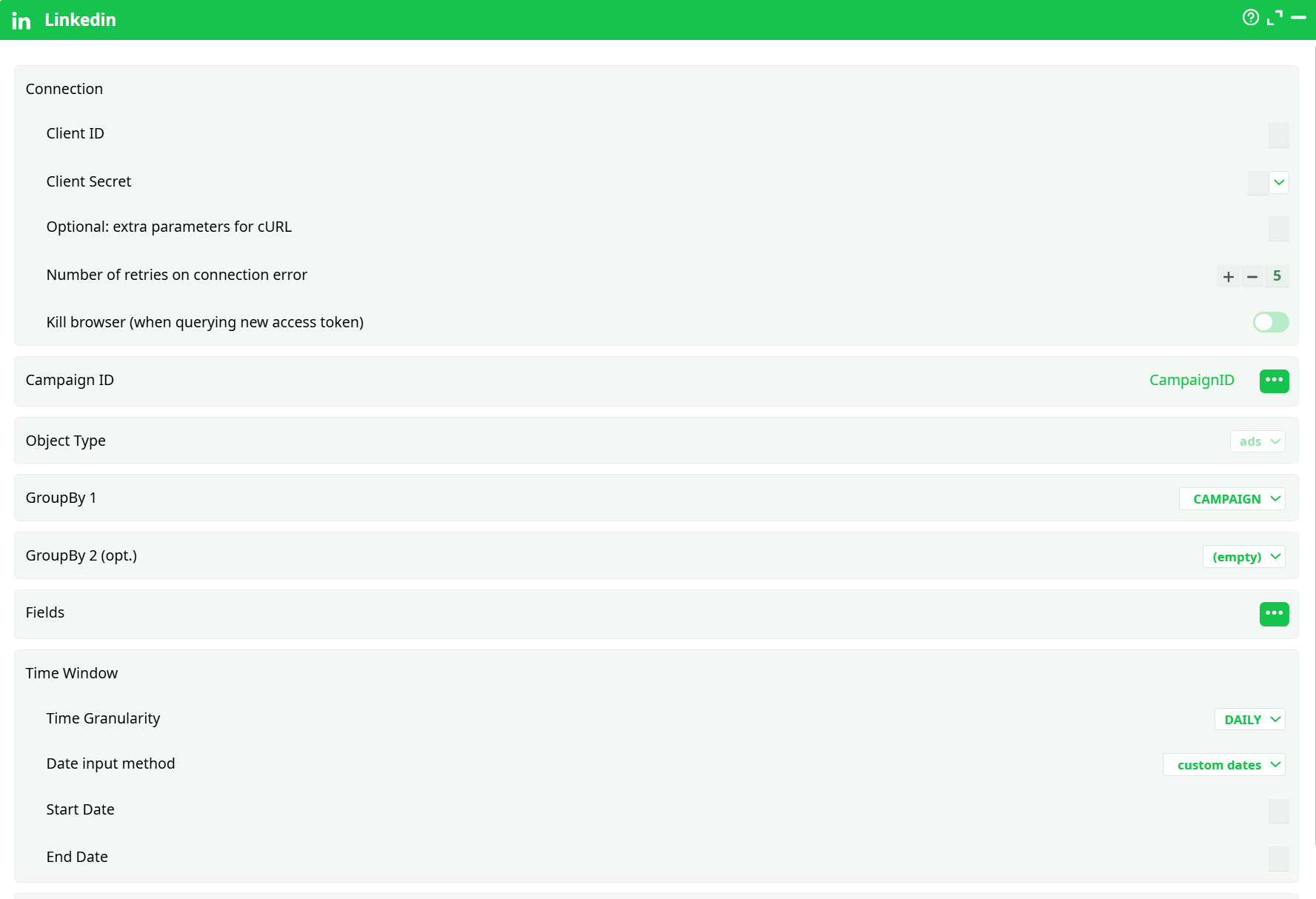
Parameters:
- Connection
- Client ID
- Client Secret
- Optional: extra parameters for cURL
- Number of retries on connection error
- Kill browser (when querying new access token)
- Campaign ID
- Object Type
- GroupBy 1
- GroupBy 2 (opt.)
- Fields
- Time window
- Time Granularity
- Date Input method
- Start Date
- End Date
- Custom Query Parameters
¶ About
The Linkedin action pulls performance data from the LinkedIn Marketing APIs (Ad Analytics). It’s designed for media reporting and optimization pipelines where you already know which campaigns (or other ad entities) you want to analyze, and you need a structured dataset with metrics over a defined time window.
Key characteristics:
- Entity-centric: You identify what to report on (campaigns, accounts, creatives, etc.) via the GroupBy settings and an input Campaign ID (or other entity URN/ID depending on your selection).
- Analytics focus: The Fields you select are metrics and attributes exposed by LinkedIn’s ad analytics endpoints (impressions, clicks, spend, conversions, lead metrics, and similar).
- Time slicing: Time Granularity controls whether rows are daily, monthly, yearly, or aggregated (“ALL”), with a strict Start/End window and predictable UTC behavior.
- Auth once, reuse safely: It uses your Client ID and Client Secret to complete OAuth, then caches tokens. The Kill browser toggle helps recover a stuck auth pop-up in headless environments.
- Resilient by design: Connection retry handling is built in. For difficult networks or strict TLS proxies, extra cURL parameters give you fine control.
Prerequisites you (or your admin) should already have:
- A LinkedIn Developer application with Marketing API access.
- Approved permissions/scopes appropriate for Ads Reporting (commonly includes r_ads and r_ads_reporting for the advertiser accounts you will query).
- Access to the ad accounts / campaigns you intend to report on.
¶ Setup — Step by Step
¶ 1) Connection
Client ID
Paste the OAuth client identifier from your LinkedIn app. This must match the application that has Ads Reporting access.
Client Secret
Paste the client secret for the same LinkedIn app. Treat this as sensitive—prefer storing it in your platform’s Secrets and referencing it here (rather than hardcoding).
Optional: extra parameters for cURL
Use only if you need to alter the underlying HTTP behavior. Typical use cases are corporate proxies, strict TLS constraints, or advanced timeouts. Leave empty unless instructed by your network/security team.
Number of retries on connection error
How many times to automatically retry on transient network failures (connection reset, DNS hiccups, etc.). The default is usually fine; increase modestly on unstable links.
Kill browser (when querying new access token)
If the embedded OAuth/browser flow becomes stuck, enable this switch for one run to force-close the embedded browser and re-initiate login. Turn it off again after recovery.
¶ 2) What to Retrieve
Campaign ID
Map a column (from an upstream action) that contains the campaign identifier expected by LinkedIn. The selector lets you:
- Choose a column from the input pin (recommended), or
- Enter a manual column name if you built it earlier in the flow.
Object Type
Select the dataset family. In LinkedIn Ads reporting, this commonly remains set to ads and determines that you are querying the Ad Analytics endpoint.
GroupBy 1
Primary breakdown dimension. This determines how your rows are grouped. Typical choices include:
- ACCOUNT (ad account level)
- CAMPAIGN_GROUP (campaign group)
- CAMPAIGN (campaign)
- CREATIVE (creative/ad)
- Additional audience or geography facets such as MEMBER_INDUSTRY, MEMBER_COUNTRY_V2, SERVING_LOCATION, etc.
GroupBy 2 (opt.)
Secondary breakdown dimension (nested within GroupBy 1). Use only if you actually need a two-level breakdown; each additional dimension multiplies row counts and can affect rate limits.
Fields
Select the metrics/attributes to fetch. Choose only what you need to keep responses small and fast. The available set depends on LinkedIn’s API and your groupings. If a combination is invalid, the API will respond with an error; reduce metrics or adjust groupings in that case.
¶ 3) Time Window
Time Granularity
- DAILY – one row per day per grouping key.
- MONTHLY – one row per month per grouping key.
- YEARLY – one row per year per grouping key.
- ALL – aggregates the whole requested window into a single row per grouping key.
Date input method
How you define the window:
- custom dates – specify explicit Start Date and End Date.
- last x days / months / years – rolling windows relative to “now”.
Start Date / End Date
Applicable when using custom dates. Use the pickers or map columns. Ensure Start ≤ End and that the window respects LinkedIn’s reporting constraints. Time zone is treated as UTC by the API.
¶ 4) Advanced Controls
Custom Query Parameters
Optional raw key=value pairs (ampersand-delimited) appended to the request. Use only when you have a specific LinkedIn parameter not surfaced by the UI. Keep this field empty unless you are certain of the parameter names and values required by the API.
¶ Execution Order (recommended)
- Provide IDs upstream (CSV, database, or another action) so Campaign ID can be column-mapped.
- Complete Connection (Client ID/Secret).
- Pick Object Type (typically ads).
- Choose GroupBy 1 (and GroupBy 2 if needed).
- Select Fields (only what you need).
- Define Time Window (granularity + date method + dates).
- Run the action.
- Check the log: first run may open OAuth; a successful request shows HTTP 200 responses and produces a table of metrics.
¶ Permissions & Governance
- Scopes: Your LinkedIn app and user must have the correct scopes for Ads Reporting and the accounts you query. Without them you will see 401/403 errors.
- Account access: Even with the right scopes, the user must be associated with the ad account(s) whose data you request.
- Rate limits: LinkedIn enforces per-app and per-org quotas. Minimize fields, avoid unnecessary dimensions, and keep time windows compact to stay within limits.
- Token lifecycle: Access tokens expire; refresh tokens may eventually require user re-consent. If requests suddenly fail after a long period, re-authorize.
¶ Data Hygiene & Performance Tips
- Keep Fields minimal. Add only the metrics your downstream steps really need.
- Start with a short window (days, not months) to validate. Scale up once the shape is correct.
- Use one GroupBy unless you truly need a second. Each extra dimension inflates the dataset and API cost.
¶ Output
The action returns a tabular dataset where each row corresponds to the selected GroupBy keys and Time Granularity, with your requested Fields as columns. The output is ready to join, aggregate, or export in downstream steps.