¶ Description
Extract Regex position.
¶ Parameters
¶ Parameters tab
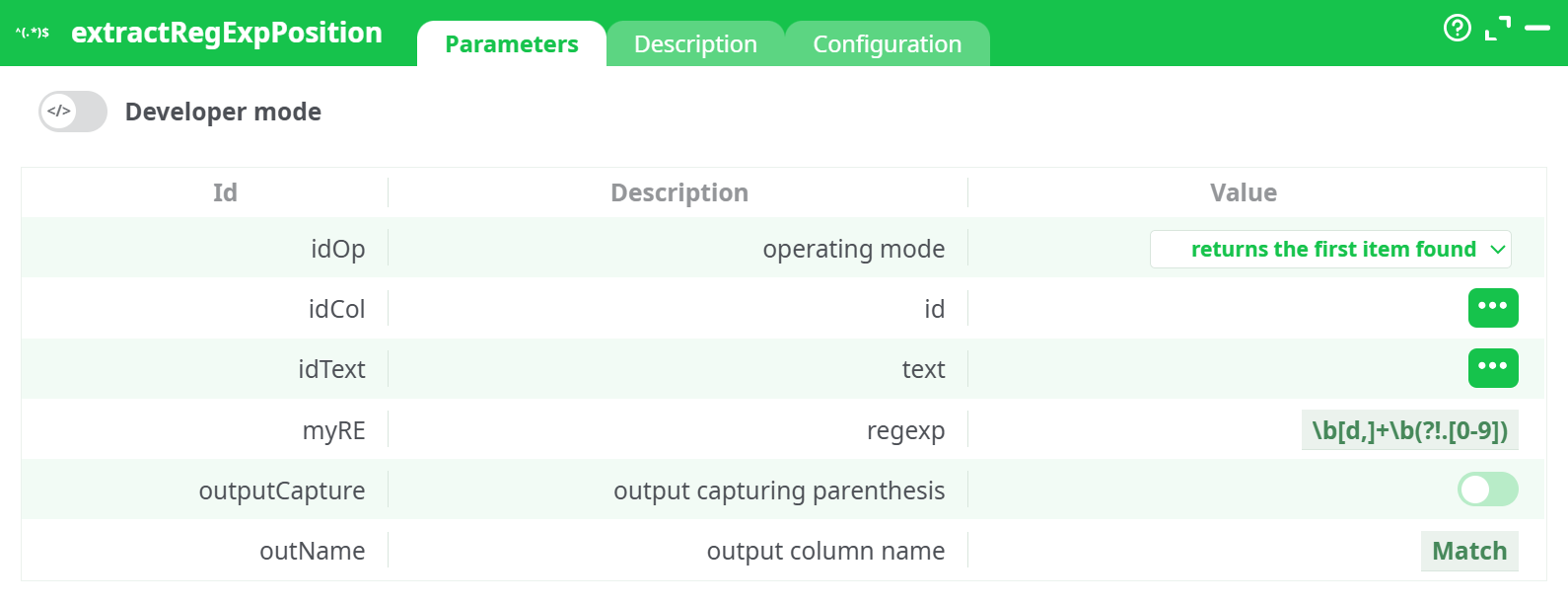
Parameters:
- Developer mode: activate/deactivate code tab.
- operating mode:
- id:
- text:
- regexp:
- output capturing parenthesis:
- output column name:
¶ Description tab
See dedicated page for more information.
¶ Code tab
extractRegExpPosition is a scripted action. Embedded code is accessible and customizable through this tab.
¶ Configuration tab
See dedicated page for more information.
¶ About
The extractRegExpPosition action is used to extract specific patterns from text using regular expressions (regex). This operation is a powerful tool for identifying and isolating structured information embedded within unstructured text, such as invoice numbers, dates, transaction IDs, amounts, or any recurring string patterns.
This action is especially useful in ETL workflows where input data contains messy or irregular strings, and you want to normalize or extract meaningful substrings for further analysis, enrichment, or transformation.
¶ Functionality
This action scans a selected text column in your dataset and applies a regular expression to each row. When a match is found, the specified portion is extracted and returned as a new column. You can configure the action to either return just the first match it finds or to return all matches found within the string.
The extraction logic is driven by a custom regular expression pattern, allowing highly flexible parsing depending on your use case. For example, extracting invoice numbers, numeric amounts, or tagged metadata from email or log content becomes easy and repeatable.
There is also an option to activate capturing groups. When enabled, the action will only return the contents of the parentheses groups inside the regex pattern rather than the entire match. This is particularly helpful when your pattern includes multiple components but you are only interested in one part of the match.
¶ Parameters
You can configure the following:
- The operating mode, which defines whether the output will return just the first match or all matches found.
- The column that contains the text to be processed.
- The regular expression pattern used to search within the text.
- The output column name where the extracted result will be stored.
- Whether to enable capture groups (output capturing parenthesis).
These parameters give you full control over the pattern matching behavior and ensure the extracted data can be easily integrated into downstream processing.
¶ Output
The output of this action is a new column added to the input table (or returned as a new table, depending on pipeline setup), containing the extracted match or matches. If operating in "first item found" mode, each row will have a single matched value. If in "all items found" mode, rows may contain multiple values or repeated entries.
For example, if the regular expression is configured to match digit sequences in the format \b\d+\b and the input text is "Invoice 1234 paid on 2024-06-01", the output will include values like 1234 and 2024.
¶ Use Case Example
Imagine you are processing a table of financial transactions, emails, or scanned invoice text, and you need to extract references like invoice numbers or payment amounts. With extractRegExpPosition, you can configure a pattern to target just the digit blocks or phrases of interest, store them in a new column, and use this clean, structured data for aggregation, validation, or reporting.
Another use case is log file analysis, where you extract timestamps, error codes, or IP addresses from raw log entries to feed into anomaly detection or monitoring dashboards.
This action is highly flexible and can be used as a precursor to filtering, grouping, or joining tables based on extracted information.
¶ Notes
- Regular expressions must be carefully crafted. Incorrect patterns may result in no matches or unintended values.
- When using capture groups, ensure the regular expression contains parentheses to isolate the desired portion of the match.
- For best performance, avoid unnecessarily complex patterns unless required.
- Always test your expression on a sample of the data before applying it at scale.