¶ Description
Use a Data Model in Python code.
¶ Parameters
¶ Parameters tab
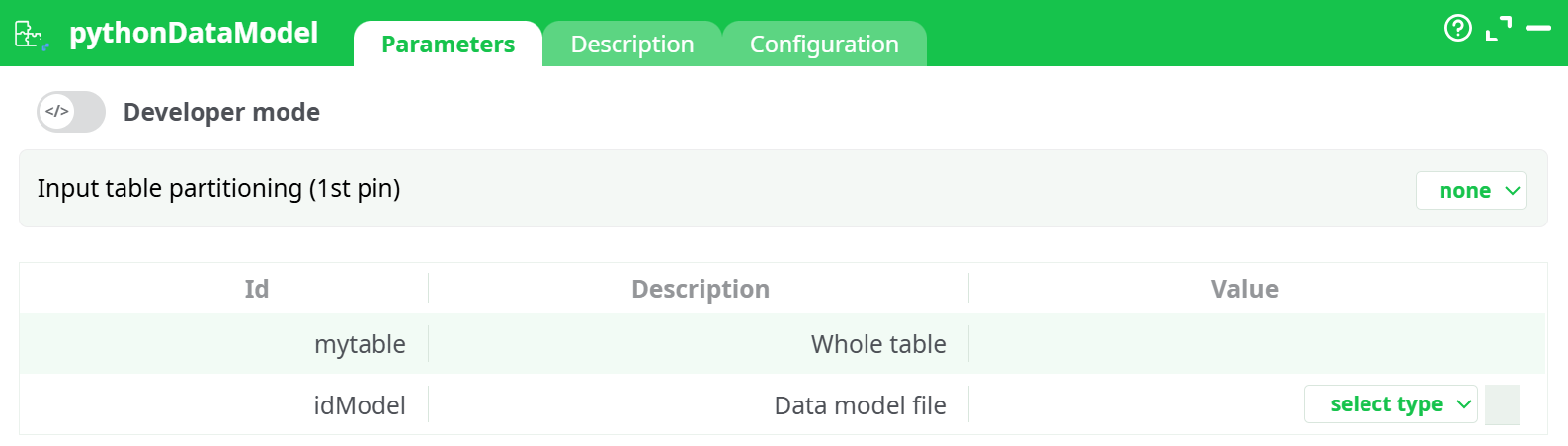
Parameters:
- Developer mode: activate code editor
- Input table partitioning (1st pin) Defines how the incoming dataset is partitioned before being passed to the Python code. Partitioning can improve performance for large datasets or allow processing in smaller logical chunks.
- Data model file
¶ Description tab
See dedicated page for more information.
¶ Code tab
PythonDataModel is a scripted action. Embedded code is accessible and customizable through this tab.
¶ Configuration tab
See dedicated page for more information.
¶ About
The pythonDataModel action button allows you to apply a trained Data Model directly within Python code inside the ETL platform.
This action is intended for advanced users who wish to integrate Python scripts into their data scoring workflows.
It enables complete customization of the model application process while still leveraging the ETL platform’s table handling and pipeline execution capabilities.
Note: Python-based model application is generally slower (approximately 40x) than the native Apply Model action in the Data Mining section. However, it offers greater flexibility and allows you to integrate custom Python logic or libraries for scoring.
¶ Workflow & Execution
When running pythonDataModel, the ETL platform:
- Reads the input dataset from the first pin.
- Loads the specified Data model file into memory.
- Executes the Python script to process the data, applying the model’s prediction or transformation logic.
- Outputs the results as a new table to the next stage in the pipeline.
This process allows integration of any Python-compatible model, including scikit-learn, TensorFlow, XGBoost, or custom-built models.
¶ Output
The output table structure depends on the Python script logic, but typically includes:
- Original input columns – All features passed into the model.
- Prediction/Score columns – Generated by the model for each record.
- Optional metadata columns – Such as confidence scores, processing time, or model version.
¶ Example Use Case
You have a Random Forest Classifier trained in scikit-learn and save. Using pythonDataModel, you can:
- Load the file from the parameter selection.
- Pass incoming data features to the model.
- Append prediction results to the dataset for further ETL processing or reporting.
¶ Notes
- Ensure that your Python code includes proper error handling to avoid pipeline interruptions.
- The model file must be compatible with the Python version selected in the Configuration tab.
- For large datasets, consider enabling parallel execution and optimizing partitioning.