¶ Description
Send Emails using Gmail.
¶ Parameters
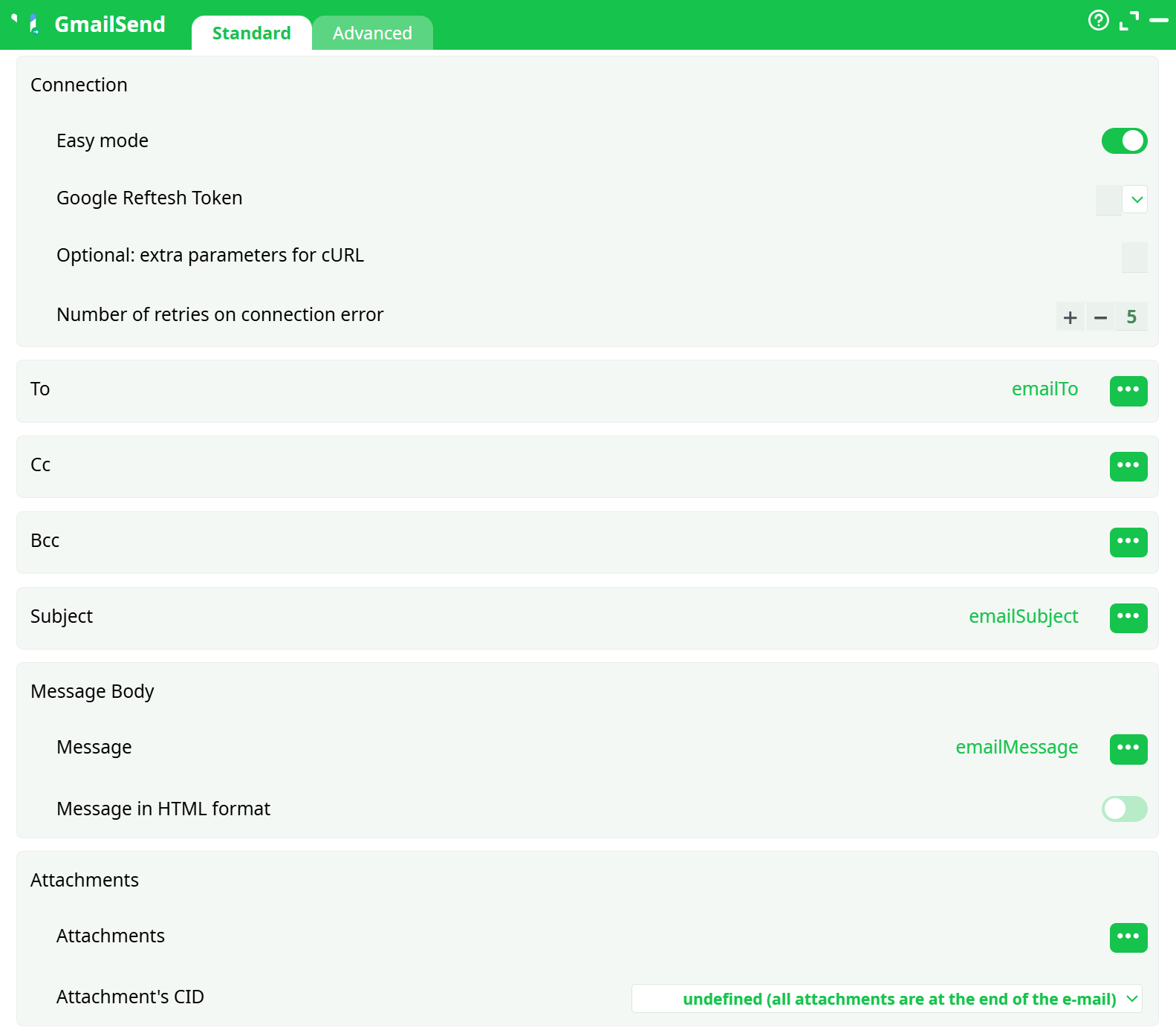
¶ Standard Tab
¶ Advanced Tab

¶ About
GmailSend is an Output box that sends one email per input row through the Gmail API (OAuth 2.0). It converts each row into a MIME message with optional Cc, Bcc, and file attachments, then delivers it from the authenticated Gmail/Google Workspace account.
¶ How the box works (deep dive)
-
Authentication: Uses OAuth 2.0 Refresh Token to request a short-lived Access Token at runtime.
- With Easy mode = ON, the box expects a refresh token minted with the vendor’s built-in Google client.
- With Easy mode = OFF, you supply your own Google OAuth client (
client_id,client_secret) and a refresh token minted with that same client.
-
Row → Email mapping: Each row must provide
emailTo,emailSubject,emailMessage(plain-text or HTML). Optional columns add CC/BCC/attachments. -
Delivery: The box calls Gmail’s
/users/me/messages/sendusing the access token. Gmail enforces size ≤ 25 MB per message (after MIME encoding) and daily send quotas (vary by account type). -
Idempotence: The box doesn’t deduplicate—to avoid duplicates, control your input rows or use pre-send checks upstream.
-
Failures: Per-run behavior is controlled by Advanced → Error Management. In “abort on error,” the pipeline stops on the first failed send.
¶ Prerequisites
- Google Cloud project with Gmail API enabled.
- OAuth Consent Screen configured (External with your address as a Test user, or Internal for Workspace).
- OAuth client (Web application) and Refresh Token (see step-by-step below).
- Network access to
oauth2.googleapis.comand Gmail API endpoints. - Sender Gmail/Workspace account allowed to send mail (quota not exceeded).
¶ Credential Setup (Gmail API OAuth 2.0) — step by step
Goal: obtain a Refresh Token and (if Easy mode = OFF) pair it with your Client ID/Secret.
A) Create/Select a project & enable the API
- Open Google Cloud Console → select or create a project.
- APIs & Services → Library → enable Gmail API.
B) Configure the consent screen
- APIs & Services → OAuth consent screen.
- Choose External (add your Gmail as a Test user) or Internal (Workspace only).
- Add scope:
https://www.googleapis.com/auth/gmail.send. Save.
C) Create OAuth client (Web application)
- APIs & Services → Credentials → Create credentials → OAuth client ID.
- Application type: Web application.
- Authorized redirect URI: add
https://developers.google.com/oauthplayground. - Save and copy Client ID and Client Secret.
D) Mint a Refresh Token (OAuth 2.0 Playground)
-
Open
https://developers.google.com/oauthplayground. Click the gear:- Use your own OAuth credentials → paste your Client ID/Secret
- Access type:
offline, Force prompt:consent
-
In Step 1, select scope:
https://www.googleapis.com/auth/gmail.send→ Authorize APIs → Allow. -
Exchange authorization code for tokens → copy the Refresh Token.
-
(Optional) Verify the trio works:
curl -s https://oauth2.googleapis.com/token \ -d client_id="<CLIENT_ID>" \ -d client_secret="<CLIENT_SECRET>" \ -d refresh_token="1//<REFRESH_TOKEN>" \ -d grant_type=refresh_tokenExpected: JSON with
access_tokenand scopegmail.send.
E) Store credentials in the platform
-
Create secrets:
gmail_client_id=<CLIENT_ID>gmail_client_secret=<CLIENT_SECRET>gmail_refresh_token=1//<REFRESH_TOKEN>
-
Reference them in GmailSend (see Parameters).
Important interdependency
- Easy mode = ON → refresh token must be minted with the vendor client (use the vendor’s “Get Google Refresh Token” helper if available).
- Easy mode = OFF → you must supply Client ID, Client Secret, Refresh Token minted with that same client (this is the configuration validated in our run).
¶ Input Requirements
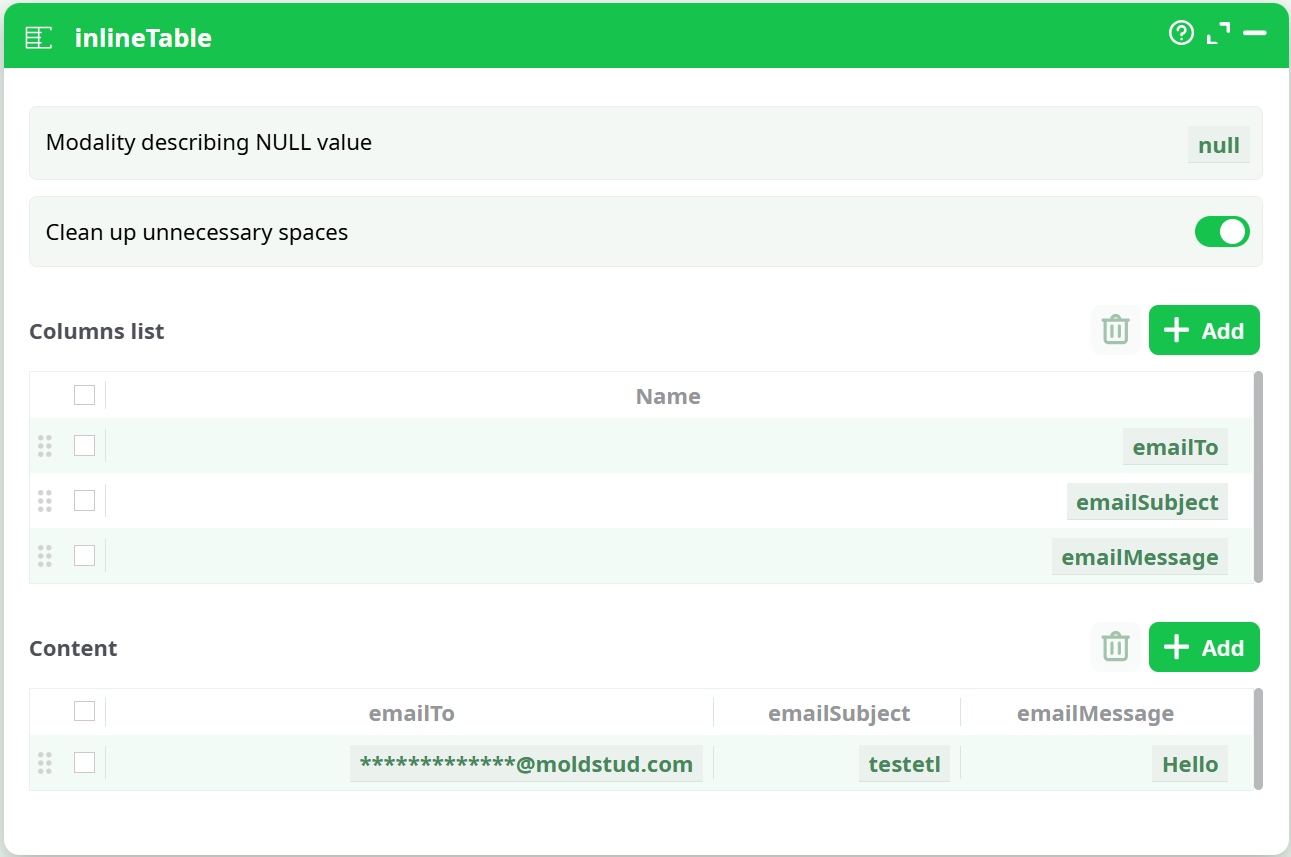
Provide a dataset with at least these columns (CSV, DB, or InlineTable). Minimum: emailTo, emailSubject, emailMessage.
| Column | Type | Required | Notes |
|---|---|---|---|
emailTo |
string | ✅ | One or more recipients; separate with commas ,. |
emailSubject |
string | ✅ | Keep concise (≤ 150 chars recommended). |
emailMessage |
string | ✅ | Plain-text or HTML (enable “Message in HTML format” if HTML). For CSV, quote multi-line values and allow CR/LF in quoted fields. |
emailCc |
string | Optional comma-separated list. | |
emailBcc |
string | Optional comma-separated list. | |
emailAttachments |
string | Absolute file path(s). For multiple, use ; consistently (or your platform’s configured separator). Keep total message size < 25 MB. |
|
attachmentCID |
string | For inline images (HTML mode). Provide a CID per row and reference it via <img src="cid:..."> in HTML. |
CSV reader safe defaults: UTF-8, delimiter ,, header row ON, text qualifier ", Allow CR/LF in quoted fields ON.
¶ Parameters
The table shows all relevant settings. Values in bold reflect the configuration that succeeded in our validation run.
| Name | Type | Required | Default | Description |
|---|---|---|---|---|
| Easy mode | Boolean | ✅ | ON | OFF to use your own OAuth client and token (used in our run). |
| Client ID | String/Secret | if Easy=OFF | — | Your Google Web application client ID. |
| Client Secret | Secret | if Easy=OFF | — | Secret paired with the client. |
| Google Refresh Token | Secret | ✅ | — | Refresh token minted with the same client used at runtime. |
| Optional: extra parameters for cURL | String | (empty) | Additional cURL flags (e.g., --connect-timeout 20). |
|
| Number of retries on connection error | Integer | 5 |
Retries for transient networking issues. | |
| To | Column selector | ✅ | — | Map to emailTo. Comma-separated recipients allowed. |
| Cc | Column selector | — | Map to emailCc. |
|
| Bcc | Column selector | — | Map to emailBcc. |
|
| Subject | Column selector | ✅ | — | Map to emailSubject. |
| Message | Column selector | ✅ | — | Map to emailMessage. |
| Message in HTML format | Boolean | OFF |
Turn ON if body is HTML. |
|
| Attachments → Attachments | Column selector | — | Map to emailAttachments; absolute paths. |
|
| Attachments → Placement | Enum | end of e-mail |
Leave default unless you need inline MIME parts. | |
| Attachments → Attachment’s CID | Column selector | — | Required for inline images with HTML bodies. | |
| Advanced → Error Management | Enum | ✅ | abort pipeline execution with error |
Stop pipeline on first failure or continue with status ERROR. |
| Advanced → Write all rows | Boolean | ✅ | ON |
Sends one email per input row. |
Interdependency rules
- If Easy mode = ON, token must be minted by the vendor client; otherwise Unauthorized at token exchange.
- If Easy mode = OFF,
Client ID,Client Secret,Refresh Tokenmust be a matched trio minted together. - For HTML + inline images: Attachment’s CID is used only when Message in HTML = ON and the HTML references
cid:URLs.
¶ Output
This is a side-effect writer; it does not create a dataset. Validate by:
- Successful pipeline status and logs (no token or HTTP errors).
- Emails present in recipient Inbox and sender’s Sent mailbox.
- For N input rows, expect N send attempts.
¶ Example Workflow (step-by-step)
-
Prepare input
Use an InlineTable for a smoke test:emailTo | emailSubject | emailMessage **********@moldstud.com | testetl | Hello -
Create credentials
Follow Credential Setup above → storegmail_client_id,gmail_client_secret,gmail_refresh_token. -
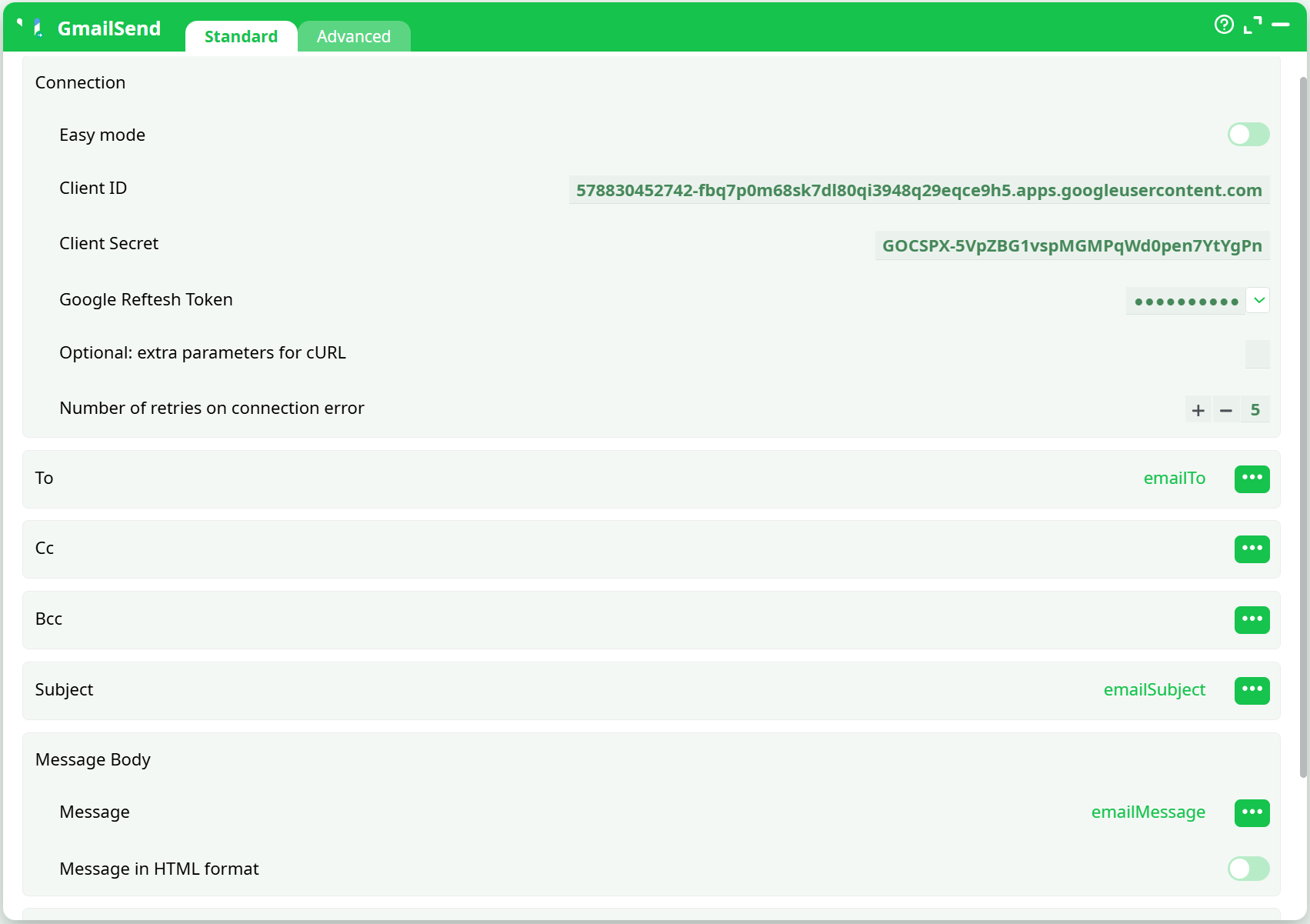
Configure GmailSend
- Easy mode = OFF
- Client ID =
${gmail_client_id} - Client Secret =
${gmail_client_secret} - Google Refresh Token =
${gmail_refresh_token} - Map To/Subject/Message to corresponding columns.
- Retries = 5, HTML mode = OFF (for plain text).
-
Advanced
- Error Management =
abort pipeline execution with error - **Write all rows = ON`
- Error Management =
-
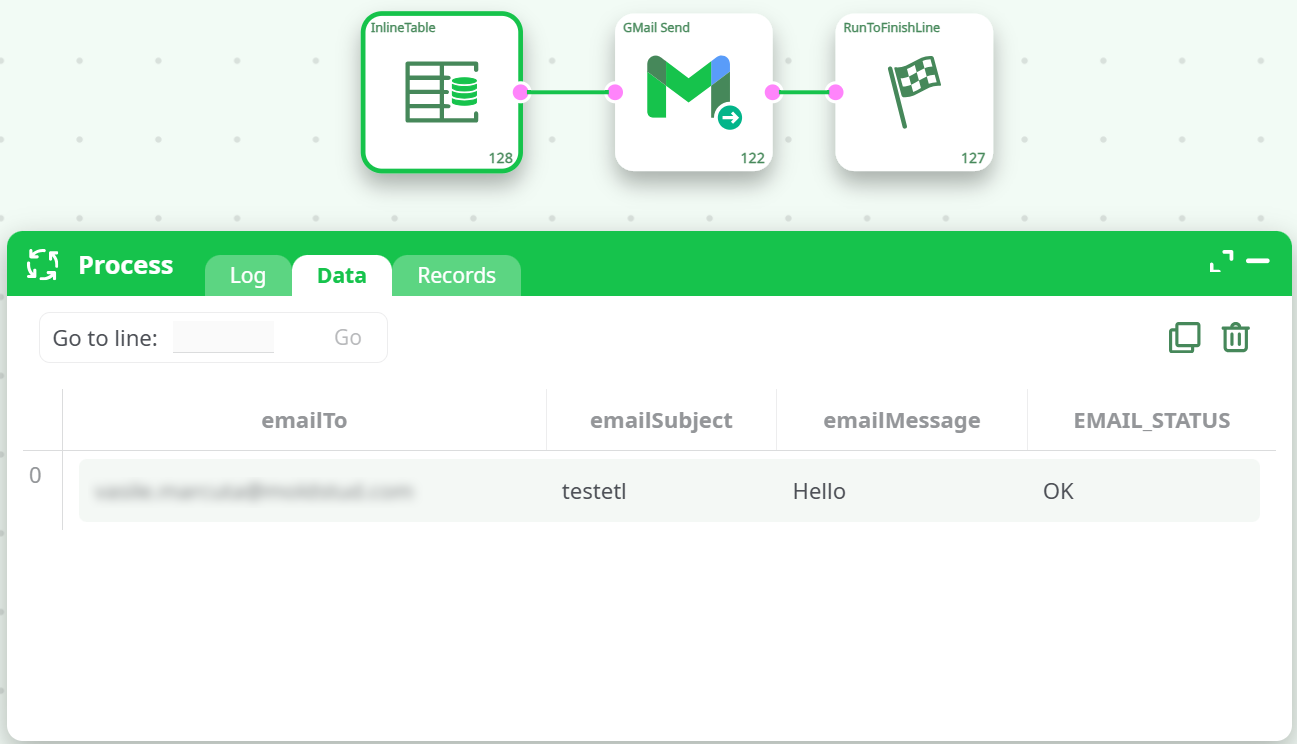
Run & validate
- Expect Pipeline execution was successful.
- Confirm email in Inbox and Sent.
¶ Troubleshooting
| Symptom / Log | Cause | Fix |
|---|---|---|
| Error 400: redirect_uri_mismatch (during OAuth) | OAuth client is not Web, or Playground redirect not allowed | Create Web application client and add https://developers.google.com/oauthplayground to Authorized redirect URIs; re-mint token. |
| ERROR: Error get access token – Unauthorized | Client/token mismatch or wrong secret | If Easy=OFF, ensure the same client_id/client_secret that minted the refresh token are configured. If Easy=ON, mint the token via the vendor helper. |
invalid_grant |
Revoked/expired refresh token or consent not forced | Remove the app at myaccount.google.com/permissions, then re-authorize in Playground with offline + consent. |
insufficientPermissions |
Wrong scope | Re-mint token with https://www.googleapis.com/auth/gmail.send. |
| CSV warning “column number … 5 instead of 6” | Multi-line body not quoted or CR/LF not allowed | Quote the message field and enable “Allow CR/LF in quoted fields” in your CSV reader. |
| Email sent but not received | Spam filtering, BCC-only, or quota | Check Spam/All Mail; include a visible “To” recipient; respect Gmail quotas. |
| Attachments missing | Wrong path or > 25 MB | Use absolute paths; verify file exists and total MIME size < 25 MB. |
| HTML not rendered | HTML mode is OFF or invalid markup | Turn Message in HTML format = ON and ensure valid HTML; use CID for inline images. |
¶ Use Cases
- Automated notifications from pipelines (success/failure alerts).
- Distribution of daily/weekly reports with attachments.
- Targeted stakeholder updates from filtered datasets.
- Programmatic transactional messages (within Gmail policy and quotas).
¶ Screenshots

¶ Security & Best Practices
- Store all secrets in the platform’s vault; never commit them to version control.
- Rotate Client Secret if exposed; regenerate a refresh token afterward.
- Keep sends within Gmail/Workspace quotas; back-off on
429/403rate-limit responses. - Log only non-sensitive metadata (e.g., counts, recipient domains).