¶ Description
Upload files in a Google Cloud storage bucket.
¶ Parameters
¶ Parameters tab
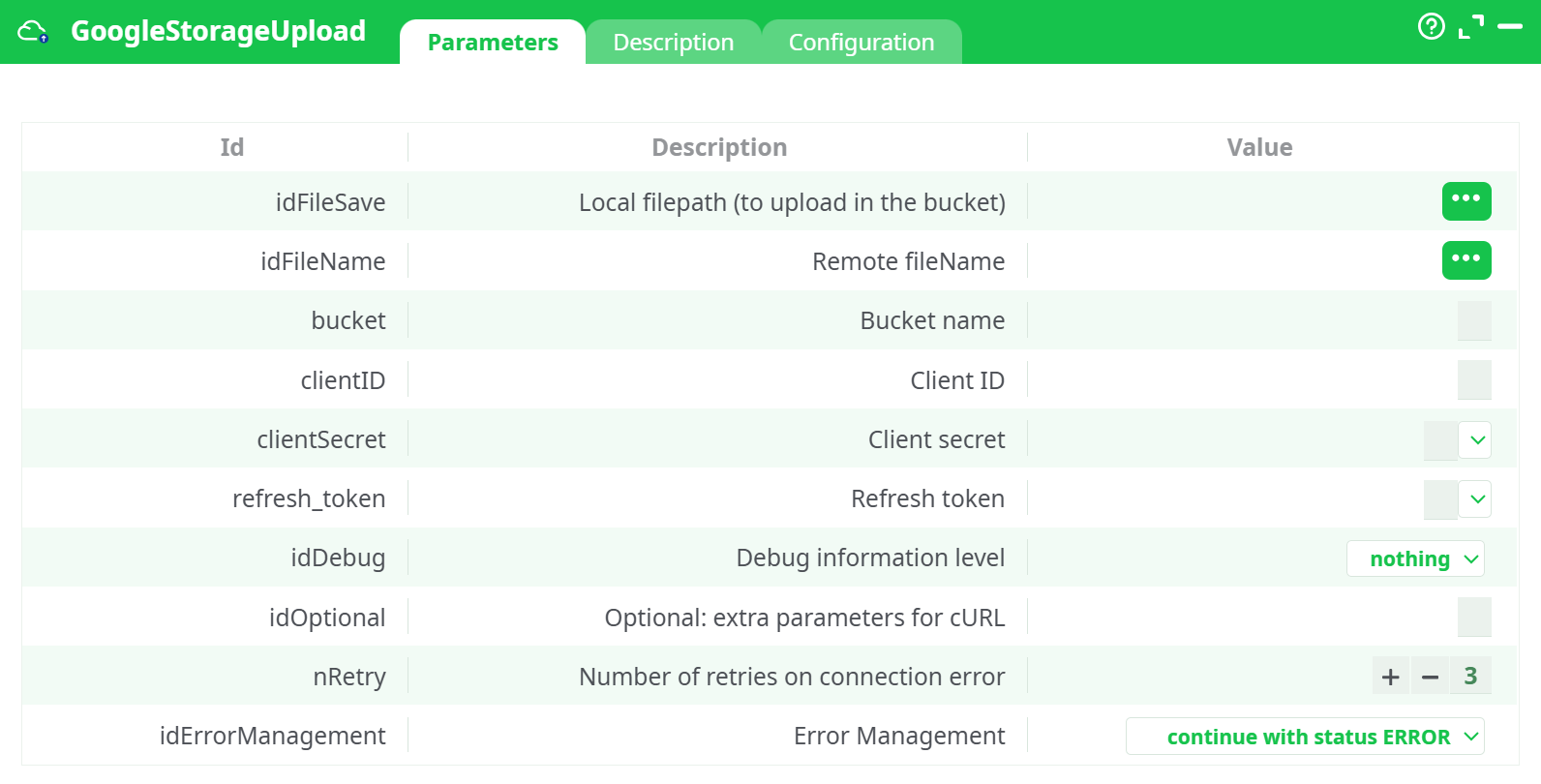
Parameters:
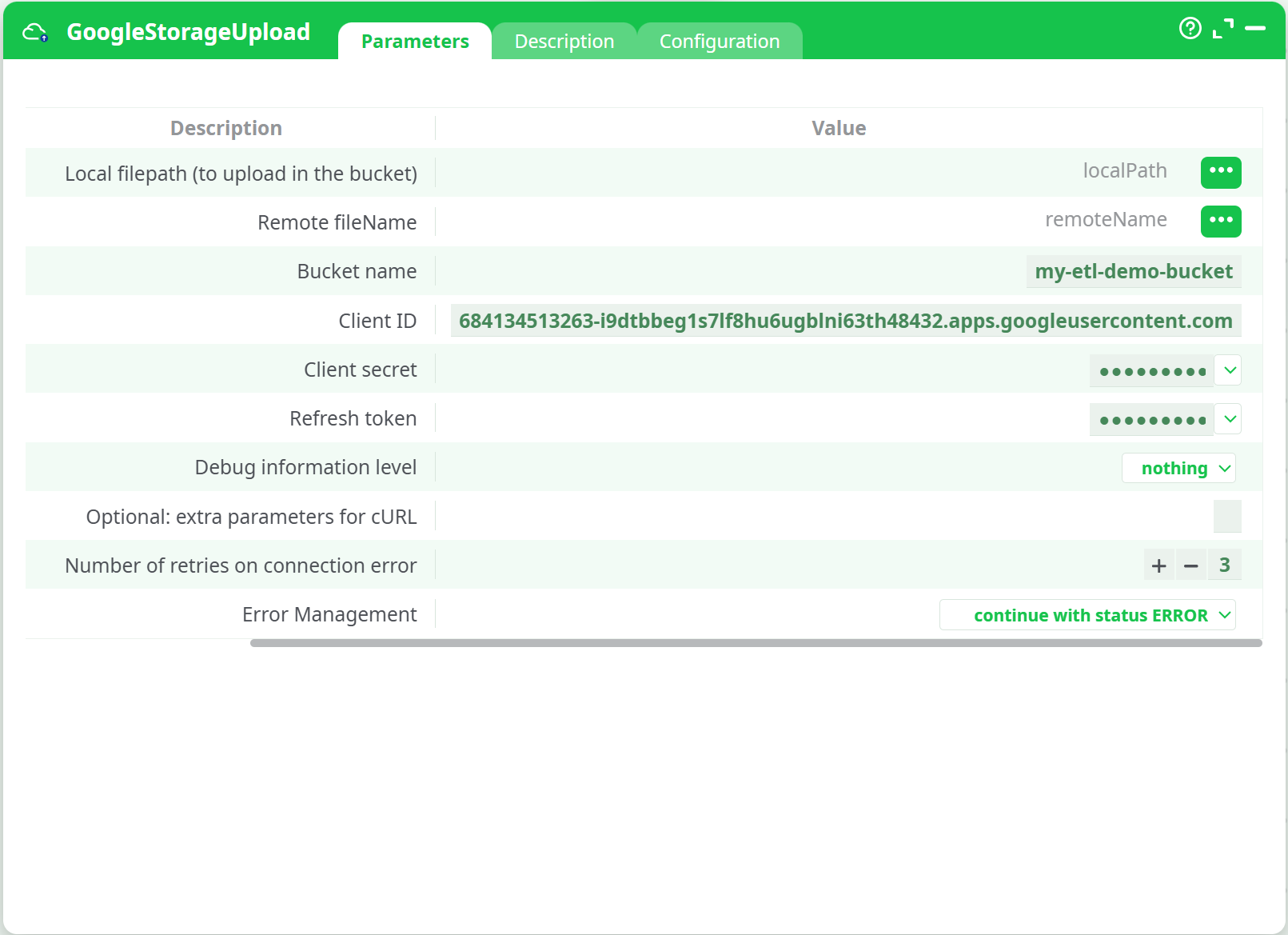
- Local filepath (to upload in the bucket) File on the ETL runner to send to GCS. Must exist at runtime.
- Remote filename Target path/name within the bucket. Prefixes behave like folders.
- Bucket name Destination GCS bucket. Must already exist and be accessible by the credentials.
- Cient ID OAuth2 client identifier.
- Client secret OAuth2 client secret. Store via the platform’s secret store.
- Refresh token OAuth2 refresh token with offline access to Cloud Storage.
- Debug information level Verbosity for HTTP/cURL logs:
nothing,basic,verbose. - Optional: extra parameters for cURL Appended to the underlying cURL command if custom networking flags are needed.
- Number of retries on connection error Retry attempts on transient failures.
- Error management Choose whether the pipeline fails or continues when an error occurs.
¶ Description tab
See dedicated page for more information.
¶ Configuration tab
See dedicated page for more information.
¶ About
GoogleStorageUpload uploads a local file from the ETL runtime to a Google Cloud Storage (GCS) bucket.
It performs a direct, byte-for-byte upload and can place the object under any prefix (folder) you specify inside the bucket.
Cloud setup note: If you need help creating OAuth credentials, getting a refresh token, and granting bucket permissions, see the platform documentation for the action button GoogleStorageListFiles (it contains the complete Google Cloud setup guide used by all GCS actions).
¶ Input
- Local file path – absolute or runtime-relative path to a file accessible by the ETL runner
(e.g.,sources/@shared/test.csv). - Remote object name – object key (path inside the bucket), e.g.,
uploads/test.csv. - Bucket name – existing GCS bucket, e.g.,
my-etl-demo-bucket. - OAuth2 credentials – Client ID, Client Secret, Refresh Token with access to the Cloud Storage JSON API.
Accepted formats:
- File types: any (
.csv,.json,.parquet,.png, etc.) — uploaded as-is. - Paths: POSIX/Windows supported by the runner. For shared locations use your platform’s conventions (e.g.,
sources/@shared/...).
¶ Output
- Object in GCS at
gs://<bucket>/<remoteName>(e.g.,gs://my-etl-demo-bucket/uploads/test.csv). - Run log with success status and retry information (visible in the ETL UI).
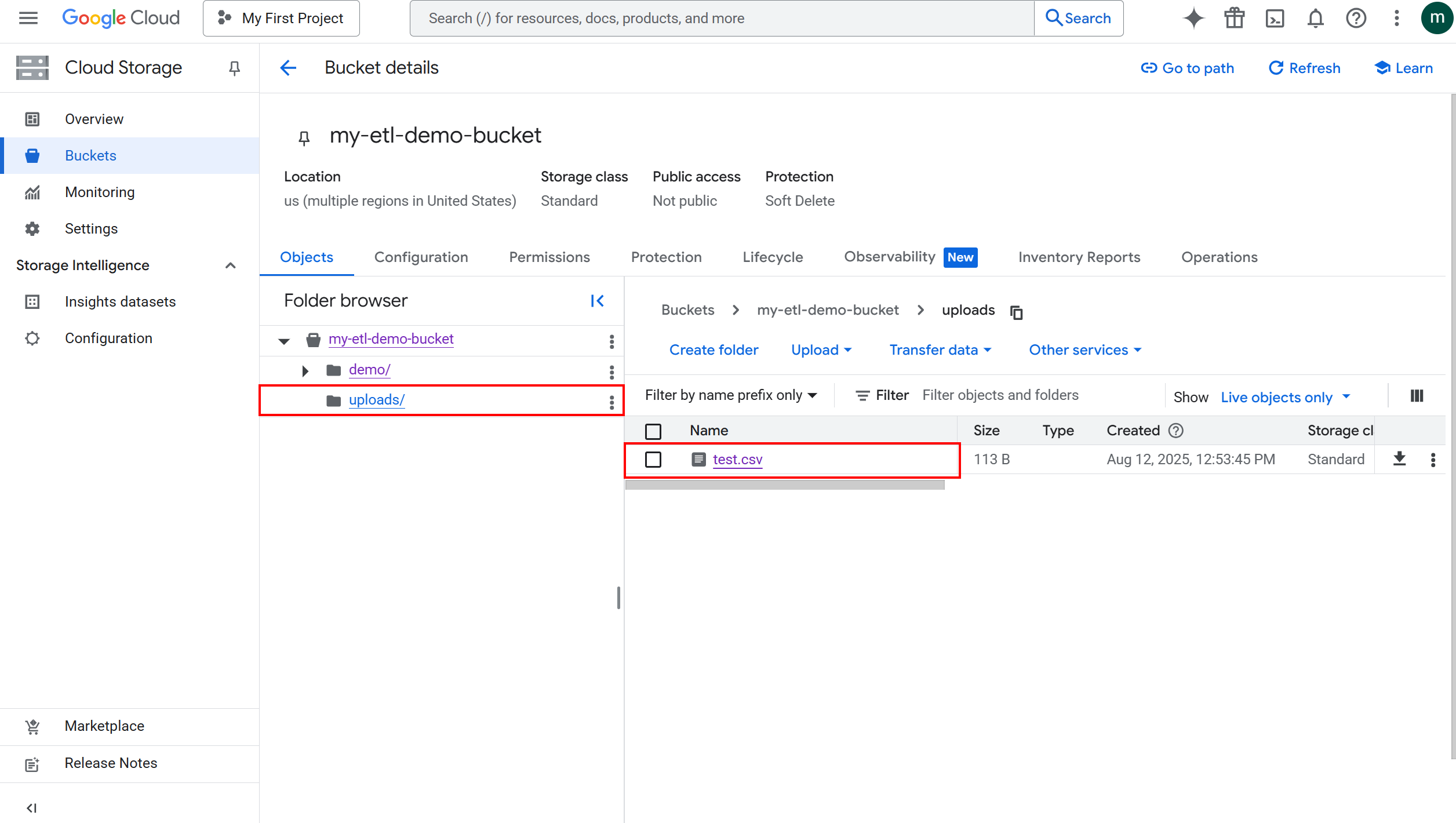
Where to verify:
- Google Cloud Console → Storage → Buckets → your bucket → prefix
¶ How to Run
-
Prepare the file
Ensure the file exists on the runner (e.g., puttest.csvinsources/@shared/).
Screenshot placeholder: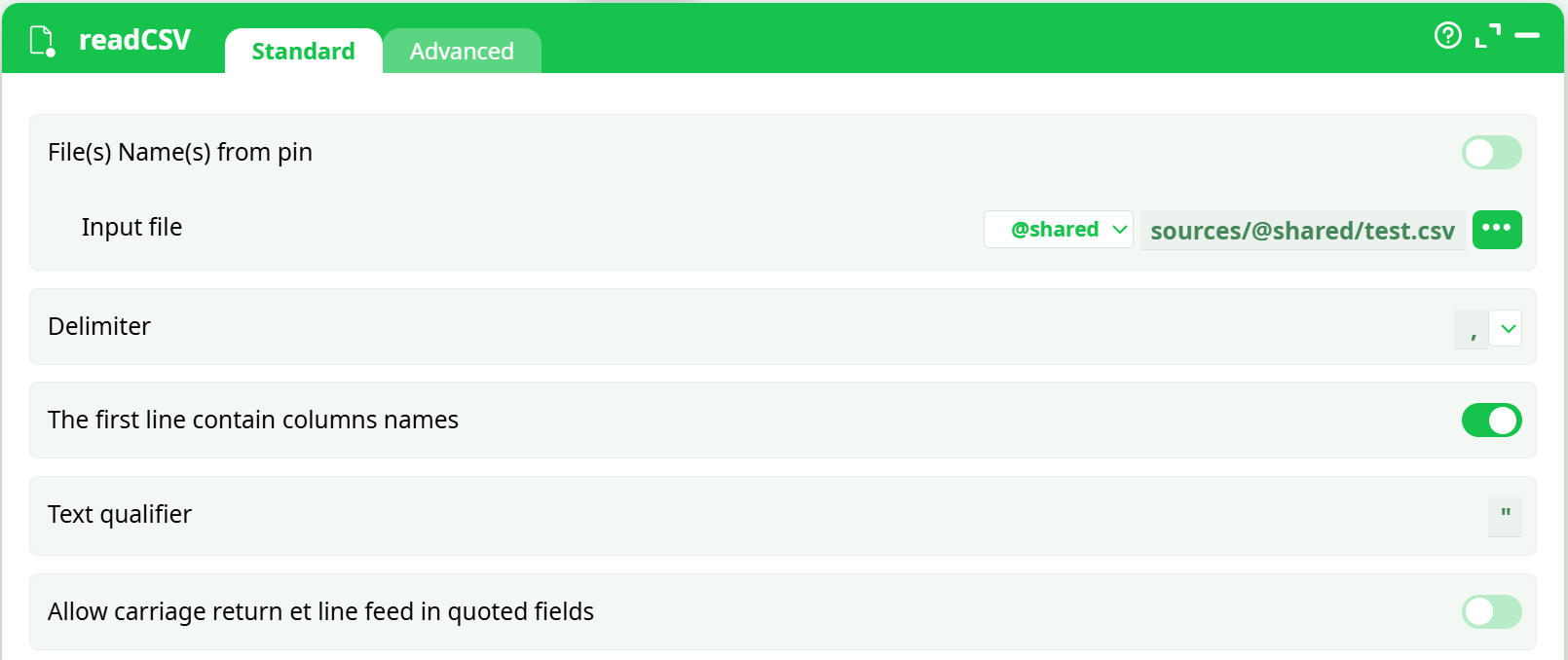 -
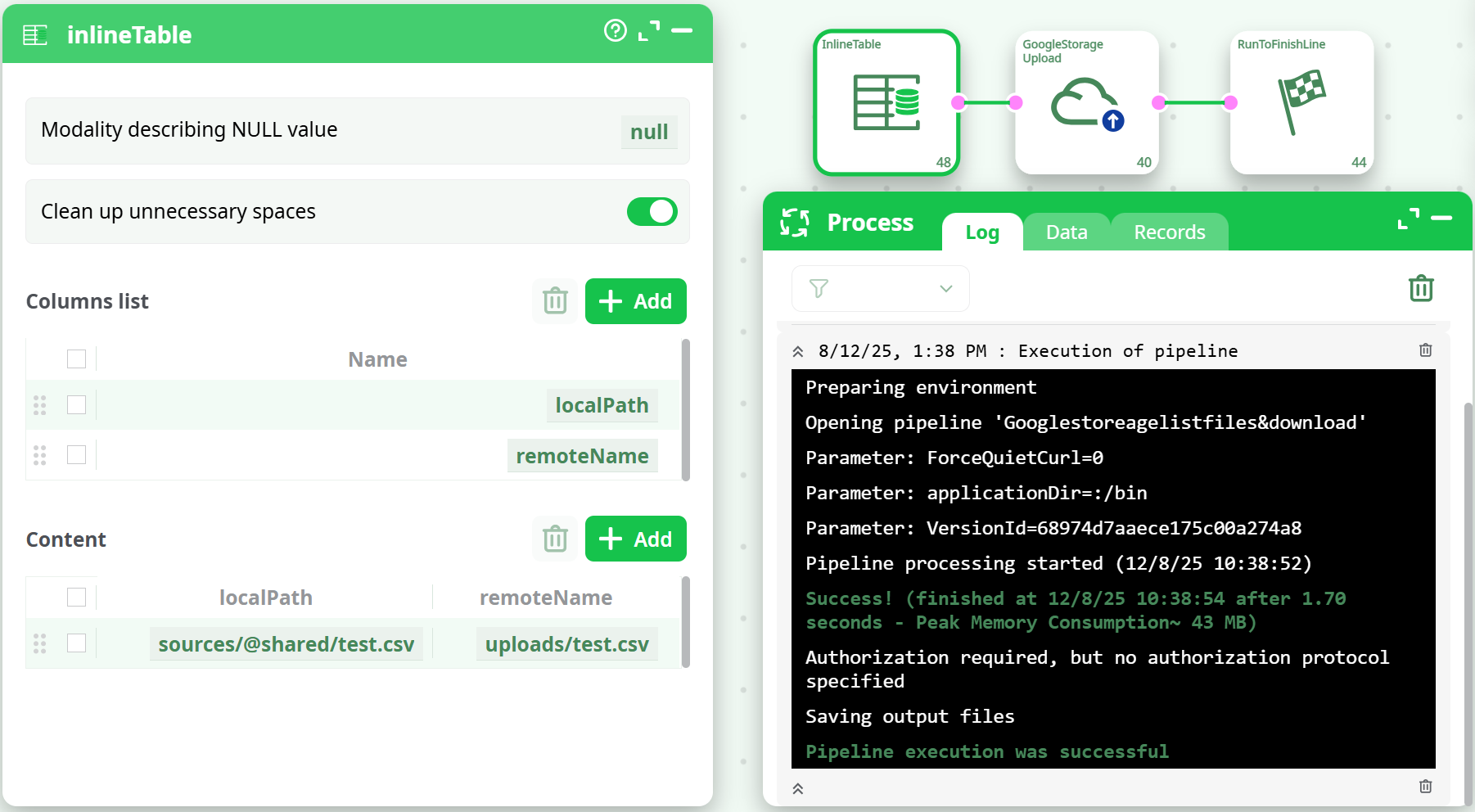
Build the pipeline
Place InlineTable (or any upstream node) → GoogleStorageUpload → RunToFinishLine.
-
Configure parameters
- Map Local filepath to the
localPathcolumn or paste a path. - Map Remote fileName to
remoteName(e.g.,uploads/test.csv). - Set Bucket name to
my-etl-demo-bucket. - Provide Client ID, Client secret, Refresh token.
- Optionally set Retries (e.g.,
3) and Error Management.
- Map Local filepath to the
-
Run the pipeline
Execute the process and check the log for a success message. -
Verify in GCS
Open the bucket and confirm the object appears under the chosen prefix.
¶ Example
Upstream input (from InlineTable)
| localPath | remoteName |
|---|---|
sources/@shared/test.csv |
uploads/test.csv |
Result
- New object at
gs://my-etl-demo-bucket/uploads/test.csvwith a timestamp and size in the GCS console.
¶ Use Cases
- Publish ETL outputs (CSV reports, images, models) to a central cloud location for downstream consumption.
- Share artifacts across teams by writing to a shared bucket/prefix.
- Archive intermediate results for reproducibility and audit.
¶ Troubleshooting
-
Success in log but no file in GCS:
- Confirm the bucket name and remote fileName (prefix) are correct.
- In the Console, ensure “Show: Live objects only” is selected and the right folder is open.
- Verify the OAuth principal has
storage.objects.createon the bucket.
-
Authentication failures: regenerate or re-enter Client ID/Secret/Refresh Token.
-
Network issues on large files: increase retry count and add cURL flags via extra parameters (e.g., timeouts).
For end-to-end Google Cloud setup (APIs, OAuth client, refresh token, permissions), refer to the GoogleStorageListFiles action button documentation—the same credentials and project configuration apply here.