¶ Description
Publish MQTT messages.
¶ Parameters
¶ Messages
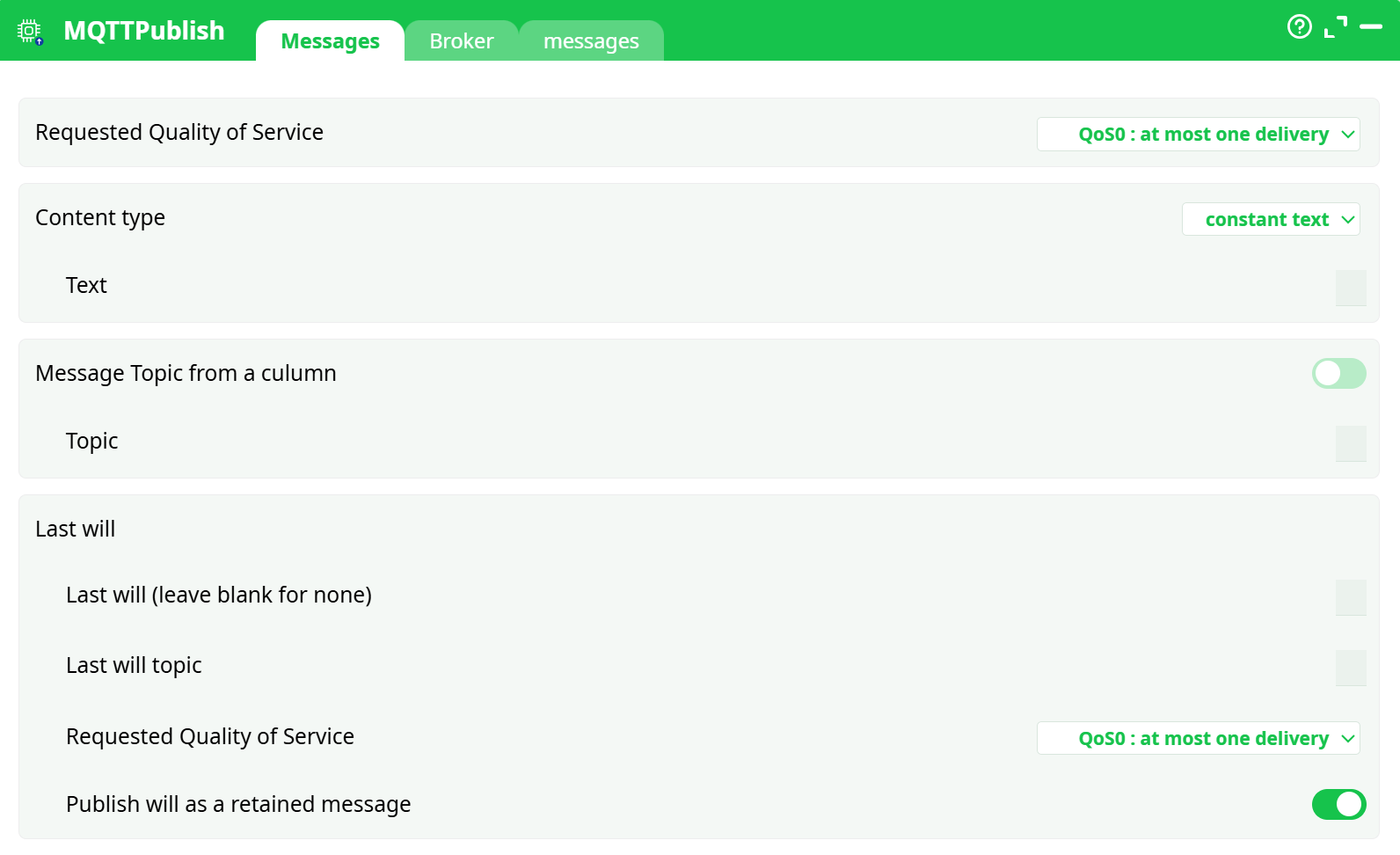
Parameters:
- Requested Quality Of Service (QoS)
- Content type
- Text
- Message topic from a column
- Subjet
- Last will
- Last will (laisser vide pour aucun)
- Last will topic
- Requested Quality Of Service (QoS)
- Publish will as a retained message
¶ Broker tab
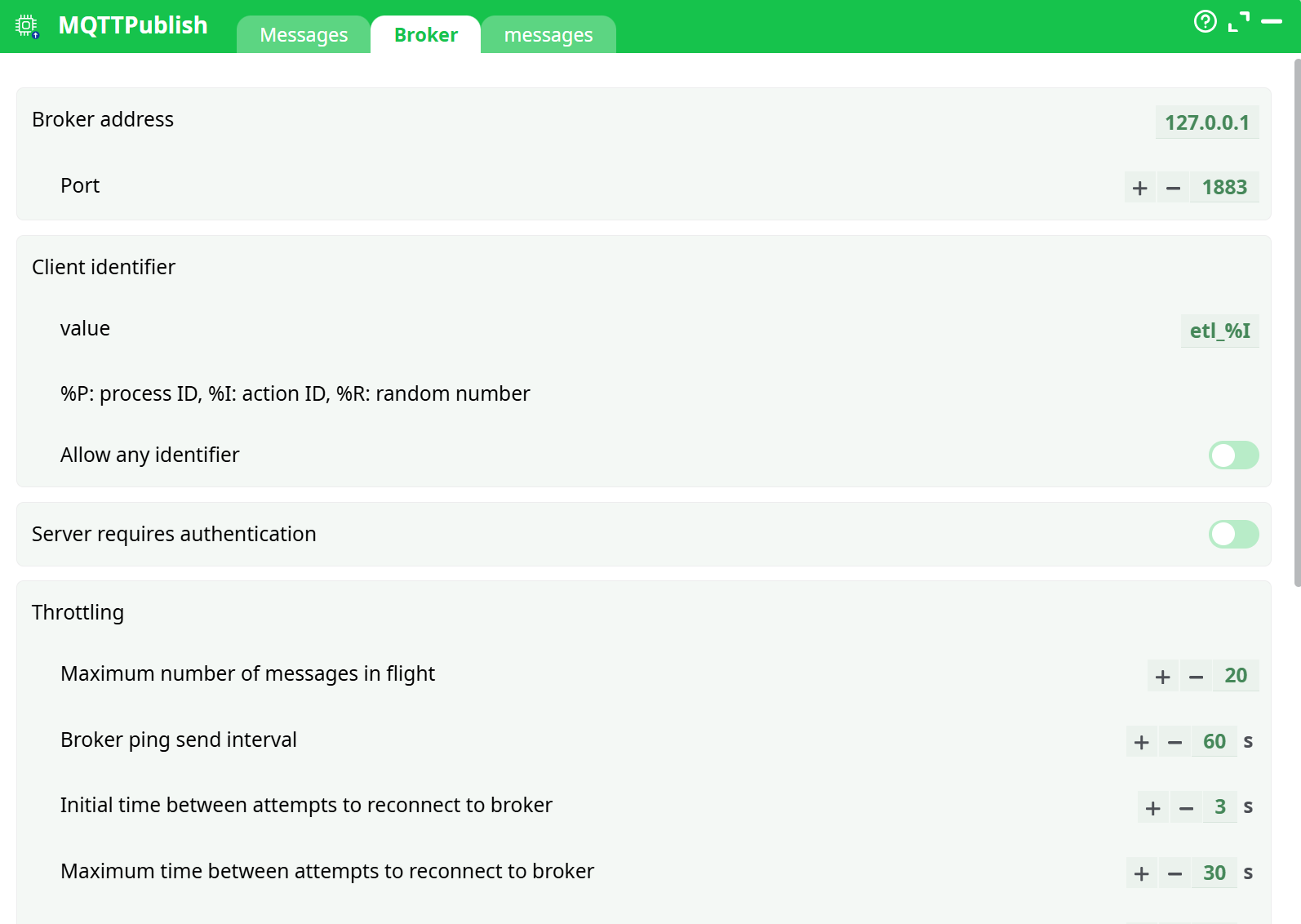
Parameters:
- Broker address
- Port
- Client identifier
- value
- %P: process ID, %I: action ID, %R: random number
- Allow any identifier
- Server requires authentication
- Throttling
- Maximum number of messages in flight
- Broker ping send interval
- Initial time between attempts to reconnect to broker
- Maximum time between attempts to reconnect to broker
- Time to wait before closing connection (prevents message loss)
- On error message from broker
- Use SSL encryption
- Logs
- Info
- Notice
- Warning
- Error
- Debug
¶ Messages tab

Parameters:
- Output status column
- Publish all rows
¶ About
MQTTPublish pushes one or more messages to an MQTT broker from your pipeline.
It opens a client session (optionally over TLS), negotiates a client identifier, sets an optional Last Will message, and then publishes each row’s payload to the target topic with the Quality of Service (QoS) you choose. The action can throttle in-flight messages, automatically reconnect with back-off, and write an output “status” column so you can see the result for every row that was attempted. You also control what to do when the broker returns an error (continue and mark the row, or stop the pipeline).
¶ When to use
- Streaming metrics, alerts, or IoT telemetry from a pipeline into an MQTT fabric.
- Fanning out processed records to edge gateways or microservices that subscribe to MQTT topics.
- Posting pipeline heartbeats or operational notifications to a broker.
¶ Prerequisites
- Network reachability from the runner to your MQTT broker (host + port).
- The topic(s) you intend to publish to (and any broker-side ACLs/permissions).
- If the broker requires auth: a username/password (and for TLS: CA, client cert/key as applicable).
- A simple data table to publish from (if publishing “from column”).
¶ Inputs & Parameters
¶ Messages tab
-
Requested Quality of Service
Choose delivery semantics per publish:- QoS0 – at most one delivery (fire-and-forget).
- QoS1 – at least one delivery (PUBACK handshake).
- QoS2 – exactly one delivery (four-way handshake; slowest but strongest).
-
Content type
How the payload is built:- constant text – send the same text for every message.
- text from column – payload comes from a column in the incoming rows.
- binary data (Base64) from column – column contains Base64; it is decoded and sent as bytes.
-
Message Topic from a column
Toggle on to read the topic from a column; otherwise fill Topic with a constant topic string.
(Empty topic will fail the publish.) -
Last will (message published by broker if this client disconnects ungracefully)
- Last will (leave blank for none) – will payload (text).
- Last will topic – topic for the will.
- Requested Quality of Service – QoS for the will.
- Publish will as a retained message – set retained flag on the will.
¶ Broker tab
-
Broker address / Port – e.g.,
127.0.0.1and1883. -
Client identifier
-
value – client ID string. You can use macros:
%P= process ID,%I= action ID,%R= random number.
(Default shown likeetl_%Ior similar.)
-
Allow any identifier – accept a server-assigned or altered ID if your chosen ID is rejected.
-
-
Server requires authentication – when enabled, provide username and password.
-
Throttling
- Maximum number of messages in flight – cap concurrent publishes (defaults around 20).
- Broker ping send interval – keep-alive seconds (e.g., 60s).
- Initial time between attempts to reconnect to broker – first back-off step (e.g., 3s).
- Maximum time between attempts to reconnect to broker – back-off ceiling (e.g., 30s).
- Time to wait before closing connection (prevents message loss) – graceful-close delay (e.g., 20s).
-
On error message from broker
How the action reacts to broker errors:- abort execution – stop the pipeline immediately.
- continue with status ERROR – keep running and mark the row’s status.
-
Use SSL encryption – enable TLS. (When on, fields for CA / client cert / key appear.)
-
Logs – enable Info, Notice, Warning, Error, Debug as needed for diagnostics.
¶ messages tab (output control)
- Output status column – name of the column added to the output table (default:
Status). - Publish all rows – when on, every row is attempted. When off, only rows emitted by upstream that match your filters/logic are published.
¶ How it works
-
The action creates an MQTT client using your Broker settings (TLS/auth if configured) and negotiates the client identifier.
-
If configured, it registers the Last Will with the broker.
-
For each input row (or once for constant payload), it:
- Resolves topic (constant or per-row column),
- Builds payload (constant, text column, or Base64→binary),
- Publishes with the selected QoS (and retain flag for the will if enabled).
-
Throttling limits in-flight messages; keep-alive pings maintain the session; reconnect is automatic using your back-off settings.
-
The action writes the Output status column per row (e.g.,
ok, error text) so downstream steps can branch or audit.
¶ Step-by-step setup
-
Broker
- Enter Broker address and Port.
- Set the Client identifier (use
%P,%I,%Rto make it unique). - If required, toggle Server requires authentication and fill credentials.
- (Optional) Toggle Use SSL encryption and provide trust/identity material.
- Tune Throttling and choose behavior On error message from broker.
-
Messages
- Choose Requested Quality of Service.
- Pick Content type and map any required column(s).
- Decide how you’ll set Topic (constant or per-row column).
- (Optional) Configure Last will (payload, topic, QoS, retained).
-
messages (output)
- Keep Output status column (e.g.,
Status) or rename it to fit your schema. - Leave Publish all rows on to push every row; turn it off if you’ll gate rows upstream.
- Keep Output status column (e.g.,
-
Run & verify
- Execute a preview. Check the Log for connection/publish messages.
- Inspect the output table; confirm the Status values and that subscribers receive the messages.
¶ Validation & troubleshooting
- Connection refused / timeout: verify host, port, firewall, and TLS settings (wrong SNI/CA/common name will fail TLS).
- Not authorized: wrong credentials or topic ACLs; confirm username/password and allowed topics.
- Invalid client identifier: shorten or change the ID; enable Allow any identifier if the broker rewrites it.
- Topic missing/empty: ensure constant topic is set or the topic column is populated.
- Payload errors: for binary mode, the column must be valid Base64.
- QoS not supported: some brokers/plugins restrict QoS2; drop to QoS1/0 if necessary.
- Throughput/back-pressure: lower Maximum number of messages in flight or raise broker limits.
- Unexpected disconnects: increase Broker ping interval slightly or review idle timeouts on proxies/LB.
- Turn on Debug logs when diagnosing handshake or publish problems.
¶ Notes & best practices
- Prefer QoS1 for reliability with moderate overhead; reserve QoS2 for cases that truly require exactly-once.
- Use distinct client identifiers for concurrent runs to avoid session kicks.
- Keep your Last Will concise; it’s for failure signaling, not bulk data.
- If you need retained application messages (not only the will), publish them via a separate step that sets the retain flag on those messages (if exposed in your build); otherwise keep will-retained scoped to failure semantics.
¶ Outputs
- The incoming table plus a Status column (or your custom name) per row, typically
okor an error description when continue with status ERROR is selected.
That’s it—you can now publish MQTT messages directly from your pipeline with predictable delivery guarantees and clear per-row outcomes.
