¶ Description
Write a parquet file.
¶ Parameters
¶ Standard tab
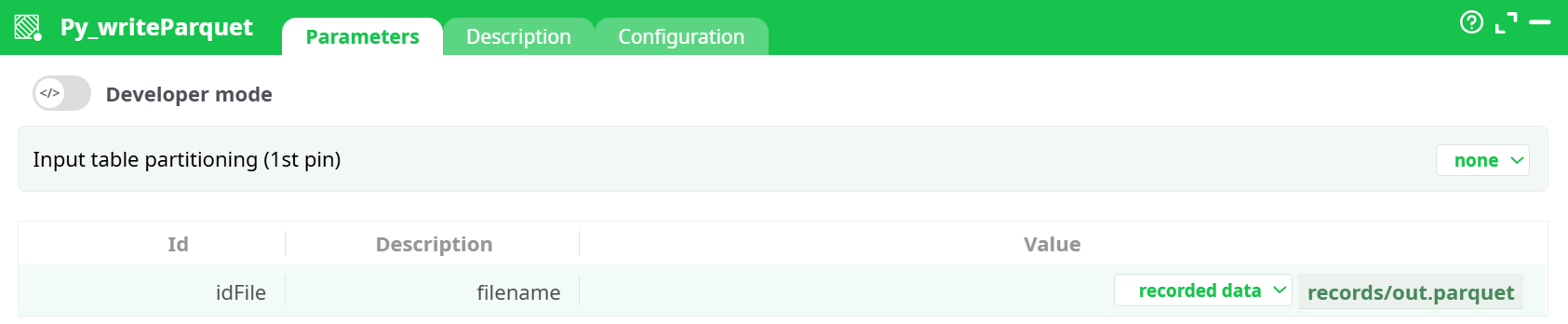
Parameters:
- Input table partitioning (1st pin)
- filename
¶ Description tab
See dedicated page for more information.
¶ Configuration tab
See dedicated page for more information.
¶ About
Py_writeParquet saves the table that arrives on its first input pin to a Parquet file (or a set of files when you choose a partitioning mode). Typical uses: archiving curated data, exchanging tables with Spark/Databricks, or handing results to downstream analytics.
¶ Quick start
-
Connect a table into the box (e.g., from readCSV or any transform).
-
Open Parameters → idFile / filename and set where to write:
- recorded data → e.g.,
records/out.parquet(kept with the flow run) - temporary data → e.g.,
temp/out.parquet(ephemeral)
- recorded data → e.g.,
-
Leave Input table partitioning as none (single file), or pick a partitioning mode (see below).
-
(Optional) In Configuration, keep defaults or adjust behavior (sorting check, parallelism, etc.).
-
Run. You’ll find the file in the Records pane and under the chosen path (
records/…ortemp/…).
¶ Parameters
¶ Input table partitioning (1st pin)
Controls whether one file is written or several.
- none – write one Parquet file (default).
- by column – splits into multiple files by the values of a column you choose (click the … to pick the Partition column).
Tip: keep Check that input table is sorted in column partition mode enabled (Configuration) and feed a table sorted by that column. - fixed number of lines (excluding last) – chunks the table into consecutive files of N rows (set the Number of lines).
¶ idFile / filename
Where to write. Choose the storage scope first, then the path:
- recorded data → persisted with the run (e.g.,
records/out.parquet) - temporary data → cleaned up automatically (e.g.,
temp/out.parquet) - JavaScript expression (advanced) → compute the path dynamically
Notes
- Use a
.parquetextension.- When partitioning is used, multiple files are created under the target path (one per chunk/partition).
¶ Typical recipes
¶ A) Write a single Parquet file
- Partitioning: none
- filename:
records/out.parquet - Run → creates one file.
¶ B) One file per customer
- Partitioning: by column → customer_id
- Upstream: sort by
customer_id. - filename:
records/customers/(e.g.,records/customers/out.parquet) - Run → creates one file per
customer_idunder the folder.
¶ C) Chunk big table into 50k-row files
- Partitioning: fixed number of lines (excluding last) → 50000
- filename:
records/sales/part.parquet - Run → multiple files
part-*.parquet.
¶ Validation & troubleshooting
- No file appears – confirm the input pin is connected and contains rows, and the path ends with
.parquet. - Partitioning by column fails – ensure the chosen column exists and the table is sorted by it (keep the sorting check ON).
- Permission/path errors – stick to
records/…ortemp/…, which are writable in the flow environment. - Type complaints – try keeping Convert integers from Python to meta-type = float and Clean up extra spaces = on.
¶ Inputs & outputs
- Inputs: 1 table (pin 0).
- Outputs: writes Parquet file(s); no data leaves the box through pins. Files are visible in Records (for
records/…) or used downstream by path.
¶ Best practices
- Prefer recorded data for artifacts you may want to download later.
- Keep file paths stable so downstream jobs can reference them reliably.
- When sharing with Spark/Delta workflows, use partitioning by column on the same keys they expect.