¶ Description
Write back on a TCP/IP socket opened using the NaiveIpServerAction.
¶ Parameters
¶ Standard Tab
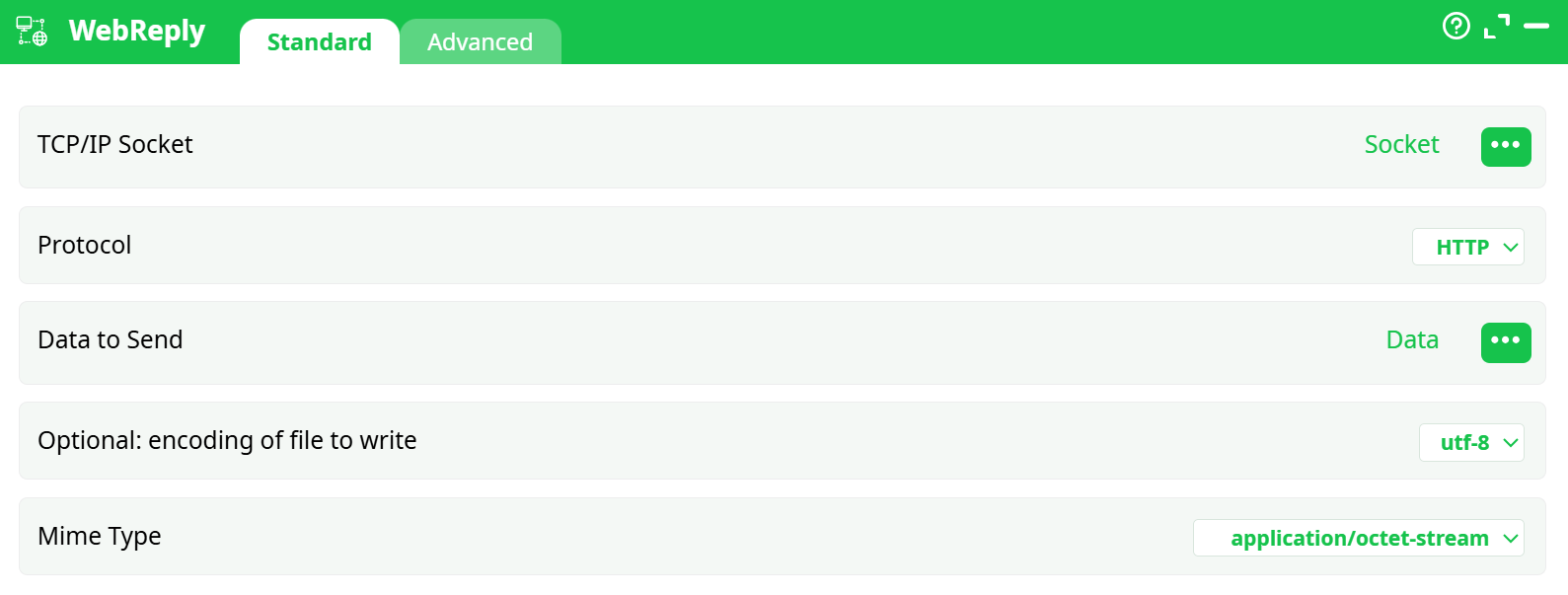
Parameters:
- TCP/IP Socket
- Protocol
- Data to send
- Optionnel : encoding of the file to write
- Mime type
¶ Advanced Tab

Parameters:
- Write all the lines
¶ About
WebReply writes a response back to a TCP/IP socket that was already opened upstream—most commonly by a listener such as NaiveIpServerAction. Use it to finish an inbound conversation (webhook, lightweight API call, custom socket exchange) by sending bytes or an HTTP response on the exact socket that originated the request.
Key points:
- WebReply does not open connections; it uses an existing socket handle carried in your flow.
- With Protocol = HTTP, it sends a proper HTTP response using your selected Mime Type and optional text encoding.
- With Protocol = raw TCP/IP Socket, it writes bytes exactly as provided, suitable for custom protocols.
¶ When to use
- You accepted a connection with NaiveIpServerAction (or similar) and need to reply on that same socket.
- You are returning a file, JSON, HTML, or plain text back to a browser or webhook client.
- You need to emit raw bytes to a client that speaks a non-HTTP protocol.
¶ Prerequisites
-
Socket column available
An upstream action must output a column that contains an open socket handle (often namedSocket). That column must reach WebReply. -
Payload column available
Your dataset should include a column containing the reply body (string or bytes) you want to send. -
One reply per request
Ensure each request leads to exactly one reply on its socket.
¶ Setup (step-by-step)
-
TCP/IP Socket
Use the column selector (•••) and choose the column that holds the socket created by NaiveIpServerAction. -
Protocol
- HTTP – Choose this when replying to an HTTP request. WebReply will send an HTTP response with the Mime Type you set below.
- raw TCP/IP Socket – Choose this for non-HTTP protocols; WebReply writes your bytes untouched.
-
Data to Send
Map the column that contains the response payload.- For HTTP, this is the body of the response.
- For raw TCP, it’s the exact byte sequence to transmit.
-
Optional: encoding of file to write
Applies to textual payloads. Pickutf-8(default) orlatin1to match the client’s expectations. -
Mime Type (HTTP only)
Sets the HTTPContent-Type. Common choices:
text/plain,text/html,application/json,application/xml,application/octet-stream.
Select the type that truly matches your payload. -
Advanced → Write all rows
- On (typical): send one reply per row, using that row’s socket and payload.
- Off: aggregate upstream to a single row and send one combined reply.
Run the pipeline: each row with a valid socket will be answered accordingly.
¶ Parameters (reference)
- TCP/IP Socket – Column containing the open socket handle to reply on. (Required)
- Protocol –
HTTP|raw TCP/IP Socket. Controls how the reply is framed. - Data to Send – Column with the payload (text/bytes). (Required)
- Optional: encoding of file to write – Character set for textual payloads (
utf-8,latin1). - Mime Type – HTTP
Content-Typeheader (HTTP mode only). - Advanced → Write all rows – Toggle per-row vs aggregated single reply.
¶ Behavior & lifecycle
- HTTP mode: Sends headers based on Mime Type and writes the body from Data to Send. The server side (from NaiveIpServerAction) handles the low-level connection.
- Raw TCP mode: Writes bytes verbatim—no HTTP framing.
- Socket finalization: The reply typically completes the interaction for that socket; don’t reuse the same handle later.
¶ Tips
- Shape before you send: Format to JSON/CSV/HTML upstream; pass the final string/bytes into Data to Send.
- Pick the right MIME: Clients rely on
Content-Typeto interpret data correctly. - Mind encoding: Keep
utf-8unless you know the client requireslatin1. - Deduplicate: Guarantee one reply per socket to avoid double-responses.