¶ Description
Send Emails using your Office 365 subscription.
¶ Parameters
¶ Standard tab
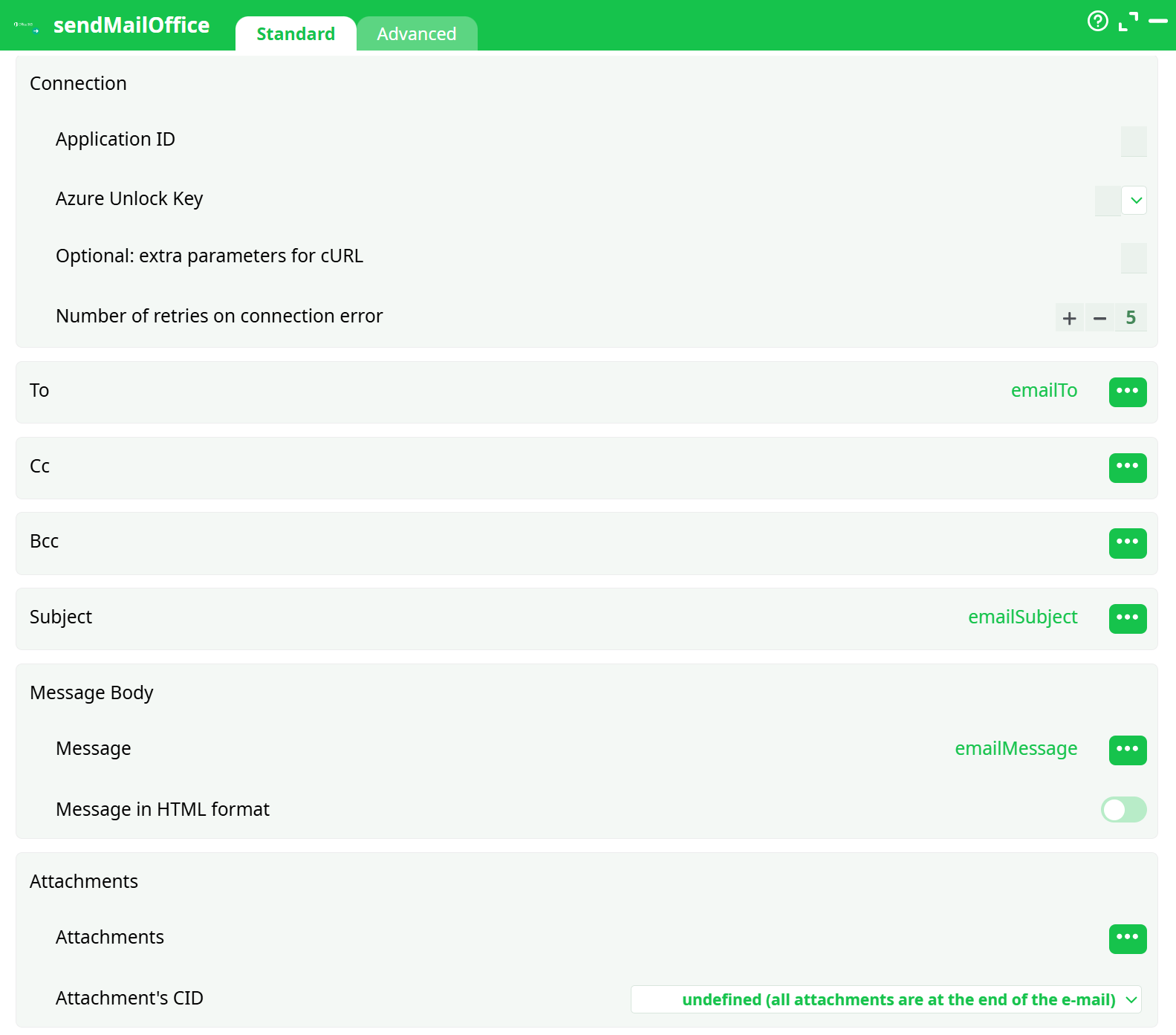
Parameters:
- Connection
- Application ID
- Azure Unlock Key
- Optional: extra parameters for cURL
- Number of retries on connection error
- To
- Cc
- Bcc
- Subject
- Message Body
- Message
- Message Type HTML
- Attachments
- Attachments
- Attachment's CID are
¶ Advanced tab

Parameters:
- Error Management
- Write all rows
¶ About
This action sends email through Microsoft 365 / Exchange Online using the Microsoft Graph API. It supports To / Cc / Bcc, HTML or plain-text body, attachments, and inline images (CID). It is designed for high-volume, automated sends inside your ETL pipelines.
¶ What this action does
- Creates and sends an email using app-only authentication (service principal).
- Sends as a mailbox you control (typically a shared mailbox like
no-reply@…or a service account). - Optionally embeds inline images with Content-ID (CID).
- Processes one or all input rows (bulk mode), depending on your Advanced setting.
¶ Prerequisites
-
A Microsoft 365 tenant and access to the Azure portal.
-
Permission to create App registrations and grant admin consent for Graph.
-
A mailbox to send from (shared mailbox or service account).
Tip: Many teams use a shared mailbox such as
no-reply@yourdomain.com.
¶ First-time setup (Credentials)
You’ll create an Azure App Registration and map its credentials into the action.
¶ 1) Create the app registration
- In Azure portal → Microsoft Entra ID → App registrations → New registration.
- Name it (e.g.,
ETL SendMail (Graph)), keep “Single tenant”. Leave Redirect URI empty. - Click Register.
- Copy Application (client) ID → this goes into the action field Application ID.
¶ 2) Create the client secret (“Azure Unlock Key”)
- Certificates & secrets → Client secrets → New client secret.
- Choose an expiry you can manage (12–24 months recommended), click Add.
- Copy the Secret Value (shown only once).
- Paste this value into the action field Azure Unlock Key.
¶ 3) Grant permissions to send mail
- API permissions → Add a permission → Microsoft Graph → Application permissions.
- Add Mail.Send.
- Click Grant admin consent and confirm.
¶ 4) (Recommended) Restrict which mailboxes the app can send as
By default, Mail.Send (Application) can send as any mailbox. To lock it down:
- Use an Application Access Policy in Exchange Online that limits the app to a group (e.g., a group containing only
no-reply@yourdomain.com). - Verify with
Test-ApplicationAccessPolicyin Exchange Online PowerShell.
Your tenant admin can do this once; the policy protects all pipelines that use this app.
¶ Parameters
¶ Connection
-
Application ID
Paste the Application (client) ID from your App registration. -
Azure Unlock Key
Paste the Client Secret Value you created. (Not the Secret ID.) -
Optional: extra parameters for cURL
Rarely needed; allows low-level tweaks (e.g., HTTP proxy flags). -
Number of retries on connection error
How many automatic retries to perform when the HTTP call fails transiently.
¶ Recipients
-
To / Cc / Bcc
- Accepts a single address or multiple addresses separated by comma , or semicolon ;
- You can bind a column (per-row sending) or type a literal list.
¶ Subject & Body
-
Subject
Free text or bound column. -
Message
The message body.- If Message in HTML format = OFF → sent as plain text.
- If ON → sent as HTML. You can include
<b>…</b>, lists, tables, etc.
-
Message in HTML format (toggle)
- ON to render the body as HTML.
- OFF for plain-text sends.
¶ Attachments
-
Attachments
- Provide one or more file paths (local/ETL workspace) or bind a column that holds file paths.
- Multiple attachments are supported.
-
Attachment’s CID (for inline images)
-
Provide a CID value per attachment if you want it embedded inline.
-
In your HTML body, reference it as:
<img src="cid:myLogoCid" alt="Logo" /> -
If a CID is not provided, the file is attached normally.
-
-
Attachment placement mode (drop-down)
Controls how the action treats attachments relative to the HTML body:- All attachments at the end of the e-mail (default).
- Based on filename (all attachments are in-line) — for cases where you want every attachment considered inline (less common).
- Defined in the column — use the Attachment’s CID column to decide which files are inline (have a CID) vs standard (CID empty).
Inline images recipe:
- Add the image file to Attachments.
- Put a unique ID (e.g.,
logo1) into Attachment’s CID.- Turn Message in HTML format ON and insert
<img src="cid:logo1">in the body.
¶ Advanced
-
Error Management
- Abort pipeline execution with error (default)
- Continue with status ERROR (logs the error but lets the pipeline move on)
-
Write all rows
- ON: the action sends one email per input row (bulk sending).
- OFF: only the first row is processed (quick single-email mode).
¶ Usage patterns
¶ A) One email per row (bulk notifications)
-
Upstream step produces rows like:
toEmail,subject,htmlBody,attachmentPath,cid alice@contoso.com,Report A,<p>Hello</p>,/tmp/a.png,logo bob@contoso.com,Report B,<p>Hi</p>,/tmp/b.png,logo -
Map:
- To →
toEmail - Subject →
subject - Message →
htmlBody(toggle HTML = ON) - Attachments →
attachmentPath - Attachment’s CID →
cid
- To →
-
Advanced → Write all rows = ON.
¶ B) Single email with multiple recipients / attachments
- Set Write all rows = OFF to use only the first row (or no upstream rows).
- Enter literal recipient list in To (e.g.,
ops@contoso.com; audit@contoso.com). - Add multiple attachment paths separated by line breaks or via a table column that enumerates files (depending on your ETL input design).
¶ Best practices
- Use a shared mailbox (
no-reply@…) instead of a person’s mailbox. - Restrict the app with an Application Access Policy so it cannot send as arbitrary users.
- Rotate the secret before it expires and update the Azure Unlock Key in the action.
- Throttle high-volume sends; Microsoft Graph enforces service limits. Stagger large batches and use the retry setting for transient failures.
- Validate HTML for inline images (CID must match exactly; avoid caching issues by using unique filenames or CIDs for dynamic images).
¶ Troubleshooting
-
403 / insufficient privileges
- Ensure Mail.Send (Application) is added and Admin consent was granted.
- If using an Application Access Policy, verify the sender mailbox is allowed.
-
401 / invalid_client
- You used the Secret ID instead of the Secret Value, or the secret expired. Create a new secret.
-
Mailbox not found / cannot send as
- Confirm the mailbox exists and is the one your app is permitted to send as.
- For shared mailboxes, ensure they’re included in the access policy (if configured).
-
Inline image not showing
- Check the HTML references
cid:<value>exactly match the Attachment’s CID. - Ensure Message in HTML format is ON.
- Check the HTML references