¶ Description
Allow to connect to an “IoT” broker using the MQTT protocol to actively unsubscribe from a channel.
¶ Parameters
¶ Key messages Tab
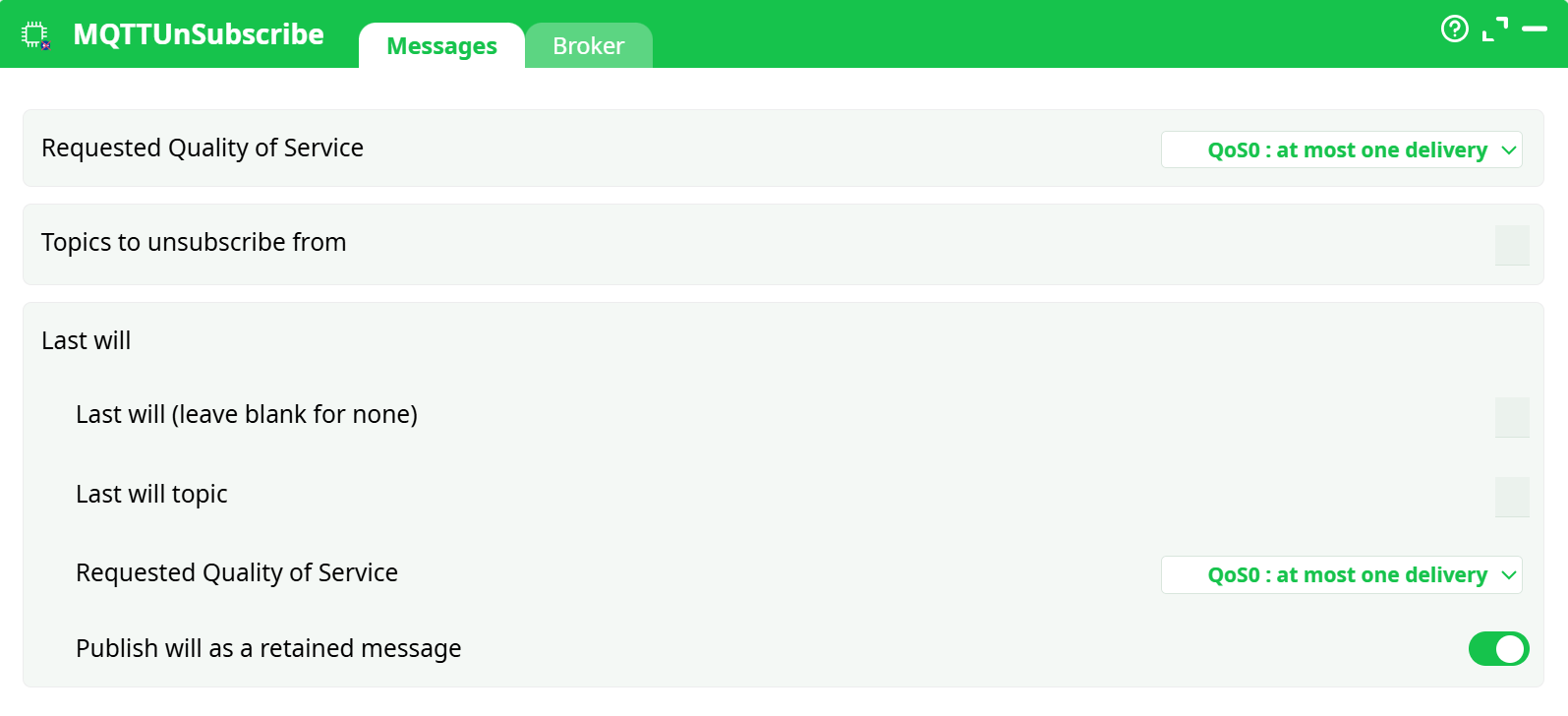
Parameters:
- Requested Quality of Service
- Topics to unsubscribe from
- Last will
- Last will (leave blank for none)
- Last will topic
- Requested Quality of Service
- Publish will as a retained message
¶ Broker Tab
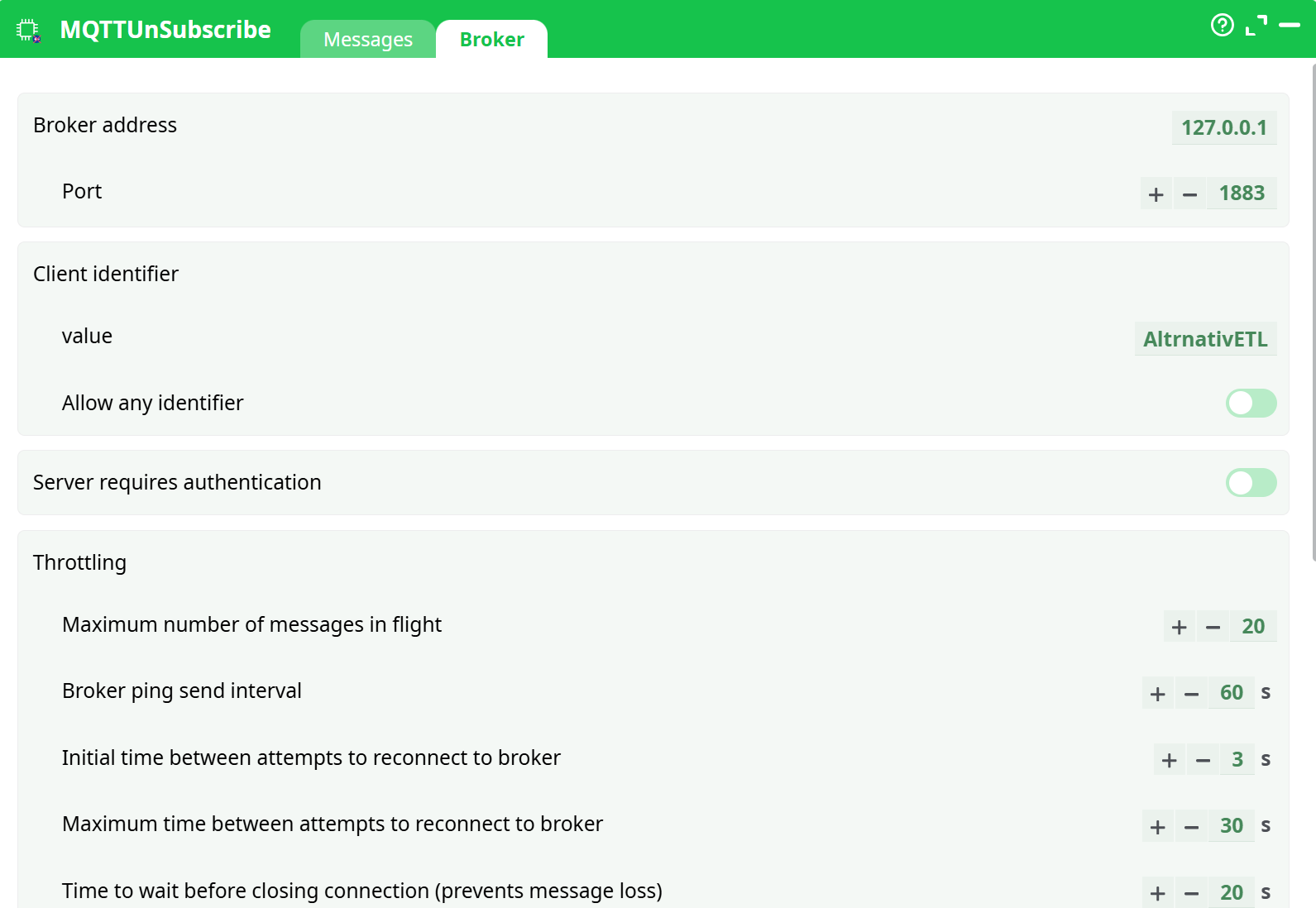
Parameters:
- Broker address
- Port
- Client identifier
- value
- Allow any identifier
- Server requires authentication
- Throttling
- Maximum number of messages in flight
- Broker ping send interval
- Initial time between attempts to reconnect to broker
- Maximum time between attempts to reconnect to broker
- Time to wait before closing connection (prevents message loss)
- On error message from broker
- Use SSL encryption
- Logs
- Info
- Notice
- Warning
- Error
- Debug
¶ About
MQTTUnSubscribe connects to an MQTT broker and actively removes one or more existing subscriptions for the client (identified by its Client ID). This is useful when you no longer want the broker to keep delivering messages to this client (especially on brokers that maintain persistent sessions).
Note
In MQTT, the UNSUBSCRIBE control packet removes the subscription(s) for the current client session. It does not delete topics nor retained messages; it only stops deliveries to this client.
¶ When to use it
- You previously used MQTTSubscribe (or another client with the same Client ID) and want to stop receiving messages.
- Your broker keeps a persistent session and continues to deliver queued messages when the client reconnects—unsubscribe to stop that behavior.
- You want to tidy up before shutting down a pipeline or before switching a Client ID to other topics.
¶ How it works (at a glance)
- The box opens a TCP/TLS connection to the broker and CONNECTs with the configured Client ID.
- (Optional) During CONNECT it can register a Last Will and Testament (LWT)—used by the broker if this client disconnects unexpectedly.
- It sends a single UNSUBSCRIBE packet for the topics you list.
- It waits for UNSUBACK. On success, the box outputs a success status and closes the connection.
Tip
MQTT 3.1.1 treats UNSUBSCRIBE as a control command (it doesn’t itself have a QoS level). The UI exposes QoS fields for consistency and for the Will message; brokers may ignore QoS in the context of UNSUBSCRIBE.
¶ Quick start (step-by-step)
-
Drop the box into your pipeline and open it.
-
Messages tab
- Topics to unsubscribe from: enter one or more topics (wildcards
+and#are supported by MQTT if allowed by your broker).
– Use one topic per line (or the multi-value input control in your UI). - (Optional) Last will: leave empty unless you want the broker to publish a will if this client disconnects unexpectedly while running this action.
- Topics to unsubscribe from: enter one or more topics (wildcards
-
Broker tab
- Broker address / Port: e.g.,
broker.example.com/1883(or8883for TLS). - Client identifier: set a unique Client ID that matches the client/session you want to alter.
- Authentication: enable and provide credentials if your broker requires them.
- Use SSL encryption: enable for
mqtts(TLS) connections.
- Broker address / Port: e.g.,
-
Save and Run the pipeline.
On success you’ll receive an UNSUBACK and the box will report OK.
¶ Parameters
¶ Messages tab
-
Requested Quality of Service
UI consistency field. MQTT UNSUBSCRIBE itself doesn’t deliver application messages, so brokers commonly ignore this. Keep the default (QoS0) unless your environment requires otherwise. -
Topics to unsubscribe from
One or more topic filters to remove for this Client ID.
Supports MQTT wildcards (subject to broker policy):-
+matches a single level (sensors/+/temp) -
#matches multiple levels (sensors/#)
Notes
- Unsubscribing a topic that wasn’t subscribed is not an error; the broker still returns UNSUBACK.
- Unsubscribe removes subscriptions; it does not clear retained messages on the topic.
-
-
Last will (optional)
These fields define the LWT published by the broker if this client disconnects ungracefully while this action is connected.- Last will (leave blank for none): message payload.
- Last will topic: topic for the will message.
- Requested Quality of Service: QoS for the will message (0/1/2).
- Publish will as a retained message: set to On if the will should be retained.
¶ Broker tab
-
Broker address / Port
Hostname or IP and TCP port. Defaults:127.0.0.1 : 1883. For TLS, brokers often use8883. -
Client identifier
- value: the MQTT Client ID (must be unique across all connected clients).
- Allow any identifier: if enabled, the client may accept a server-assigned ID (not recommended when you intend to modify a specific session).
-
Server requires authentication
Enable if your broker enforces auth; the UI will expose username/password (and, with TLS, client-cert options where supported). -
Throttling
-
Maximum number of messages in flight: upper bound of QoS1/2 in-flight control packets. Default is fine for UNSUBSCRIBE.
-
Broker ping send interval: keep-alive interval (seconds).
-
Initial time between attempts to reconnect to broker: first retry delay after a connection loss.
-
Maximum time between attempts to reconnect to broker: caps the backoff.
-
Time to wait before closing connection (prevents message loss): graceful close wait.
Recommended defaults for this box (typical):
Ping 60s • Initial reconnect 3s • Max reconnect 30s • Close wait 20s. -
-
On error message from broker
Choose runtime behavior if the broker returns an error:
Abort pipeline with ERROR (strict) or Continue with status ERROR (box sets an error status but lets the flow continue). -
Use SSL encryption
Enable TLS. Ensure the broker’s certificate chain is trusted by the runtime; for mutual-TLS provide client credentials if your build supports it. -
Logs
Toggle Info / Notice / Warning / Error / Debug for diagnosis.
¶ Outputs
The box emits a single operational status row to the flow context. Typical fields:
_MQTT_Status—OKon success, otherwise an error code/message._MQTT_Broker— the host:port used._MQTT_ClientID— the Client ID used._MQTT_Unsubscribed— list of topics requested.
Field names can vary slightly depending on your product build; check the Process → Data panel after a run to confirm exact names.
¶ Examples
¶ 1) Unsubscribe from multiple sensor feeds
Topics to unsubscribe from
factory/line1/+/metrics
factory/line2/#
alerts/system
Client ID: etl-line-maintenance.
Result: all three filters are removed for this client’s session.
¶ 2) Cleaning up before shutting down
- Unsubscribe from
telemetry/#foretl-telemetry. - Leave Will empty.
- Run once; then shut down the pipeline.
This prevents the broker from queueing further telemetry for that Client ID.
¶ 3) Clearing a retained message (separate action)
Unsubscribe does not clear retained messages. To clear one retained topic, publish an empty payload with retained flag = ON from a Publish box to that topic.
¶ Best practices
- Use a stable Client ID. Unsubscribe affects the current client session. If the ID changes, you’ll be affecting a different session.
- Prefer TLS on untrusted networks; never send credentials over plain text.
- Principle of least privilege: lock down topics and wildcards on the broker side; use per-client credentials if possible.
- Graceful operations: unsubscribe first, then stop your consumer pipeline to avoid race conditions and queued deliveries.
- Observe wildcards carefully:
#is powerful; ensure your policy permits it before using.
¶ Troubleshooting
| Symptom | Likely cause | Fix |
|---|---|---|
Identifier already in use |
Another client is connected with the same Client ID | Disconnect the other client or change the Client ID |
| Box loops reconnecting | Wrong host/port, firewall, or TLS trust issue | Verify address/port; test with an MQTT CLI; import CA certificates if needed |
Not authorized / Access refused |
Credentials missing/invalid or topic ACL denies UNSUBSCRIBE | Provide correct username/password; check broker ACLs for the Client ID |
| Box reports OK but messages still arrive later | You unsubscribed a different Client ID, or another subscription (different filter) still matches | Confirm the exact Client ID and the precise topic filters currently subscribed |
| Retained message keeps appearing | Unsubscribe does not delete retained messages | Publish an empty retained message to that topic to clear it |
¶ Security considerations
- With TLS enabled, verify server identity (trust the CA chain).
- Avoid putting secrets in Will payloads; will messages can be visible to many subscribers.
- Rotate credentials regularly; use per-environment Client IDs and credentials.
¶ FAQ
Q: Does UNSUBSCRIBE have QoS?
A: No. UNSUBSCRIBE is a control packet; the “Requested QoS” fields in the UI apply to Will or are kept for UI consistency. Brokers do not apply QoS to UNSUBSCRIBE itself.
Q: Can I unsubscribe from a topic I never subscribed to?
A: Yes. Brokers typically ACK the request; no subscription is removed, and it’s not an error.
Q: Will this delete retained messages?
A: No. Retained messages are independent of subscriptions. Publish an empty retained payload to clear them.
Q: MQTT v5 reason codes supported?
A: When the broker is MQTT v5, UNSUBACK may return per-topic reason codes (e.g., 0x11 Not authorized). The box surfaces these as error messages when applicable.