¶ Description
Run a child pipeline in a loop.
¶ Parameters
¶ Parameters tab
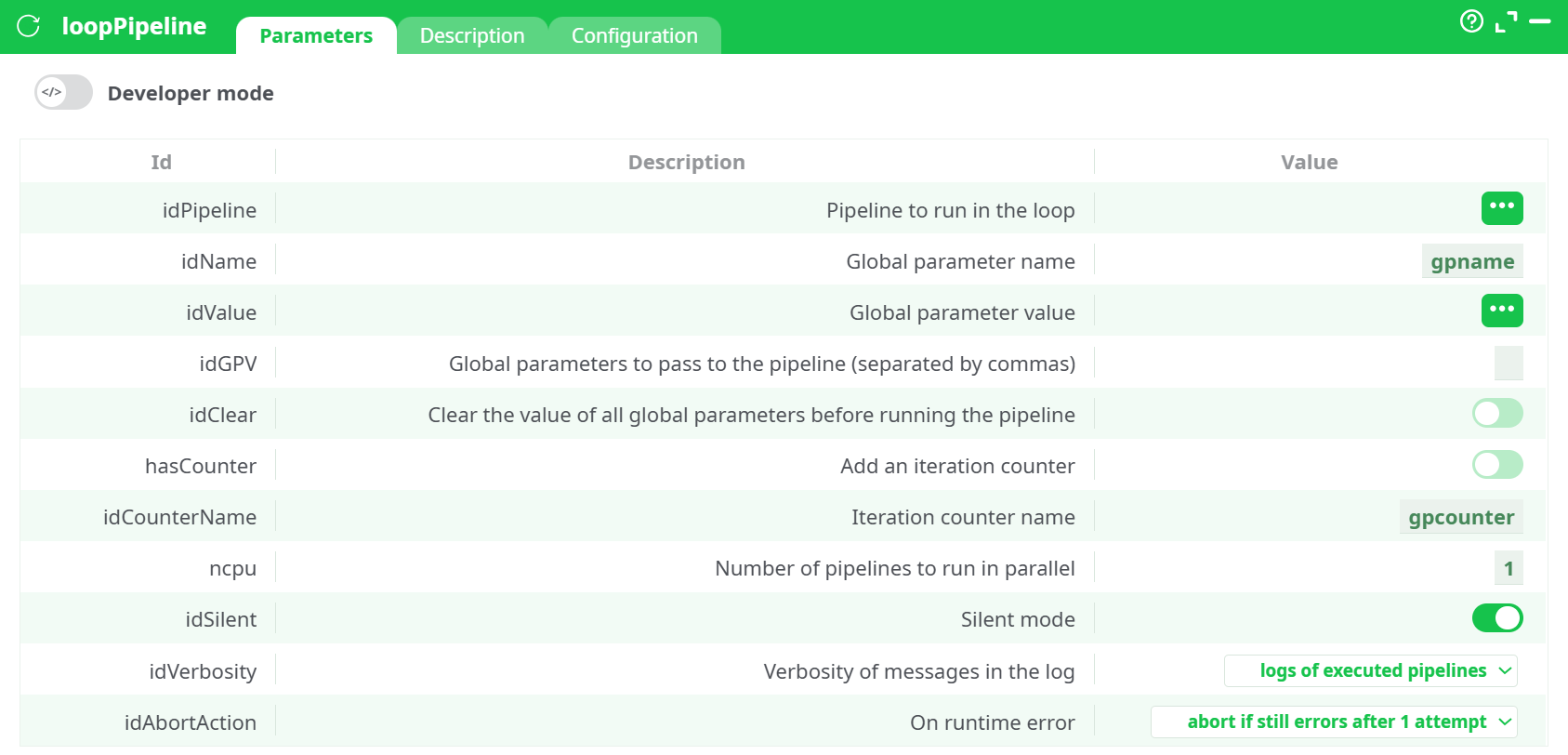
Parameters:
- Developer mode: activate/deactivate code tab.
- Pipeline to run in the loop
- Global parameter name
- Global parameter value
- Global parameters to pass to the pipeline (separated by commas)
- Add an iteration counter
- Iteration counter name
- Number of pipelines to run in parallel
- Silent mode
- Verbosity of messages in the log
- On runtime error
¶ Description tab
See dedicated page for more information.
¶ Code tab
loopPipeline is a scripted action. Embedded code is accessible and customizable through this tab.
¶ Configuration tab
See dedicated page for more information.
¶ About
The loopPipeline action executes a given “sub-pipeline” (i.e. a given .age file) several times “in a loop”. At each iteration of the loop, the loopPipeline sets a different value for one Global Parameter (whose name is, by default, “gpname”) that is used inside the “sub-pipeline”. The number of iterations is equal to the number of rows in the input table.
If you can execute all the different “sub-pipeline(s)” in any order (i.e. when there are no depencies towards previous iteration of the loop), then you can execute several “sub-pipelines” in parallel (simultaneously): Just set the parameter “Run N pipeline(s) in parallel. N=?” to a higher value. This allows to easily use the several cores available inside your CPU. If you have limited RAM (or if you are on 32-bit PC), be careful to not use a large value (“1” is our safest option).
Loops are probably the trickiest operations in ETL, but no worries, this is still manageable without any line of code.
One way to introduce “loops” inside ETL is to “code” them in JavaScript, R, or Python as these languages offer complete freedom to code whatever you need/want. This is not always the best option as those languages will process data much slower than standard ETL components. When speed and scalability matters, it’s usually better to avoid Javascript, R or Python and use the loop functionality from ETL.
loopPipeline is a control action that iterates over a set of values and, for each value, executes a selected child pipeline. The value of each iteration is exposed to the child as a Global Parameter (GP). You can read iteration values from an input table column or provide them inline as a list. The action can add an iteration counter, forward other GPs unchanged, and run several child pipelines in parallel.
Launches a child pipeline multiple times, optionally passing a global parameter whose value comes from a table column (column-selector mode) or from a comma-separated list. Supports per-iteration counters and parallel execution.
¶ Input
¶ Supported modes
- Column selector mode (recommended) — Connect a table to the input pin and set
idValueto a column in that table. The action will run the child once per row, passing the column value as a GP. - Inline list mode — No input table required. Provide a comma-separated list of values in
idValue.
¶ Minimal driving table (for column selector mode)
W1
0.2
0.4
0.6
¶ Output
- The node itself does not produce a transformed table. Its outputs are the side effects of the child pipeline (e.g., files written by the child, database updates).
- The Log shows one block per child execution when Verbosity = “logs of executed pipelines.”
- If the child writes files, they will appear under Records → out/.
¶ How to Run
¶ Recipe 1 — Column selector mode (iterate W1 through the child)
-
Parent pipeline graph:
readCSV (driving table) → loopPipeline -
readCSV: load the CSV shown above (column
W1). -
loopPipeline parameters:
idPipeline=R_greenleafe (current)idName=W1idValue= select columnW1hasCounter= ON,idCounterName=gpcounteridVerbosity=logs of executed pipelinesidAbortAction=abort if still errors after 1 attempt
-
Child pipeline (
R_Greenleaf) mapping:-
Set parameter W1 to Global parameter →
W1 -
Keep other parameters as usual (e.g.,
idxVars,Mi,SDevi). -
If the child writes files, make filenames unique:
- Example:
out/greenleaf_W1_${W1}_it_${gpcounter}.csv
- Example:
-
-
Run the parent. Expect one child run per row (
W1=0.2, 0.4, 0.6).
¶ Recipe 2 — Inline list mode (no table)
-
Place
loopPipelineby itself (no input). -
Parameters:
idPipeline= your childidName=W1idValue=0.2,0.4,0.6(plain text list)- Other options as in Recipe 1.
-
Child binds W1 to Global
W1. Run.
¶ Recipe 3 — Parallel runs (when outputs don’t clash)
- Set
ncpu> 1 to launch multiple child runs concurrently. - Ensure the child writes to iteration-unique paths (use
${gpcounter}or${W1}in filenames).
¶ Troubleshooting
-
ReferenceError: Can't find variable: idFile
Cause: Column selector mode with no input table connected.
Fix: Attach a table to the loop’s input (e.g., theW1CSV) or switch to inline list mode and type values inidValue. -
Child “doesn’t see” the parameter
Cause: The child’s parameter isn’t bound to the Global Parameter.
Fix: In the child, set the target parameter to Global →idName(e.g.,W1). -
Outputs overwrite each other
Cause: All iterations write the same filename.
Fix: Include${gpcounter}or${idName}(e.g.,${W1}) in output names. -
Parallel runs fail intermittently
Cause: Shared resource/file lock.
Fix: Lowerncpu, or make outputs/resources per-iteration unique.