¶ Description
Do a “If…then…else …” inside a pipeline (branching instruction).
¶ Parameters

Parameters:
- Execute the actions on a specific input pin
- Total number of input PIN's
¶ About
The parameter P1 can have two different values :
- Execute all actions on all input pins
- Execute the actions on the input pin number given here below
There are, basically, three different techniques to do a “If…then…else …” inside ETL.
¶ “If…then…else …” technique (1): based on the "Abort” action
This first technique is very easy to use:
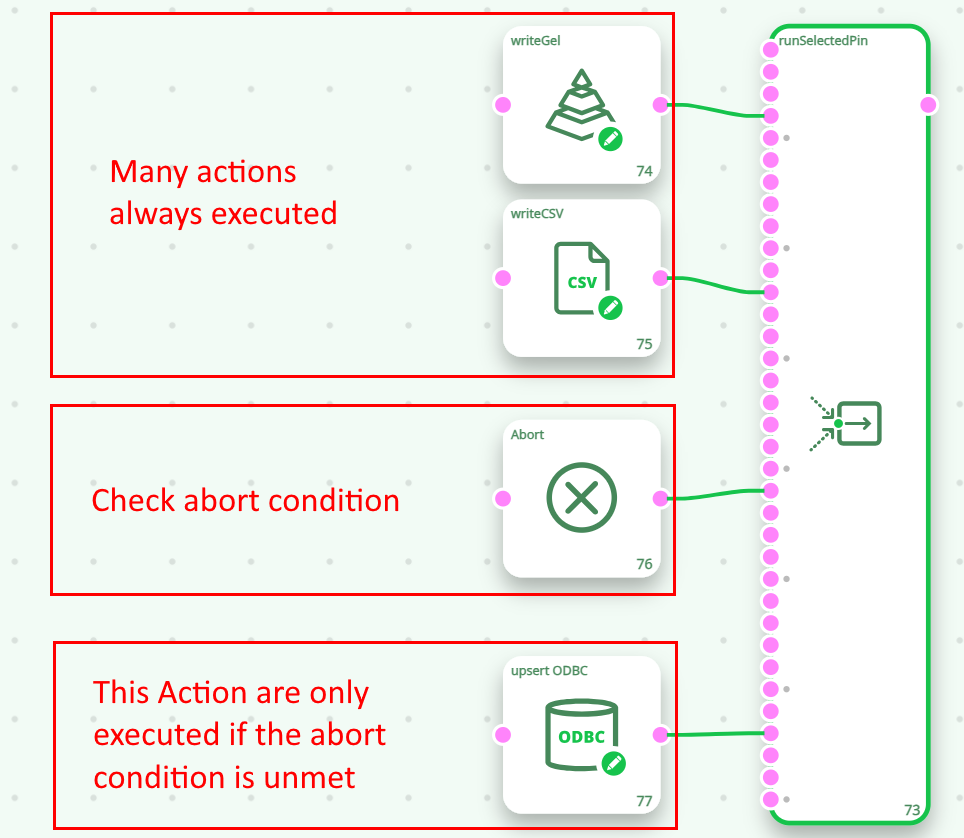
The draw back of this technique is: This technique is not very flexible: it only allows to “skip” the
execution of some actions at the end of an ETL pipeline.
¶ “If…then…else …” technique (2): based on the “runSelectedPin” action
Here is an example:
This technique is very flexible and very useful.
In the example above, the global parameter “selectedPin” can takes two values (0 or 1) and thus the first or the second input-branch of the runSelectedPin bow is executed. Now, nothing is stopping you from using a global parameter “selectedPin” that is in the range from 0 to 10: you’ll just have 10 input-branches to the runSelectedPin action (and ETL will execute only one of these branches). In this sense, the runSelectedPin action is more like a “CASE…WHEN” branching instruction (where you can have many different outomes).
The only (little) drawback of the runSelectedPin action is that you need to be familiar with the way how “global parameters” works inside ETL. For more information on “global parameters”, see the section 5.1.5.
¶ “If…then…else …” technique (3): based on the “LoopAdv” action
The draw back of this technique is that you need to create a new .anatella file (i.e. a new sub-pipeline) for each different “branch” of your “if…then…else…” instruction. This means that you might end-up with a cluterred working directory containing many different .anatella files (one file for each of your branch).