¶ Description
Manage contacts inside Azure.
¶ Parameters
¶ Standard tab
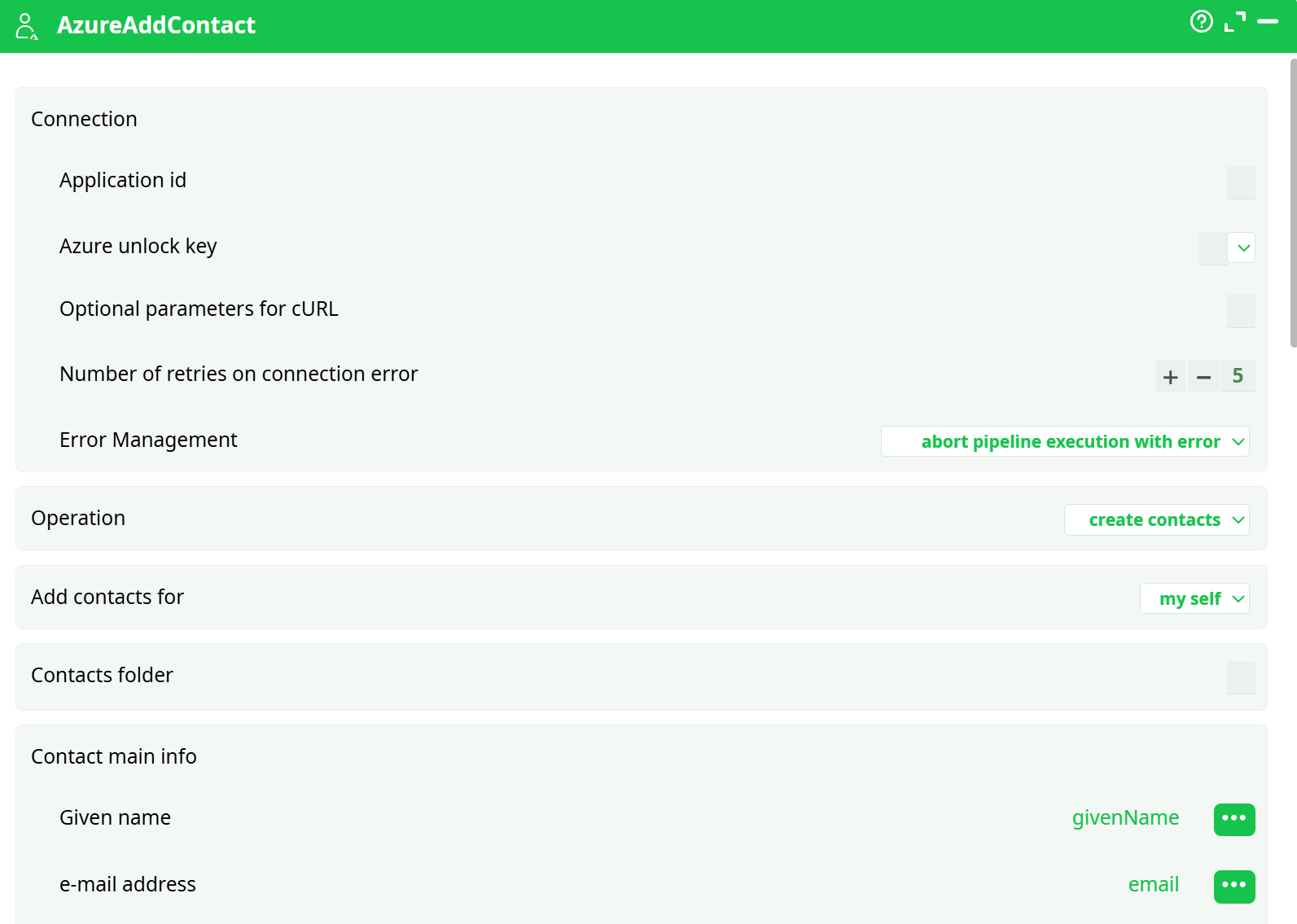
Parameters:
- Operation
- Add contacts for
- Contacts folder
- Contact main info
- Given name
- Email address
- Business phones
- Mobile phone
- Company name
- Job title
- Extra info
- Assistant name
- Birthday
- Business address
- Business home page
- Categories
- Department
- Display name
- File as
- Generation
- Home address
- Home phones
- IM addresses
- Initials
- Manager
- Middle name
- Nickname
- Office location
- Other addresses
- Personal notes
- Profession
- Spouse name
- Surname
¶ About
AzureAddContact creates Microsoft 365 contacts via Microsoft Graph.
This action uses credentials cached by AzureUnlock and maps columns from your upstream table (CSV, DB, etc.) into Contact fields.
¶ Prerequisites
-
An Azure AD app (client credentials flow) with:
- Microsoft Graph → Application permission:
Contacts.ReadWrite - Admin consent granted for the tenant
- Client secret created (keep the Value, not the Secret ID)
- Microsoft Graph → Application permission:
-
A mailbox (Exchange Online license) for the target user that will own the contacts.
-
An AzureUnlock action configured and run in the same pipeline execution with:
idContacts = ONclientID = a1de2d48-4915-4e37-83ac-0cf3a118cc55idTenant = <your tenant GUID>clientSecret = <secret VALUE>xx = parameters.AzureStorage.xx(constant valueazunlock-myetlazstorage-contacts-v1)
-
A dataset containing the columns you plan to map (see Input Requirements).
¶ Input Requirements
Provide a table with at least these columns:
| Column | Required | Notes |
|---|---|---|
givenName |
Yes | Contact’s first name |
surname |
Yes | Contact’s last name |
email |
Yes | Primary email address |
mobilePhone |
No | Use E.164 format (e.g., +14085550123) |
companyName |
No | Company |
jobTitle |
No | Job title |
displayName |
No | If omitted, Outlook builds it from names |
Example CSV (AzureAddContact_Input_Sample.csv)
givenName,surname,email,mobilePhone,companyName,jobTitle,displayName
Ariana,Sanders,ariana.sanders@example.com,+14085550001,Northwind,Analyst,Ariana Sanders
Bhavin,Patel,bhavin.patel@example.com,+14085550002,Contoso,Engineer,Bhavin Patel
Chloe,Nguyen,chloe.nguyen@example.com,+14085550003,Fabrikam,Manager,Chloe Nguyen
¶ Parameters
¶ Connection & Control
| Name | Type | Required | Default | Description |
|---|---|---|---|---|
| Application id | GUID (string) | Yes | — | Azure AD App ID. Used: a1de2d48-4915-4e37-83ac-0cf3a118cc55. Must match the app used by AzureUnlock. |
| Azure unlock key | string / parameter path | Yes | — | Handle that ties to AzureUnlock’s token cache. Used: parameters.AzureStorage.xx → azunlock-myetlazstorage-contacts-v1. |
| Optional: parameters for cURL | string | No | — | Extra cURL flags (rare). Leave blank. |
| Number of retries on connection error | integer | No | 5 |
Retries for transient HTTP errors. |
| Error Management | enum | No | abort pipeline execution with error |
Failure strategy. |
¶ Operation
| Name | Type | Required | Default | Description |
|---|---|---|---|---|
| Operation | enum | Yes | create contacts |
Only supported op for this action in this flow. |
| Add contacts for | enum (my self | user) |
Yes | my self |
Where to create the contacts. If user, supply a UPN/userId field (see note). |
| Contacts folder | string | No | default “Contacts” | Target contacts folder name. Leave blank for default. |
¶ Field Mapping (common)
| Name in Action | Type | Required | Default | Description |
|---|---|---|---|---|
| Given name | string (col ref) | Yes | — | Map to column givenName. |
| Surname | string (col ref) | Yes | — | Map to column surname. |
| e-mail address | string (col ref) | Yes | — | Map to column email. |
| Mobile phone | string (col ref) | No | — | Map to mobilePhone in E.164. |
| Company name | string (col ref) | No | — | Map to companyName. |
| Job title | string (col ref) | No | — | Map to jobTitle. |
| Display name | string (col ref) | No | — | Map to displayName (optional). |
Note: The panel exposes many additional optional fields (addresses, categories, notes, etc.). They are all optional string/list fields. Map only what you have; unfilled fields are ignored.
Interdependency rules
- AzureAddContact requires a valid token cache created by AzureUnlock in the same run and with the same unlock key.
- If Add contacts for = user, you must provide the target user principal name (UPN) or userId per row or as a constant; otherwise the action fails.
¶ Example Workflow
-
Create constant unlock key
Pipeline Parameters → General → Constants- Name:
AzureStorage.xx - Value:
azunlock-myetlazstorage-contacts-v1
- Name:
-
Configure AzureUnlock
idContacts = ONclientID = a1de2d48-4915-4e37-83ac-0cf3a118cc55idTenant = <your-tenant-id>clientSecret = <secret VALUE>(redact)xx = parameters.AzureStorage.xx
-
Run AzureUnlock (Play/Run to this pin) to cache tokens.
-
Prepare input with columns listed under Input Requirements (e.g.,
readCSV→ your sample CSV). -
Configure AzureAddContact
- Application id =
a1de2d48-4915-4e37-83ac-0cf3a118cc55 - Azure unlock key =
parameters.AzureStorage.xx - Operation =
create contacts, Add contacts for =my self - Map fields:
givenName, surname, email, mobilePhone, companyName, jobTitle(+displayName)
- Application id =
-
Run AzureAddContact (Play).
-
Validate in Process → Records/Data and in Outlook People.
¶ Troubleshooting
| Symptom / Log | Likely Cause | Precise Fix |
|---|---|---|
ERROR: Missing connexion parameter |
clientSecret empty in AzureUnlock, or AzureUnlock wasn’t run, or unlock keys don’t match |
Paste the secret VALUE into AzureUnlock, ensure xx matches in both boxes, Run AzureUnlock then retry. |
Authorization required, but no authorization protocol specified |
No token cached for the unlock key | Run AzureUnlock with Play (not Preview). Confirm same xx. |
HTTP 403 Insufficient privileges |
App lacks Graph Application permission | Add Microsoft Graph → Application → Contacts.ReadWrite, Grant admin consent, run again. |
| Contacts don’t appear in Outlook | Target mailbox not provisioned | Ensure the account has an Exchange Online license and a mailbox. |
| Phone/email rejected | Invalid format | Use E.164 phones; valid email syntax. |
| Duplicates created | No upstream de-dup | Add a deduplicate step on email before this action. |
¶ Use Cases
- Bulk-create CRM leads as Outlook contacts for a sales mailbox.
- Seed a shared Contacts folder for a project team.
- Migrate contacts from CSV/legacy systems into Microsoft 365.