¶ Description
Join several tables. You can have many different KEY columns inside the MASTER table.
¶ Parameters
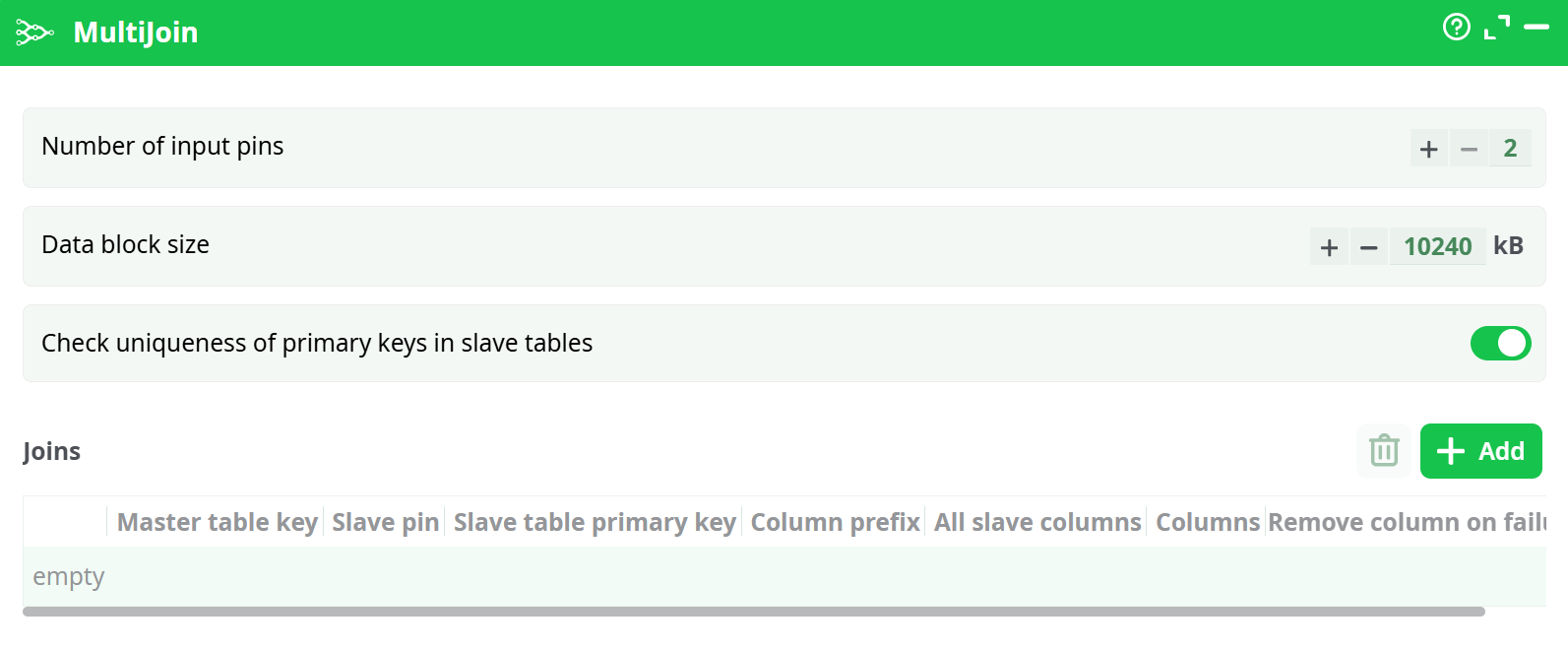
Paramters:
- Number of input pins:
- Data block size:
- Check uniqueness of primary keys in slave tables:
¶ About
This Action joins several tables based on different keys. Some definition:
- The first input pin contains the MASTER table.
- The other input pins (second, third, etc.) contain the SLAVE tables.
During the join, the SLAVE tables are added to (i.e. “joined with”) the MASTER table.
The MultiJoin only computes “Left Outer Joins”.
It is assumed that the column used as key inside the SLAVE tables have no duplicates (i.e. it can be used as primary key). Unexpected results may occur if that’s not the case. ETL checks for the uniqueness of the keys in the SLAVE tables. This check might take some time and you can thus de-activate it but it’s strongly not recommended. If the check fails (i.e. if there are some duplicate keys inside one of the slave tables), you can investigate this data quality issue using the NaïveDeDuplicate action.
The MultiJoin action first loads all the SLAVE tables into RAM Memory and then, once the loading is finished, it starts processing the MASTER table row-by-row. Thus, we have the following:
- The MASTER table is processed row-by-row and can thus have any size (i.e. it can be as big as you want without increasing RAM memory consumption).
- The RAM Memory consumption of the MultiJoin action is proportional to the size of the SLAVE tables. If your SLAVE tables are large, you’ll have a large RAM Memory consumption. There are three ways to reduce RAM memory consumption (to be able to handle bigger SLAVE tables):
- If the same SLAVE table S is used several times in different joins, connect the SLAVE table S one time to only one of the input pin of the MultiJoin action.
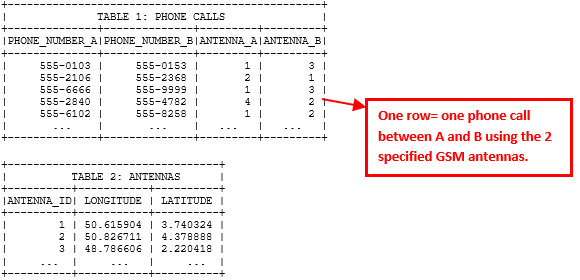
For example: We want to know the longitude & latitude of the two individuals A and B, each time they call each other. We have two tables:
- If the same SLAVE table S is used several times in different joins, connect the SLAVE table S one time to only one of the input pin of the MultiJoin action.
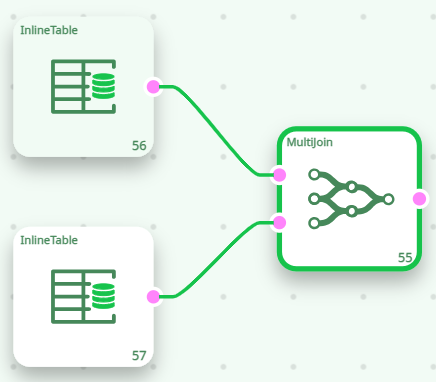
This is the best way of performing the 2 joins:
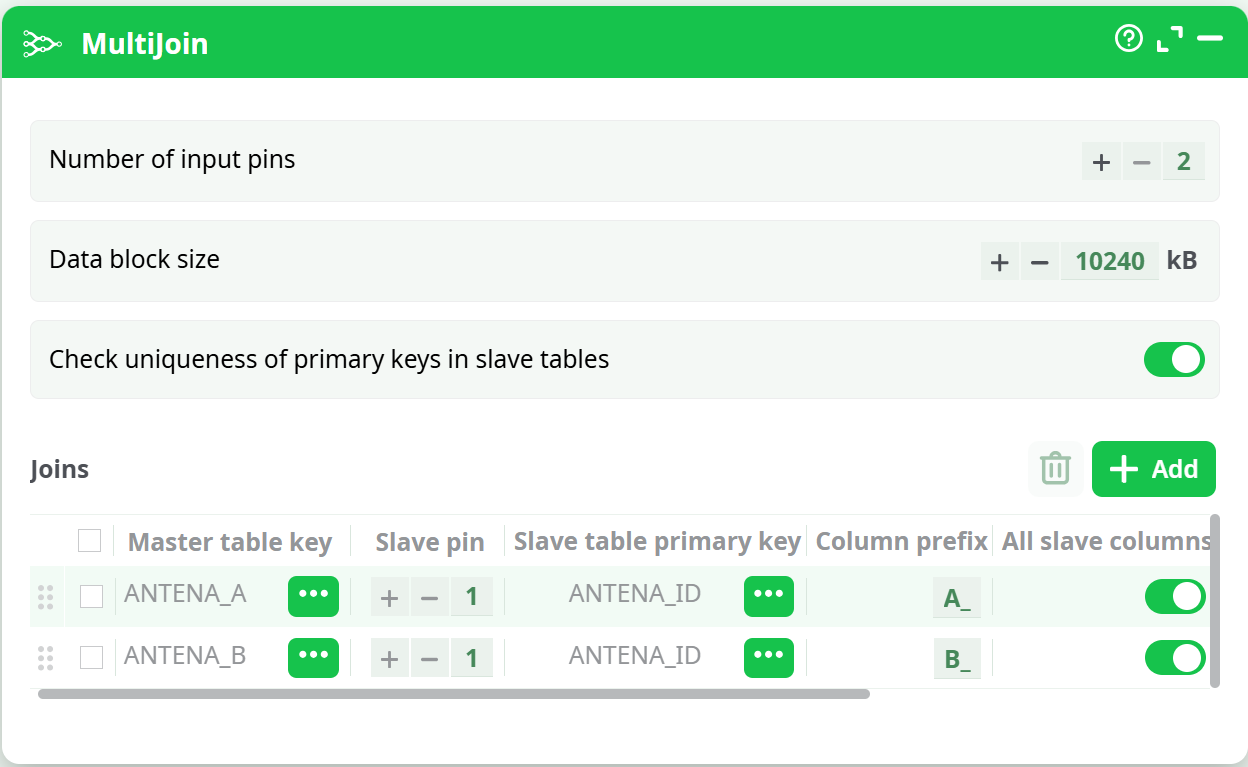
Do not use the following settings because it doubles the RAM memory consumption (although it gives the correct answer):
NOTE:
Each row of the above table (i.e. the table inside the MultiJoin properties window) is defining one join between two tables. The number of rows inside the above table can thus be completely different from the number of tables used to compute the output of the MultiJoin action:
e.g. It can happen that you compute 5 different joins using only 2 tables. In such situation, the above table will have 5 rows and the number of input pin is only 2.
The SLAVE table that is used inside a particular join is specified using its input pin number. In the example, the second join is using the SLAVE table on pin 1.
The correct answer for the join operation is the following table:

-
Use a memory-efficient data-type to store the data inside your columns (see section 5.1.2 about data-types). To remind you: The most memory-efficient data type is “Key” (4 bytes per cell) and after “Float” (8 bytes per cell).
-
You should only select, inside the slave tables, the columns required inside the output table of the MultiJoin action because only these columns will be loaded into RAM memory (thus reducing the memory required to store the SLAVE table). By default, ALL the columns of the SLAVE tables are loaded into RAM memory (this is thus very bad from the RAM memory consumption point-of-view).
[ISSUE]
To select some particular columns from the SLAVE tables:
- untick the checkboxes here:
- click here to select some particular column:
Despite the above optimizations, the MultiJoin action might still consume a very large amount of RAM memory.
Typically, the MultiJoin action is used to de-normalize (i.e. put everything inside a single table) the databases that are in “Star Schema”. For example, we have:
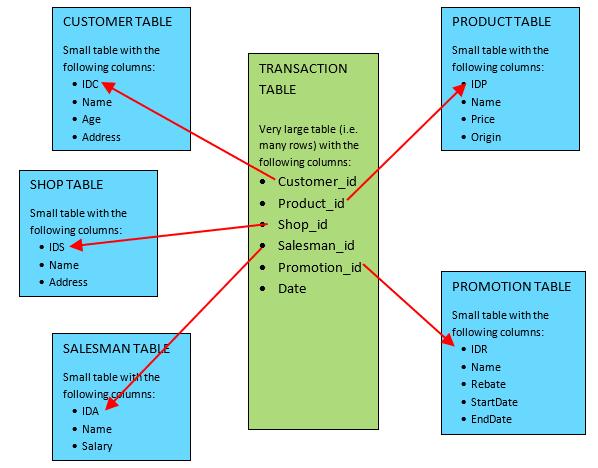
It should be obvious, from the look of the above schema, to guess why this schema is named “Star” schema. Inside the database literature, you’ll find that:
- The large table “in the center” of the schema (i.e. the table named TRANSACTION, in green) is referred as the “FACT” table in the literrature.
- The small tables “on the border” of the schema (i.e. the blue tables) are referred as the “DIMENSION” tables in the litterature.
To de-normalize “Star Schema” databases, you will:
- set as MASTER table of the MultiJoin Action the FACT table (in the example above: the TRANSACTION table).
- set as SLAVE tables of the MultiJoin Action all the DIMENSION tables (in the example above: the blue tables).
We’ll have the following:
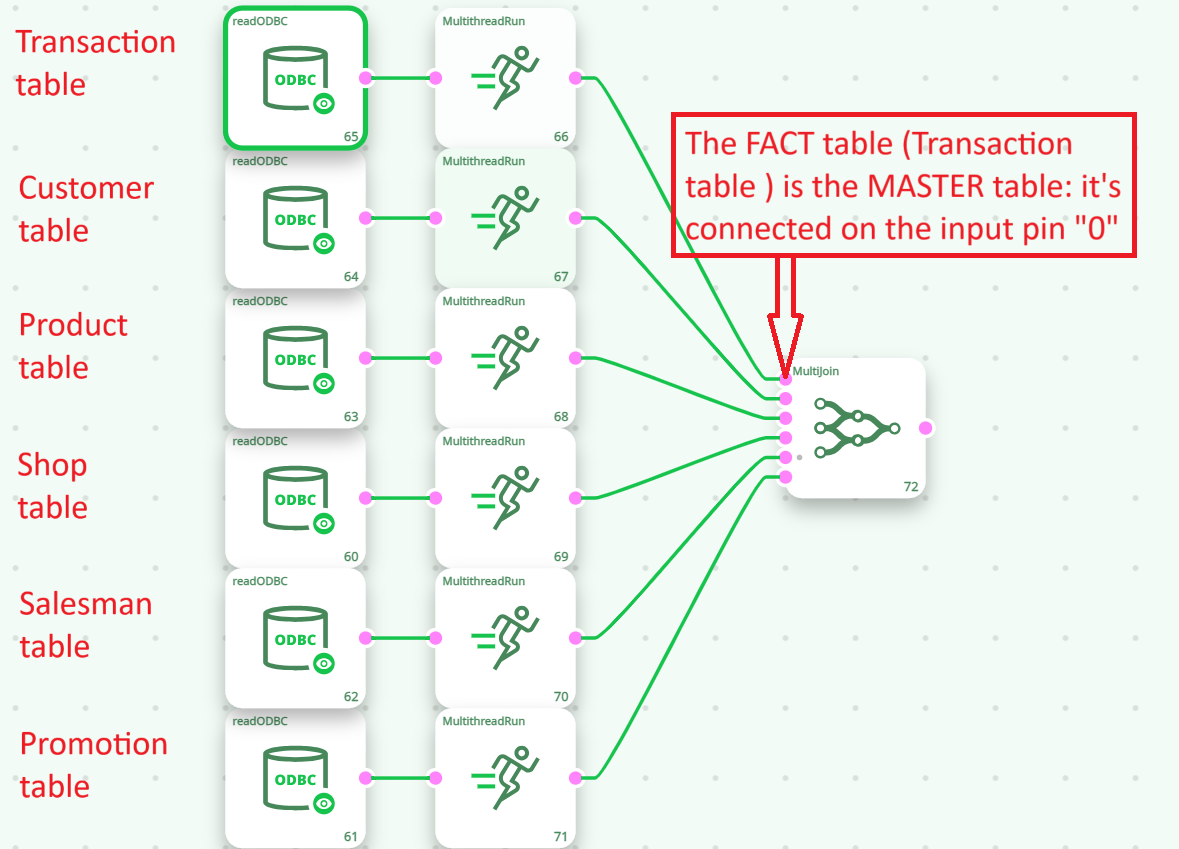
Using column-name-prefixes is important to avoid any “collision”. In the above example, the output table from the MultiJoin Action contains the columns: CUSTOMER_Name, PRODUCT_Name, SHOP_Name, SALESMAN_Name, PROMOTION_Name.
If we forgot to set any prefixes (Warning: This is the default ETL behavior!), all these different columns ends up with exactly the same name (that is “Name”) and we have many “column name collisions”. Collisions are detected at runtime inside the CSVFileWriter action and the GenericODBCWriter action.