¶ Description
Move the location of the datalake.
¶ Parameters
¶ Parameters tab
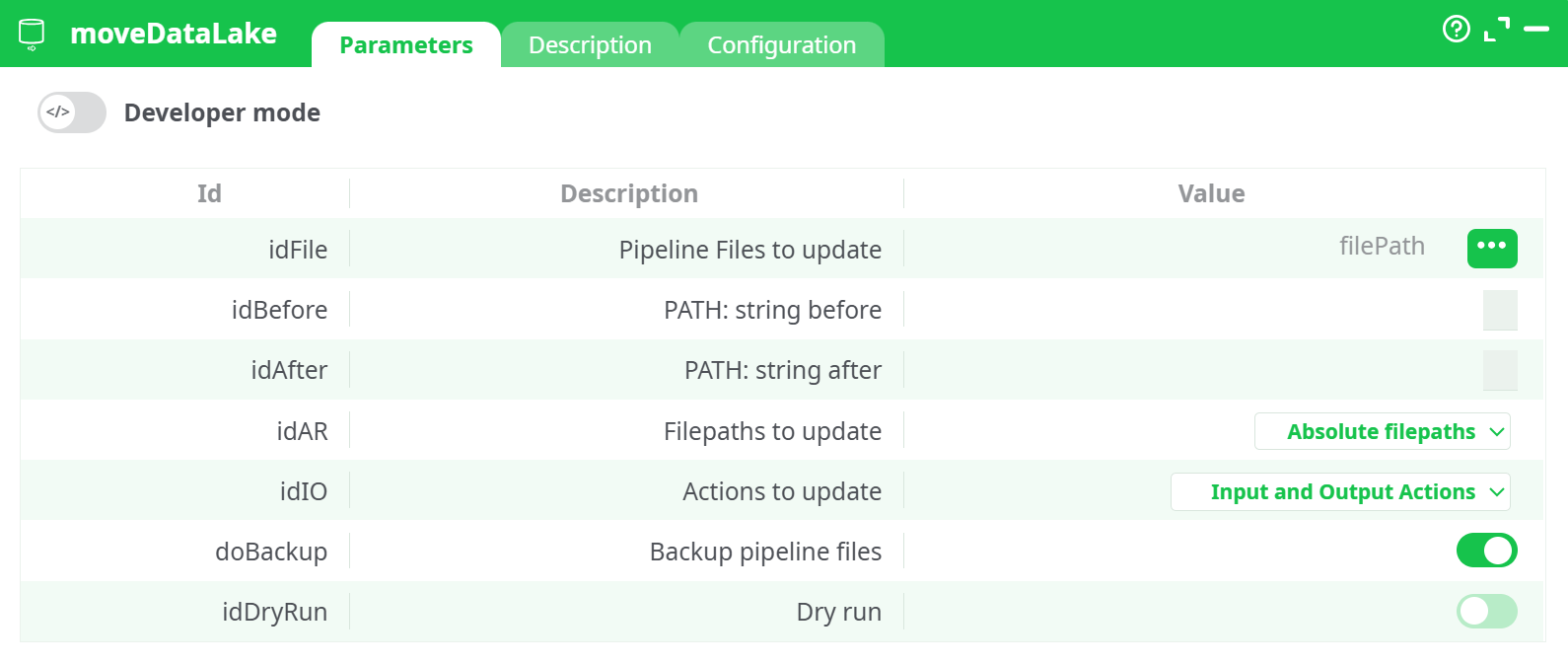
Parameters:
- Pipelines to update
- Filepath: String Before
- Filepath: String After
- Filepath to update
- Actions to update
- Backup the pipeline
- Dry run
¶ Description tab
See dedicated page for more information.
¶ Code tab
moveDataLake is a scripted action. Embedded code is accessible and customizable through this tab.
¶ Configuration tab
See dedicated page for more information.
¶ About
Purpose: moveDataLake bulk-updates file paths used by pipelines when a data lake (or any shared storage) is reorganized. It scans selected pipelines, finds path strings in the configured scope (inputs/outputs), and rewrites those paths by replacing a “before” substring with an “after” substring. It can run in a dry-run mode to preview changes and can backup files before writing.
¶ What this action does
-
Bulk path refactor. Rewrites many pipeline file references in one shot (great for environment moves like
/data/raw/...→/mnt/datalake/raw/..., or switching a mount prefix). -
Targeted scope. You choose whether to update absolute, relative, or all paths and whether to touch inputs, outputs, or both.
-
Safe by design.
- Dry run shows what would change without writing.
- Optional backup keeps a copy of every modified pipeline file so you can restore instantly.
-
Actionable report. The Data tab returns a compact table per pipeline with a status of what happened.
¶ When to use it
Use moveDataLake when you need to:
- Migrate pipelines between environments (dev → test → prod) where storage roots differ.
- Adopt a new folder convention (e.g., insert
/bronze/, rename/records/→/after_Records/). - Normalize path styles (convert absolute references to relative ones, or vice-versa).
- Fix broken references after moving a folder tree.
¶ How it works (conceptual)
-
You provide the list of pipelines to process.
The incoming table must include a column namedpaththat points to pipeline files (or folders, if supported by your setup). -
You tell the action what to change.
Provide the substring to find (“before”) and the substring to write (“after”). Replacement is a straightforward string substitution (no regex). Scope it to absolute / relative / all paths and to inputs / outputs / both. -
It analyzes & (optionally) writes.
- In Dry run, it scans and reports what would change.
- With Dry run off, it optionally backs up each file and then applies the rewrites.
-
You review the result.
The Data tab summarizes outcomes per pipeline and the Log explains what happened internally.
¶ Prerequisites & assumptions
- You can provide an input table with a
pathcolumn. A simple InlineTable works well. - The referenced pipelines are accessible and writable (draft/workspace files). If a file is missing or locked, the action will report it.
- Your “before” substring must be specific enough to avoid accidental rewrites (e.g., prefer
/records/overrec).
¶ Inputs & outputs you’ll see
¶ Incoming data (to this action)
path— the pipeline file path to scan/update. (If your environment supports folders, a folder path may cause recursive processing of contained pipelines.)
Tip: Feed one row per pipeline you want to update.
¶ Outgoing data (from this action)
A compact audit table with at least:
-
path— the processed pipeline file. -
_updateStatus— outcome for that path. Typical values include:Updated— at least one reference changed and saved.NoChange— nothing matched your “before” substring under the chosen scope.Missing— the file could not be found at the provided path.DryRun— changes were detected but not written (because Dry run was on).BackedUp(or included in the log) — file was copied before changes.Error— the action failed to read/write the file; check the Log for details.
Exact status names can vary by version; always cross-check the Log for full context.
¶ Key behaviors you should understand
¶ Path selection mode
- Absolute — only updates references that begin with a root (e.g.,
/mnt/...,s3://...,gs://...). - Relative — only updates references that don’t start with a scheme/root (e.g.,
records/out.csv). - All — updates both absolute and relative paths.
¶ Action scope
- Inputs — update only dataset/file references used to read.
- Outputs — update only dataset/file references used to write.
- Inputs and outputs — update both.
¶ Dry run
- Does not modify any file.
- Produces the same report you’d get in a real run, so you can validate impact safely.
¶ Backup
- When enabled, saves a copy of each file before writing.
- Backups make rollback trivial if you spot something to tweak.
¶ Replacement semantics
- Simple substring replacement across supported path fields in the chosen scope.
- It does not interpret wildcards or regex.
- Use a precise “before” value to avoid unintended edits.
¶ Operational flow you can follow
-
Prepare your pipeline list.
Create (or load) a table with one row per pipeline and apathcolumn. -
Open moveDataLake and configure at a high level.
- Choose the pipelines to scan (from the incoming table).
- Enter the before and after path fragments.
- Pick Absolute / Relative / All and Inputs / Outputs / Both.
- Turn Dry run on for the first pass; optionally enable Backup.
-
Run & review.
- Data tab: check
pathand_updateStatus. - Log tab: confirm backups (if enabled) and see counts of updated references.
- Data tab: check
-
Apply for real.
Turn Dry run off, keep Backup on (recommended), run again, then publish your updated pipelines if your workflow requires it.
¶ Troubleshooting & tips
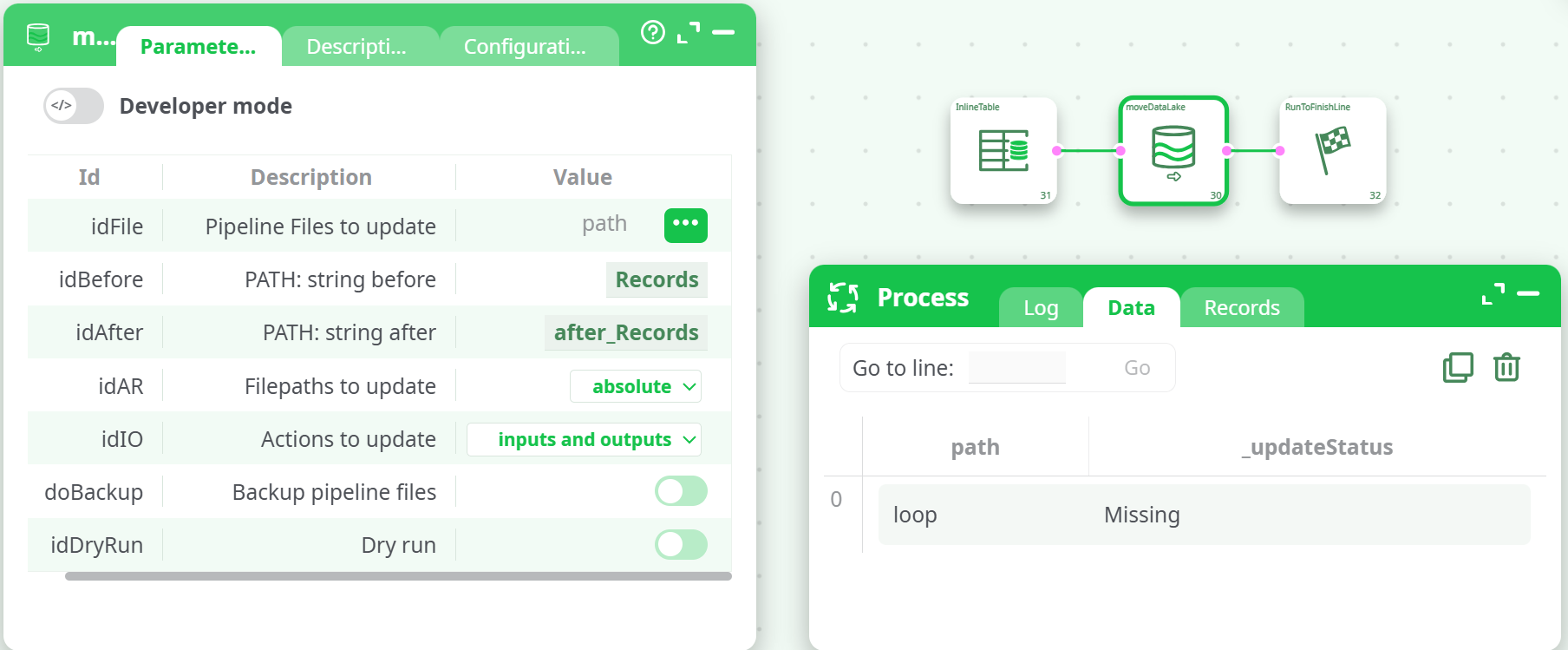
Missingstatus
The file path in thepathcolumn doesn’t point to a pipeline file that moveDataLake can reach. Verify the path, workspace, and permissions.
-
No changes after a run
- Your “before” string didn’t match any references under the selected scope.
- Try Dry run with All and Inputs and outputs to discover where matches exist.
- Ensure you’re targeting the correct absolute/relative type.
-
Unintended rewrites
- Restore from Backup, then narrow the “before” substring (e.g., include a leading slash or folder token).
-
Permission or write errors
- Make sure you’re editing draft or otherwise writable pipeline files.
- Check workspace controls or file system permissions.
-
Post-run issues when executing pipelines
- A path now points to a non-existent location. Either create the target folders/files or adjust the “after” value and rerun moveDataLake.
¶ Performance & safety considerations
- Processing time scales with the number and size of pipelines inspected. Start with Dry run on a small subset to validate.
- Keep Backup enabled for the first full update in any environment.
- Plan your cut-over: perform updates during a maintenance window if pipelines are actively executed.
¶ Security notes
- The action modifies pipeline definition files; it does not read or write your data lake content directly.
- Changes are local to your workspace or project storage and respect your platform’s access controls.