¶ Description
Reproject geometries inside a new coordinate system.
¶ Parameters
¶ Standard tab
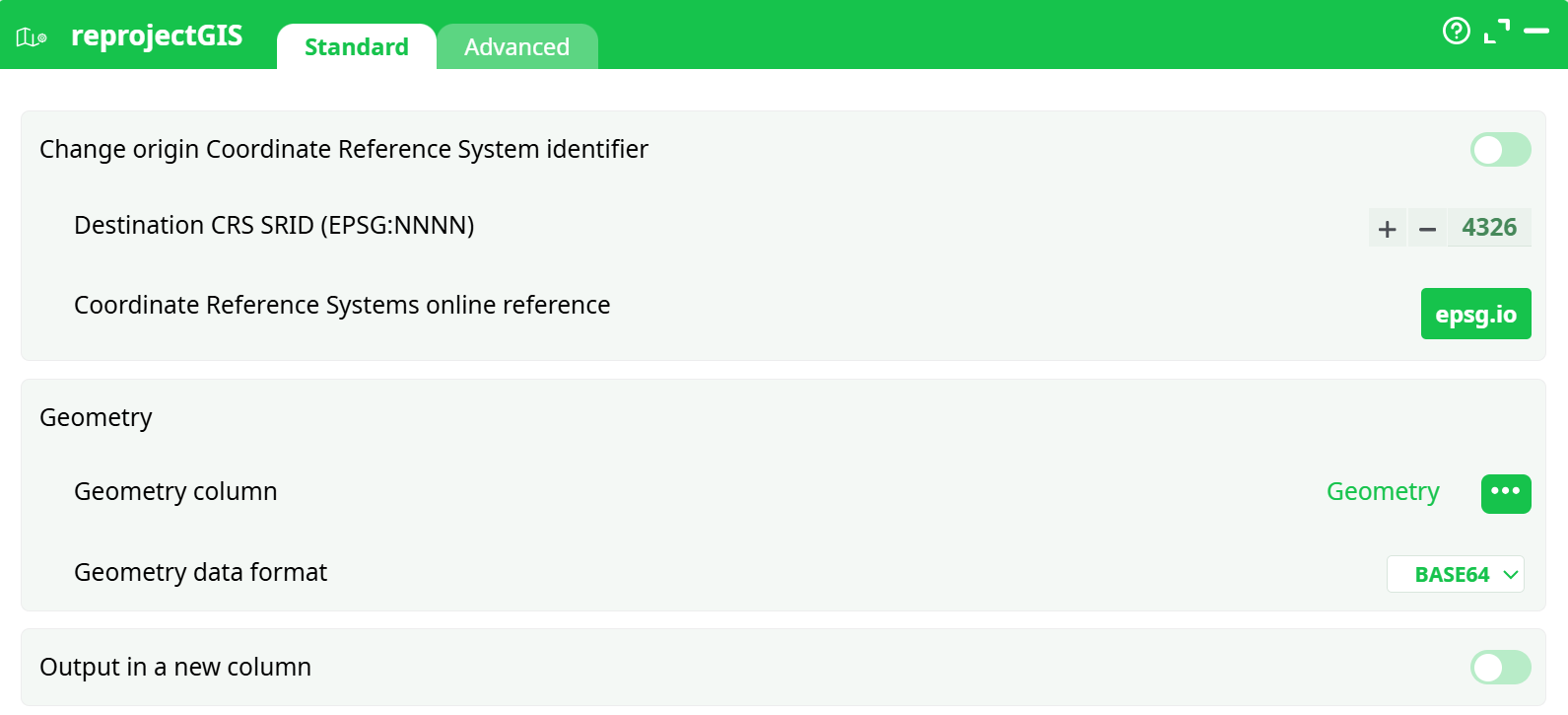
Parameters:
- Set origin SRID
- New destination SRID
- Geometry
- Geometry column
- Geometry data format
- Output in a new column
- New column name
¶ Advanced tab

Parameters:
- Display debug information in the log window
¶ About
Most of the visualization action inside ETL do require to get their geometries described in decimal degrees (i.e. inside the coordinate system with the 4326 SRID).
One particularity of the “SRID=4326 coordinate system” is that a “step” of 10 degree of longitude (i.e. along the direction of the “X” axis) represents 354 Km at the equator (i.e. when the latitude is zero) and the same “step” of 10 degree of longitude near the Noth Pole (i.e. when the latitude is near 90°) is nearly zero Km. All this is explained in the following illustrations:
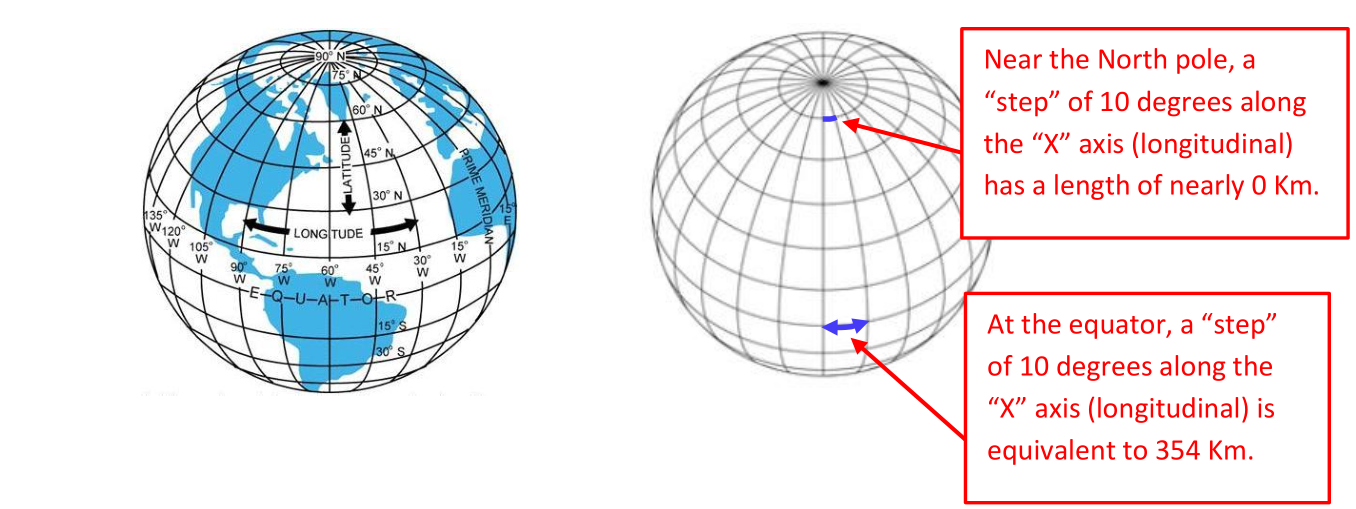
In other words, inside the 4326 SRID, a step of one unit along the X axis does not always “moves us” of the same distance (it depends of the value of the Y axis). Hopefully, in the direction of the Y axis – the latitude – all the steps have the same contant length. So, moving in the X direction (i.e. changing longitude) and moving on the Y direction (i.e. changing latitude) is definively not the same. Here is an example of this strange phenomenon: We created some shapes that looks like perfect circles inside the “SRID=4326 coordinate system”:
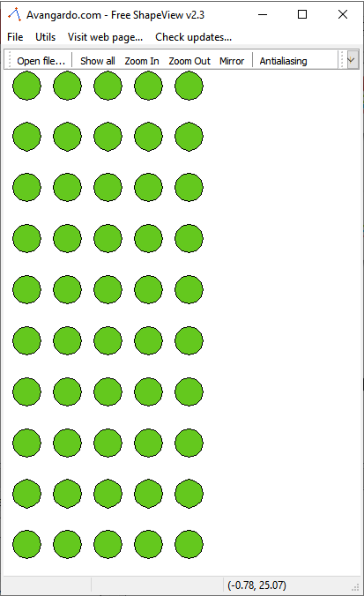
…but when we look at these same “perfect circles” on the Earth spheroid, we actually see:
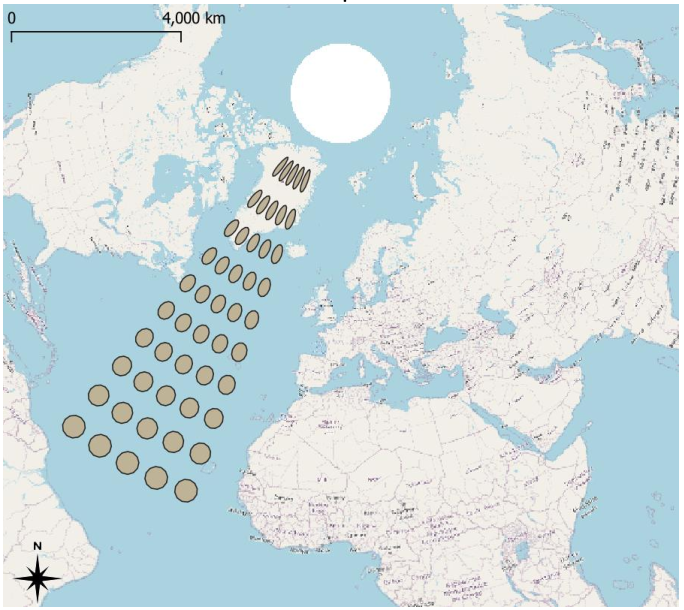
This example illustrates very well that the “X axis” (i.e. the longitude direction) “shrinks” when we approach the poles. Many complex GIS action (such as these action: KNN, ConcaveHull, SimplifyGIS, ExpandGIS, tesselateGIS) do not work very well inside this “SRID=4326 coordinate system” because these actions all assume that we are in a standard planar cartesian coordinate system (they totally ignore the fact that our geometries were first defined on a spheroid): i.e. doing a “step” of one unit-length always “move us” of the same constant distance whatever the direction of the step. Hopefully there is a solution to this problem: re-projection! The ETL Reproject action allows to take the geometries defined inside the problematic 4326 and reproject them inside a new coordinates system that has the nice “planar&cartesian” properties (i.e. all directions are equivalent). Once inside this new coordinate system, you can thus safely use all the complex GIS actions (KNN, ConcaveHull, SimplifyGIS, ExpandGIS, TesselateGIS) to do all your computations. Also, typically, at the end of all the computations, you’ll reproject inside the 4326 SRID, just for visualization purposes (because, most of the time, the visualizations require the 4326 SRID).
¶ A good, working example
Let’s go back to our previous example: We again want to create a small grid of “perfect circles” on the Earth spheroid, but this time, we’ll succeed:
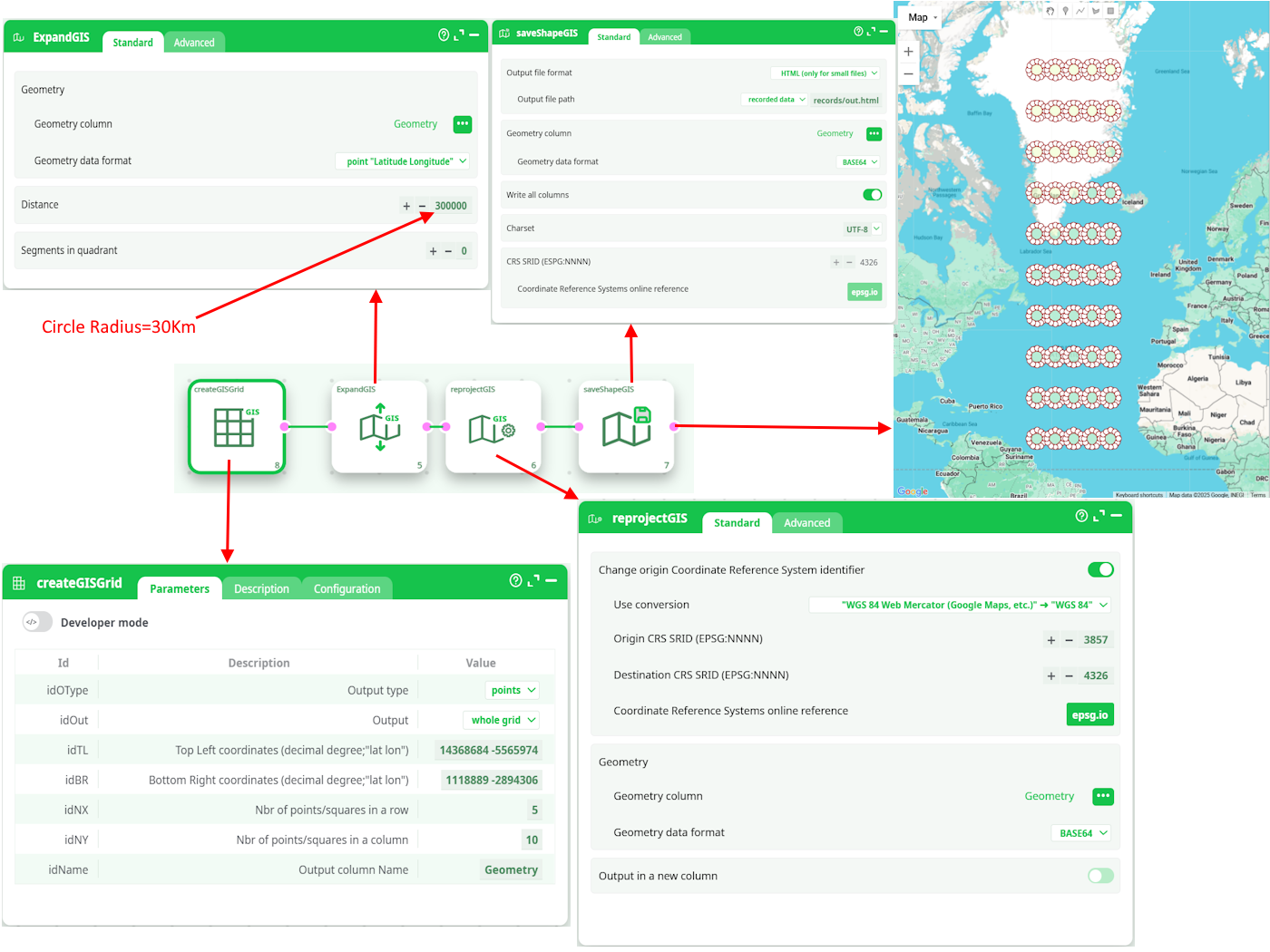
The 4 steps (for the 4 actions here above) are:
- We generate a simple grid of points inside the 3857 SRID (using createGISGrid)
- We transform each point into a small disc of radius 30Km (using ExpandGIS)
- We want to display our grid of “prefect circles” on an Earth Map: To do so, we first need to
reproject into 4326 SRID. - We create the .html Google Map based on the geometries in the 4326 SRID.
¶ SRID and Storage Formats
Inside ETL, the geometries are stored/represented using 5 different formats:
- Point Coordinates "Latitude Longitude"
- Rectangle "Latitude1 Longitude1 Latitude2 Longitude2"
- Geometry data in WKT format
- Geometry data in HEX format
- Geometry data in BASE64 format
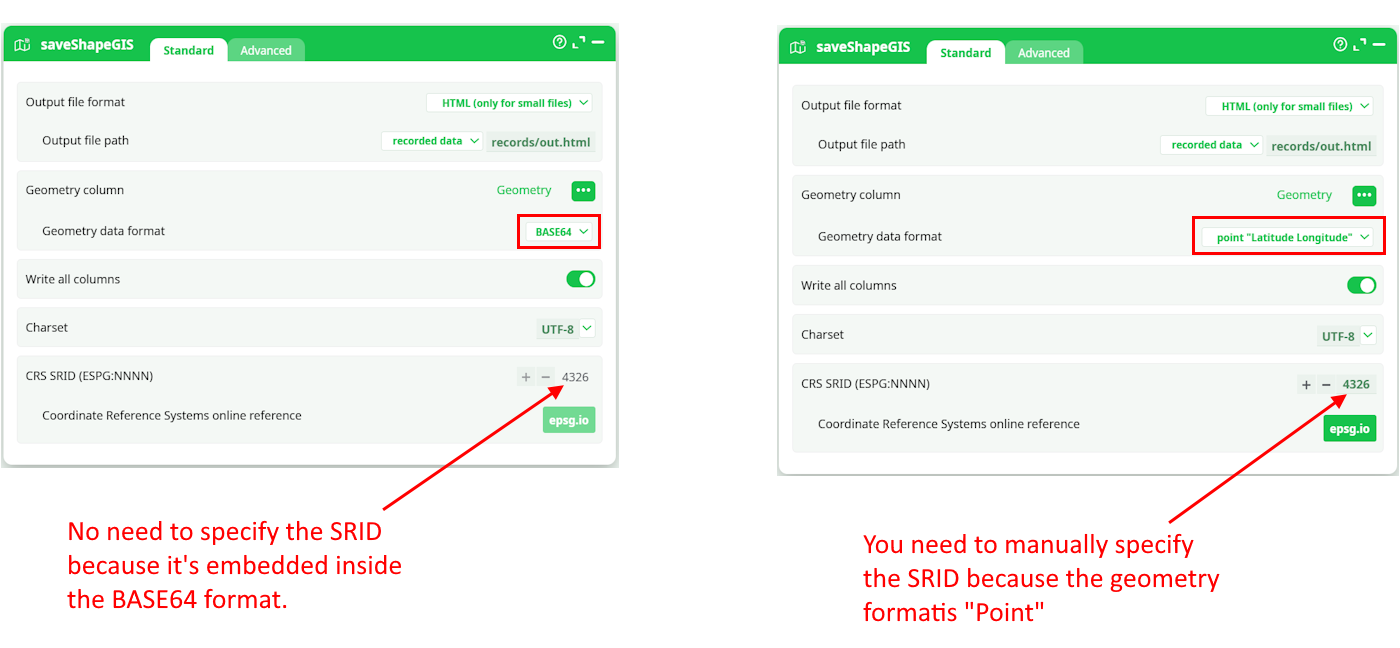
The data for the geometries stored inside the last 2 formats (the HEX and the BASE64 formats) include everything required to define the geometry: …And this includes the SRID! Using the GeometryInfo action, you can see the SRID of the geometries (that are stored in HEX or BASE64 format).
In opposition, when using the first 3 formats (i.e. the POINT, the RECTANGLE and the WKT formats), some actions will ask you to manually specify the SRID (because the SRID is not embedded into the data for these more primitive geometry formats). For example, when you use the saveShapeGIS action:
¶ How to select a good SRID/Coordinate system?
Usually, SRID’s are linked to countries (SRID 2154 for France, SRID 31370 for Belgium, SRID 4269 for North America, etc.). So, if you are manipulating geometries from a specific country, a good starting point it to select the SRID for this country: This will be the SRID with the less distortion for your geometries.
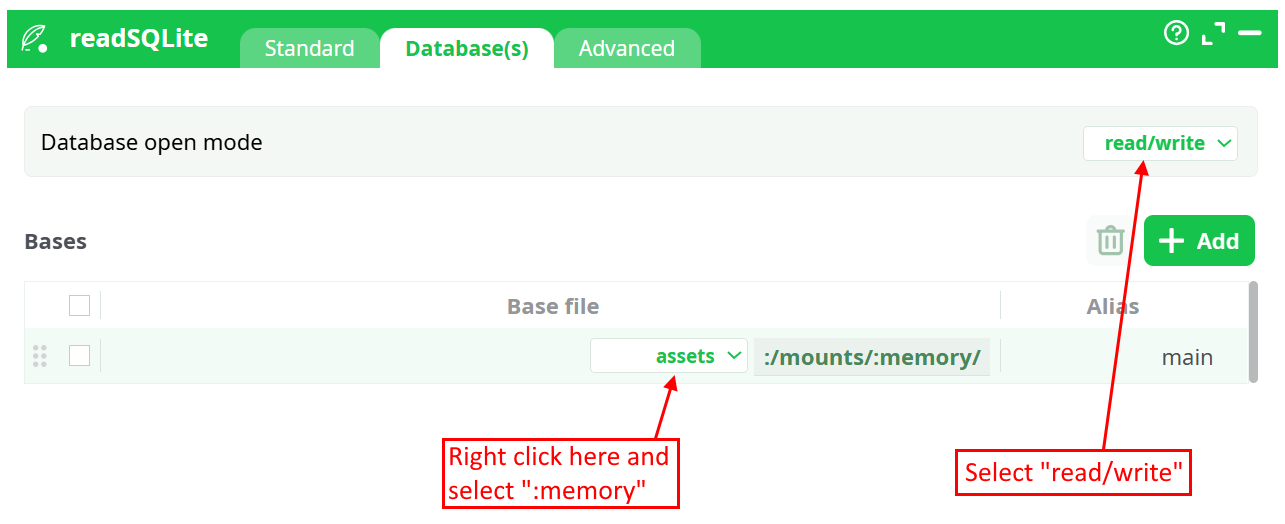
ETL supports reprojection into 4922 different SRID’s. To get a table with the complete list of all the supported SRID’s, execute the readSQLite action with the following parameters:
- The SQL command to run is: select * from spatial_ref_sys_all
- The database name is “:memory:” and the “Database Open mode” is “Read & Write”:
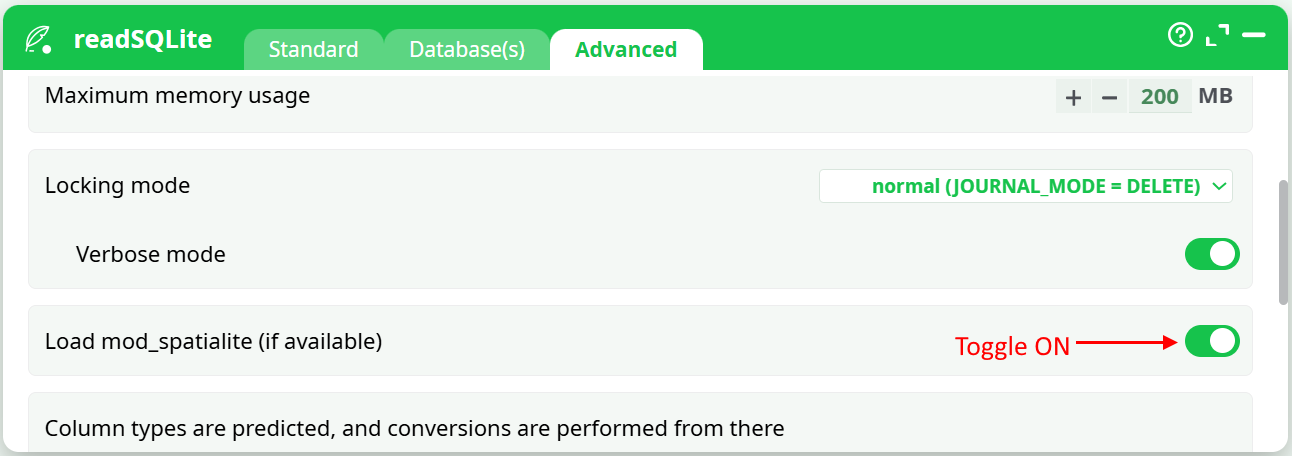
- Enable the GIS extensions:
When searching internet for a correct SRID, you can also search for EPSG because the SRIDs from spatialite (used in ETL) are compatible with EPSG.