¶ Decription
Split a cell into several rows
¶ Parameters
¶ Parameters tab
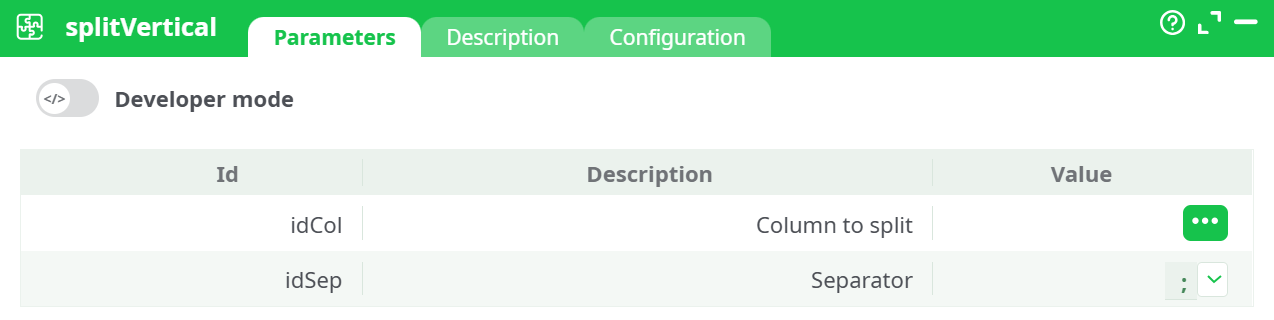
Parameters:
- Column to split
- Separator
¶ Description tab
See dedicated page for more information.
¶ Configuration tab
See dedicated page for more information.
¶ About
splitVertical transforms a dataset where one column contains delimited lists into a normalized, one-value-per-row representation. For each row, the action parses the selected column using a specified separator and emits one output row per parsed element. All non-selected columns are duplicated as-is so downstream joins, aggregations, and audits retain their original context.
¶ Inputs and Outputs
- Input: A tabular dataset with at least one column containing delimited values.
- Output: A tabular dataset in which the selected column contains a single value per row. The number of rows increases in proportion to the number of items found in the selected column.
¶ Configuration
- idCol (Column to split)
Name of the input column to explode. The column must be present in the incoming schema and be of a textual type or convertible to text. - idSep (Separator)
Single-character or short string used to split the cell content (e.g.,;,,,|, or a space). The separator is treated literally (no regex). If values include the separator as a literal character, they must be pre-escaped or pre-cleaned upstream.
¶ Execution Requirements
- The node’s input pin must be connected to an action that emits a table (e.g., a reader, a previous transform, or a cached dataset).
- The value configured in idCol must exist in the incoming schema.
- The separator configured in idSep must match the actual delimiter used in the data.
- If the pipeline enforces schema locking, ensure downstream nodes accept the increased row count and the unchanged column set.
¶ Processing Semantics
- For each input row, the action splits the target column on idSep.
- For each resulting token, a new row is produced. All other columns are copied from the source row.
- Empty tokens (arising from leading/trailing separators or consecutive separators) are emitted as empty strings unless trimmed upstream.
- Whitespace adjacent to the separator is preserved; trimming is not performed by this action.
- Input rows with a null in idCol are passed through unchanged (one row with a null value), unless the upstream node converts nulls to empty strings.
¶ Operational Considerations
- Cardinality growth: Row counts may increase significantly. Validate memory headroom and downstream operator limits before running on large datasets.
- Data quality: If values contain unexpected separators, perform pre-cleaning or escaping upstream.
- Ordering: Output preserves the original row order, and within each row, token order follows the order in the source cell.
- Types: The split column is treated as text. Cast to numeric/date types downstream when needed.
¶ Best Practices
- Normalize separators and whitespace upstream (trim, collapse doubles, remove trailing delimiters) to avoid empty tokens.
- Chain multiple
splitVerticalactions if several columns require explosion—run one column per node to keep lineage clear. - After splitting, consider de-duplicating rows if repeated tokens are possible.
- If the split column is critical for joins, index or sort downstream to maintain performance.
¶ Troubleshooting
- “The selected pin is not connected” in the column selector: Connect an upstream node that emits a table, then reopen the selector.
- Column not listed in selector: Ensure the upstream node has executed/previewed and that schema propagation is enabled.
- Unexpected empty rows after split: Inspect data for consecutive or trailing delimiters; clean upstream or filter empty tokens downstream.
- Incorrect tokenization: Verify idSep matches the data’s delimiter and that embedded delimiters are escaped or removed earlier.
- Performance degradation: Estimate worst-case expansion (max tokens per row × row count) and process in batches or add filters upstream.