¶ Description
Download Data from Microsoft Dynamics CRM
¶ Parameters
¶ Standard tab
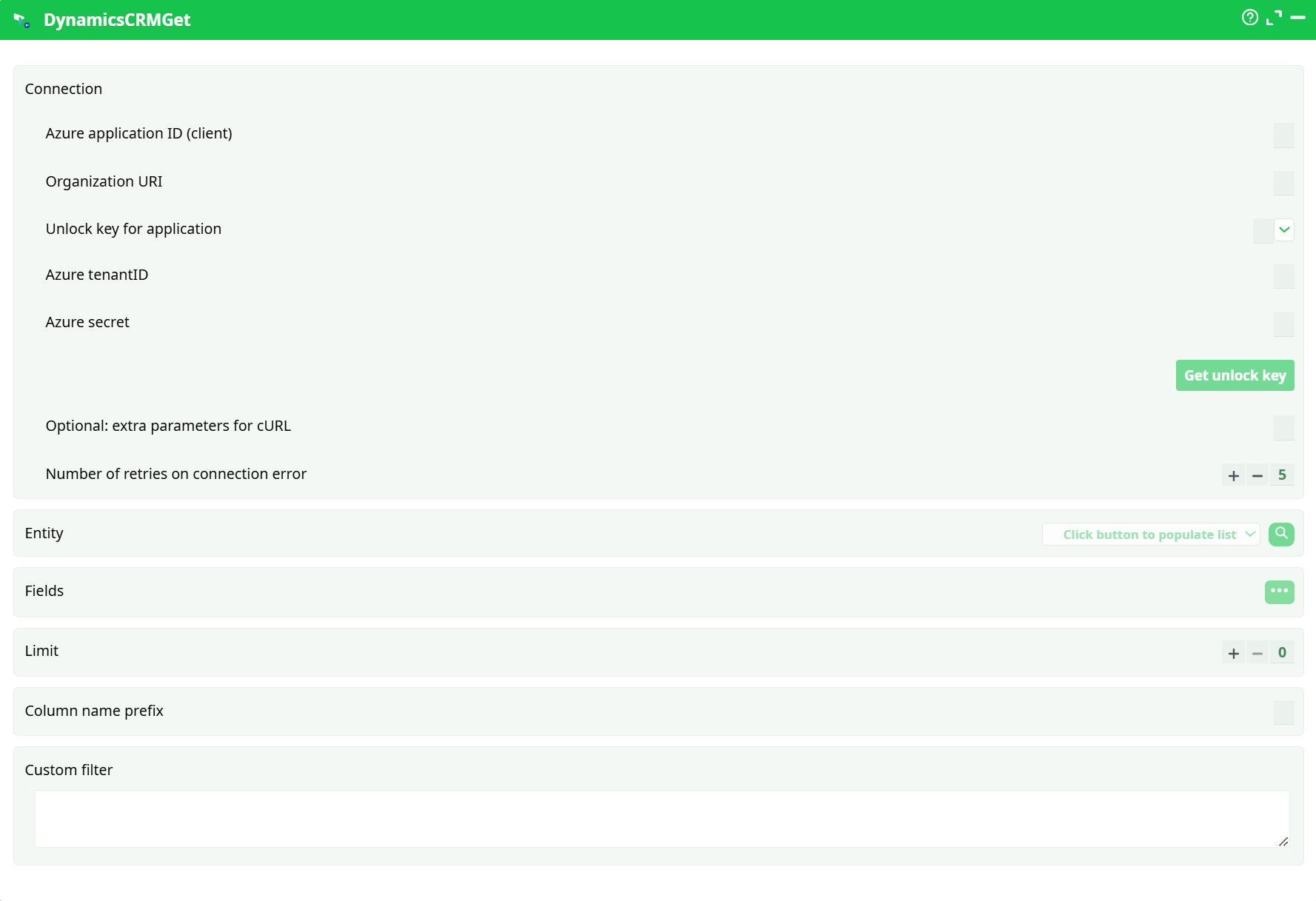
Parameters:
- Connection
- Azure application ID (client)
- Organization URI
- Unlock key for application
- Azure tenantID
- Azure secret
- Optional: extra parameters for cURL
- Number of retries on connection error
- Entity
- Fields
- Limit
- Column name prefix
- Custom filter
¶ About
DynamicsCRMGet reads records from Microsoft Dataverse (Dynamics 365) using an Azure AD application via the client-credentials flow. The action is designed for reliable, paginated extraction from any Dataverse table (entity) and returns a typed tabular dataset ready for downstream transformations. Authentication is handled through an unlock key cache so that OAuth tokens are reused during the pipeline run, minimizing re-authentication overhead. In the Phase-1 run, the action was configured to read from the contacts entity with a conservative preview limit and a column prefix to avoid name collisions.
- For detailed instructions on how to configure the Azure service, see: AzureServiceConfiguration
¶ Prerequisites
-
Azure AD application (app registration) with a client secret.
- Application (client) ID used:
a1de2d48-4915-4e37-83ac-0cf3a118cc55 - Directory (tenant) ID used:
3b48d674-944c-4e4d-8bd8-2e7f46298569 - Client secret: store securely; paste only in the action’s secret field.
- Application (client) ID used:
-
Dataverse Application User bound to the Azure AD application in the same environment you will query. Assign a security role that grants read permissions for the target tables (for testing, a broad role; for production, least-privilege custom role).
-
Organization URI for the environment being queried, for example
https://<org>.crm.dynamics.com(no trailing slash). -
Unlock key constant defined in Pipeline parameters → General → Constants.
- Name used:
AzureCRM.xx - Value used:
azunlock-dynamics-etl-v1
This key identifies the token cache entry created by the “Get unlock key” operation.
- Name used:
-
Network / API access to
*.crm.dynamics.comandlogin.microsoftonline.com(or the regional authority used by your tenant). -
Governance: ensure API usage complies with Dataverse service protection limits and your organization’s data-access policies.
¶ Input Requirements
This action is a source; it does not require an upstream file. It needs only valid connection information and the query configuration (entity, field list, optional filter). The logical entity name must exist in the target Dataverse environment, and the configured application user must have read permission on that entity.
¶ Parameters
| Name | Type | Required | Default | Description |
|---|---|---|---|---|
| Azure application ID (client) | string (GUID) | Yes | — | The Application (client) ID from Azure AD for the app registration. Used: a1de2d48-4915-4e37-83ac-0cf3a118cc55. |
| Organization URI | URL | Yes | — | The base URL of the Dataverse environment to query, e.g., https://<org>.crm.dynamics.com. No trailing slash. Must match the environment where the Application User is created. |
| Unlock key for application | string (constant ref) | Yes | — | Reference to the pipeline constant holding the token-cache key. Used: parameters.AzureCRM.xx → value azunlock-dynamics-etl-v1. Press Get unlock key once after filling connection fields to seed the cache. |
| Azure tenantID | string (GUID) | Yes | — | The Directory (tenant) ID. Used: 3b48d674-944c-4e4d-8bd8-2e7f46298569. |
| Azure secret | secret | Yes | — | The client secret VALUE for the app registration. Redact in screenshots and version control. Rotates per your org policy. |
| Optional: extra parameters for cURL | string | No | (empty) | Advanced networking/tuning flags forwarded to cURL. Normally left blank. |
| Number of retries on connection error | integer | No | 5 |
Retry attempts on transient network failures or 5xx responses. Exponential backoff is recommended. |
| Entity | string | Yes | — | The target Dataverse table’s logical name (e.g., contacts, accounts, leads). Must exist and be readable by the app user. |
| Fields | comma-separated string | Yes | — | Comma-delimited list of columns to select. Use logical column names. Selecting only needed columns reduces payload size and improves performance. |
| Limit | integer | No | 0 |
Maximum number of rows to return. 0 means no limit (the action will page through all available records). Used during Phase-1 preview with a small, non-zero value for fast iteration. |
| Column name prefix | string | No | (empty) | Optional prefix added to every output column name (e.g., crm_) to avoid collisions downstream. Used during Phase-1 for safer joins. |
| Custom filter | string (OData) | No | (empty) | An OData v4 filter expression applied server-side (e.g., status, date ranges). Use logical column names and proper OData operators. Leave blank to return all records (subject to Limit). |
Parameter interdependencies
- Get unlock key must be executed after setting Application ID, Tenant ID, Secret, and Organization URI. Changing any of those requires re-getting the unlock key.
- The Entity, Fields, and Custom filter must reference logical names that exist in the same Organization URI the token is scoped to.
¶ Example Workflow (step-by-step)
-
Create the unlock constant
Open Pipeline parameters → General → Constants and addAzureCRM.xx = azunlock-dynamics-etl-v1. -
Fill connection fields in
DynamicsCRMGet- Azure application ID (client):
a1de2d48-4915-4e37-83ac-0cf3a118cc55 - Organization URI:
https://<your-org>.crm.dynamics.com - Unlock key for application:
parameters.AzureCRM.xx - Azure tenantID:
3b48d674-944c-4e4d-8bd8-2e7f46298569 - Azure secret: paste secret value (redacted)
- Azure application ID (client):
-
Seed the token cache
Click Get unlock key. Confirm success/cached status in the UI or Log. -
Configure the retrieval
Set Entity, Fields, an optional Custom filter, and Limit appropriate for your run. Optionally set a Column name prefix to protect downstream joins. -
Run the action
Use Run to this pin. Observe HTTP 200 responses and pagination in Log. -
Validate output
Open the Data tab: verify row count, presence of required columns, and expected data types. Confirm that the dataset aligns with the configured filter and limit. -
Chain downstream
Connect to a formatter/writer (e.g., write to CSV, database, or move into enrichment/transformation steps).
¶ Troubleshooting
-
401/403 Unauthorized
- The app is not configured as an Application User in this environment, or the Organization URI points to a different environment.
- The client secret is invalid/expired. Recreate a secret and paste the VALUE.
- The token cache is stale after changing connection fields—click Get unlock key again.
-
Insufficient privileges / missing tables
- The Application User’s security role lacks read access on the requested entity/columns. Adjust the role or use a profile with the required privileges.
-
Empty result set
- The Entity logical name is incorrect or the Custom filter is too restrictive. Verify logical names via Dataverse metadata and temporarily clear the filter.
- The Application User is scoped to an environment that does not contain the target data; confirm the Organization URI.
-
Slow extraction or throttling
- Dataverse enforces service protection limits. Reduce selected columns, use filters to narrow the window, and keep Limit small during development. Respect backoff if the log indicates throttling.
- Increase Number of retries on connection error to ride over transient 5xx responses.
-
Column collisions downstream
- Enable Column name prefix (e.g.,
crm_) to avoid name conflicts when joining with other sources.
- Enable Column name prefix (e.g.,
-
Token cache not used
- Ensure the unlock constant name matches exactly and that Get unlock key was executed after all connection fields were filled.
¶ Use Cases
- Operational syncs of key Dataverse tables (contacts, accounts, opportunities, leads) into a data lake or warehouse.
- Incremental pulls using OData filters on date/time columns for efficient windowed ingestion.
- Domain-specific extractions for marketing, sales, or support analytics where only a subset of columns is required.
- Pre-enrichment staging before identity resolution or CRM–ERP reconciliation workflows.
- Data quality monitoring by periodically sampling critical entities and validating mandatory attributes.