¶ Description
- Adds one new column that contains a sequence of increasing number (i.e. a “Key” Column).
- Adds some new columns that each contain a constant value (i.e. a “Constant” Column).
¶ Parameters
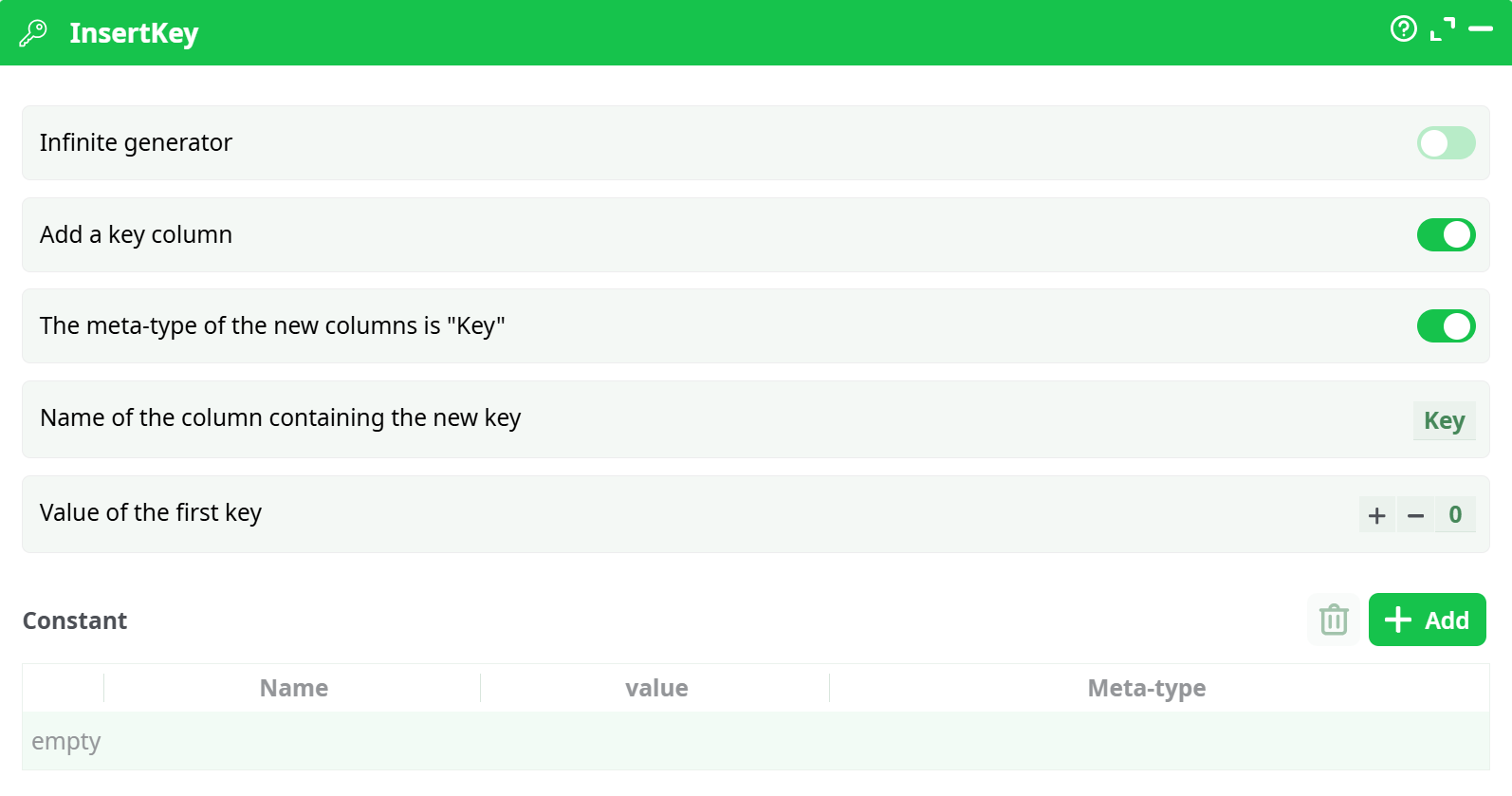
Parameters:
-
Infinite generator
If enabled, the action generates an infinite stream of rows and keeps incrementing the key.
In typical ETL pipelines this is disabled. -
Add a key column
If enabled, the output includes a numeric key column that increments by +1 for each row. -
The meta-type of the new columns is "Key"
If enabled, the generated key column is tagged with the meta-type Key. -
Name of the column containing the new key
Sets the name of the generated key column (example:Key,RowId,Index). -
Value of the first key
Defines the starting value of the sequence (commonly0or1). -
Constant
Lets you define one or more constant columns (name/value pairs).
Each constant becomes a column added to the output, and every row receives the same value.
¶ About
The InsertKey action enriches your data by adding:
- A sequential numeric Key column (useful as a row identifier / index).
- Optional Constant columns (useful to attach a fixed value to each row, like a label, an environment name, a pipeline identifier, etc.).
This is helpful when you want to:
- Add a stable row index before exporting or debugging.
- Create a simple numeric ID without extra logic.
- Carry fixed parameters as columns so downstream actions can reuse them.
Behavior notes:
- When Infinite generator is OFF, the key is generated for incoming rows.
- The key is assigned in the order rows are processed. If you need a specific order, sort upstream before
InsertKey.
¶ How to Use
- Connect an upstream action that produces data (for example a CSV reader).
- Add
InsertKeyright after it. - Configure:
- Add a key column = ON
- Name of the column containing the new key =
Key(or your preferred name) - Value of the first key =
0(or1)
- (Optional) Add constants in the Constant section if you want extra columns with fixed values.
- Run the pipeline and check the output in the Data tab.
¶ Example Pipeline
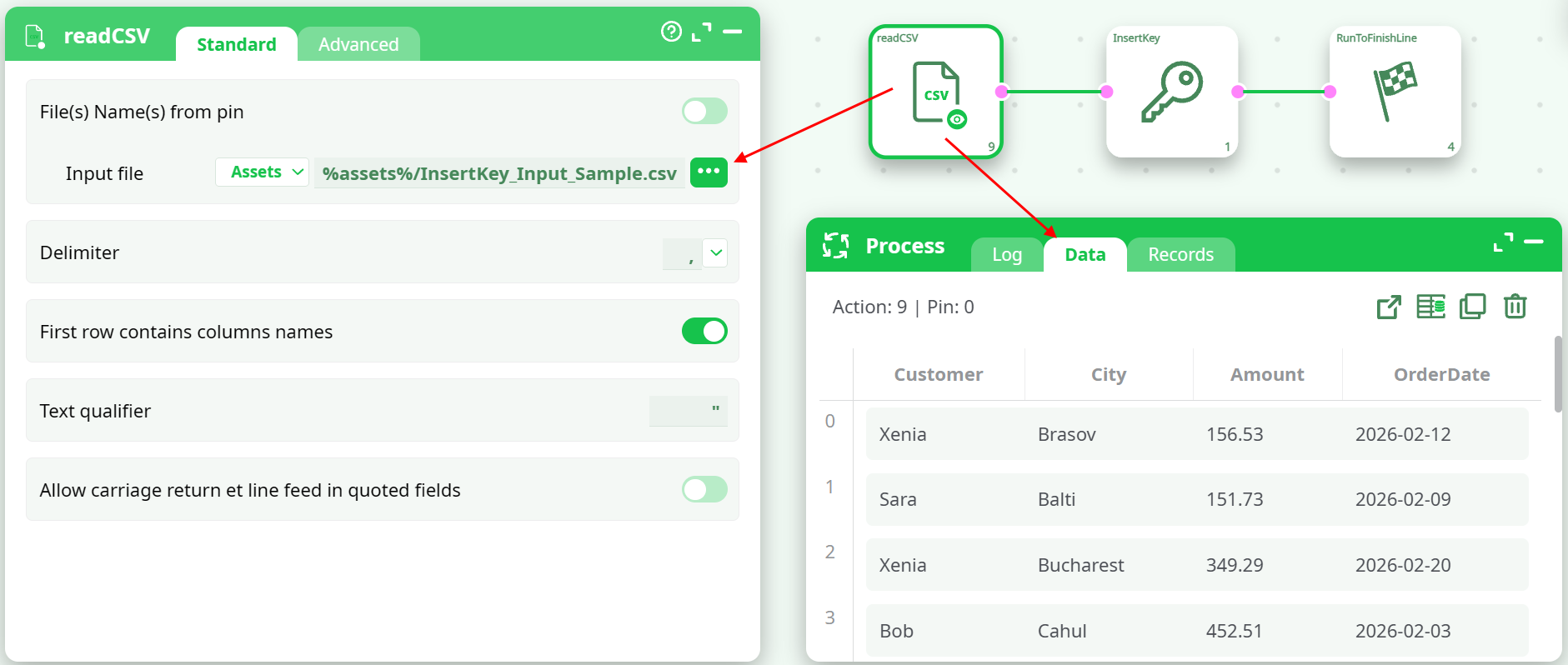
¶ 1) Read input data
Load any dataset (example: CSV input).
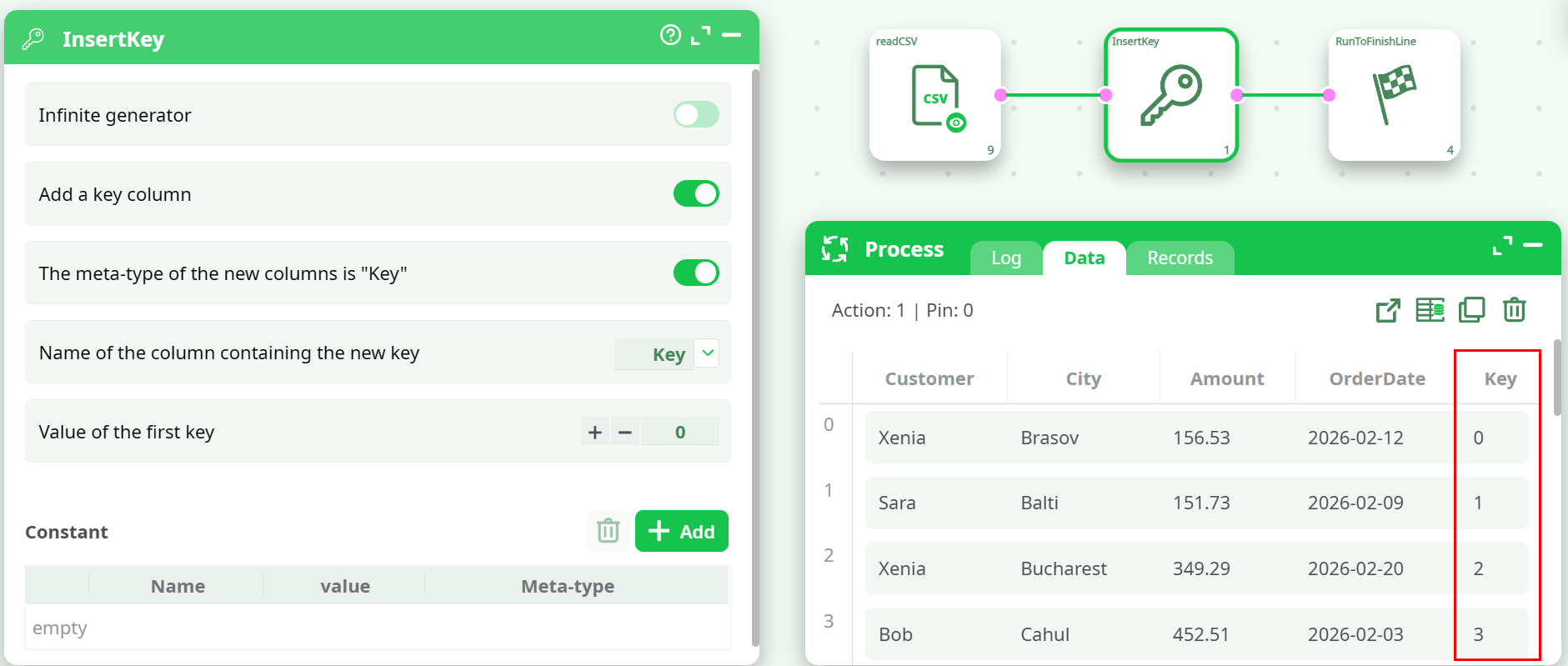
¶ 2) InsertKey
Adds a sequential Key column, and (optionally) extra constant columns.
¶ Example 2: Add a Constant with meta-type pipeline
This example shows how to attach a constant column that stores a pipeline reference (meta-type: pipeline).
This is useful when another action expects a pipeline identifier/name provided as a column value.
¶ 1) InsertKey configuration
- Add a key column = ON
- Name of the column containing the new key =
Key - Value of the first key =
0 - Constant section:
- Name =
idPipeline - Value =
pipeline1(or any existing pipeline name from your project) - Meta-type =
pipeline
- Name =
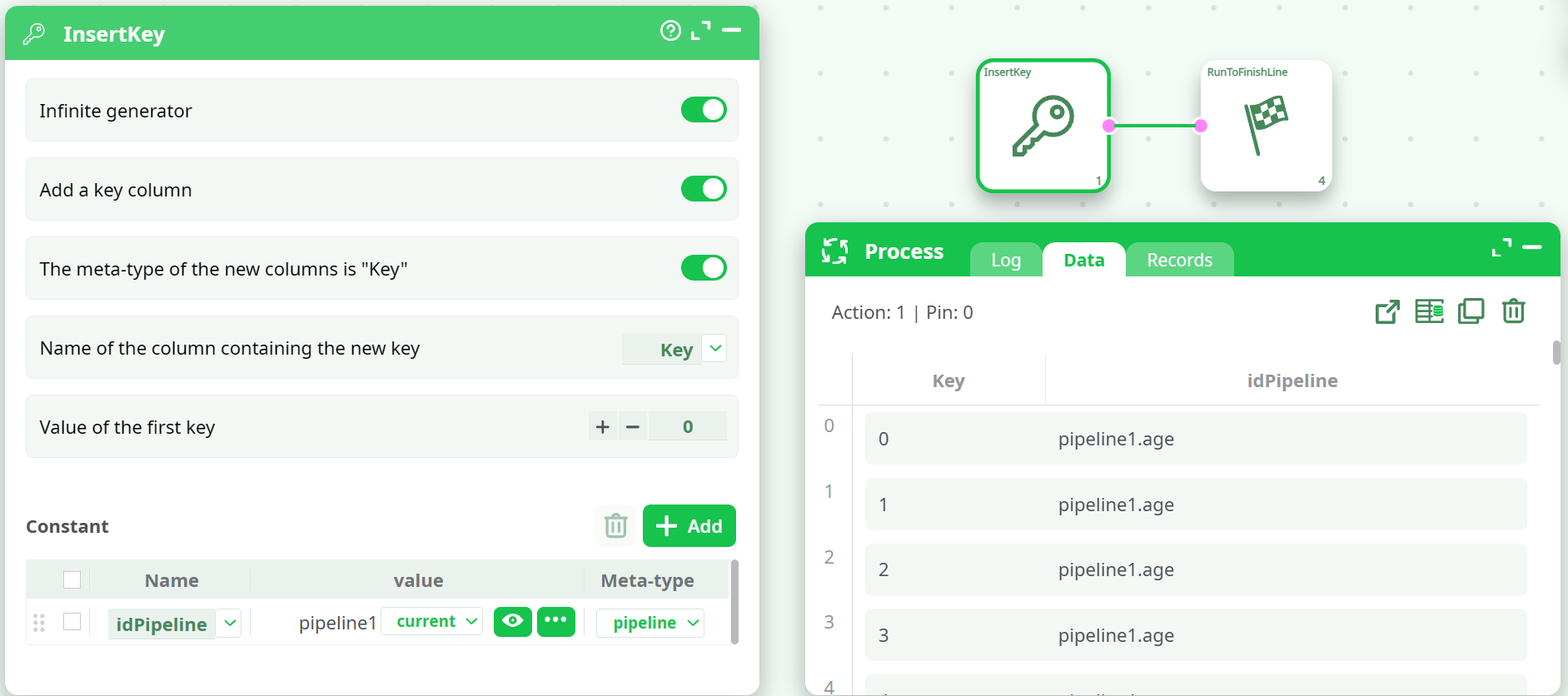
After running, the output contains:
Keycolumn (0, 1, 2, 3, …)idPipelinecolumn where each row contains the same value (example:pipeline1) and is tagged with meta-typepipeline.
¶ Example 3: Use InsertKey with loopPipelines
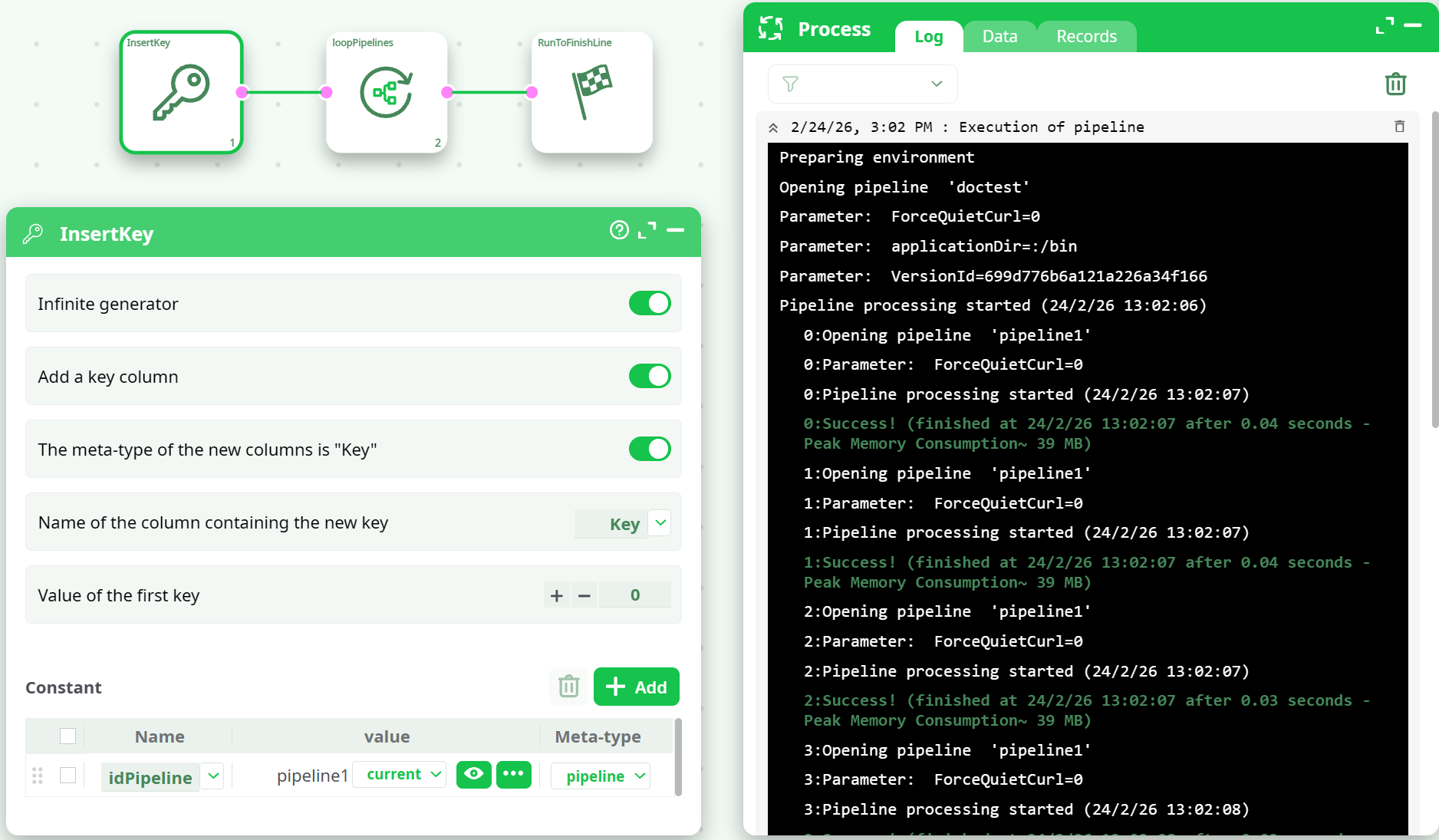
This example demonstrates how to use InsertKey to generate a table containing a pipeline reference column, and then execute those pipelines using loopPipelines.
¶ 1) InsertKey (generate rows + pipeline reference column)
Configure InsertKey like this:
- Infinite generator = ON (demo usage to generate rows without an upstream input)
- Add a key column = ON
- Name of the column containing the new key =
Key - Value of the first key =
0
In the Constant section add:
- Name =
idPipeline - Meta-type =
pipeline - Value = select an existing pipeline (example:
pipeline1)
Expected output (Data tab) contains:
Key: 0, 1, 2, 3, …idPipeline: the same pipeline reference on every row (example:pipeline1)
The execution log shows one iteration per row (0:, 1:, 2:, …).
With the setup above, the same pipeline is executed repeatedly:
0: Opening pipeline 'pipeline1'1: Opening pipeline 'pipeline1'2: Opening pipeline 'pipeline1'
Note: With a constant
idPipeline, the same pipeline will be executed once per generated row.
For running different pipelines, build an input table with multiple rows and different pipeline references.
¶ Output
After execution, the output dataset contains:
- All original input columns (when Infinite generator is OFF and you have input data).
- A new sequential Key column (if enabled).
- Any Constant columns you defined.
¶ Use Cases
- Generate Key IDs: Create a simple unique row identifier.
- Create row index: Make debugging and validation easier.
- Inject constants: Add columns like
env="prod",source="import",tag="daily". - Prepare for downstream logic: Provide stable columns that later actions can rely on.
Notes:
InsertKeyis the simplest and fastest way to generate a sequential row key.
- Use Infinite generator only for testing/demo scenarios, because it does not stop by itself.